Post Name

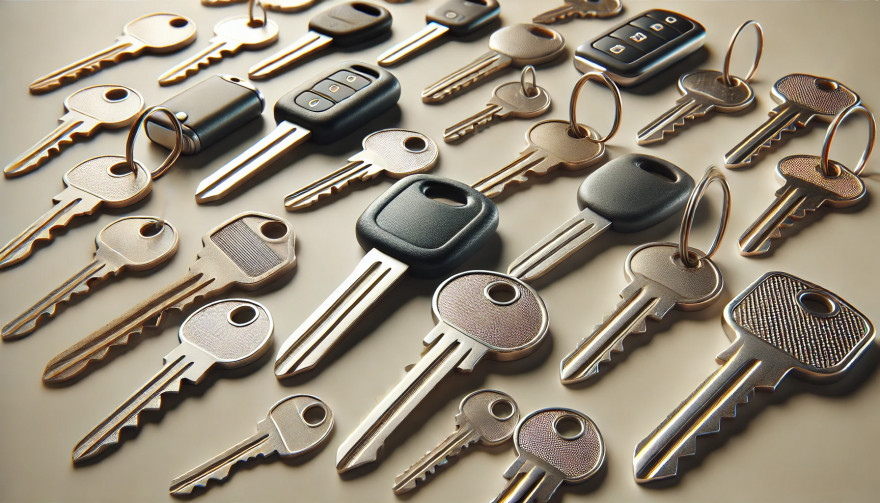
Replacing a lost or broken key might seem straightforward, but identifying the correct type of key is crucial to getting an exact replacement. Whether you need a car key, a house key, or even a cabinet key, each type has specific features that determine its function and fit. Here’s a step-by-step guide to understanding your key type, so you can save time and avoid unnecessary frustration when ordering a replacement.

Why Key Identification is Important

Keys come in many shapes and sizes, each designed for specific types of locks. Understanding your key’s unique characteristics ensures you get the right replacement and avoid wasted time or money on mismatched keys.

  • Avoid Extra Costs: Ordering the wrong key can mean additional fees for reordering.
  • Save Time: Getting the right key from the start saves the hassle of sending it back and waiting for the correct replacement.
  • Enhance Security: Accurate key identification ensures your security by avoiding compromised, incorrect key fits.

Types of Keys: Which One is Yours?

Understanding the different types of keys can help you determine what you have. Here are the common types and what makes each unique.

1. Household Keys

Household keys are typically designed for residential locks like front doors, back doors, and garage doors. These keys are often small and have either a single or double-sided cut pattern along the edges. Some household keys are unique in design, making them specific to a particular lock type.

  • Common Features: Smaller, single or double-sided cuts.
  • Typical Use: Standard residential door locks, such as deadbolts and knob locks.

Tip: Look for any identifying numbers or letters on the key itself. These may indicate a specific lock series, making it easier to identify.

2. Car Keys

Car keys come in various styles, depending on the make, model, and year of the vehicle. While older cars may use basic metal keys, most modern vehicles use transponder keys or fob keys with embedded chips for added security.

  • Basic Car Keys: Metal keys without electronic components.
  • Transponder Keys: These have a small chip embedded in the head, which communicates with the car to prevent theft.
  • Key Fobs: Some cars use a fob that contains a keyless entry system, which requires programming specific to your vehicle.

Tip: If your car uses a transponder or fob key, you may need assistance programming the replacement.

3. Padlock Keys

Keys for padlocks can be small and compact, with a straightforward design. These keys often have a unique series number printed on them, making it easier to match them to a specific lock model.

  • Common Features: Small size, usually single-sided.
  • Typical Use: Storage units, gym lockers, and outdoor gates.

4. Furniture and Cabinet Keys

Furniture and cabinet keys are typically found on desks, filing cabinets, and other types of lockable furniture. These keys are generally small, with a straight or tubular shaft, and they often have numbers or letters for identification.

  • Common Features: Compact, single or double-sided cuts, often with identification codes.
  • Typical Use: Office furniture, personal storage, and older-style drawers.

5. High-Security Keys

High-security keys are specifically designed to prevent unauthorized duplication. These keys have unique, intricate cut patterns and require special authorization for copying.

  • Common Features: Complex, often multi-sided cuts with additional security features.
  • Typical Use: High-security doors in residential or commercial settings, safes, and secure access points.

Key Identification Tips: What to Look For

Once you know the type of key, you’ll want to examine specific details that will help with identification. Here’s what to look for:

  • Keyway and Shape: The groove pattern, or “keyway,” is specific to the key type. Take note of the key’s shape and groove configuration.
  • Markings and Codes: Look for any numbers or letters printed on the key. These often refer to specific lock brands or key series.
  • Size and Length: Measure your key’s length, as some keys are longer or shorter depending on the lock type.
  • Metal Head Design: Certain keys, like car keys, may have plastic or rubberized heads, which can indicate the need for a transponder or chip inside.

Steps to Identify Your Key Type

  1. Inspect for Markings: Look closely at your key for any stamped numbers, letters, or symbols. These markings can often be referenced to find a matching lock or brand series.
  2. Measure Your Key: Use a ruler or tape measure to record the length and width of your key. These dimensions can help narrow down the exact key type.
  3. Examine the Cut Pattern: Take note of the number of cuts and whether they are on one or both sides.
  4. Identify the Head Style: If it’s a car key with a transponder, the head might be plastic or rubber.
  5. Check for a Code on the Lock: Some padlocks and cabinet locks have codes printed on them that correspond to a specific key model.

What to Do When You Can't Identify the Key

If your key has no visible markings or the cuts are unusual, consider taking a photo to help in the identification process. For specialty keys or hard-to-identify types, you may want to seek professional help or consult a detailed online database for reference.

Preventing Future Key Confusion

Once you’ve identified your key, take a few steps to prevent future issues with identification.

  • Label Your Keys: Adding a small tag with a brief description can help you remember the type of key.
  • Keep Spare Keys in a Safe Place: Having a backup key prevents you from needing a replacement immediately.
  • Store Key Codes or Information: If your key or lock has a series code, store it in a safe place in case you need it for future reference.

Identifying your key type is essential for getting a precise replacement without unnecessary hassle. By taking the time to understand your key’s unique features, you can save both time and money when it’s time to replace it. Following these steps will help ensure that your replacement key works as smoothly as the original.

Related Posts

Removing Keys from Locks: A Comprehensive Guide

Removing Keys from Locks: A Comprehensive Guide

Removing a key from a lock may seem simple, but it can become tricky when dealing with stuck or broken keys. Whether you're dealing with a standard lock, padlock, or vehicle ignition, understanding the correct techniques can save you from damage and frustration. This guide will walk you through the essential steps for removing keys from various types of locks, offering practical advice and tips to ensure a smooth process. Common Scenarios and Challenges Keys can become stuck or difficult to remove for several reasons, including misalignment, wear and tear, or damage to the key or lock. Additionally, environmental factors like temperature changes can cause metals to expand or contract, making key removal more challenging. Recognizing the cause of the issue is the first step in effectively addressing it. Basic Techniques for Key Removal Gentle Wiggle and Pull: The first technique to try is a gentle wiggle and pull. Hold the key firmly and move it slightly up and down or side to side while pulling gently. This method works well if the key is simply stuck due to misalignment. Lubrication: If the key is difficult to remove, applying a small amount of graphite powder or a silicone-based lubricant into the keyhole can help. Avoid using oil-based lubricants, as they can attract dirt and grime, potentially worsening the problem. Tapping the Lock: For stubborn cases, lightly tapping the lock with a hammer while gently pulling the key can help dislodge it. This method is effective when the key is stuck due to debris or minor misalignments within the lock. Advanced Techniques for Stuck Keys Using a Key Extractor: If the key is broken off inside the lock, a key extractor tool can be very effective. Insert the tool into the keyhole, hook the broken key piece, and pull it out carefully. This method requires patience and a steady hand. Pliers and Tweezers: If part of the key is still protruding, you can use needle-nose pliers or tweezers to grip and pull the key out. Be careful not to apply too much force, as this can push the key further into the lock or damage the lock mechanism. Heat Application: In cold weather, metal contracts, which can cause the key to get stuck. Gently heating the key with a hairdryer or warm cloth can expand the metal slightly, making it easier to remove. However, avoid using an open flame, as it can damage the lock or key. Preventing Key Stuck Issues Prevention is always better than cure. Here are some tips to prevent keys from getting stuck in the future: Regular Maintenance: Keep your locks and keys clean and well-lubricated with appropriate materials. Regularly inspect for wear and tear, and replace any damaged keys or locks. Use Duplicate Keys: If you notice a key becoming difficult to use, have a duplicate made before it breaks or becomes stuck. This will save you the hassle of dealing with a stuck key. Avoid Excessive Force: Never force a key into a lock. If it doesn’t turn easily, stop and inspect both the key and the lock for damage or obstruction. When to Call a Professional While many stuck key issues can be resolved with the techniques mentioned above, there are times when professional assistance is necessary. If you’ve tried all the methods and the key remains stuck, or if you’re dealing with a high-security lock, it’s best to contact a professional locksmith. They have the tools and expertise to safely remove the key without damaging the lock or key further. Dealing with a stuck key can be frustrating, but understanding the proper techniques can save you time and prevent damage. From basic wiggling and lubrication to more advanced methods like using a key extractor, there are various approaches depending on the severity of the situation. Regular maintenance and careful handling can help prevent these issues from occurring in the first place. When in doubt, don’t hesitate to seek professional help to ensure your lock and key remain in good working condition.

Car Key Fobs Explained: How They Work and Why They’re Essential

Car Key Fobs Explained: How They Work and Why They’re Essential

In today’s world, unlocking your car or starting the engine has never been easier. With a simple press of a button, the days of fumbling for traditional keys are behind us. Car key fobs are the modern solution that offer a blend of convenience, security, and technology. But how do these small, often overlooked devices work, and why are they so crucial in today’s automotive world? In this blog, we will dive into the mechanics of car key fobs, their benefits, and why you should understand their functionality. The Evolution of the Car Key Fob Car key fobs, as we know them today, are a far cry from the traditional metal keys that dominated the automotive world for centuries. The shift from traditional keys to key fobs began in the 1980s and 1990s, as automakers sought more efficient and secure ways to unlock vehicles and enable keyless entry. The first remote keyless entry (RKE) systems were introduced to the market in the 1980s. These systems allowed car owners to unlock their doors remotely without inserting a physical key. Over time, the technology evolved further, incorporating additional functions like starting the engine, opening the trunk, and even controlling the vehicle’s security systems—all from a single device. Today, most new vehicles come equipped with key fobs, and many modern models include advanced features like proximity sensing and even remote start capabilities. How Do Car Key Fobs Work? Car key fobs operate on radio frequency identification (RFID) or infrared (IR) technology to communicate with the car’s locking system. The process is relatively simple but requires precise technology to ensure security and functionality. Radio Frequency Communication (RF) : When you press a button on your key fob, it sends out a low-frequency signal to the car's receiver. This signal contains encrypted information, such as the command to unlock the doors or start the engine. The receiver in the car decodes the signal and executes the command. Encryption for Security : One of the key benefits of car key fobs is the security they offer. The signal transmitted by the fob is encrypted, making it difficult for hackers or thieves to intercept and clone the signal. In addition, many fobs are programmed with rolling codes, meaning the signal changes each time the fob is used, further reducing the risk of duplication. Proximity Sensors and Keyless Entry : Modern key fobs often include proximity sensors, which allow the car to detect when the fob is nearby. This enables keyless entry systems that unlock your car automatically as you approach. The fob only needs to be within a certain range—often just a few feet—for the car to recognize it. Battery-Powered : Key fobs rely on small batteries to function. Most key fobs use lithium coin cell batteries, which typically last between one and five years, depending on usage. The battery powers the transmitter, receiver, and any additional features (such as a display or remote start). Why Are Car Key Fobs Essential? In addition to their basic function of locking and unlocking a car, key fobs have become essential components for vehicle security and convenience. Below are several reasons why these devices are more than just an accessory: 1. Enhanced Security As vehicle theft has evolved, so too has the need for better security measures. Traditional car keys are relatively easy to copy, especially for older models. In contrast, key fobs provide far superior protection due to their encrypted signals and rolling code technology. This makes them much harder to duplicate or hack. Moreover, many key fobs are linked to sophisticated alarm systems. If an unauthorized attempt is made to start the vehicle without the fob’s signal, an alarm will sound, and the engine will not start. This extra layer of security significantly reduces the chances of vehicle theft. 2. Convenience and Ease of Use The days of manually unlocking a car with a metal key are long gone. Key fobs offer unprecedented convenience. With a simple button press, you can lock or unlock your doors, open the trunk, and even start the engine without removing the fob from your pocket or bag. This hands-free operation makes accessing your vehicle faster and easier, especially when carrying groceries or dealing with inclement weather. The proximity sensing technology also adds an extra layer of convenience, allowing you to unlock and start your car without needing to press any buttons—ideal for those busy days when you’re juggling multiple tasks. 3. Keyless Entry and Remote Start One of the most exciting features of modern car key fobs is the keyless entry and remote start functionality. These features have revolutionized how people interact with their vehicles. Keyless entry allows you to enter your car simply by being in close proximity, while remote start lets you start the engine from a distance, often via a smartphone app or by pressing a button on the fob itself. Remote start is particularly useful during the winter months. It allows you to start the car in advance, so the engine and cabin are warmed up before you even step inside. Similarly, in hot climates, remote start can be used to cool the cabin, making the car more comfortable when you enter. Global Adoption and Future Trends Car key fobs have become a global standard, with nearly all major automakers offering this feature in their vehicles. As more people embrace technology, the demand for even smarter key fobs continues to rise. In the future, we are likely to see further advancements in key fob technology. For instance, some manufacturers are already exploring biometric security features, such as fingerprint or facial recognition, to enhance the security of key fobs even further. Additionally, smartphone integration is becoming more widespread, allowing car owners to use their phones as key fobs, eliminating the need for a physical device altogether. While car key fobs have transformed the automotive landscape, they also raise new concerns, particularly regarding privacy and hacking risks. As technology advances, automakers and tech companies will need to stay ahead of potential security vulnerabilities to ensure that key fobs continue to serve as effective and secure tools for car owners. Car key fobs are no longer just a convenience—they have become an essential part of modern car ownership. From enhanced security features to the convenience of keyless entry and remote start, key fobs offer a range of benefits that make them indispensable for drivers around the world. As technology continues to evolve, we can expect even more advanced features to be integrated into future key fobs, further improving both convenience and security. Understanding how key fobs work and why they’re important is crucial for anyone who wants to make the most of their vehicle's technology. As we look to the future, it’s clear that key fobs will continue to play a central role in how we access and interact with our cars—an innovation that started with simple remote locking and has now become a vital aspect of our daily driving experience.

Programming Your Car’s Keyless Remote: A Simple Guide for Every Car Owner

Programming Your Car’s Keyless Remote: A Simple Guide for Every Car Owner

When it comes to convenience, car keyless remotes have revolutionized the way we interact with our vehicles. No more fumbling with traditional keys or worrying about locking yourself out. With just a push of a button, you can lock, unlock, and even start your vehicle. But what happens when your keyless remote stops working, or when you need to program a new one? Here’s a simple guide to help you program your car's keyless remote, regardless of your vehicle's make or model. Understanding Keyless Remotes Before jumping into the programming process, it’s important to understand what a keyless remote is and how it works. Essentially, a keyless remote allows you to interact with your vehicle without needing to physically insert a key. Instead of using a traditional metal key, your car’s electronic system communicates wirelessly with the remote, allowing you to lock, unlock, and sometimes even start your vehicle, all with the push of a button. These remotes typically use a radio frequency to communicate with your car, sending a signal that’s encrypted for security. Most modern cars use transponder technology, which makes the system more secure and resistant to hacking or copying. This means that the remote must be properly programmed to your vehicle’s system to function correctly. When Do You Need to Program a Keyless Remote? There are several situations in which you might need to program your keyless remote: Replacing a Lost or Damaged Remote : If you’ve lost your keyless remote or it’s no longer functioning properly, you’ll need to get a replacement. This may require programming the new remote to sync with your vehicle. Adding a New Remote : If you’ve bought an additional keyless remote for your car (for a spouse, child, or other family member), you’ll need to program it so that it works with your vehicle. Battery Replacement : Sometimes, replacing the battery in your remote can cause the programming to reset, meaning you’ll need to reprogram the remote for it to work again. Changing or Resetting Vehicle Settings : Occasionally, vehicle settings or remotes can be reset or reprogrammed as part of regular maintenance, requiring you to program new or additional remotes. How to Program Your Car’s Keyless Remote Programming a keyless remote is easier than you might think, and in most cases, it can be done by following a few simple steps. The process varies slightly depending on the make and model of your car, but here’s a general overview of the steps involved: Get Your New or Replacement Remote : Ensure that your remote is compatible with your car’s system. If you're not sure, you can check with your car's manufacturer or an authorized dealership. Some remotes require specific codes to be programmed. Sit Inside Your Vehicle : For safety and security reasons, most cars require you to be inside the vehicle while programming the remote. Insert the Key in the Ignition : Insert the key into the ignition and turn it to the "ON" position without starting the engine. For cars with push-to-start systems, you may need to press the start button without pressing the brake pedal. Activate the Programming Mode : Depending on your car’s system, you’ll need to follow a sequence of steps to enter programming mode. This could involve turning the key on and off several times, or pressing certain buttons in a specific order. Refer to your vehicle’s manual for the exact steps, as the process can differ from one model to another. Program the Remote : Once your car is in programming mode, you’ll need to press the button on your keyless remote that you want to program. Usually, you’ll hear a chime or see the lights flash, indicating that the remote has been successfully programmed. Some cars may require you to press the button several times to ensure proper synchronization. Test the Remote : After programming, test the remote to make sure it works properly. Try locking and unlocking the doors or starting the engine. If everything works as expected, you’re done! Exit Programming Mode : To finish the process, simply turn off the ignition and remove the key. This should exit programming mode. If you have additional remotes to program, repeat the steps above for each one. What to Do if Programming Doesn’t Work While programming a keyless remote is usually a straightforward process, there are instances where things don’t go as planned. If your remote isn’t syncing with your car after following the steps, here are a few troubleshooting tips: Check the Battery : If the remote’s battery is dead or weak, it won’t transmit the signal to your car. Replace the battery and try programming again. Verify the Compatibility : Make sure that the remote is compatible with your vehicle’s make, model, and year. Some vehicles require special remotes that can only be programmed by the manufacturer or an authorized locksmith. Reset Your Vehicle’s System : In some cases, you might need to reset the car’s system to clear previous programming attempts. Check your owner’s manual or consult a professional for assistance. Consult a Professional : If you continue to have issues, it might be time to visit a dealership or a certified locksmith. These professionals have the tools and experience to program the remote correctly and ensure everything works seamlessly. Why Programming Your Keyless Remote Is Important Programming your keyless remote is a simple but important task that helps ensure your car’s security and convenience. By understanding how the process works and what to do if things go wrong, you’ll be able to troubleshoot and solve any issues quickly. Whether you’re replacing a lost remote or adding a new one to your collection, knowing how to program your remote saves time and money compared to visiting a dealership or locksmith. With the increased reliance on keyless remotes for unlocking and starting vehicles, it’s essential for every car owner to be familiar with this process. By keeping your remote in good working condition and knowing how to program it when necessary, you’ll enjoy a smoother, more efficient experience with your vehicle.

Effortlessly Ordering Multiple Replacement Car Keys: A Step-by-Step Guide

Effortlessly Ordering Multiple Replacement Car Keys: A Step-by-Step Guide

As a car owner, managing multiple key replacements can be daunting. Fortunately, there's a streamlined method to order several keys simultaneously using a CSV file. Here's how you can simplify the process: 1. Prepare Your Key List Create a Spreadsheet: Use software like Microsoft Excel to list your key codes. Enter Details: In Column A, input each key code; in Column B, specify the quantity needed. Avoid Headers: Start directly with your data; do not include column titles. 2. Save as CSV Choose CSV Format: When saving, select 'CSV (Comma delimited)' from the 'Save as type' dropdown. Ensure Correct Format: Avoid other CSV formats to prevent compatibility issues. 3. Upload Your CSV File Access Your Account: Log into your trade account on the key replacement website. Navigate to Product Page: Find the specific key product you need. Upload CSV: Click the 'Upload a CSV' button above the key number entry field and select your file. Wait for Processing: Large files may take time to upload; remain on the page until completion. 4. Complete Your Order Add to Basket: Once uploaded, click 'Add to basket.' Proceed to Checkout: Follow the standard payment process to finalize your order. Important Considerations Separate Files for Different Keys: If ordering various key types or series, create individual CSV files for each. Trade Account Requirement: This feature is typically available to trade account holders; ensure you have the necessary access. By following these steps, you can efficiently manage bulk key replacements, saving time and ensuring accuracy.

Chat with us