
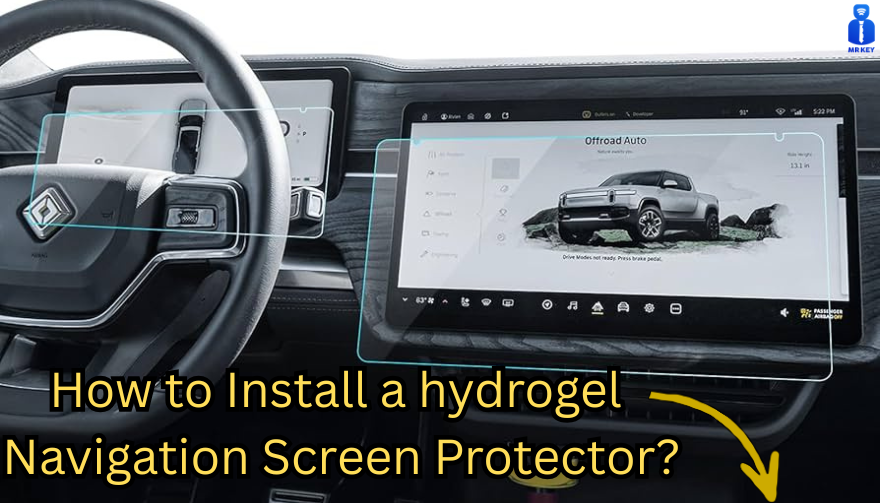
Post Name

Nowadays car interiors rely heavily on touchscreens. Whether you drive a BMW 3 Series, VW Golf, Audi A4, Mercedes A-Class, Peugeot 3008, or Skoda Octavia, your infotainment display is the centre of navigation, settings, entertainment and safety features.

But these screens are also fragile—prone to scratches, fingerprints, micro-abrasions, and glare. A hydrogel navigation screen protector is one of the best ways to protect your car touchscreen without affecting clarity or touch sensitivity.

This guide shows you exactly how to install a hydrogel protector, step by step, with expert tips, mistakes to avoid, and a few insider tricks that most guides miss.

What Is a Hydrogel Screen Protector?


Hydrogel is a soft, self-healing, flexible material used widely in phone protection and now increasingly in automotive displays. Unlike tempered glass, it adapts to curved edges and eliminates small bubbles over time.

For more technical background, you can read the scientific definition on hydrogels

Hydrogel is ideal for infotainment screen protection because it:

Reduces glare

Absorbs micro-scratches

Maintains full touch sensitivity

Adapts to curved and angled car screens

Self-heals small marks over 24–48 hours

It’s especially useful for European cars where screens are large and glossy, such as:

Mercedes MBUX screens (A-Class, C-Class, GLC)

Volkswagen MIB systems (Golf, Passat, Tiguan)

BMW iDrive displays (3 Series, X1, X3)

Audi MMI touchscreens (A4, A3, Q5)

Peugeot i-Cockpit models

Renault Clio, Captur, Megane

Skoda Octavia, Superb, Scala


Curious which specific models benefit the most from hydrogel protection?

Check out our full guide on which cars benefit most from hydrogel navigation protection.

Before You Start: Essential Preparation


Installing a hydrogel protector takes only a few minutes, but the preparation stage determines whether the final result looks factory-perfect.

You Will Need


Hydrogel screen protector

Microfiber cloth

Screen-cleaning wipe (wet & dry)

Dust-removal sticker (optional but recommended)

Small squeegee / card 

Choose the Right Environment


Install the protector in:

A dust-free space (car parked indoors is ideal)

Soft lighting (so dust particles are visible)

A still environment (no wind, no blowing air)

Avoid doing it outside or while standing near open windows.
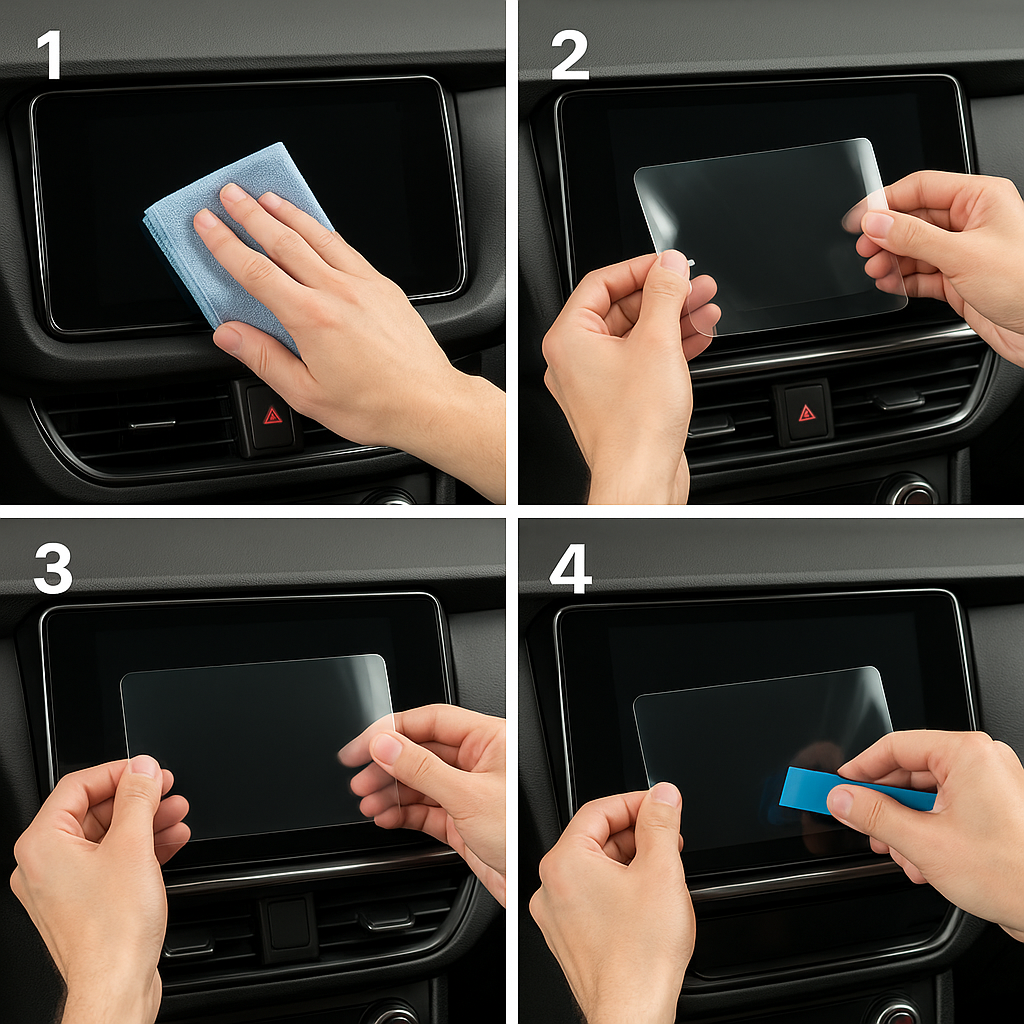
Step-by-Step: How to Install a Hydrogel Navigation Screen Protector


1. Clean the Navigation Screen Thoroughly


Use a wet wipe first, then a dry microfiber cloth.

Focus on:

Corners

Edges

Around the frame

Any oily fingerprints

Tip: Turn the screen off to see dust more easily.

2. Remove All Dust Particles


Even one small dust speck can create a permanent bubble.

Use:

Dust-removal stickers

A clean microfiber cloth

Hold the screen at an angle and look under the light. If perfectionism matters anywhere, it’s here.

3. Peel the First Protective Layer


Most hydrogel protectors have two layers.

Peel Layer 1 halfway and align the protector with:

Left and right edges

Upper frame

Any curved edges

Do not peel it completely yet.

4. Align and Apply the Protector


Once aligned:

Press the top centre gently

Slowly drag your finger downward

Peel off the rest of Layer 1 as you go

The film will naturally stick without much force.

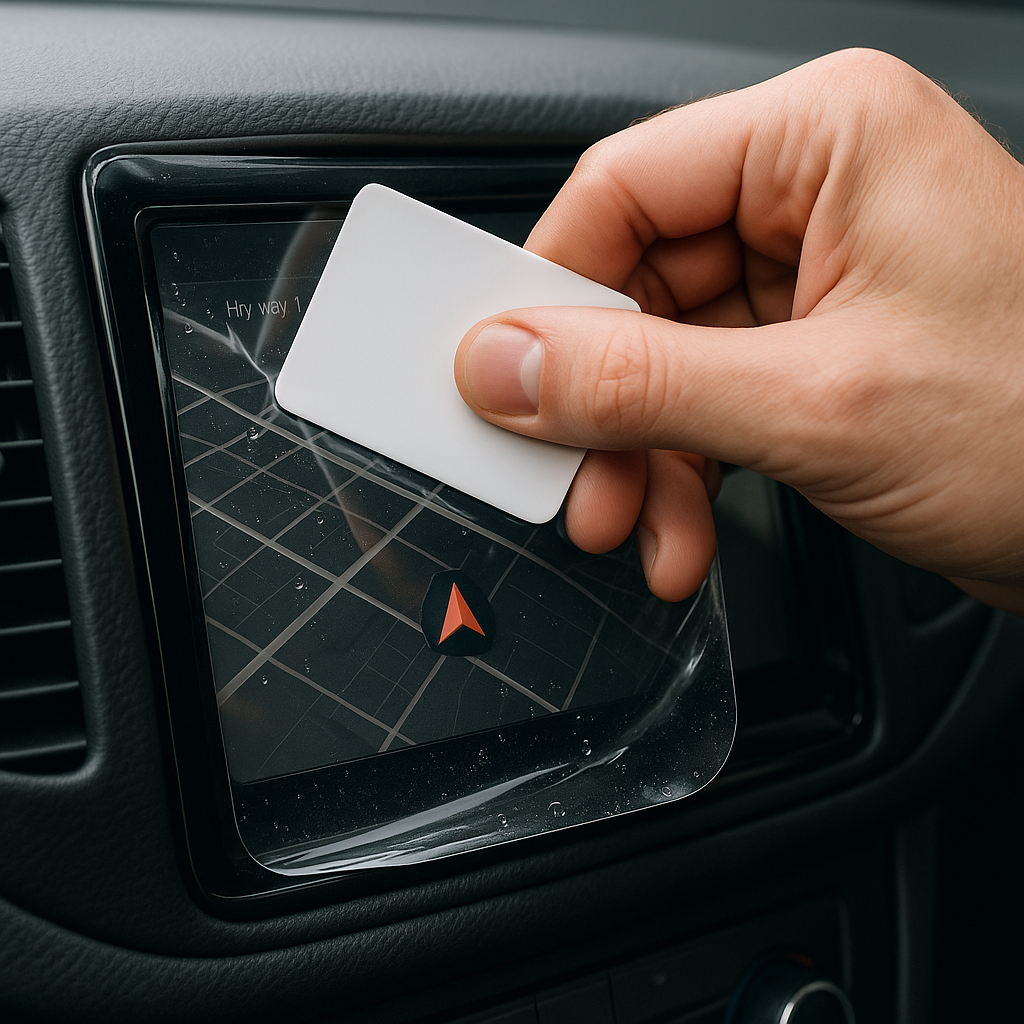
5. Use the Squeegee to Push Out Air


Work from centre outward, using firm but controlled pressure.

Hydrogel is self-healing, so small micro-bubbles usually disappear within 24–48 hours.

6. Remove the Final Top Layer


After application:

Peel Layer 2 from one corner

Pull slowly to avoid lifting the protector

This reveals a glossy, clear surface below.

7. Allow 24 Hours for Full Adhesion


Do not touch the screen too much during this period.

Avoid:

Heat exposure

Cleaning sprays

Aggressive pressing

Hydrogel needs time to “settle” and self-heal.
Common Mistakes to Avoid

Even a perfect protector can be ruined by simple errors.

 Installing in a dusty environment

Fibres, dust and hair easily get trapped.

Touching the sticky side

This leaves permanent marks.

Rushing the alignment

Hydrogel is flexible but not stretch-proof.

Cleaning with alcohol after installation

This can damage the outer coating.

Installing on a hot screen

Heat weakens adhesion and causes micro-bubbles.


For a complete walkthrough, see our guide on how to protect your car’s navigation screen.

Why Hydrogel Is Better Than Tempered Glass for Car Screens


Tempered glass works well for smartphones—but not for car navigation screens.

Hydrogel performs better because:

It bends and adapts to curved displays

It doesn’t create raised edges

It avoids touchscreen sensitivity issues

It self-heals micro-abrasions

It provides better Anti-Glare performance


If you want to see more in depth guide on why hydrogel protectors are better check out our guide on Hydrogel vs Tempered Glass Navigation Protectors Comparison


FAQs


1. Does a hydrogel protector reduce screen sensitivity

No. Hydrogel maintains full touch responsiveness because the material is soft and pressure-adaptive.

2. Can I reuse a hydrogel screen protector?

No. Once removed, it cannot be reinstalled cleanly.

3. How long do micro-bubbles take to disappear?

Usually 24–48 hours.

Stubborn ones may take up to 72 hours if the screen is curved.

4. Will the protector affect brightness or clarity?

High-quality hydrogel preserves original screen clarity.

Matte versions reduce glare but may slightly soften reflections.

5. Is hydrogel safe for anti-reflective or coated screens?

Yes. Hydrogel adhesive is gentle and does not damage coatings.


If you want premium hydrogel protectors for BMW, Audi, Mercedes, VW, Peugeot, Renault, Skoda and more, explore our full selection today.

Visit our shop at mr-key.com


Related Guides

Which cars benefit most from hydrogel navigation protection

How to Protect Your Car’s Navigation Screen from Scratches,Glare & Fingerprints

Hydrogel vs Tempered Glass Navigation Protectors Comparison

Related Posts

KEY COVERS: WHAT DO YOU NEED TO KNOW?

KEY COVERS: WHAT DO YOU NEED TO KNOW?

What is a Key Cover? A key cover , often referred to as a key shell or key case, is the outer part of your key. It houses the electronic board, chip, and battery but excludes the internal electronics themselves. If your key casing is damaged, there’s no need to replace the entire key – just changing the key cover can restore its durability and usability while saving you money. When Do You Need a New Key Cover? You might need a key cover replacement when: The buttons on your key become worn out or stop responding. The outer case cracks, exposing the internal electronics. The key mechanism no longer functions smoothly. You want to refresh the appearance of your key with a new, sturdy shell. Instead of struggling with a faulty key, simply replace the cover and extend the lifespan of your original key! How to Choose the Right Key Cover? When selecting a replacement key cover, consider the following factors: Button Layout: Ensure that the number of buttons and their symbols match your existing key. Blade Shape: If your key includes an integrated blade, make sure the new shell accommodates it correctly. Quality: A good-quality key cover ensures a snug fit, smooth functionality, and long-lasting durability. At MR-KEY , we offer a variety of key covers designed to match your specific car model perfectly, providing both aesthetics and functionality. How to Change Your Key Cover? Replacing your key cover is simple and doesn’t require professional assistance. Here’s how: Purchase a compatible key cover from our website. Open your old key case carefully. Transfer the electronic board and chip from your original key to the new key cover . Reassemble the key, ensuring all components fit securely. Test the buttons and functions to confirm everything is working properly. For step-by-step guidance, we provide video tutorials on our website, showing you exactly how to change your key shell and even replace the battery if needed. What Else Can You Change When Replacing the Key Cover? While changing your key cover, it's the perfect time to: Replace non-functional click buttons on your key’s electronic board. Change the battery since you're already disassembling the key, ensuring it lasts longer. At MR-KEY , we strive to make key replacements easy, affordable, and accessible to everyone. Explore our website to find the perfect key cover, key cutting services, and useful video guides to help you maintain your car key like a pro!

The Benefits of Smart Car Keys: A Leap Into the Future of Automotive Convenience

The Benefits of Smart Car Keys: A Leap Into the Future of Automotive Convenience

Smarter, Simpler, Safer Imagine walking toward your car, and instead of fumbling through your bag or pockets for keys, your vehicle recognizes your presence and unlocks itself. This convenience is not a futuristic concept—it’s the reality of smart car keys, an innovation that has redefined automotive technology. As vehicles become more advanced, smart keys are becoming indispensable for drivers seeking security, convenience, and style. But what exactly makes smart keys so revolutionary? Let’s explore their features and benefits. What Are Smart Car Keys? Smart car keys, also known as proximity keys or keyless entry systems, use advanced technology to simplify the interaction between you and your vehicle. Unlike traditional keys or even remote fobs, smart keys rely on radio frequency identification (RFID) or Bluetooth to communicate with your car. Once within a specific range, the car recognizes the key, unlocking the doors and enabling push-button ignition. These keys offer far more than just access and starting capabilities. They are designed to enhance security and integrate features like personalized settings, making them a step ahead of conventional systems. From luxury sedans to electric vehicles, smart keys are rapidly becoming a standard feature in modern cars. The Key Benefits of Smart Car Keys One of the most noticeable advantages of smart keys is their unmatched convenience. Imagine walking to your car with hands full of groceries or during a rainstorm. With a smart key in your pocket or bag, the car automatically unlocks as you approach, eliminating the need to dig around for your keys. Similarly, starting the engine is as simple as pressing a button, streamlining the driving experience. Smart keys also prioritize security. Unlike traditional keys that can be duplicated, smart keys use encrypted communication to connect with the vehicle. This encryption ensures that unauthorized users cannot access or start the car. Some smart systems even include anti-theft mechanisms that disable the engine if the key is not detected nearby, adding an extra layer of protection. Moreover, many smart keys are equipped with customizable features. Depending on the car, they can store and recall settings such as seat positions, climate control preferences, and mirror adjustments. Some even allow for remote control of the car via a smartphone app, enabling users to lock, unlock, or preheat their vehicle with a simple tap on their phone. Smart Keys Around the World: Trends and Adoption The use of smart keys is growing globally, with different regions adopting the technology at varying rates. In developed markets like North America, Europe, and Japan, smart keys have become standard in mid-range and luxury vehicles. These regions, driven by technological advancements and consumer demand, are setting the pace for smart key adoption. In emerging markets, traditional keys are still more prevalent due to their affordability. However, the demand for smart keys is on the rise, especially among buyers of premium cars. As automotive manufacturers expand their offerings, smart keys are becoming accessible to a broader audience. The future of smart keys is even more exciting. Many automakers are exploring app-based systems and biometric authentication, such as fingerprint or facial recognition. These innovations aim to further integrate vehicles into the digital ecosystems of their owners, offering seamless connectivity and enhanced personalization. Challenges of Using Smart Keys While smart keys bring significant advantages, they are not without their challenges. One of the primary concerns is the cost of replacement. Losing a smart key can be expensive, with replacements often requiring programming by a dealership or specialized locksmith. This cost is significantly higher than that of traditional keys. Another issue is the potential vulnerability to hacking. Relay attacks, where thieves amplify the signal from a smart key to unlock a vehicle, are a known risk. While manufacturers are continually improving encryption methods, owners should take precautions, such as using signal-blocking pouches, to protect their keys. Battery life is another consideration. Smart keys depend on batteries, and if the battery dies unexpectedly, you may find yourself locked out of your car. Most manufacturers include a physical backup key or emergency override options, but staying mindful of your key’s battery status is essential. Why Smart Keys Are the Future Smart keys represent more than just a technological advancement—they symbolize a shift in how we interact with vehicles. Their ability to enhance convenience, security, and personalization makes them a must-have feature for modern drivers. As cars become increasingly integrated with digital ecosystems, smart keys are expected to evolve, incorporating features like biometric security and deeper smartphone integration. For drivers, this evolution means a more intuitive and tailored experience. From automatically adjusting settings based on the detected key to integrating with smart home systems, smart keys are paving the way for a connected and seamless future. Embrace the Smart Key Revolution Smart car keys are more than a luxury; they are becoming an essential tool in modern driving. Their convenience, advanced security, and customizable features make them a game-changer in automotive technology. However, as with any innovation, understanding their potential challenges and how to address them is crucial. Whether you’re unlocking your car as you approach or starting the engine with a simple button press, smart keys represent a leap forward in convenience and functionality. As automotive technology continues to advance, smart keys are leading the charge, offering a glimpse into a future where cars seamlessly adapt to our needs.

5 Common Car Key Problems and Easy Fixes to Get You Back on the Road

5 Common Car Key Problems and Easy Fixes to Get You Back on the Road

Losing or encountering issues with your car key can feel like a nightmare, especially when you’re in a hurry. From unresponsive key fobs to stuck keys, these problems are more common than you might think. The good news? Most of these issues have simple, affordable fixes that you can address quickly. This guide will help you identify common car key problems and provide solutions to get you back on track without breaking the bank. 1. Key Won’t Turn in the Ignition Why It Happens: When your car key refuses to turn, it’s often due to a worn-out key, a damaged ignition cylinder, or a locked steering wheel. How to Fix It: Check the Steering Wheel: If the wheel is locked, try gently turning the steering wheel left and right while turning the key in the ignition. Inspect the Key: A bent or worn-out key can cause alignment issues. Try a spare key if you have one. Lubricate the Ignition: Use a small amount of graphite lubricant (avoid oil-based products) to loosen the ignition cylinder. If All Else Fails: Consult a professional to replace the key or ignition lock. Tip: Avoid forcing the key, as this could damage the ignition further. 2. Car Key Fob Isn’t Responding Why It Happens: Modern key fobs are convenient, but they rely on batteries and electronic components that can fail. A dead battery is the most common culprit. How to Fix It: Replace the Battery: Open your key fob (usually with a small screwdriver) and swap out the old battery for a fresh one. Most fobs use coin-shaped batteries like CR2032. Reprogram the Key Fob: If changing the battery doesn’t work, your fob may need reprogramming. Follow your car manual’s instructions or consult a professional locksmith. Check for Damage: Inspect the buttons and internal components for signs of wear or moisture. Tip: Always keep a spare battery on hand to avoid unexpected key fob failures. 3. Key Stuck in the Ignition Why It Happens: This issue often stems from a locked transmission, dirt in the ignition, or a worn-out key that doesn’t align properly. How to Fix It: Ensure the Car Is in Park: For automatic cars, check that the gear shifter is fully in the “Park” position. Clean the Ignition: Use compressed air to remove dirt or debris from the keyhole. Jiggle the Key: Gently wiggle the key while applying light pressure to help free it. Inspect for Damage: If the key is bent, avoid forcing it. A professional can help safely extract it. Tip: If the problem persists, you may need to replace the ignition cylinder or key to prevent further damage. 4. Worn or Damaged Car Key Why It Happens: Over time, constant use can wear down the grooves on your key, making it difficult to start the car or open the doors. How to Fix It: Get a Duplicate Key: If your key is showing wear, have a duplicate made while it still works. Replace the Key: A locksmith can create a new key based on your car’s lock or key code. Upgrade to a Modern Key: If you’re using an older mechanical key, consider upgrading to a transponder key or key fob for added convenience and security. Tip: Don’t wait until your key stops working entirely. Replacing a worn key early can save you time and stress. 5. Key Fob Signal Interference Why It Happens: Sometimes, your car key fob may not respond due to signal interference from nearby electronics or a faulty antenna. How to Fix It: Move Away from Interference: Check for other devices nearby, such as Wi-Fi routers or radios, which may disrupt the signal. Inspect the Fob: Ensure the key fob’s battery is working and the buttons are functional. Reset the Key Fob: Follow your car manual’s instructions to reset or resynchronize the fob. Test the Car’s Receiver: If the problem persists, there may be an issue with your car’s signal receiver. Tip: Parking in a location free from electronic interference can help diagnose if this is the root cause. Preventing Car Key Problems: Simple Tips Taking care of your car key now can save you from bigger headaches later. Here are some quick maintenance tips: Keep Keys Clean: Avoid exposing keys to water, dirt, or chemicals. Store Spare Keys Safely: Always have a backup key in a secure and accessible place. Replace Batteries Regularly: Change key fob batteries annually to prevent unexpected failures. Inspect Your Keys: If you notice wear, cracks, or loose buttons, address the issue early. Why Addressing Car Key Problems Early Saves You Money Ignoring small car key problems can lead to more expensive repairs down the road. For example: A damaged ignition can cost far more to replace than addressing a stuck key early. Reprogramming a lost or broken key fob is more costly than simply replacing a battery. Getting a duplicate key before the original breaks ensures you’re not left stranded. By staying proactive, you can keep your car keys functioning smoothly without spending a fortune.

How to Maintain and Extend the Life of Your Car Keys

How to Maintain and Extend the Life of Your Car Keys

Your car keys are more than just tools to unlock and start your vehicle—they’re essential components for your car's convenience and security. Taking proper care of them can prevent unexpected failures and ensure they last for years. Here are seven easy and practical tips to help you keep your car keys in the best condition possible. 1. Keep Your Keys Clean and Dry Why It Matters: Moisture and dirt are the biggest enemies of car keys, particularly electronic fobs. Exposure to these elements can cause internal corrosion and failure. How to Do It: Avoid Moisture: Keep your keys away from water, rain, and high humidity. If they accidentally get wet, dry them immediately with a soft, absorbent cloth. Regular Cleaning: Gently wipe your keys with a clean cloth to remove dirt and dust. For crevices around buttons, use a cotton swab to clean hard-to-reach areas. 2. Handle Your Keys with Care Why It Matters: Dropping, tossing, or mishandling your keys can cause physical damage or misalign internal components, rendering them unusable. How to Do It: Avoid Drops: Be mindful when handling your keys. Attach them to a lanyard or key holder for better grip and to reduce accidental drops. Use a Protective Key Cover: A well-fitted key cover adds an extra layer of protection against scratches, drops, and general wear and tear. Plus, they’re available in various styles to match your preferences. 3. Replace Key Fob Batteries on Time Why It Matters: A weak battery can lead to your car key fob failing to work when you need it most, leaving you stranded or locked out. How to Do It: Watch for Warning Signs: If your key fob’s range decreases or requires multiple presses to function, the battery is likely weak and needs replacement. Replace Properly: Follow your car’s manual for step-by-step instructions on changing the battery. Using the correct battery type ensures reliable performance. 4. Protect Your Keys from Extreme Temperatures Why It Matters: Excessive heat or cold can harm the electronic components inside your key fob or damage the metal of traditional keys. How to Do It: Avoid Direct Sunlight and Heat: Don’t leave your keys exposed to the sun on your dashboard or near heaters. Extreme heat can warp materials and damage internal circuits. Keep Away from Freezing Temperatures: In colder months, avoid leaving your keys in your car or outside for prolonged periods, as freezing conditions can impact their functionality. 5. Rotate and Use Spare Keys Why It Matters: Spare keys can deteriorate if left unused for long periods. Regularly using them ensures they remain functional and ready in emergencies. How to Do It: Alternate Keys: Use your spare key occasionally to keep it in good working condition. This prevents any surprises when you actually need it. Safe Storage: Store spare keys in a dry, cool place, away from moisture, heat, or any magnetic devices that could interfere with their programming. 6. Avoid Overloading Your Keychain Why It Matters: A heavy keychain might seem harmless, but the extra weight can wear down your car’s ignition switch or damage your key over time. How to Do It: Limit What You Carry: Stick to the essentials—remove unnecessary keys, charms, or heavy accessories. Use Lightweight Keychains: Choose minimalistic and lightweight keychains to prevent undue stress on the ignition and the key itself. 7. Regularly Inspect for Wear and Tear Why It Matters: Keys, especially those with buttons or electronic components, can show signs of wear over time. Early detection helps avoid complete failure. How to Do It: Look for Physical Damage: Check for cracks, faded buttons, or scratches that might affect functionality. Seek Professional Help: If you notice significant wear or damage, consult a professional locksmith or dealership for repairs or replacement. Ignoring issues could lead to bigger, costlier problems down the line. Why Car Key Maintenance is Worth Your Effort Properly maintaining your car keys ensures they stay reliable, functional, and secure for years to come. Whether it’s a traditional key or a modern electronic fob, these small actions can save you from costly replacements or inconvenient malfunctions. Taking care of your keys isn’t just about preventing problems—it’s also about convenience, peace of mind, and getting the most out of your vehicle’s features. By following these simple tips, you’ll keep your car keys in top shape and avoid the stress of unexpected failures.

Chat with us