
Post Name

Swirl flaps are a BMW system that has been introduced to help burn the fuel mixture in the cylinder better due to the fact that diesel engines do not have throttle valves and it is not possible to adjust the air-fuel ratio. A diesel engine without vortex valves operates between a poor and a rich fuel mixture, because the only way to regulate it is through fuel injection.

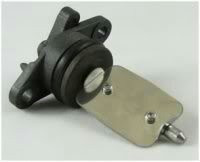
Design of the first generation swirl flaps that are made of made of metal.
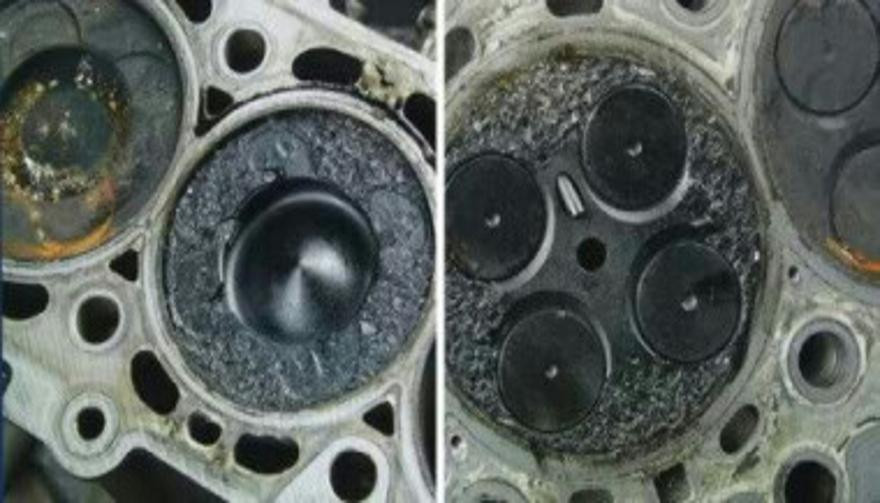
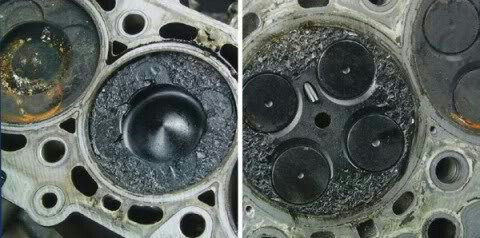
Unfortunately, swirl flaps are responsible for countless damaged engines and costly repairs due to design errors or metal fatigue. Once damaged, the cylinder sucks them in and causes great damage.

This is how damaged valves damage the cylinder.
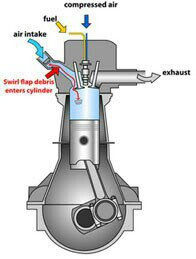
Typical swirl flaps  suction damage.
The vortex valves are positioned in the inlet and are controlled by vacuum (DDE 4.0) or electrically (DDE5.0 / DDE6.4) by the engine ECU.

Effects of malfunctioning valves:

  • Swirl valves are  stuck in open position: Deterioration of exhaust gas performance at lower speeds.
  • Swirl valves are stuck in closed position: Approximate power loss of 10% at high engine speeds.

How swirl flaps work:

Performance characteristics:

The vortex valves are in the closed position, at low engine speeds and small amounts of fuel injected (controlled by the ECU card).

They open under the following conditions:

  1. coolant temperature <14 ° C OR * fuel quantity> 24 mg OR
  2. engine speed 2250 rpm OR
  3. inlet air temperature <-5 ° C

BMW and Pierburg have decided to produce diesel engines with metal vortex valves. The speed at which the pistons in the diesel engine operate is at least 60 rpm, so a sucked vortex valve will break and cause a number of damages inside the engine.

In most cases, one or more pistons are severely damaged, as a bonus you get valves, in some cases a head or turbocharger. And this combination with a BMW engine is like a cumulative jackpot  🙂

In 2004, BMW began work on the problem and improved the design, however, a number of owners reported ongoing problems in this area.

The solution to this problem is by removing the vortex valves and plugging, which does not affect the performance of the engine and at the same time, you can safely pass the exhaust test.

Engines:

M47 (136hp VP44 fuel pump) has no valves.

M47N common rail engine (including M47N / M47TU / M47TUD20) (150hp. Face lift model from 2001 -) has valves.

M57 engines (M57D) (525d & 187hp. 330d) cars with manual transmission do not have valves, but those with automatic have.

M57N engines (M57TUD) (525d & 330d 204hp) have vortex valves.

Ruined swirl flaps:

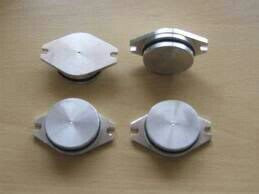
The plugs that replace the vortex valves are easy to find on the internet, but you can also find them here on our website.

Typical plugs:
 

Disassembly of vortex valves:

The vortex valves can be safely dismantled and in most cases if they are  removed properly no loss of power is felt.

Final list of models for which vortex valves are installed:

Engine: M47N/M47TU/M47TUD20

Applications:

* 110 kW (148 hp) and 330 N·m (243 lb·ft)

o E46 320d 2001-2005

o E83 X3 2.0d (up to end of 2006)

Engine: M47TU2D20

The engine was updated again in 2004 as the M47TU2D20. Still at 1995 cc, it produced more power across the range.

Applications:

* 120 kW (161 hp) and 340 N·m (251 lb·ft)

E60/E61 520d

E87 120d

E90/E91 320d

E83 X3 2.0d (end of 2006 onwards)

Engine: M57/M57D25

M57D25 was introduced in 2000.

Applications:

* 166 PS (122 kW; 164 hp) at 4000 rpm, 350 N·m (260 lb·ft) at 2000-2500 rpm with a 4750 rpm redline, models:

2000-2003 E39 525d *Vehicles With Automatic Transmission ONLY*

Engine: M57N/M57TU/M57TUD25

M57TUD25 was introduced in 2004.

Applications:

* 177 PS (130 kW; 175 hp) at 4000 rpm, 400 N·m (300 lb·ft) at 2000-2750 rpm models:

E60/E61 525d

Engine: M57/M57D30

M57D30, also called M57D29, was introduced in 1998.

Applications:

* 184 PS (135 kW; 181 hp)@4000, 390 N·m (290 lb·ft)@1750-3200 models:

E39 530d *Vehicles With Automatic Transmission ONLY*

E46 330d/330xd *Vehicles With Automatic Transmission ONLY*

* 184 PS (135 kW; 181 hp)@4000, 410 N·m (300 lb·ft)@2000-3000 models:

E38 730d *Vehicles With Automatic Transmission ONLY*

E53 X5 3.0d

* 193 PS (142 kW; 190 hp)@4000, 410 N·m (300 lb·ft)@1750-3000 models:

E38 730d

E39 530d

Engine: M57N/M57TU/M57TUD30

M57TUD30 was introduced in 2002. It originally produced 160 kW (215 hp) at 4000 rpm and 500 N·m (370 lb·ft) at 2000-2750 rpm, but was tweaked for 150 kW (201 hp) at 4000 rpm and 410 N·m (300 lb·ft) at 1500-3250 rpm for 2003 and again for 200 kW (268 hp) at 4000 rpm and 560 N·m (410 lb·ft) at 2000-2250 rpm in 2004.

Applications:

* 204 PS (150 kW; 201 hp)@4000, 410 N·m (300 lb·ft)@1500-3250 models:

E46 330d/330Cd/330xd

E83 X3 3.0d

* 218 PS (160 kW; 215 hp)@4000, 500 N·m (370 lb·ft)@2000-2750 models:

E53 X5 3.0d

E60/E61 530d/530xd

E65 730d

* 272 PS (200 kW; 268 hp)@4000, 560 N·m (410 lb·ft)@2000-2250

E60/E61 535d

* 245 PS (180 kW; 242 hp)@4000, 500 N·m (370 lb·ft)@2000-2250

* 286 PS (210 kW; 282 hp)@4000, 580 N·m (430 lb·ft)@2000-2250

Engine: M57TU2D30

M57TU2D30 was introduced in 2007, making its debut in the facelifted E60 and E61.

* M57TU2D30-UL: 197 PS (145 kW; 194 hp)

* M57TU2D30-OL: 235 PS (173 kW; 232 hp)@4000, 500 N·m (370 lb·ft)@2000-2750

* M57TU2D30-TOP: 286 PS (210 kW; 282 hp), 580 N·m (430 lb·ft)

Applications:

* 197 PS (145 kW; 194 hp), 400 N·m (300 lb·ft) models:

E90/E91/E92 325d

E60/E61 525d/525xd

* 231 PS (170 kW; 228 hp)@4000, 500 N·m (370 lb·ft)@2000-2750 models:

E65 730d

E90/E91 325d

E90/E91 330d/330xd

* 235 PS (173 kW; 232 hp) models:

E60/E61, BMW E70, BMW E71

* 286 PS (210 kW; 282 hp), 580 N·m (430 lb·ft) models:

E60/E61 535d

E70 X5 3.0sd

E71 X6 xDrive35d

E83 X3 3.0sd

E90/E91 335d

The above models are listed for information only if you want to to make sure your engine has valves installed, please contact a competent person.

Please note that the information described above is for informational purposes only and does not claim to be reliable. Mr-key.com is not responsible for any repair work you undertake that is related to the topic described in this article.

Related Posts

Removing Keys from Locks: A Comprehensive Guide

Removing Keys from Locks: A Comprehensive Guide

Removing a key from a lock may seem simple, but it can become tricky when dealing with stuck or broken keys. Whether you're dealing with a standard lock, padlock, or vehicle ignition, understanding the correct techniques can save you from damage and frustration. This guide will walk you through the essential steps for removing keys from various types of locks, offering practical advice and tips to ensure a smooth process. Common Scenarios and Challenges Keys can become stuck or difficult to remove for several reasons, including misalignment, wear and tear, or damage to the key or lock. Additionally, environmental factors like temperature changes can cause metals to expand or contract, making key removal more challenging. Recognizing the cause of the issue is the first step in effectively addressing it. Basic Techniques for Key Removal Gentle Wiggle and Pull: The first technique to try is a gentle wiggle and pull. Hold the key firmly and move it slightly up and down or side to side while pulling gently. This method works well if the key is simply stuck due to misalignment. Lubrication: If the key is difficult to remove, applying a small amount of graphite powder or a silicone-based lubricant into the keyhole can help. Avoid using oil-based lubricants, as they can attract dirt and grime, potentially worsening the problem. Tapping the Lock: For stubborn cases, lightly tapping the lock with a hammer while gently pulling the key can help dislodge it. This method is effective when the key is stuck due to debris or minor misalignments within the lock. Advanced Techniques for Stuck Keys Using a Key Extractor: If the key is broken off inside the lock, a key extractor tool can be very effective. Insert the tool into the keyhole, hook the broken key piece, and pull it out carefully. This method requires patience and a steady hand. Pliers and Tweezers: If part of the key is still protruding, you can use needle-nose pliers or tweezers to grip and pull the key out. Be careful not to apply too much force, as this can push the key further into the lock or damage the lock mechanism. Heat Application: In cold weather, metal contracts, which can cause the key to get stuck. Gently heating the key with a hairdryer or warm cloth can expand the metal slightly, making it easier to remove. However, avoid using an open flame, as it can damage the lock or key. Preventing Key Stuck Issues Prevention is always better than cure. Here are some tips to prevent keys from getting stuck in the future: Regular Maintenance: Keep your locks and keys clean and well-lubricated with appropriate materials. Regularly inspect for wear and tear, and replace any damaged keys or locks. Use Duplicate Keys: If you notice a key becoming difficult to use, have a duplicate made before it breaks or becomes stuck. This will save you the hassle of dealing with a stuck key. Avoid Excessive Force: Never force a key into a lock. If it doesn’t turn easily, stop and inspect both the key and the lock for damage or obstruction. When to Call a Professional While many stuck key issues can be resolved with the techniques mentioned above, there are times when professional assistance is necessary. If you’ve tried all the methods and the key remains stuck, or if you’re dealing with a high-security lock, it’s best to contact a professional locksmith. They have the tools and expertise to safely remove the key without damaging the lock or key further. Dealing with a stuck key can be frustrating, but understanding the proper techniques can save you time and prevent damage. From basic wiggling and lubrication to more advanced methods like using a key extractor, there are various approaches depending on the severity of the situation. Regular maintenance and careful handling can help prevent these issues from occurring in the first place. When in doubt, don’t hesitate to seek professional help to ensure your lock and key remain in good working condition.

Why Your Car Remote Isn’t Working and How to Fix It

Why Your Car Remote Isn’t Working and How to Fix It

Car remotes have become an essential part of modern vehicle ownership, offering convenience and added security. However, when they stop working, it can lead to frustration and delays. If you’ve ever faced a malfunctioning car remote, don’t worry—you’re not alone. Here’s a guide to help you understand the common reasons why your car remote might fail and how you can fix the issue quickly and affordably. 1. Dead Battery: The Usual Suspect One of the most common reasons for a non-functional car remote is a dead battery. Over time, the small coin batteries in your remote lose their charge, making the remote unusable. Signs of a Dead Battery: Reduced range, inconsistent functionality, or complete failure to respond. How to Fix It: Replace the battery with a compatible CR-type coin battery. Check your car manual or the remote’s casing for the correct battery type. Pro Tip: Always keep a spare battery in your glove compartment to avoid getting stranded. 2. Signal Interference: The Invisible Barrier Signal interference can block communication between your remote and your car. This can happen in areas with high electromagnetic activity or if the remote’s signal is weakened. Common Causes: Proximity to cell towers, Wi-Fi routers, or even other key fobs . How to Resolve It: Move closer to your car and try again. Change your location if you’re in a crowded parking area. Keep your remote away from other electronic devices that might cause interference. Prevention Tip: Avoid storing your car remote near electronics when not in use. 3. Remote Needs Reprogramming Sometimes, a car remote loses its programming, which is essential for communicating with your car. This can happen after battery replacement, electrical system resets, or software glitches. Signs Your Remote Needs Reprogramming: The buttons don’t respond, or the remote only works intermittently. What You Can Do: Check your car manual for DIY reprogramming instructions. If DIY methods fail, consult a professional locksmith or your car dealer for assistance. Pro Tip: Always reprogram your remote immediately after replacing its battery to avoid compatibility issues. 4. Physical Damage: More Than Just Wear and Tear Daily use, accidental drops, or exposure to moisture can damage your car remote, leading to malfunction. The internal components, such as the circuit board, are particularly sensitive. Signs of Damage: Cracks on the casing, loose buttons, or water ingress. How to Address It: For minor issues, replace the remote casing or repair loose buttons. If the circuit board is damaged, you’ll need a replacement remote. Preventative Measures: Use a protective key cover to shield your remote from damage. Keep your remote away from water and extreme temperatures. 5. Faulty Car Receiver: The Problem Isn’t Always the Remote In some cases, the issue lies with your car’s receiver rather than the remote. If the receiver is damaged or malfunctioning, it won’t recognize signals from the remote. How to Diagnose: If multiple remotes fail to work with the same car, the receiver might be the issue. Test your remote on a similar vehicle, if possible, to rule out the remote as the problem. How to Fix It: Consult a professional mechanic to inspect and repair the car’s receiver system. General Tips to Keep Your Car Remote Functional Prevention is better than cure, especially when it comes to car remotes. Here are some tips to avoid future issues: Regular Maintenance: Inspect your remote periodically for wear and tear. Store It Safely: Keep your remote in a safe, dry place to avoid accidental damage. Backup Plan: Always have a spare key or remote handy for emergencies. Invest in a Tracker: Attach a Bluetooth tracker to your remote for easy location if it gets misplaced. When to Seek Professional Help While many car remote issues can be resolved with DIY methods, some problems require professional assistance. If your remote still doesn’t work after troubleshooting, consult a locksmith or an automotive specialist. They can help with repairs, replacements, and reprogramming at an affordable cost. Don’t Let a Faulty Remote Slow You Down A malfunctioning car remote can be a hassle, but most issues are fixable with a little know-how. Whether it’s a dead battery, signal interference, or physical damage, understanding the root cause will help you resolve the problem efficiently. With proper care and maintenance, your car remote will continue to offer the convenience and security you rely on every day.

How to Tell If Your Car Key Needs a Battery or a Full Replacement

How to Tell If Your Car Key Needs a Battery or a Full Replacement

In an age where technology is at the core of almost every part of a vehicle, car keys are no longer simple pieces of metal. They’ve become compact, electronic tools that combine convenience with security — from remote locking systems to transponder chips and push-start capabilities. However, like any piece of technology, car keys are not immune to wear, damage, or electronic failure. And when they stop working, most drivers are left with one essential question: does my key just need a new battery, or is it time for a full replacement? This article dives deep into that very question. Understanding how to recognize the early signs of battery failure versus a complete key malfunction can save drivers from unnecessary frustration and expensive dealership visits. Whether you're dealing with a FIAT flip key, a HYUNDAI remote, or any modern fob, this guide will help you identify the issue and make an informed decision on what to do next. The Anatomy of a Modern Car Key To understand why a key might stop working, it’s helpful to know what’s actually inside it. Most modern car keys—especially those from brands like FIAT, Hyundai, Kia, Peugeot, or Volkswagen—are composed of several key components. At the core is a small lithium coin battery , typically a CR2032 or CR2025, which powers the key's remote functions. There's also a circuit board that contains the remote buttons and signal transmission systems. Some keys include a transponder chip , a tiny RFID device that communicates with your vehicle’s immobilizer system. Then there's the key blade —mechanical or flip-style—and the outer shell , which holds it all together and includes physical buttons. When something goes wrong, the issue can stem from any one of these components. But most commonly, the culprit is either a drained battery or damage to the internal electronics or casing . Early Warning Signs: Is It Just the Battery? Many car key issues start with subtle signs that most drivers overlook. The key may still work occasionally, or it might only respond when standing close to the car. These are common indicators that the battery is on its way out, but hasn’t failed completely yet. One of the first things a driver might notice is that the range of the remote decreases . You may find yourself needing to stand much closer to the vehicle than usual to lock or unlock it. In some cases, the key might require multiple button presses to get a response. If the key has a small LED light (common in many models), you might see it flicker weakly or stop lighting up altogether. These are signs that the battery still has some life, but it's not providing the power needed for consistent performance. The good news? Replacing the battery is often a quick and inexpensive fix, especially if there are no signs of physical damage or moisture exposure. How Long Does a Key Battery Last? The battery inside your key is designed to last between 2 to 3 years under regular use. Factors like frequent use, temperature changes, or prolonged storage can reduce that lifespan. If your key has never had a battery change and it's approaching that age, a weak battery is the most likely cause of any issues. Changing the battery is a simple task in most cases. Many key fobs can be gently pried open using a flathead screwdriver or a plastic tool. Inside, you’ll find the round battery, which can be swapped out for a new one. Always use a high-quality battery from a trusted brand like Panasonic or Maxell to ensure optimal performance. After inserting a fresh battery, the key should immediately start functioning normally again. If it doesn't, then the issue likely runs deeper. When It’s More Than Just the Battery So what happens if you've replaced the battery and the key still doesn't work? This is when it’s time to look at other possibilities. A complete key failure doesn’t just affect the remote functions—it can also affect the chip, the buttons, or even the mechanical components. For instance, if your car uses a push-to-start system and it no longer recognizes your key after a battery replacement, the issue may lie with the transponder chip . This chip is essential for starting the engine, and if it’s been damaged by a drop or water exposure, the car may not respond at all. Keys that have been exposed to moisture , such as rain or accidental washing, are also at high risk. Even small amounts of water can short out the internal electronics or cause corrosion on the contacts, rendering the key useless. Similarly, keys that have been dropped or stepped on can suffer internal damage even if the outer shell looks fine. Another common reason for total failure is button wear . Over time, the rubber buttons on a key can wear down or detach completely, making it difficult to send a signal to the car—even if the electronics are still working underneath. Shell Damage vs. Internal Failure It's important to distinguish between cosmetic damage and a true functional failure. A key with a cracked or broken shell may still work perfectly well, but using it daily becomes inconvenient—or risky, as it can fall apart further over time. In these cases, replacing only the key shell is often the most cost-effective solution. Shell replacement kits are available for most makes and models, including popular FIAT and Hyundai keys. They allow users to transfer the internal electronics and battery into a new casing, restoring the look and feel of the original key without needing reprogramming or electronic parts. However, if the circuit board inside the key is broken , or the transponder chip is no longer recognized by the vehicle , a complete key replacement will be necessary. This often requires purchasing a new key and having it programmed to your vehicle , either through a locksmith or via dealership-level tools. Identifying the Right Replacement Solution The path forward depends entirely on the root cause of the issue. Here’s how to decide: If your key works intermittently and shows no physical damage, start with a battery replacement . If the buttons are worn or the casing is cracked , but the electronics are fine, consider a shell replacement . If the key doesn’t respond at all , even with a new battery, and has no LED or signal , a full replacement is likely needed. If the mechanical blade is damaged , but the remote still functions, you can often just replace the key blade . Replacing just the parts you need can save time and money. Reliable sellers, like mr-key.com , offer a wide range of high-quality key shells, batteries, blades, and even full replacement keys—including options for programming and compatibility details. When your car key stops working, it’s natural to panic. But in most cases, the fix is far simpler than expected. A weak or dead battery accounts for the majority of key-related issues, and replacing it can restore full function within minutes. However, when the damage goes beyond the battery, identifying whether it’s the shell, chip, or internal electronics at fault will determine whether a full replacement is necessary. Being able to recognize the difference between a temporary battery issue and a deeper hardware failure empowers car owners to take quick, cost-effective action. With the right tools and parts—and a little guidance—almost anyone can resolve a car key issue without visiting a dealership. For a full range of replacement parts, including key shells, blades, batteries, and complete remote keys, visit mr-key.com and explore quality products that help restore your car key to like-new condition.

How to Take the Perfect Photo of Your Key for Easy Replacement

How to Take the Perfect Photo of Your Key for Easy Replacement

When you need a replacement key , taking a clear, detailed photo of your key can make the process much faster and more accurate. A high-quality image helps key makers understand the exact specifications, cuts, and dimensions of your key, which is especially important if you don’t have a spare. In this guide, we’ll walk you through the best practices for photographing your key so you can get an accurate replacement with ease. Why a Clear Key Photo Matters Photographing a key might sound simple, but it requires a bit of attention to detail. A well-taken photo captures the key’s grooves and unique cuts clearly, helping the key cutter replicate the exact pattern. Saves Time : A high-quality photo reduces the need for multiple attempts to cut a new key . Ensures Accuracy : Clear images help capture specific details, leading to a more precise fit. Convenient Process : With just a smartphone and a few tips, you can photograph your key from home without needing special equipment. Essential Tools for Photographing Your Key To take a clear photo of your key, you don’t need much beyond a few household items. Here’s what you’ll need: Smartphone or Camera : A phone camera is usually sufficient, but a standard digital camera works well too. Plain Background : Choose a neutral, solid-colored background like a piece of white paper or a smooth table surface. Good Lighting : Natural daylight or a bright room light helps capture details without shadows. Small Object for Elevation : A coin or similar item can lift the key slightly, making it easier to photograph. Step-by-Step Guide to Taking the Perfect Key Photo Follow these steps to take a photo that ensures clarity and accuracy for key replacement. 1. Set Up the Background Place a piece of plain white paper or another smooth, light-colored surface under your key. The solid color helps the details of the key stand out without any visual distractions. Tip : Avoid backgrounds with patterns or textures, as these can obscure the key’s features. 2. Position the Key Correctly Lay the key flat on the background, with the grooves and cuts facing up. The key should be positioned horizontally to allow a clear view of all its details. Side Profile : Make sure to capture the side profile that shows the cuts and grooves. Elevate Slightly : Place a coin or small object under one end of the key to angle it slightly toward the camera. This can help reduce shadows and improve focus on the cuts. 3. Adjust Lighting Good lighting is essential for capturing details. If possible, photograph your key in natural daylight near a window or use a well-lit room. Avoid Shadows : Ensure that no shadows fall across the key, as they can obscure details. Diffuse Light : If using a lamp, consider placing a thin cloth over it to diffuse the light and reduce harsh reflections. 4. Focus and Zoom Make sure your camera or smartphone is focused directly on the key. You may need to tap the screen to bring it into sharp focus. Zoom in Carefully : If you’re using a smartphone, zoom in slightly to capture the details, but avoid over-zooming, which can blur the image. Test Multiple Angles : Sometimes a slight adjustment in angle can capture the cuts more effectively, so take a few shots from slightly different perspectives. 5. Capture Multiple Photos It’s always a good idea to take several photos to ensure you have the best one. Try different angles and lighting adjustments to capture as many details as possible. Close-Up of the Grooves : Take one close-up image focusing on the cuts and grooves of the key. Overall Image : Include one full-length photo that shows the entire key from end to end. Try Different Angles : Slightly tilt the key or move the camera to see which angle best captures the detail of the cuts. Common Mistakes to Avoid When Photographing Your Key To get the best results, steer clear of these common issues that can impact the quality of your key photo: Blurry Images : If your hand shakes, use a small tripod or prop your phone on a stable surface. Poor Lighting : Avoid taking photos in dim rooms; use bright light to ensure the key is clearly visible. Obstructed Details : Make sure the entire length of the key is visible, without any part being cut off or covered. Tips for Ensuring a Smooth Replacement Process Once you have a clear photo of your key, there are a few final steps to make the replacement process as efficient as possible. Check the Photos : Look over your photos before sending them to ensure that they’re clear and detailed. Label the Key : If you’re photographing multiple keys, label each one in the image or add a note to avoid confusion. Include Measurements : If possible, add the measurements of the key’s length and width in your notes for added accuracy. A clear, detailed photo of your key can save you time and effort when seeking a replacement. By following these simple steps, you’ll provide all the necessary details to ensure your new key is an accurate match. Remember, good lighting, focus, and capturing all the unique cuts are essential to achieving the best results. With these guidelines, you’re set to take a photo that will make your key replacement process smooth and hassle-free.

Chat with us