Post Name

The ignition switch is one of the most important electrical components in any car. When it starts to fail, the symptoms can appear suddenly, seem unrelated, and quickly leave you stranded. This guide explains the real-world signs, the common causes, the most accurate diagnosis steps, and a clear ignition switch replacement guide that helps any driver understand what’s happening and what to do next.

If you’re dealing with car ignition lock problems, this article gives you the clarity you need to fix the issue fast and safely.


What the Ignition Switch Actually Does

The ignition switch has two critical jobs:

1. Electrical power distribution

It sends power to the dashboard, fuel pump, ignition system, starter motor, and electronic modules.

2. Starting the engine

When you turn the key (or press the button), it bridges electrical circuits, enabling the starter motor to crank the engine.

When the ignition switch begins failing, even slightly, it disrupts these circuits. That’s why symptoms can range from flickering dash lights to complete engine shutdown.


Symptoms of a Failing Ignition Switch


These are the most common, proven symptoms that mechanics use to identify ignition switch problems.

1. Car Won’t Start or Cranks Intermittently


If turning the key does nothing—or the engine cranks sometimes but not always—the ignition switch may not be sending power consistently to the starter relay.

Typical behavior includes:

Silence when turning the key

Clicks but no cranking

Starts only after multiple attempts

Total power loss during cranking

This is one of the most classic ignition switch symptoms.

2. Stalling While Driving


A failing ignition switch can cut power to the engine while you’re moving.

Common signs:

Sudden stall for no reason

All dash lights go off instantly

Engine dies when hitting bumps

Engine cuts out but restarts immediately

This is dangerous and needs urgent attention.

3. Dashboard Lights Flickering or Turning Off


When the internal contacts inside the switch wear out, they create tiny power interruptions.

You may see:

Speedometer drops to zero

Warning lights randomly appear

Interior electronics momentarily cut out

Radio resets or flickers

These short power losses are a major red flag.

4. Key Feels Hot or Hard to Turn


If the key is warm after driving, the switch may be overheating internally.

If the key becomes difficult to rotate, the ignition cylinder (mechanical part) may be worn — which often leads to switch failure later.

5. Accessories Don’t Work in ACC Mode


If turning the key to ACC does not activate:

radio

wipers

power windows

heater fan

…the accessory circuit inside the switch may be failing.

6. No Sound from the Fuel Pump When Turning the Key


You should hear a soft humming for 1–2 seconds.

If you don’t, it may mean the ignition switch isn’t powering the pump relay.
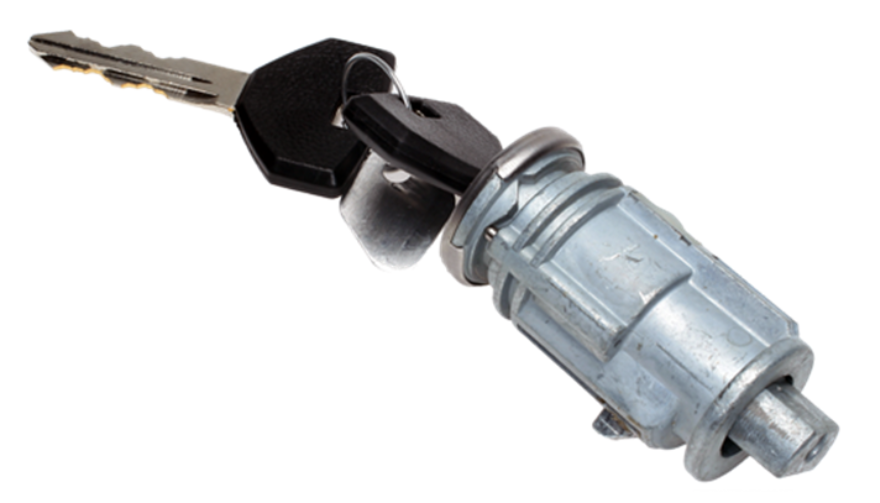


What Causes Ignition Switch Problems?


Ignition switches fail for predictable and well-documented reasons.

1. Internal Wear Over Time


Inside the ignition switch are metal contact plates.

After thousands of cycles, these contacts burn, corrode, or lose tension.

Symptoms develop slowly:


random stalling

needing to wiggle the key

intermittent power

This is the most common cause.

2. Heavy Keychains


Many drivers don’t realise this:

A heavy keychain constantly pulls on the ignition cylinder.

Over years, this causes:

internal looseness

misalignment

premature switch failure

If your keychain has more than a few items, it may be contributing.

3. Heat and Electrical Overload


Faulty relays, worn fuel pumps, or aftermarket accessories can overload the ignition switch.

Excess heat damages the internal copper contacts, causing:

hot key symptoms

partial circuit failure

total switch burnout

4. Moisture or Dirt in the Cylinder


Moisture or dust causes the mechanical part of the ignition to jam or bind.

This forces extra pressure onto the switch every time the key turns.


5. Faulty Key or Worn Key Blade


If your key doesn’t rotate smoothly, it can damage both the cylinder and the switch.

Worn keys often lead to electrical faults later.


How to Diagnose Ignition Switch Problems Accurately


Before replacing parts, you should confirm the ignition switch is truly the issue. These steps follow the same logic professional mechanics use.


1. Check if Dashboard Lights Turn On


Turn the key to ON without starting the engine.

If:

no lights come on

lights flicker

radio stays off

…the ignition switch might not be sending voltage.

2. Try Starting with Accessories On


Turn the key to ACC.

If the accessories work in ACC but the engine won’t start, the “start circuit” inside the ignition switch may be failing.


3. Wiggle Test


Gently wiggle the key while:

trying to start

with ACC on

with the engine idling


If wiggling makes electronics turn on/off, the switch is internally worn.

4. Bump Test While Driving


If the car stalls when hitting bumps or potholes, the switch is losing internal contact momentarily.

This is one of the strongest indicators of a failing switch.

5. Test Voltage at the Ignition Switch (Advanced)


Using a multimeter, check for:

constant power

switched power

accessory power

start signal power

If any circuit fails randomly, it confirms an ignition switch fault.


If you need a safety reference for electrical testing, you can check the UK Government’s general vehicle safety guidance here:


Prevention: How to Avoid Ignition Switch Problems


Ignition switch failures can often be prevented with small habits.

1. Keep Your Keychain Light


Remove heavy accessories.

This reduces stress on the ignition cylinder and switch dramatically.

2. Avoid Resting Hands on the Key While Driving


Constant pressure on the key twists the internal contacts.

3. Only Use Correct, Undamaged Keys


Bent, cracked, or worn keys can damage:

the cylinder

the switch

the steering lock


If your key is worn, replace it before it causes further problems.


4. Address Electrical Problems Early


A failing alternator, weak battery, or short circuits can overload the ignition switch.

If you notice dim headlights or battery warnings, fix those early.

5. Keep Dust and Moisture Out of the Cylinder


Avoid spraying WD-40 or household lubricants into the ignition—it attracts dust.

Use proper graphite lock lubricant if needed.


Ignition Switch Replacement Guide


You should only replace the ignition switch if diagnosis confirms it.

Below is a clear replacement overview used by both DIYers and technicians.


Note: Procedures vary by vehicle, but the overall steps are similar.

1. Disconnect the Battery


Always disconnect the negative terminal.

This prevents:

accidental airbag deployment

electrical shorts

damage to modules

2. Remove Steering Column Covers


Most cars use simple screws underneath.

Once removed, the top and bottom covers split apart.

3. Locate the Ignition Switch Module


It is usually mounted behind the ignition cylinder.

Depending on the car:

it may be held by two screws

or secured with clips

or integrated into a combined steering lock module

4. Remove the Electrical Connector


Ignition switches usually have one large multi-pin connector.

Release the locking tab and pull it gently.

5. Remove and Replace the Switch


Install the new switch in the exact orientation as the old one.

Common mistakes to avoid:

misaligning the switch’s internal slot

tightening screws unevenly

damaging wiring during removal

6. Reassemble and Test Thoroughly


After reassembly, test:

ACC mode

ON mode

engine start

headlights

indicators

wipers

radio

If everything works consistently, the replacement is successful.


Is It Safe to Drive with a Bad Ignition Switch?


Usually no.

A failing ignition switch can:

stall the engine suddenly

disable power steering

shutdown ABS

cut power to headlights at night


The RAC warns that electrical failures causing engine cut-outs are a serious safety risk.

If your switch is failing, get it inspected immediately.


FAQ: Car Ignition Switch Problems


1. How much does ignition switch replacement cost?

Most replacements cost £80–£300 depending on the vehicle. Some modern cars require coding, making the cost higher.

2. Can a bad ignition switch cause the car to stall?

Yes. Loss of electrical contact in the switch can cut power to the engine instantly.

3. Is a failing ignition switch the same as a bad starter?

No.

A bad starter prevents the engine from cranking.

A bad ignition switch prevents power from reaching the starter or other systems.

4. Can a locksmith replace an ignition switch?

In many cases, yes — especially for older vehicles.

For modern immobilizer systems, a vehicle technician may be required.

5. Can I drive with ignition switch problems?

It’s unsafe. The engine can cut out while driving, especially on bumps or turns.

6. Does a bad ignition switch affect accessories only?

It can affect:

accessories

engine start

fuel pump

dashboard power

ECU communication

It depends on which internal circuit fails.

7. What’s the lifespan of an ignition switch?

Most last between 10–15 years, depending on usage and electrical load.

8. Do push-button cars have ignition switches?

Yes — they use an electronic ignition switch module instead of a mechanical one.

Failure symptoms are similar.

9. What does a worn key have to do with ignition switch problems?

A badly worn key can cause mechanical strain on the cylinder, which then stresses the electrical switch linked behind it.

10. Can I prevent ignition switch issues?

Yes — keep your keychain light, avoid forcing the key, and keep electrical systems maintained.


For high-quality replacement automotive parts and spare key, visit our shop at mr-key.com.

Related Posts

The Ultimate Guide to Opel, Peugeot, and Citroën Car Keys: Battery Replacement, Flip Key Issues, and Shell Compatibility

The Ultimate Guide to Opel, Peugeot, and Citroën Car Keys: Battery Replacement, Flip Key Issues, and Shell Compatibility

Car keys have come a long way from simple metal tools to advanced electronic devices. While they offer convenience and security, they're also prone to wear and tear over time. If you own an Opel, Peugeot, or Citroën, you've likely encountered a dead battery, faulty buttons, or a cracked key shell. These issues, though frustrating, are easy to fix with the right approach. This guide explores everything you need to know to maintain or restore your car key's functionality—without unnecessary expense. From understanding how these keys work, to step-by-step maintenance practices, we'll walk you through all the essentials to keep your keys working like new. How Car Keys Work Today Modern car keys are more than just tools to unlock and start your vehicle. They are miniaturized computers embedded with microchips, transponders, and signal systems that communicate with your car's onboard electronics. Most Opel, Peugeot, and Citroën models feature flip keys with integrated remote buttons, and inside each key fob lies a delicate configuration of electronics that perform critical functions like remote unlocking and engine ignition authorization. These keys depend heavily on power from a small coin-cell battery, usually the CR2032. While small and seemingly insignificant, the battery is the heart of your key fob. When it begins to fail, even slightly, the symptoms can range from reduced signal range to complete unresponsiveness. That’s why it’s crucial to replace it in time. Replacing the Battery in Opel Car Keys Your Opel car key is essential to your daily routine. Over time, the lithium CR2032 battery inside may weaken, resulting in slower response or reduced range. The good news is that replacing it is straightforward and requires only a few tools. Once you identify your key type—typically a flip key with two or three buttons—you can open the casing using a small screwdriver or plastic tool. Inside, you'll find a battery nestled within the key's internal framework. Carefully remove the old battery and insert a new CR2032, ideally a reliable model like the Panasonic CR2032 . Proper alignment is crucial; the wrong orientation can prevent the key from functioning entirely. Align the shell halves carefully and press them back together until they click into place. If your key shell is also showing signs of damage or wear, consider replacing it with this Opel 3-button key housing . Replacing the battery is a quick job, but it makes a world of difference in reliability and peace of mind. Plus, it spares you the inconvenience of getting stranded or needing dealer intervention. Common Peugeot Flip Key Issues and How to Fix Them Peugeot flip keys are compact and stylish, but frequent use can expose a few recurring problems. The flip mechanism may lose tension, buttons may stop responding, or the outer shell may crack. In many cases, the spring inside wears down, and the plastic buttons may degrade over time. Exposure to moisture, dirt, or accidental drops can also damage the key fob. These symptoms can often be resolved by replacing both the battery and the key shell. Thankfully, most replacement shells come with a new flip mechanism already installed, making the process quick and cost-effective. If you're dealing with a damaged shell or non-functional buttons, a compatible Peugeot key shell can restore both the look and performance of your key. To repair your key, begin by opening the shell using a thin screwdriver. Remove the internal circuit board and transponder chip carefully. Transfer them into the new shell, ensuring everything fits snugly. Insert a fresh CR2032 battery before closing the key shell, then test all functions. Unlike dealer replacements, this DIY approach is affordable and efficient, putting the control in your hands. Understanding Citroën Key Shell Compatibility Citroën keys often resemble Peugeot models but feature subtle design differences that can impact shell compatibility. Before purchasing a replacement shell, it's important to examine a few key details. First, confirm that the button layout matches exactly—some models include a trunk release, while others do not. Next, check the blade type, usually HU83 or VA2, and make sure your new shell supports that configuration. You’ll also need to ensure there’s a space for the transponder chip, as without it, your car won’t start. Lastly, confirm that your circuit board (PCB) fits securely in the new housing. If you're unsure, compare your key with this Citroën 3-button shell for reference. A mismatched shell can result in poor fitment, misaligned buttons, or failure to lock and unlock your car. That’s why it's important to compare your current key closely to any replacement product. Shell replacements are not one-size-fits-all—small deviations in size or design can render them useless. Going Beyond: Caring for Your Car Key Long-Term Maintaining your car key goes beyond occasional repairs. Think of it as part of your overall vehicle care routine. Keep your key clean by regularly wiping it down with a soft cloth. Avoid exposing it to moisture or extreme temperatures, which can damage the battery and internal electronics. If your key starts to feel loose or if the blade no longer flips smoothly, it's a sign that maintenance is due. Another often-overlooked aspect is the condition of your key ring. Overloaded or heavy keychains can put unnecessary strain on the ignition switch and the key’s blade over time. Keeping your key light and secure can prolong both the key and the ignition system’s lifespan. If you find yourself frequently pressing buttons or experiencing lag in signal response, don't ignore it. These early symptoms are usually signs that a new battery is needed, or the shell's contacts are worn. Addressing small problems before they escalate can save you from full key failure. Car Key Maintenance Caring for your car key doesn’t have to be a daunting task. Whether you drive an Opel, a Peugeot, or a Citroën, regular maintenance and minor DIY repairs can significantly extend the life of your key. Replacing a worn battery and upgrading a broken shell not only restores functionality but also revives the overall appearance of your key. Use quality components, take your time during repairs, and always test your key before final assembly. By taking these small steps, you can avoid costly replacements and enjoy reliable key performance for years to come. Explore trusted replacement parts and accessories online at mr-key.com to keep your car keys in top condition year-round.

How to Maintain and Extend the Life of Your Car Keys

How to Maintain and Extend the Life of Your Car Keys

Your car keys are more than just tools to unlock and start your vehicle—they’re essential components for your car's convenience and security. Taking proper care of them can prevent unexpected failures and ensure they last for years. Here are seven easy and practical tips to help you keep your car keys in the best condition possible. 1. Keep Your Keys Clean and Dry Why It Matters: Moisture and dirt are the biggest enemies of car keys, particularly electronic fobs. Exposure to these elements can cause internal corrosion and failure. How to Do It: Avoid Moisture: Keep your keys away from water, rain, and high humidity. If they accidentally get wet, dry them immediately with a soft, absorbent cloth. Regular Cleaning: Gently wipe your keys with a clean cloth to remove dirt and dust. For crevices around buttons, use a cotton swab to clean hard-to-reach areas. 2. Handle Your Keys with Care Why It Matters: Dropping, tossing, or mishandling your keys can cause physical damage or misalign internal components, rendering them unusable. How to Do It: Avoid Drops: Be mindful when handling your keys. Attach them to a lanyard or key holder for better grip and to reduce accidental drops. Use a Protective Key Cover: A well-fitted key cover adds an extra layer of protection against scratches, drops, and general wear and tear. Plus, they’re available in various styles to match your preferences. 3. Replace Key Fob Batteries on Time Why It Matters: A weak battery can lead to your car key fob failing to work when you need it most, leaving you stranded or locked out. How to Do It: Watch for Warning Signs: If your key fob’s range decreases or requires multiple presses to function, the battery is likely weak and needs replacement. Replace Properly: Follow your car’s manual for step-by-step instructions on changing the battery. Using the correct battery type ensures reliable performance. 4. Protect Your Keys from Extreme Temperatures Why It Matters: Excessive heat or cold can harm the electronic components inside your key fob or damage the metal of traditional keys. How to Do It: Avoid Direct Sunlight and Heat: Don’t leave your keys exposed to the sun on your dashboard or near heaters. Extreme heat can warp materials and damage internal circuits. Keep Away from Freezing Temperatures: In colder months, avoid leaving your keys in your car or outside for prolonged periods, as freezing conditions can impact their functionality. 5. Rotate and Use Spare Keys Why It Matters: Spare keys can deteriorate if left unused for long periods. Regularly using them ensures they remain functional and ready in emergencies. How to Do It: Alternate Keys: Use your spare key occasionally to keep it in good working condition. This prevents any surprises when you actually need it. Safe Storage: Store spare keys in a dry, cool place, away from moisture, heat, or any magnetic devices that could interfere with their programming. 6. Avoid Overloading Your Keychain Why It Matters: A heavy keychain might seem harmless, but the extra weight can wear down your car’s ignition switch or damage your key over time. How to Do It: Limit What You Carry: Stick to the essentials—remove unnecessary keys, charms, or heavy accessories. Use Lightweight Keychains: Choose minimalistic and lightweight keychains to prevent undue stress on the ignition and the key itself. 7. Regularly Inspect for Wear and Tear Why It Matters: Keys, especially those with buttons or electronic components, can show signs of wear over time. Early detection helps avoid complete failure. How to Do It: Look for Physical Damage: Check for cracks, faded buttons, or scratches that might affect functionality. Seek Professional Help: If you notice significant wear or damage, consult a professional locksmith or dealership for repairs or replacement. Ignoring issues could lead to bigger, costlier problems down the line. Why Car Key Maintenance is Worth Your Effort Properly maintaining your car keys ensures they stay reliable, functional, and secure for years to come. Whether it’s a traditional key or a modern electronic fob, these small actions can save you from costly replacements or inconvenient malfunctions. Taking care of your keys isn’t just about preventing problems—it’s also about convenience, peace of mind, and getting the most out of your vehicle’s features. By following these simple tips, you’ll keep your car keys in top shape and avoid the stress of unexpected failures.

What’s the Difference Between a Key Fob, Smart Key, and Proximity Key?

What’s the Difference Between a Key Fob, Smart Key, and Proximity Key?

Over the past two decades, vehicle security and convenience have evolved dramatically. Traditional metal keys have steadily given way to a range of more advanced systems that offer not only better protection but also more comfort for the everyday driver. Among the most commonly used terms in today’s automotive world are key fob , smart key , and proximity key . While often used interchangeably, these are not identical technologies. Each represents a step forward in how drivers interact with their cars, and understanding the differences between them is essential—especially when replacing, repairing, or purchasing new key components. In this article, we’ll explore each key type in detail, highlight what sets them apart, and offer practical insights to help you identify which type you own—and what that means for functionality, replacement options, and compatibility. Key Fob: The Foundation of Remote Access A key fob , in the modern context, refers to a remote control device that allows users to perform basic functions such as locking or unlocking the car doors. The word "fob" originally described a decorative accessory on a keychain, but it has evolved to refer specifically to these electronic remotes. Most key fobs use radio frequency (RF) signals to communicate with the vehicle. When you press a button on the fob, it sends a coded signal to a receiver inside the car, instructing it to lock, unlock, open the trunk, or activate the panic alarm. Some key fobs also include a physical key blade that can be used manually if the battery is dead or if the remote functionality fails. Key fobs became standard in the early 2000s and are now found in nearly every modern car. They represent the bridge between the traditional mechanical key and more advanced systems. While they don’t offer hands-free operation or engine-starting capabilities by default, they introduced a level of convenience that significantly improved the driving experience at the time of their launch. Smart Key: Hands-Free, High-Tech, Highly Secure The smart key builds on the foundation of the key fob but adds a major element of sophistication: hands-free access and ignition . With a smart key, you no longer need to press buttons to enter or start your vehicle. Instead, the key communicates continuously with the vehicle via low-frequency antennas and encrypted signals . As long as the key is within a certain range—often in your pocket or handbag—the vehicle automatically detects it and allows for keyless entry and push-button start. In many smart key systems, simply touching the door handle unlocks the vehicle. Once inside, starting the car requires nothing more than pressing a button on the dashboard. Some smart keys even store personalized settings, such as seat position or mirror alignment, offering a more tailored driving experience for each registered user. Originally reserved for luxury vehicles, smart keys have become increasingly common across all vehicle classes. Brands like Lexus, Mercedes-Benz, and BMW were early adopters, but today you’ll find smart keys in many Hyundai, Kia, Toyota, Nissan, and Volkswagen models. They offer both convenience and enhanced security thanks to rolling code encryption, which helps prevent signal interception and unauthorized vehicle access. Proximity Key: The Functional Twin of the Smart Key The term proximity key is often used synonymously with smart key, and in many cases, it functions in the same way. A proximity key allows the car to detect when the key is nearby—typically within one to three feet—and respond accordingly. You can unlock the car simply by approaching or touching the handle, and engine start is enabled through a button as long as the key remains inside the cabin. However, while all smart keys are proximity-based, not all proximity systems include the full feature set of a smart key. In some vehicles, the proximity key may lack advanced personalization or remote app integration, but the core functionality— hands-free locking, unlocking, and push-to-start capability —remains intact. The term “proximity key” is more commonly used in owner manuals or by manufacturers in Europe and Asia, while “smart key” has become the marketing standard in North America. Regardless of the terminology, the underlying technology is largely the same, relying on short-range radio waves, signal encryption, and two-way authentication between the key and the car. Breaking Down the Differences To simplify the distinctions between these three key types, it’s helpful to focus on user experience and technical capability. A traditional key fob requires active input—pressing a button to unlock the doors—whereas smart and proximity keys allow for passive, automatic operation. Additionally, the integration of engine start buttons, memory features, and enhanced security protocols tends to be exclusive to smart and proximity systems. Another notable difference lies in design and construction . Key fobs often have visible mechanical blades and rubber buttons, while smart keys are usually more compact, feature fewer or no physical buttons, and hide the emergency key blade inside the unit. Understanding this can help when shopping for replacement shells, batteries, or full units. Identifying Your Key Type Not sure which key your car uses? You’re not alone. Here's how to tell: If you must press a button on your key to unlock the doors and start the engine with a physical ignition slot, you’re likely using a key fob . If your car unlocks automatically when you approach and starts with a dashboard button —without ever removing the key from your pocket—you have a smart key or proximity key . If your car allows for keyless entry but still requires button pressing on the remote , it's most likely a standard key fob with added convenience features. Why Knowing the Difference Matters Understanding what type of key you use is crucial when you’re purchasing replacement components. A smart key cannot be replaced by a basic key fob, as it contains far more complex electronics and vehicle-specific programming. Likewise, replacing a proximity key requires knowing the exact frequency, chip type, and compatibility with your vehicle’s immobilizer system. At mr-key.com , we help car owners find exactly what they need—whether it’s a replacement key shell, a fresh battery, or a full remote unit with electronics and transponder chip included. With detailed listings sorted by make, model, and key type, it’s easy to identify the correct product and avoid costly dealership programming fees. As automotive technology continues to evolve, so does the way we access and operate our vehicles. Whether you're using a classic key fob, a cutting-edge smart key, or a proximity-based system, each offers a different balance of convenience, security, and technical complexity. Recognizing the key you use—and understanding how it works—not only makes you a more informed vehicle owner but also helps you take better care of your key system. When the time comes for a replacement or upgrade, you’ll be prepared to make the right choice quickly and confidently. For high-quality, vehicle-specific replacement parts, visit mr-key.com . From fob covers and CR2032 batteries to complete electronic keys and blades, we’ve got everything you need to keep your key performing like new.

The Ultimate Guide to Car Key Replacement: What You Need to Know

The Ultimate Guide to Car Key Replacement: What You Need to Know

Locked Out? Here’s What to Do Next Imagine this: you’re rushing to an important meeting or trying to get your kids to school, only to discover you’ve lost your car keys or locked them inside your vehicle. Panic sets in, and the inconvenience seems insurmountable. Losing or damaging your car keys is a frustrating, but surprisingly common problem. Luckily, car key replacement services are more advanced and accessible than ever. But where do you start? From understanding key types to navigating costs and services, this guide breaks down everything you need to know about car key replacement. Understanding Car Key Types: The First Step to Replacement Before diving into the replacement process, it’s essential to identify the type of car key you have. The complexity of your key determines the cost and the effort required for replacement. Traditional Mechanical Keys The simplest and most common in older vehicles. Easily duplicated at hardware stores or locksmiths. Transponder Keys Equipped with a microchip that communicates with the car’s ignition system. Offers enhanced security, as the car won’t start without the correct chip signal. Remote Key Fobs Allows remote locking, unlocking, and other functions like opening the trunk. Replacing a lost or damaged fob can be more expensive due to programming needs. Smart Keys Found in modern luxury cars, these keys provide keyless entry and start. Operate via proximity sensors, making them highly convenient but costly to replace. Each key type requires a different replacement approach, so understanding your key’s functionality is crucial. The Replacement Process: What to Expect Replacing a car key can range from a quick, inexpensive fix to a more involved process requiring specialized tools and expertise. Here's a step-by-step overview of what to expect: Determine Your Replacement Options Authorized Dealership : Best for complex keys, but often the most expensive option. Local Locksmith : Typically faster and more affordable for mechanical keys and some transponders. Online Services : Websites offering key duplication or fob replacements can be convenient, though programming may still require a locksmith. Gather Essential Information Vehicle identification number (VIN) and proof of ownership. Details about the key type and car make and model. Programming and Testing Keys with transponders or fobs often require programming to match your car’s system. A professional locksmith or dealership will ensure the new key functions seamlessly. Costs: How Much Should You Expect to Pay? The cost of car key replacement varies significantly based on the key type, service provider, and your location. Here’s a general breakdown: Mechanical Keys : $10–$50 for duplication. Transponder Keys : $75–$200, including programming. Remote Key Fobs : $150–$400, depending on the car make and model. Smart Keys : $250–$600, with luxury models at the higher end. Factors affecting cost include the car's age, whether you need key programming, and the urgency of the service. Always compare prices across locksmiths, dealerships, and online providers for the best deal. A Global Perspective: Trends and Innovations in Car Key Replacement Car key replacement practices vary worldwide, influenced by technology, availability of services, and local regulations. United States and Europe : Locksmiths and dealerships dominate the market, with online platforms gaining traction for basic duplications. Asia : With the rise of smart keys in markets like Japan and South Korea, dealerships often handle replacements due to proprietary technology. Emerging Markets : Mechanical keys are still prevalent, and costs are generally lower, though advanced key systems are increasingly common. Global trends indicate a shift toward digital and biometric key systems, with smartphone-based replacements and app-controlled access gaining popularity. However, these advancements also raise concerns about cybersecurity and hacking. Tips to Avoid Future Key Emergencies While no one can predict when a key might be lost or damaged, a few preventative measures can save you from headaches down the road: Invest in a Spare Key : Having a duplicate ready can save time and money. Use a Key Finder Device : Attach a Bluetooth tracker to your keyring to locate lost keys easily. Protect Smart Keys : Store them in a signal-blocking pouch to prevent relay attacks. Plan Ahead and Stay Prepared Car key replacement might seem daunting, but with the right knowledge and preparation, it’s a manageable process. Understanding your key type, exploring your replacement options, and taking preventative steps can save you time and money. If you’re facing a key emergency, start by identifying your options and gathering the necessary information. And for the future, consider investing in a spare or upgrading to a more secure system. Losing your car keys may be inconvenient, but it doesn’t have to derail your plans. With modern solutions and a little foresight, you’ll be back on the road in no time.

Chat with us