
Post Name

Get ready for the road ahead with our collection of 15 essential car hacks for 2026. From daily driver tips to clever car life hacks, these practical tricks will help every driver – new or experienced – save time, money and stress behind the wheel.

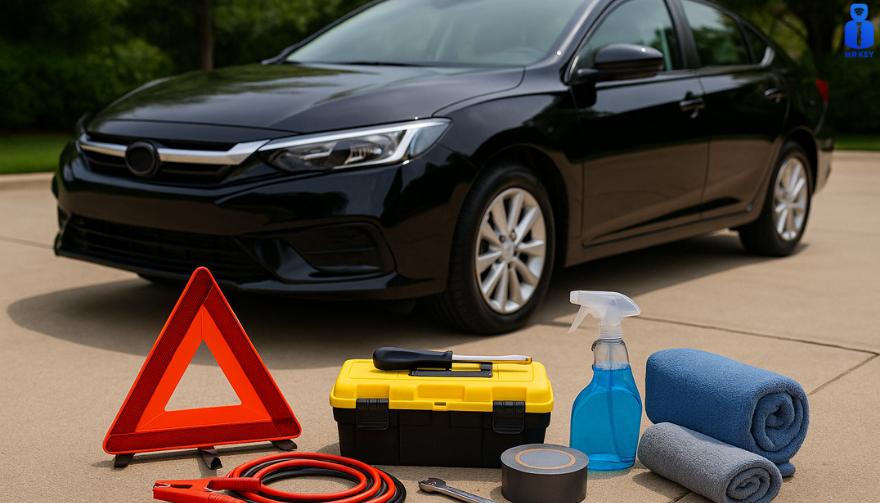
1. Pack a Smart Emergency Kit


Never be caught unprepared. Your car’s emergency kit should include basic tools and supplies: jumper cables, flashlight, first-aid kit and a blanket. Don’t skip the abrasive material – keep a bag of sand or cat litter on hand to spread under icy wheels for traction . Store these items in a sturdy box or duffel in the trunk. For example, AAA recommends keeping sand, salt or kitty litter for tire grip, and even suggests using a floor mat under a spinning tire to get out of snow.

Jumper cables: A dead battery can ruin your day.

Kitty litter or sand: Sprinkle under spinning tires for grip .

Flashlight & flares: Stay visible at night or in breakdowns.

Tools & blanket: Basic tools (multi-tool, duct tape) plus a warm blanket.

2. Boost Your Traction Tricks


If you ever get stuck in snow or mud, common household items can help you move. AAA specifically recommends carrying a bag of sand, rock salt or kitty litter for traction. You can also use your car’s own items: slide one of your floor mats under a stuck wheel to give the tire something to grab . With a gentle back-and-forth rocking of the vehicle, you’ll likely be back on the road in no time.

3. Track Your Maintenance History


Keep a log of every oil change, brake service and repair. When selling or trading in your car, a documented history proves you cared for it. In fact, buyers will pay more for a vehicle with clear service records . Use a small notebook in the glovebox or a smartphone app to note dates and mileage for each service. This simple habit boosts resale value and prevents overlooked maintenance.

4. Check for Recalls Often


Automakers sometimes issue safety recalls, and driving with an unresolved recall can be dangerous. Make it a habit to check your vehicle’s VIN on NHTSA’s website or app at least twice a year . NHTSA even offers email alerts and a “SaferCar” app to notify you of new recalls . If there’s a recall, visit your local dealer for a free fix. Regular recall checks keep you safely on the road.

5. Don’t Idle to Warm Up the Engine


In cold weather, skip the long idling. Modern fuel-injected engines warm up faster when you drive, not when idling. In fact, idling too long can foul plugs and degrade engine oil . Start the car and drive away gently after about 30 seconds – you’ll reach operating temperature faster and waste less fuel. The EPA even advises limiting idling to 30 seconds or less to reduce pollution.

6. Keep the Car Organized


A clutter-free car is a stress-free car. Use simple containers and organizers to tame the mess. For example, putting a couple of laundry baskets in the trunk lets you group items (gym gear in one, groceries in another) . Hang an over-seat organizer or shower caddy on the back of a front seat to stash toys, chargers and snacks. A tidy cabin means you’ll spend less time hunting for what you need.

Laundry baskets: Sort trunk items by category .

Seatback pockets: Store phones, maps, sunglasses and cables.

Cupholder liners: (silicone or paper muffin liners) to catch crumbs for easy cleanup.

7. Leverage Your Smartphone Apps


Your phone is a powerful co-pilot. Navigation apps (Google Maps, Waze) give real-time traffic alerts and fastest routes. For parking, use Apple Maps’ “parked car” feature or apps like iParked to mark your location. Fuel apps like GasBuddy or Gas Guru can find the cheapest gas nearby. Just use a hands-free mount or voice commands so your eyes stay on the road. These daily driver tips can save time and money on every trip

8. Clean Headlights with Toothpaste


Faded, cloudy headlights don’t just look old – they reduce night visibility. An easy remedy: apply non-gel toothpaste to a damp cloth and scrub the headlight lens in circular motions . The mild abrasives polish away grime and small scratches. Rinse and wipe clean – your headlights will shine clearer, improving safety and curb appeal.

9. Polish the Dashboard with Kitchen Oil


Dull, dusty dashboards can be revived with items you already have. Pour a bit of olive oil (or baby oil) onto a coffee filter and gently wipe the dash . The oil lifts dust and adds a light shine without harsh chemicals. It’s a cheap, scratch-free way to keep your interior looking sharp.

10. Thaw Frozen Door Locks


Winter mornings often mean frozen locks. Keep an alcohol-based hand sanitizer (gel) in the glove box or door pocket. A small squirt into the lock’s keyhole will melt ice on contact , letting your key turn again. This quick hack saves time and frustration on cold days.

11. Protect Doors in the Garage


Tight garages often mean dinged doors. A simple hack: attach foam pool noodles or strips to the garage wall at car-door height. When you open the door, it bumps the soft foam instead of your paint. This DIY bumper protects against scratches and dents during parking.
12. Use Gas-Saving Habits


Fuel economy hacks can save real money. In hot weather, try to fill up in the cool of early morning or late evening – gasoline is denser when it’s cold, so you get slightly more fuel per gallon. Smooth acceleration and maintaining steady speeds also boost mileage. Over time, good habits and using gas-price apps make a noticeable difference in your wallet.

13. Photograph Rentals Before Driving


Always take photos of any rental or loaner car (or even a valet-parked car) before you drive off . Capture all sides, bumpers and interiors. Those timestamped photos document pre-existing scratches or dings, protecting you from false damage claims later.

14. Store Spare Change and Documents Wisely


Keep a small change container in the car for parking meters and tolls – an empty gum or Tic-Tac box works well. Also organize your paperwork: put your vehicle registration, insurance and roadside assistance info in the glovebox or a designated pouch. Being able to grab these without panic is a true life hack when you need them.

15. Park Strategically


When possible, face east during winter. The morning sun will hit your windshield first and help defrost it. In summer, park in shade if you can, or use a sunshade on the dash to keep the interior cooler. These little parking hacks make getting into your car more comfortable.


FAQ


Q: What should I include in a basic car emergency kit?

A: At minimum, pack jumper cables, a flashlight with extra batteries, a first-aid kit, warm blankets, and a basic tool kit. Add jumper cables and an auto tool kit. AAA and NHTSA advise including sand or kitty litter (for tire traction) plus flares or a reflective triangle in winter . Store all supplies in a waterproof box or bag in your trunk.


Q: How often should I check my tire pressure?

A: Check tire pressure at least once a month and before long trips . Temperature changes affect pressure: tires lose about 1-2 psi when it’s cold. Proper pressure improves mileage and handling, so use a gauge or have it done when you gas up.


Q: Is it really bad to let my car idle in winter?

A: Yes. Modern cars warm up faster by driving than by idling . Extended idling wastes fuel and increases engine wear. Start the car, let it run ~30 seconds, then drive gently until it reaches normal temperature. This gets you on the road sooner, saves gas, and reduces emissions.


Q: How can I defrost my windshield faster?

A: Aside from using the car’s defroster, park facing the rising sun (east) on cold mornings to let sunlight help melt ice. An ice scraper is essential. You can also spread a non-clumping cat litter or sand on the windshield while it’s cold (before icing) to help break up ice in the morning. In a pinch, pour lukewarm (not hot) water carefully on the glass to speed defrosting.


Q: What’s a quick way to clean foggy headlights?

A: Toothpaste to the rescue! Apply a dab of toothpaste on a soft cloth and scrub the headlights in circles . The mild abrasive will polish the plastic lens, removing haze and minor scratches. Rinse off and buff with a clean cloth. This simple hack can dramatically restore headlight clarity.


Ready to put these hacks to use? For more car essentials and tools, visit our shop at mr-key.com. Safe driving!

Related Posts

The Evolution of the Car Key: Unlocking the Future of Mobility

The Evolution of the Car Key: Unlocking the Future of Mobility

A Journey Through Time Imagine holding a car key from 1920 and trying to start a modern electric vehicle. The mere concept of what a “car key” represents has undergone a profound transformation, reflecting changes in automotive technology, security, and convenience. From simple mechanical tools to sophisticated digital devices, car keys have evolved alongside the vehicles they unlock. But how did we get here, and what does the future hold for this essential accessory? The Humble Beginnings: Mechanical Keys The car key’s story begins in the early 20th century, a time when cars were a luxury rather than a necessity. Early automobiles didn’t require keys as we know them today. Drivers used manual cranks to start the engine, a labor-intensive and often hazardous process. By the 1920s, the first generation of mechanical car keys emerged. These keys were simple, utilitarian devices used to lock the vehicle’s ignition or steering mechanisms. They marked the beginning of an era where security and convenience started to merge. Key features of early car keys included: A straightforward design, often a single-sided cut metal key. Limited security, as locks were rudimentary and easily picked. Despite their simplicity, these keys represented a revolutionary leap in vehicle security and usability. Entering the Electric Era: Ignition and Beyond The 1940s and 1950s saw a significant evolution in car keys with the introduction of ignition locks. These new systems required a key to start the vehicle, making cars both safer and easier to use. Manufacturers like Chrysler pioneered these innovations, creating a standard that would dominate for decades. The electric ignition systems introduced: A dual-purpose functionality: keys could unlock doors and start engines. Enhanced security, discouraging theft by eliminating manual starts. However, as automotive theft techniques became more sophisticated, so did the need for better security measures. The Advent of Remote Keyless Entry The 1980s and 1990s marked a pivotal period in the evolution of car keys with the introduction of remote keyless entry (RKE) systems. These keys included a built-in transmitter, allowing drivers to lock and unlock their cars with the push of a button. This innovation redefined convenience and set the stage for a digital future. Key highlights of RKE systems: Enhanced security with encrypted signals to prevent unauthorized access. Added features such as panic buttons and trunk releases. For many, the ability to control their car remotely became synonymous with modern luxury and convenience. Smart Keys and Digital Transformation As the 21st century arrived, car keys underwent another transformation, becoming “smart.” These keys, often shaped more like fobs than traditional keys, allowed for keyless ignition and entry. Equipped with proximity sensors, smart keys automatically unlock doors and start engines when the fob is nearby. Features of smart keys include: Passive entry and start systems, eliminating the need to physically insert a key. Advanced encryption technologies to combat modern car theft tactics. Automotive giants such as Mercedes-Benz and BMW led the charge in incorporating smart keys into their vehicles, reflecting a growing trend toward connectivity and automation. Biometric and Smartphone Integration: A Glimpse into the Future Today, the car key is on the brink of another revolution. Biometric systems and smartphone integration are becoming increasingly common, offering even greater security and convenience. Emerging trends include: Fingerprint and facial recognition systems : Some luxury vehicles now allow drivers to unlock and start their cars using biometric data. Digital keys : Smartphone apps are replacing physical keys entirely, enabling drivers to control their vehicles remotely. These innovations are part of a broader shift toward connected mobility. With digital ecosystems becoming central to the automotive experience, car keys are evolving into multifunctional tools that integrate seamlessly with a driver’s digital life. Global Perspectives: Trends Across Markets The evolution of car keys has not been uniform across the globe. In developed markets such as North America, Europe, and Japan, digital and smart keys dominate, reflecting advanced technological adoption. In contrast, mechanical keys remain prevalent in emerging economies, where affordability and simplicity often take precedence over cutting-edge innovation. Automotive manufacturers are responding to these differences by tailoring their offerings. For instance: In premium markets, luxury carmakers emphasize smart and biometric key systems as standard. In cost-sensitive regions, manufacturers offer basic mechanical or remote keys as a practical solution. These distinctions highlight the diverse ways in which the car key continues to evolve, shaped by cultural, economic, and technological factors. The Challenges Ahead: Balancing Innovation and Security While modern car keys offer unparalleled convenience, they also come with challenges. Cybersecurity threats, such as hacking and relay attacks, pose significant risks to digital and smart key systems. Industry experts emphasize the need for robust encryption and regular software updates to mitigate these risks. Moreover, the shift toward digital keys raises concerns about dependency on smartphones. What happens if a phone runs out of battery or malfunctions? Manufacturers are exploring hybrid solutions that combine digital and physical access to address such scenarios. Unlocking the Future The evolution of the car key mirrors the broader changes in automotive technology, from mechanical simplicity to digital sophistication. As we move toward an era of autonomous and connected vehicles, the humble car key is poised to become an even more integral part of our mobility experience. For now, car keys remain a fascinating blend of past, present, and future. Whether it’s a vintage metal key or a cutting-edge biometric system, they continue to unlock not just our vehicles but also the stories of innovation and progress. The next time you hold your car key—be it physical, smart, or digital—pause for a moment to appreciate the journey it represents. Who knows? In a few decades, we might be reminiscing about keys altogether as we step into fully autonomous, keyless vehicles.

The Impact of Artificial Intelligence on Automotive Innovation: A Glimpse into the Future of Driving

The Impact of Artificial Intelligence on Automotive Innovation: A Glimpse into the Future of Driving

The automotive industry is experiencing a transformative shift, and at the center of this revolution is artificial intelligence (AI). From the development of fully autonomous vehicles to enhancements in key systems, AI is changing how we drive, maintain our vehicles, and secure them. While these advancements promise increased efficiency and convenience, they also raise new questions, particularly regarding cost, accessibility, and how car owners will interact with their vehicles in the future. Let’s take a closer look at how AI is reshaping the automotive world and why it’s important for car owners to understand these changes. Smarter Cars, Smarter Keys Artificial intelligence isn’t just revolutionizing self-driving cars—it’s also transforming the traditional car key. What once required a physical key is now being replaced by more advanced, secure alternatives. With the rise of smart keys, biometric access, and mobile apps, car keys are becoming increasingly sophisticated. AI-powered keyless entry systems allow you to unlock and start your car without needing to take a physical key out of your pocket or bag. The car senses your presence and communicates wirelessly to grant access. Additionally, biometric keys such as fingerprint or facial recognition are gaining traction, ensuring that only authorized users can access the vehicle. These systems are nearly impossible to duplicate, offering an unparalleled level of security. While these innovations add layers of convenience, they also highlight the growing need for professional key replacement services to ensure your car's security isn’t compromised. Autonomous Vehicles: A Step Toward the Future The idea of self-driving cars has long been a futuristic concept, but AI is making it a reality. Although fully autonomous vehicles are not yet mainstream, the technology is evolving quickly. AI algorithms are able to process data from sensors, cameras, and radars in real-time, allowing the car to navigate without human input. While fully autonomous driving has the potential to reduce accidents caused by human error—responsible for over 90% of crashes today—there are still many challenges to overcome. Self-driving cars must be equipped with robust systems capable of handling emergencies and unpredictable situations, which are crucial for ensuring safety. Even if true autonomy is still a few years away, many modern vehicles already feature semi-autonomous capabilities, such as adaptive cruise control, automatic emergency braking, and automated parking. These features, powered by AI, offer significant improvements in driving safety and convenience. Predictive Maintenance: Preventing Problems Before They Happen Imagine a world where your car could tell you when it’s about to break down. With AI, this is becoming a reality. Predictive maintenance, powered by AI, is revolutionizing how we approach vehicle care. AI-driven systems can analyze your car’s performance in real-time, predicting when parts need servicing before they fail. Examples of Predictive Maintenance : Notifications for upcoming maintenance, such as oil changes or brake pad replacements. Alerts about issues like low tire pressure or a battery nearing its end. Suggestions for repairs based on your driving patterns, reducing the chances of unexpected breakdowns. By identifying potential issues before they become major problems, AI helps save you time and money, providing a smoother, more reliable driving experience. Enhanced Driving Experience AI is not only about improving vehicle performance but also enhancing your overall driving experience. Through smart technologies, driving has become more intuitive and enjoyable. Voice assistants, for example, allow you to control various functions hands-free, from adjusting climate settings to managing calls and navigation. AI also customizes your vehicle experience based on your preferences. Over time, AI learns your favorite seating positions, climate control settings, and even your regular routes, making every drive more comfortable. With AI-powered infotainment systems, you can enjoy real-time traffic updates, personalized music playlists, and even hands-free control over entertainment choices. These innovations make driving safer, more enjoyable, and tailored to your individual needs. Transforming Vehicle Security The introduction of AI in automotive security is setting new standards. As vehicles become increasingly connected, the potential for cyber threats rises. Fortunately, AI is being implemented to protect against these risks, offering peace of mind for car owners. AI-enhanced Security Features: Advanced Theft Protection : AI systems can detect unusual activities, like attempted break-ins, and alert you immediately via your smartphone. Geo-fencing : Some vehicles now allow you to create safe zones. If your car moves outside the designated area, you’ll receive an instant notification. Anti-Hacking Measures : As cars become more integrated with the internet, AI helps protect against cyberattacks, ensuring your vehicle's systems remain secure. These features not only protect your vehicle from theft but also provide you with more control over your car’s safety, no matter where you are. What This Means for Key Replacements As AI continues to evolve in the automotive industry, the process of replacing and programming car keys is becoming more complex. Advanced keys, such as those based on biometric authentication or smartphone applications, are more expensive to replace than traditional metal keys. Furthermore, these modern systems require specialized equipment and expertise to program properly. For car owners, it’s essential to stay informed about your vehicle’s key system. Always keep a spare key on hand and familiarize yourself with emergency unlocking features, so you're prepared if something goes wrong. Challenges of AI in Cars While the benefits of AI in automotive innovation are clear, there are also some challenges to consider. AI can drive up the cost of manufacturing and repairs, and adapting to new features can sometimes be overwhelming for drivers. High Costs : Implementing AI technologies in vehicles can increase both the initial price and the cost of repairs. Learning Curve : Some drivers may find it difficult to adapt to new, AI-driven features, especially if they are not technologically inclined. Dependence on Connectivity : Many AI-powered systems require an internet connection, which can be problematic in remote areas or locations with poor service. Being aware of these challenges will help you navigate the evolving automotive landscape and make informed decisions about your car’s technology. Embracing the Future of Driving Artificial intelligence is rapidly transforming the automotive industry, changing everything from how we drive to how we secure and maintain our vehicles. For car owners, these innovations bring immense convenience and enhanced security. But they also require a deeper understanding of the systems that power your car, from keyless entry to semi-autonomous driving features. As AI continues to develop, staying informed will help you make the best decisions for your lifestyle and budget. Whether you’re exploring new key technologies or considering a fully autonomous vehicle, the future of driving is undeniably shaped by AI—and it’s already here.

How to Protect Your Car’s Navigation Screen from Scratches, Glare & Fingerprints

How to Protect Your Car’s Navigation Screen from Scratches, Glare & Fingerprints

Modern cars often pack large touchscreens into the dash, and keeping these displays clear is key to enjoying every drive. A single scratch or dirty spot can make maps and menus hard to read. Car insurers warn that infotainment screens are surprisingly fragile – even a small dent or scratch can disable parts of the system . Worse, replacing a built-in navigation unit can cost thousands and take weeks . The good news? A little proactive care goes a long way. Interior dashboards are loaded with touchscreens that easily pick up scratches and smudges. For example, a high-quality navigation screen protector can shield your display from daily wear . These protectors are often made of tough 9H-tempered glass with an oleophobic coating (to repel fingerprints) and an anti-glare matte finish . A properly fitted protector keeps your screen looking brand-new and makes cleaning simpler. Invest in a Quality Screen Protector Choose the right fit Get a protector cut for your car’s make and model so it covers the entire display without blocking cameras or buttons. Hydrogel protector over tempered glass A hydrogel navigation screen protector is the best modern option for car screens. Unlike tempered glass, hydrogel film is flexible, ultra-thin, and self-healing — meaning small scratches disappear on their own over time. Hydrogel also fits curved or irregular screens better, doesn’t crack or chip like glass, and offers excellent clarity with strong anti-scratch and anti-glare properties. It maintains perfect touch sensitivity and blends seamlessly with the original display. To understand the real differences between hydrogel film and tempered glass — and which one offers the best long-term protection for your car — check out our detailed comparison guide: Hydrogel vs Tempered Glass Navigation Protectors Comparison . Anti-glare & oleophobic coatings Many navigation screen protectors include a matte, anti-glare surface. This scatters harsh sunlight and helps repel fingerprints and oil. (Some even advertise oleophobic layers that resist smudges.) Installation matters Follow the instructions carefully (clean the screen first, align the film, and smooth out bubbles). A misaligned or bubbled protector can itself cause visibility issues. Installing a car screen protector isn’t just about preventing scratches. It also helps maintain screen clarity over time. As one Tesla owner discovered, adding a new glass protector made even a worn, glare-prone screen “look almost new again” If you’ve already chosen a hydrogel protector and want to install it correctly, follow our step-by-step guide on how to install a hydrogel navigation screen protector . Clean Your Screen the Right Way Fingerprints, dust and grease are everyday enemies of visibility. But cleaning improperly can do more harm than good. Follow these expert tips: Use a microfiber cloth Wipe the screen with a soft, clean microfiber towel – even better if it’s dedicated just to your screen . This gentle fabric removes oils without scratching the glass. Spray cleaner on the cloth, not the screen If you need liquid cleaning, lightly mist it onto the cloth first. Never spray cleaners or water directly onto the touchscreen . Too much liquid or harsh chemicals can seep into seams or damage any oleophobic coatings. Avoid household glass cleaners Standard window cleaners (with ammonia or alcohol) can strip away protective coatings or damage the display . In fact, Car and Driver cautions that you should “avoid using household glass cleaner on your car’s touchscreen” unless you know it’s ammonia- and alcohol-free . Use fresh wipes Always use a clean side of your cloth or a new wipe on the screen. AGWS (an auto insurer) advises against using a cloth or wipe that’s already been on the dashboard or door panels – it can transfer grit and actually scratch the display Detail with precision If dirt or fingerprints linger, dampen the cloth with plain water or a gentle, screen-safe cleaner and buff in small circles. For stubborn spots, a second dry pass with the microfiber cloth will remove streaks. Wipe smudges away with a soft cloth – spraying cleaner on the cloth, not on the screen . Clean your screen each time you wash the car, or whenever you notice foggy patches. In fact, one test found that many “interior detailer” sprays (like Chemical Guys or Meguiar’s) can work just as well as specialized screen cleaners if they’re labeled safe for screens. Reduce Sunlight Glare Glare is one of the biggest complaints with modern car touchscreens. It makes maps hard to read, increases eye strain, and leads to drivers pressing harder on the display—over time, this causes wear and visible marks. To reduce glare: Install a matte hydrogel screen protector Adjust the display’s brightness and contrast Avoid cleaning with shiny or oily cloths Park with the dashboard away from intense sunlight when possible Hydrogel films help significantly because they diffuse harsh reflections without dulling the screen. Prevent Fingerprints and Smudges Touchscreens are fingerprint magnets. Oils from your hands quickly accumulate on the surface, especially on climate controls or zoom gestures. Solutions that actually work: Oleophobic coatings (built into many hydrogel protectors) Regular microfiber wipe-downs Avoid touching the screen with sunscreen or lotion on your hands Use voice commands for common actions when possible Drivers notice a big difference after installing a car navi screen protector—much fewer smudges and much easier cleaning. Protect the Screen During Everyday Use Small habits reduce long-term wear: Remove rings before using the touchscreen Don’t store hard objects (keys, coins) near the display Keep dust off the dashboard Avoid pressing with fingernails Use steering-wheel controls when possible Tiny scratches add up, especially on softer automotive materials. FAQ What is the best way to protect a car navigation screen? Installing a car-specific hydrogel screen protector provides the best protection against scratches, glare and fingerprints. Do hydrogel protectors really self-heal? Yes. The top layer softens slightly with heat and pressure, allowing micro-scratches to fade within minutes. Do these protectors affect touch sensitivity? No. Hydrogel films are extremely thin and designed to preserve the original touchscreen response. Can I install a screen protector myself? Hydrogel films are easy to install because they are flexible and bubble-resistant. Most people complete the installation in minutes. Will a protector reduce screen brightness? A high-quality hydrogel film maintains screen clarity while reducing harsh glare. Do car manufacturers recommend screen protectors? Many dealerships now advise using some form of screen protection due to rising replacement costs and increasing touchscreen sizes. Which Cars Benefit Most Some car brands benefit disproportionately from hydrogel screen protection — especially large-format touchscreens in premium models. If you want the full breakdown of the top models for 2025–2026, see our detailed guide on which cars benefit most from hydrogel navigation protection . To protect your own car’s screen from scratches, glare and fingerprints, visit our shop at mr-key.com . Related Guides How to Install a Hydrogel Navigation Screen Protector Which Cars Benefit Most From Hydrogel Navigation Protection? (2026 Overview) Hydrogel vs Tempered Glass Navigation Protectors Comparison

Effortlessly Ordering Multiple Replacement Car Keys: A Step-by-Step Guide

Effortlessly Ordering Multiple Replacement Car Keys: A Step-by-Step Guide

As a car owner, managing multiple key replacements can be daunting. Fortunately, there's a streamlined method to order several keys simultaneously using a CSV file. Here's how you can simplify the process: 1. Prepare Your Key List Create a Spreadsheet: Use software like Microsoft Excel to list your key codes. Enter Details: In Column A, input each key code; in Column B, specify the quantity needed. Avoid Headers: Start directly with your data; do not include column titles. 2. Save as CSV Choose CSV Format: When saving, select 'CSV (Comma delimited)' from the 'Save as type' dropdown. Ensure Correct Format: Avoid other CSV formats to prevent compatibility issues. 3. Upload Your CSV File Access Your Account: Log into your trade account on the key replacement website. Navigate to Product Page: Find the specific key product you need. Upload CSV: Click the 'Upload a CSV' button above the key number entry field and select your file. Wait for Processing: Large files may take time to upload; remain on the page until completion. 4. Complete Your Order Add to Basket: Once uploaded, click 'Add to basket.' Proceed to Checkout: Follow the standard payment process to finalize your order. Important Considerations Separate Files for Different Keys: If ordering various key types or series, create individual CSV files for each. Trade Account Requirement: This feature is typically available to trade account holders; ensure you have the necessary access. By following these steps, you can efficiently manage bulk key replacements, saving time and ensuring accuracy.

Chat with us