Post Name

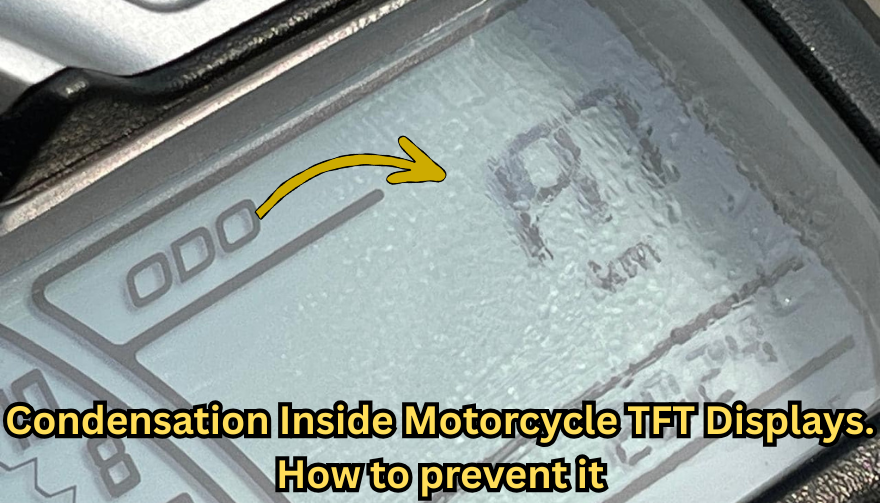
Every modern motorcycle rider has seen it. You park your bike after a cold morning ride, glance at the dashboard, and notice a faint haze forming behind the TFT screen. Maybe small droplets gather along the edges. Maybe the whole display looks fogged from the inside.

That moisture is not cosmetic. It is water inside a sealed electronic unit — and it is the earliest visible warning of a problem that can destroy a component costing €700 to over €1,200 to replace.

This guide explains exactly why condensation forms inside motorcycle TFT displays, which bikes are most affected, what it really means for your instrument cluster, and the one affordable upgrade that prevents the damage cycle before it starts.

Why Motorcycle TFT Displays Get Condensation Inside

A motorcycle TFT display is a sealed electronic module exposed to some of the harshest conditions any screen will ever face. Unlike your phone in a pocket, a motorcycle dashboard sits directly in the path of rain, road spray, temperature swings, UV radiation, and constant vibration.

Condensation forms when warm, humid air trapped inside the display housing meets a cooler surface — the glass front panel. The moisture in that air turns to liquid droplets on the coldest point, which is almost always the inside face of the screen.

Here is how moisture gets trapped in the first place.

Thermal breathing. Every ride creates a heat cycle. The engine, direct sunlight, and the display's own backlight warm the air inside the housing. When the bike stops and cools, that air contracts and draws in fresh, humid outside air through micro-gaps in the seals. Over weeks and months, humidity accumulates inside the unit.

Seal degradation. The rubber gaskets and adhesive bonds that seal a TFT housing are not permanent. UV exposure breaks down rubber. Vibration loosens adhesive joints. Temperature cycling causes materials to expand and contract at different rates, gradually opening pathways for water ingress.

Micro-damage to the front surface. Stone chips, cleaning scratches, and pressure marks on the display face can create hairline cracks invisible to the naked eye. These become moisture entry points — especially in rain or when using a pressure washer.

High-humidity environments. Riders in coastal areas, tropical climates, or northern European countries with persistent dampness face accelerated moisture ingress. A bike garaged in a humid environment without ventilation is particularly vulnerable.

The result is always the same: water inside the display that the sealed housing cannot easily release.

Which Motorcycles Are Most Affected

Condensation inside TFT displays is not limited to one manufacturer. It has been documented across virtually every major brand using TFT instrument clusters.

BMW — The R 1250 GS, R 1300 GS, S 1000 RR, F 850 GS, and F 900 R all use 6.5-inch or 10.25-inch TFT displays. These are high-quality units, but they sit in exposed positions — particularly on adventure models ridden in all weather conditions. OEM replacement for the 6.5-inch TFT runs around £1,200, and if the wiring loom is damaged during theft or failure, that figure can reach £3,000+.

Yamaha — Models like the MT-09, MT-07, Tracer 9, and Ténéré 700 use TFT dashboards. Yamaha's displays are generally well-sealed, but the same thermal breathing cycle applies. Adventure and touring riders who cover high mileage in variable conditions report condensation after 2–3 seasons.

Honda — The Africa Twin, CB650R, and CBR1000RR-R all run TFT clusters. The Africa Twin's display sits in a highly exposed cockpit position. Forum reports from owners confirm moisture ingress, especially after extended wet-weather riding.

Triumph — The Tiger 900, Street Triple, and Speed Triple RS use TFT displays. Triumph's units are compact, but the same vulnerability to vibration-induced seal failure applies across the range.

Kawasaki — The Z900, Ninja 1000SX, Versys 1000, and newer Z650 models all feature TFT dashboards. Like all manufacturers, Kawasaki's sealed units face the same environmental pressures.

The pattern is clear: this is not a brand-specific defect. It is an inherent vulnerability of mounting sensitive display technology in one of the most hostile environments imaginable.

The Warning Signs You Should Never Ignore

Condensation inside a motorcycle TFT display is progressive. It starts small and escalates. Here is what each stage looks like — and what it means.

Light fogging after a cold start. A thin mist on the inside of the screen that clears within 10–15 minutes of riding. This is the earliest sign. Moisture is present inside the housing but has not yet caused damage. At this stage, the problem is still manageable.

Persistent edge condensation. Droplets that form along the bottom or side edges of the display and do not fully evaporate during a ride. This means moisture is accumulating faster than it can escape. The seals are compromised.

Internal staining or water marks. Visible trails, spots, or discolouration behind the glass that remain even when the display is dry. This is mineral residue from evaporated water. It means moisture has been cycling inside the display repeatedly. The internal coatings and bonding layers are being attacked.

Intermittent display issues. Flickering backlight, sections of the screen dimming unevenly, or the display briefly shutting off during a ride. These are early signs of electrical damage from moisture reaching the circuit board or flex connectors behind the panel.

Dead pixels appearing alongside condensation. If you see pixel failure combined with any visible moisture, the display is in active degradation. The liquid crystal layer or its driver circuits are being damaged. This combination almost always leads to full failure.

Complete display blackout. The screen powers on but shows nothing, or fails to power on at all. At this point, the TFT module is usually beyond repair and must be replaced entirely.

The critical takeaway: condensation that clears quickly is a warning. Condensation that stays, stains, or coincides with display glitches means damage is already underway.

What Condensation Actually Does to a TFT Display

The fog itself is not the problem. The damage happens behind it.

A motorcycle TFT display is a laminated stack of layers: a front glass or polycarbonate cover, a polarising film, the liquid crystal panel itself, LED backlighting, and a circuit board with drivers and connectors. All bonded together with adhesive and housed in a sealed plastic or metal frame.

When moisture sits inside this assembly, several destructive processes begin simultaneously.

Corrosion of electrical contacts. The flex cables and solder joints connecting the LCD panel to the main circuit board are extremely sensitive to moisture. Even trace amounts of water can cause oxidation, increasing resistance and eventually breaking the connection. This is how entire rows or columns of pixels fail at once.

Delamination of optical layers. The adhesive bonds between the polariser, LCD panel, and backlight diffuser swell and weaken when exposed to moisture. This causes visible clouding, uneven brightness, and eventually permanent optical distortion.

Mineral deposits on internal surfaces. Water that evaporates inside the display leaves behind dissolved minerals and contaminants. These deposits scatter light, reduce contrast, and cannot be cleaned without disassembling the unit — which is rarely possible without destroying it.

Short circuits on the PCB. If enough moisture reaches the main circuit board, it can bridge traces and create short circuits. This can cause complete display failure, error codes, or even damage to the motorcycle's CAN bus communication system.

A motorcycle TFT display is not designed to be serviced. It is a sealed, disposable module. Once moisture damage reaches the internal electronics, the only option is full replacement.

How to Prevent Water Ingress in Motorcycle TFT Displays Before Damage Starts

Prevention is not complicated. But it requires acting before symptoms appear — not after.

Never use a pressure washer on the dashboard. High-pressure water jets force moisture past seals that can handle rain but not direct, concentrated spray. Wash the display area gently with a damp microfibre cloth and motorcycle-safe LCD cleaner.

Avoid parking in direct sunlight for extended periods. Prolonged heat accelerates UV degradation of seals and adhesives. It also increases the temperature differential that drives the thermal breathing cycle. Use a cover or park in shade when possible.

Store the bike in a ventilated, dry environment. A damp, unventilated garage is one of the worst places for a motorcycle with a TFT display. If humidity control is not possible, a small dehumidifier or silica gel packs placed near the bike can help.

Inspect the display edges regularly. Look for any visible gap between the display housing and its frame, or any separation of the front glass from the body. Catching a seal failure early — before moisture accumulates — gives you the chance to act.

Protect the display surface from physical damage. The front face of the TFT is the largest and most vulnerable entry point for moisture. A single stone chip or a scratch from an abrasive cloth can breach the surface coating and create a pathway for water. Preventing that surface damage is the single most effective thing you can do.

r/Harley - Got some moisture into the digital speedometer of my streetbob. Any ideas how to get it out?

The One Upgrade That Prevents Condensation Damage in Motorcycle TFT Displays

A quality screen protector designed specifically for your motorcycle's TFT display is the most cost-effective protection available — by a wide margin.

Here is what a properly fitted screen protector actually does.

It creates a physical barrier against impact. Stone chips, gravel flicks, and minor impacts hit the protector instead of the display surface. This eliminates the micro-cracks that become moisture entry points.

It shields the surface from UV radiation. UV is the primary cause of seal and adhesive degradation. A screen protector absorbs UV energy before it reaches the display housing, slowing the ageing process of the seals beneath.

It prevents cleaning damage. Without a protector, wiping the TFT with a dirty cloth, gloves, or the wrong cleaning product can create fine scratches that compromise the surface. With a protector fitted, you can clean aggressively without risking the display itself. After a few years, replace the protector — the screen underneath stays pristine.

It reduces direct water contact with the display edges. A well-fitted protector overlaps the display bezels slightly, redirecting water away from the most vulnerable seal points around the screen perimeter.

The cost comparison makes the decision obvious. A screen protector costs between €10 and €25. A TFT display replacement costs €700 to €1,500 or more, depending on the motorcycle. That is a return on investment measured in thousands of percent.

Riders who fit a screen protector on day one of ownership — before the first ride, before the first stone chip, before the first rain — give their TFT display the best possible chance of lasting the life of the motorcycle.

What to Do If You Already Have Condensation

If moisture is already visible inside your display, the situation is not necessarily hopeless — but your options depend on how far it has progressed.

If you see light fogging only. Park the bike in a warm, dry, ventilated space. Run the engine and let the display heat up for 20–30 minutes to encourage evaporation. Some riders have had success placing a small silica gel packet near the display housing to draw out residual moisture. Fit a screen protector immediately to prevent further surface-level water entry.

If the bike is under warranty. Contact your dealer. Condensation inside a sealed TFT display is a manufacturing defect in the seal or housing. Many manufacturers — including BMW and KTM — have replaced displays under warranty for this exact issue. Document the condensation with clear photographs before your appointment.

If condensation has caused staining or pixel issues. At this stage, the damage is internal and typically irreversible without replacing the display module. Get a quote from your dealer, check whether aftermarket options exist for your model, and fit a screen protector to the new unit immediately to prevent the cycle repeating.

FAQ

Is condensation inside my motorcycle TFT display normal? A very light, temporary fog on a cold morning that clears within minutes can occur even in a properly sealed unit. However, persistent condensation, visible droplets, or any staining is not normal — it indicates a compromised seal and active moisture ingress.

Can I fix condensation inside a motorcycle display myself? If it is only light fogging, gentle heat and dry storage may resolve it temporarily. However, the seals are already compromised, so it will likely return. Full repair requires resealing or replacing the display unit, which is not a realistic DIY job for most riders.

Will condensation void my warranty? No. Condensation inside a sealed factory unit is a seal failure, not user damage. Most manufacturers honour warranty claims for moisture ingress, provided there is no evidence of physical impact or tampering. Always document the issue with photos.

How much does it cost to replace a motorcycle TFT display? OEM replacement costs vary significantly. BMW TFT units typically cost £700–£1,200 for the part alone, plus fitting. Honda, Yamaha, Triumph, and Kawasaki displays range from €400–€900 depending on the model. Labour adds €100–€300.

Does a screen protector actually prevent condensation? A screen protector does not fix existing condensation. What it does is prevent the surface damage — stone chips, scratches, UV degradation — that causes seals to fail and moisture to enter in the first place. It is the most effective preventive measure available.

Should I fit a screen protector to a brand-new bike? Yes. Day one. Before the first ride. The TFT display is at its most vulnerable when new because the seals have not yet been tested, and any early surface damage will accelerate their failure. Protecting the screen from the start is the best insurance against a four-figure repair bill down the line.

Does riding in rain damage a motorcycle TFT display? Rain alone should not damage a properly sealed TFT display. The issue is cumulative: repeated exposure to rain, spray, temperature cycling, and UV gradually degrades seals over time. A screen protector significantly slows this process by shielding the most exposed surface.

Protect Your Display Before It Costs You Hundreds

A motorcycle TFT display is one of the most expensive single components on a modern bike — and one of the most exposed. The damage from water ingress is progressive, often invisible until it is too late, and almost always irreversible.

A screen protector fitted from day one is the simplest, cheapest, and most effective way to protect that investment.

Browse precision-fit motorcycle TFT screen protectors for BMW, Yamaha, Honda, Triumph, Kawasaki, and more at mr-key.com.

Related Posts

Comprehensive Guide: Common Car Key Problems and How to Solve Them

Comprehensive Guide: Common Car Key Problems and How to Solve Them

Your car key is a small but essential part of your daily life. When it stops working properly—whether due to a dead battery, water exposure, signal interference, or ignition issues—it can quickly disrupt your plans. Fortunately, many common car key problems can be identified early and resolved effectively with the right approach. In this comprehensive guide, we explore four of the most frequent car key issues and provide detailed solutions to help you stay on the road with confidence. Recognizing a Failing Car Key Battery The battery inside your car key fob is designed to last, but not indefinitely. On average, a CR2032 battery will power a key fob effectively for one to three years, depending on usage patterns and environmental conditions. A weakening battery usually does not fail suddenly; it provides warning signs that many drivers overlook. One of the earliest indications is a noticeable decrease in the remote’s operating range. You may find yourself needing to stand closer to the vehicle for the key fob to work. As the battery continues to lose power, the fob may start working inconsistently, responding only after multiple button presses or with a delay. Some vehicles will display a low battery warning on the dashboard, providing a clear signal that replacement is necessary. Allowing the battery to fully deplete can leave you unable to unlock or start your car at a critical moment. By promptly replacing the battery with a reliable product, such as the Panasonic CR2032, you can restore full functionality and prevent future inconvenience. Addressing Water Damage in Car Keys Water damage is a common cause of key fob failure. Whether it’s from rain exposure, dropping the key in water, or accidental washing, moisture can cause both immediate and long-term damage to the key's internal components. When water enters the fob, it can short-circuit the delicate electronics, rendering the key inoperative. In other cases, corrosion may develop slowly, causing the key to malfunction days or weeks after the exposure. If your car key gets wet, the first step is to remove the battery immediately to minimize damage. Dry the key as thoroughly as possible using a soft cloth and allow it to air dry in a warm, ventilated space for at least 24 hours. It is crucial to avoid using heat sources like hair dryers, which can damage sensitive components. After drying, install a fresh battery and test the key. If the key still does not function, the internal circuits may have been irreparably damaged, and a professional evaluation or shell replacement may be necessary. Understanding Weak Signal Issues in Car Keys A weak key fob signal can lead to frustration and can often be mistakenly attributed to a battery issue alone. While a low battery is a common cause, signal strength can also be affected by other factors. Physical impacts, such as dropping the key, can disrupt the internal connections or damage the antenna, reducing the fob's ability to communicate effectively with the car. Environmental factors can also interfere with the signal. Parking near large metal structures, power lines, or areas with strong electronic interference can block or weaken the signal temporarily. Additionally, worn buttons that no longer make proper contact with the internal circuit board can result in poor signal transmission, even if the battery is new. When experiencing signal issues, it is important to inspect the key carefully. Replacing the battery, ensuring all components are securely seated, and considering the replacement of worn key shells can often restore proper function. Persistent problems, however, may require professional assessment to ensure the key and vehicle are correctly paired. Dealing with Ignition Problems When the Car Key Won’t Turn One of the most alarming car key issues is inserting the key into the ignition only to find it won’t turn. This problem can stem from several sources, and identifying the correct cause is essential for a safe and effective fix. A worn key blade is a common culprit, especially in vehicles with many years of use. Over time, the precision cuts on the key blade can wear down, making it difficult for the key to properly engage the pins within the ignition cylinder. Another frequent cause is the steering wheel lock mechanism. If the steering wheel locks in place, it can prevent the key from turning until the wheel is gently moved to relieve the pressure. In some cases, the ignition cylinder itself may become dirty, misaligned, or mechanically worn. If you have a spare key, testing it can help determine whether the issue lies with the key or the ignition. Cleaning the ignition slot with compressed air can sometimes resolve minor blockages. If the problem persists, professional servicing of the ignition system may be necessary to avoid more serious mechanical failures. Car Key Maintenance and Problem Solving Car key problems are a common inconvenience that most drivers will face at some point. However, understanding the signs and causes of these issues can empower you to act quickly and avoid more significant disruptions. Whether dealing with a failing battery, water exposure, weak signal, or ignition lockout, timely intervention and proper maintenance can prevent escalation. Regularly checking your key's condition, replacing batteries with trusted products, and ensuring your key shell remains intact are simple yet effective practices that can extend the life of your car key. By addressing small issues early, you can maintain reliable access to your vehicle and reduce the risk of unexpected problems. For high-quality replacement shells, batteries, and accessories, visit mr-key.com and explore solutions designed to keep your car key functioning like new.

What to Do If You Lose Your Car Keys While Travelling?

What to Do If You Lose Your Car Keys While Travelling?

1. Why this happens and why you must act fast Losing car keys while travelling is more common than you might assume. Whether it’s slipping out of a beach bag, leaving them at a café or dropping in transit, your vehicle becomes vulnerable. In addition, modern keys increasingly contain electronic transponders , chips or fobs—meaning replacement cost and complexity shoot up. When you’re away from home, both the stress and the stakes increase: you may face towing, expensive replacements or worse — being stranded. The sooner you act the less time you give for theft, theft-of-opportunity or further cost escalation. 2. Immediate steps when you realise your keys are missing a) Stay calm and retrace your steps Start by pausing. Panic hampers clear thinking. Consider the last time you remember using your keys: in the car, on unloading luggage, at hotel reception. Retrace your route slowly. As RAC advise, this step often resolves the problem without cost. b) Search systematically Check all pockets, bags, seats, coat hangers, beach bags, under cushions, in and around your car. If you’re staying somewhere temporarily, check hotel rooms, fuelling stations, parking lots. As one travel-site suggests: “Go through all your pockets… look around all surfaces in your hotel room”. c) Contact places you visited Call restaurants, cafés, shops, airport parking or hotels where you parked the vehicle. Key finders are often handed in. d) Assess risk of theft If you suspect the keys were stolen (pick-pocket, hotel burglary or unattended vehicle) you should alert local police and your insurance provider—once a key is missing, your vehicle security is compromised. e) Secure the vehicle If the vehicle is parked in an insecure location, consider moving it (if possible) or arranging towing. Leaving it locked but unattended increases theft risk. 3. How to use replacement key delivery services Replacement key delivery refers to services that cut and program a new car key and deliver it (or have it fitted) to your location—whether your holiday base, airport car park or home driveway. Steps to follow: Have vehicle details ready: make, model, year, registration number, VIN if available. Choose service: For UK and travel users, many auto-locksmiths offer mobile services that come to you. Confirm delivery logistics: Where is the vehicle parked? Will you be present when the key is delivered or fitted? If abroad, is the company able to support your location? Understand key type: Basic mechanical, transponder chip key, keyless fob—all vary in price and logistics. Check old key de-activation: A top provider will delete the lost key’s code so it cannot be used in future—critical for security. Why this is often your best path while travelling Going via your vehicle manufacturer dealer is often slower and pricier — as UK guide notes: “The quickest and least expensive way … is via an auto locksmith.” In a foreign locale, a mobile specialist or key-delivery service saves towing the vehicle and waiting for factory part shipment. 4. Hiring an emergency locksmith: what to look for When you’re locked out or stranded, an emergency locksmith (24-hour) can be your lifeline. But not all are equal. Checklist: Confirm they specialise in auto locksmith / car key replacement , not just domestic locks. Ask for credentials (affiliation with industry body). Insist on proof they will delete/pair the key to your vehicle (so lost key becomes useless). Understand travel/overseas call-out charges. Before arrival, ask for an estimate and payment process (card, cash etc.). Some holiday locales only accept cash. Stay with your vehicle in a safe public place. If you are on a remote vacation site, move to well-lit area before the locksmith arrives. Typical process: The locksmith arrives, verifies ownership (ID + logbook/V5C). They cut and/or program a key, or fix the lock/immobiliser if required. You pay for service and receive the new key — vehicle is back on the road. 5. Insurance, roadside cover and overseas travel issues Insurance/key cover Do you have lost key cover? Most UK car insurance policies don’t include lost keys as standard. You might need a premium add-on. If you claim, your no-claims bonus may be affected. Breakdown/roadside assistance Your breakdown provider (e.g., Motorway or RAC ) may offer key services, but often their vans don’t carry full key-programming equipment. So an auto locksmith still may be needed. Travelling abroad Check if your insurance/cover extends to the country you’re in. Confirm language support and local currency charges with any service you call. If you rented the car: contact the rental company immediately — they may have specific protocols for lost keys (often expensive). 6. Special cases: rental vehicles, keyless entry & fobs Rental vehicles When you lose the keys to a hire car abroad, you are likely to be liable for high fees. Rental companies will likely charge for towing and replacement, not just the locksmith. According to travel forums: “We do not offer coverage for lost keys… The replacement fee of $125 for lost key.” Call the rental agency, follow their instructions, and keep all receipts. Keyless / smart keys & modern cars Most vehicles since 2000 use transponder chips or keyless systems. Replacement these can cost several hundred pounds—UK guides show typical range from £100–£300 or more depending on brand. When you lose a keyless fob, you may need the original still in possession or need the vehicle brought to the dealer. Factor this potential delay into your travel plans. Single key left If you only have one remaining key, treat it as your last key. Get a spare made ASAP once you’re home so you’re not in the same situation again. 7. Preventative measures for your next trip Always carry a spare key at home or with a trusted person. Use a tracker (such as an AirTag or Bluetooth key-tracker) on your keyring. UK blogs suggest this simple tech helps locate lost keys. Establish a routine spot where you place your keys at the start of every journey. If you have old keys (house + car), don’t mix them during travel. Note down your vehicle details (make, model, registration, VIN) in your phone before travelling—so you’re ready if you need a replacement. For holiday car hire, take a photo of the key and keep the rental company’s emergency phone number saved. FAQ Q: What happens if I lose my only car key and I’m abroad? A: You’ll need to contact an auto locksmith or dealer who can cut and program a new key. Have vehicle details ready. Expect cost and waiting time to increase since you have no spare. Q: Can I just use a dealer to replace the key? A: Yes, but often it’s slower and more expensive . UK guides claim mobile auto locksmiths are typically faster and cheaper. Q: How long does replacement take? A: For many modern cars, the physical key can be cut quickly, but programming and blank arrival may take days. Dealers might take up to weeks. Q: Will my car insurance cover a lost key? A: Only if you have key-cover added or your insurance includes it—not standard. Check your policy. Claiming may affect your no-claims status. Q: What should I do if I lose the key and my car is locked in a remote place? A: First make sure you are safe. Then use your breakdown/roadside cover to move the vehicle to a safe area if needed. Then call an emergency auto locksmith to attend and provide a replacement. Need a reliable solution now? Visit our shop at mr-key.com to discover how we can cut and deliver replacement car keys swiftly—even when you’re travelling.

Top 5 Interesting Facts About Audi: The Legacy Behind the Four Rings

Top 5 Interesting Facts About Audi: The Legacy Behind the Four Rings

When you think of Audi , luxury, innovation, and performance probably come to mind. But behind the sleek design and advanced technology, Audi’s story is filled with fascinating history and achievements. Whether you’re a long-time fan or new to the brand, there’s a lot to discover. In this article, we’ll uncover five of the most interesting facts about Audi that every car enthusiast should know. 1. The Meaning Behind Audi’s Four Rings At first glance, Audi’s logo—four interlocking rings—seems like a simple yet stylish design. However, these rings have deep significance. Each ring represents one of the four founding companies that came together in 1932 to form Auto Union: Audi , DKW, Horch, and Wanderer. A Rich History : This merger marked the beginning of what would eventually evolve into Audi, and the four rings symbolize the unity of these brands. It’s more than just a logo; it’s a reminder of Audi’s prestigious heritage and long-standing dedication to automotive innovation. Survival Through the Ages : Despite wars, economic downturns, and changes in the automotive landscape, the legacy of these four companies continues to live on in Audi’s cutting-edge vehicles. 2. Audi Was the First to Introduce Quattro All-Wheel Drive In 1980, Audi made waves in the automotive world by introducing the Quattro all-wheel-drive system. Originally developed for rally racing, the Quattro system was revolutionary, giving drivers improved traction, handling, and stability in all types of weather conditions. A Game-Changer for Drivers : This innovative system quickly became a staple for Audi vehicles, giving them superior control and stability. Today, the Quattro system is still a key feature, especially in models designed for performance and sport. Setting the Standard : Audi’s Quattro system not only changed the way we think about driving in tough conditions but also set the benchmark for all-wheel-drive technology, making it one of the most trusted names in the industry. 3. The Name "Audi" Has Latin Origins Did you know that the name "Audi" has an interesting linguistic history? The name comes from the Latin translation of the German word “Horch,” which means “listen.” August Horch, the founder of Audi, had to change the name of his company due to legal reasons after he left the Horch company. Rather than giving up his name completely, he chose to translate it into Latin, giving birth to the name “Audi.” An International Touch : This name change added an international flair to the brand and has since become synonymous with high performance and luxury. A Tribute to the Founder : Audi’s name serves as a lasting tribute to August Horch’s vision and his pioneering spirit in the world of automobiles. 4. Audi’s Revolutionary Win at Le Mans In 2006, Audi made history by becoming the first car manufacturer to win the prestigious 24 Hours of Le Mans race using a diesel engine. Audi’s R10 TDI was not only fast but also fuel-efficient, demonstrating the potential of diesel technology in endurance racing. Fuel Efficiency Meets Performance : The victory wasn’t just about speed; it was about showcasing how efficiency and performance could work hand in hand. This win cemented Audi’s reputation for innovation and opened the door for more advanced technologies in racing. Multiple Wins : Audi’s dominance at Le Mans didn’t stop there. Over the years, the brand has secured numerous wins at the event, further proving that Audi’s commitment to excellence extends to the world of motorsports. 5. Audi’s Focus on Lightweight Design: The Audi A8 Audi has always been at the forefront of automotive design, and the Audi A8 is a testament to that. Introduced in the 1990s, the A8 was one of the first vehicles to feature an all-aluminum body, significantly reducing its weight while enhancing performance and fuel efficiency. Aluminum Innovation : By using lightweight aluminum in place of traditional steel, Audi was able to create a vehicle that not only performed better but was also more fuel-efficient and environmentally friendly. An Industry Leader : This innovative approach to vehicle design has influenced the automotive industry as a whole, and the Audi A8 remains a leader in the luxury sedan market. Audi’s Legacy of Innovation Audi is more than just a luxury car brand—it’s a company that consistently pushes the boundaries of what’s possible in automotive technology. From pioneering all-wheel-drive systems to revolutionizing motorsports, Audi has proven time and time again that it’s a brand dedicated to innovation, performance, and quality. As a car owner, whether you’re drawn to Audi for its history or its cutting-edge technology, it’s important to ensure you have reliable and convenient solutions for every aspect of car ownership, including your car keys. Audi’s legacy of innovation can serve as a reminder that planning ahead—whether in technology or practical matters like having a spare key—can save you from unexpected hassles down the road.

How to Know If Your Car Key Has a Hidden Transponder Chip

How to Know If Your Car Key Has a Hidden Transponder Chip

Modern car keys are more than just simple tools to unlock doors—they're powerful components of your vehicle’s security system. Hidden inside many keys is a small yet crucial piece of technology known as a transponder chip . But how can you tell if your car key has one? Whether you’ve lost your key, are looking to replace it, or simply want to understand your vehicle better, knowing if your key contains a transponder chip is essential. This guide will explain what a transponder is, why it matters, and how you can easily check if your key is equipped with one. What Is a Transponder Chip? A transponder chip, short for "transmitter + responder," is a small electronic microchip embedded inside the plastic head of the car key or within a smart key fob. When you insert the key into the ignition—or have it nearby in a push-button start system—the chip emits a unique signal. The vehicle’s onboard computer must recognize this signal before it will allow the engine to start. Without the correct signal, even if the key physically fits into the ignition, the car won’t move. Transponders have been a game-changer in reducing car theft, and today, nearly all vehicles produced after the late 1990s are equipped with them. Learn more about how modern keys work and find replacement options in our car keys collection. Why It’s Critical to Know If Your Key Has a Chip If your key has a hidden transponder chip, replacing it is more complicated than simply cutting a new metal key. You will need a key that not only matches the cut but also includes the correct programming to communicate with your car’s immobilizer system. Failing to recognize this can lead to frustration, extra dealership fees, or even being stranded. Moreover, understanding your key's technology helps you make smarter choices when buying a spare, upgrading your security setup, or troubleshooting ignition issues. How to Check If Your Car Key Has a Transponder Chip Fortunately, you don’t need expensive equipment to find out. Start by considering the age of your vehicle: if your car was manufactured after 1995 (in Europe) or 1998 (in the USA), chances are very high it uses a transponder system. Next, examine the physical key. Keys with large, bulky plastic heads usually house a chip inside. In contrast, purely metallic keys without plastic parts tend to belong to older, non-transponder vehicles. You can also perform a simple foil test. Wrap the head of your key in aluminum foil and try to start the car. Since foil blocks radio frequencies, if the car refuses to start, it’s likely that a transponder chip is present. If you want absolute certainty, consult your vehicle’s manual or speak with a professional locksmith. Many locksmiths use specialized tools to detect whether a chip exists. For additional technical explanation, you can refer to this guide on how immobilizer systems work. What Happens If the Transponder Signal Is Missing? If you try to start your car without the proper transponder signal, the immobilizer system kicks in. Most vehicles will either not crank at all or crank without allowing the engine to fire. Some models will display a warning light on the dashboard, often shaped like a padlock or a car with a key icon. Without a valid transponder signal, you won't be going anywhere—no matter how new or well-cut the key is. Can You Program a Transponder Key Yourself? Depending on the make and model of your car, some basic keys can be programmed at home—especially if you already have one working key available. However, many newer vehicles require professional diagnostic tools connected directly to the car’s computer to program keys securely. Attempting DIY programming on these systems without the right knowledge can lock your car’s immobilizer and lead to expensive repairs. Always consult your car’s manual or seek professional help before attempting any programming yourself. Knowledge = Protection Understanding whether your car key contains a hidden transponder chip isn’t just a fun fact—it's essential for protecting your vehicle and saving yourself time, money, and hassle. Whether you're planning to replace a worn-out key, add a backup, or upgrade your security, knowing what’s inside your key helps you make better, safer decisions. If you ever need a spare key, a battery replacement, or advice on key maintenance, you can explore more in our online store at Mr Key . Remember: a smart driver is a secure driver. Stay informed, stay prepared, and you'll always stay one step ahead.

Chat with us