Post Name

Unlocking the World of Car Keys

Car keys have come a long way from simple metal tools to high-tech devices designed to enhance convenience and security. As vehicles evolve, so do the keys that unlock and operate them. Whether you’re a car enthusiast or a driver navigating modern technology, understanding the different types of car keys and their functions can help you appreciate their role in your vehicle’s performance and safety. This guide explores various car key types, their unique features, and the technologies behind them.

Traditional Car Keys: The Classics

Traditional car keys, often referred to as mechanical keys, are the simplest type of car keys. These are commonly found in older vehicles and rely on a basic metal blade that fits into the car’s ignition and door locks.

Key Features of Traditional Keys:

  • Require no electronic components.
  • Depend on physical alignment to operate the lock or ignition.
  • Can be duplicated easily using a standard key-cutting machine.

While these keys are straightforward to use and replace, they lack the advanced security features of modern alternatives, making them more vulnerable to theft.

Transponder Keys: Enhanced Security

Transponder keys are a significant upgrade from traditional keys, incorporating a small electronic chip inside the plastic head of the key. This chip communicates with the vehicle's computer system to authenticate the key before the car starts.

How Transponder Keys Work:

  • The chip transmits a unique signal to the car’s receiver when the key is turned in the ignition.
  • If the signal matches, the car starts; if not, the engine remains immobilized.

Benefits of Transponder Keys:

  • Reduced risk of car theft due to their encryption technology.
  • Widely used in most vehicles manufactured after the mid-1990s.

However, duplicating or replacing a transponder key requires specialized equipment, making it more expensive than traditional keys.

Smart Keys: The Modern Marvels

Smart keys represent a leap into advanced automotive technology. These keys are typically used in vehicles with keyless entry and push-button start systems. Instead of inserting a key into the ignition, drivers simply need to have the smart key inside the vehicle.

Key Features of Smart Keys:

  • Allow for keyless entry and ignition.
  • Use radio frequency identification (RFID) or Bluetooth technology to communicate with the car.
  • Often come with additional functions, such as opening the trunk or remotely starting the vehicle.

Advantages of Smart Keys:

  • Enhanced convenience and ease of use.
  • Advanced security features to deter theft.

Despite their benefits, smart keys are expensive to replace and rely heavily on battery power.

Remote Keys: A Blend of Mechanical and Digital

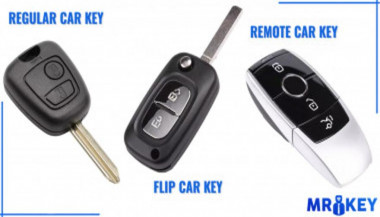
Remote keys, often combined with transponder technology, offer the ability to lock and unlock car doors at the push of a button. They are commonly included in modern car key fobs and sometimes have a physical blade as a backup.

Features of Remote Keys:

  • Control doors, windows, and sometimes the trunk remotely.
  • Combine traditional key functions with modern convenience.

These keys are versatile and user-friendly but may require reprogramming if the battery is replaced or the signal becomes disrupted.

Key Cards: Compact and Stylish

Key cards are a relatively new addition to the world of car keys, commonly used in high-end and electric vehicles. These slim, credit card-sized devices function like smart keys and communicate wirelessly with the vehicle.

Advantages of Key Cards:

  • Compact and easy to carry.
  • Offer the same functionality as smart keys, including keyless entry and ignition.

While key cards are sleek and innovative, they are prone to damage due to their thin design and may not be as durable as traditional keys.

Valet Keys: Limited Access

Valet keys are designed to offer restricted functionality, allowing a valet or another driver to operate the car without accessing certain areas, such as the glove compartment or trunk.

Purpose of Valet Keys:

  • Provide limited access to the vehicle for security purposes.
  • Prevent unauthorized access to personal belongings.

Valet keys are a practical solution for safeguarding your possessions while still enabling temporary access to your car.

Digital Keys: The Future of Key Technology

Digital keys are the latest innovation in car key technology, allowing drivers to use their smartphones or smartwatches to unlock and start their vehicles.

How Digital Keys Work:

  • Use NFC (Near Field Communication) or Bluetooth to interact with the vehicle.
  • Allow for remote access, such as locking or unlocking the car from a distance.

Benefits of Digital Keys:

  • Eliminate the need for a physical key.
  • Offer enhanced customization, such as granting temporary access to other users.

As convenient as they are, digital keys rely on smartphone technology and can be vulnerable to hacking if not properly secured.

Choosing the Right Key for Your Needs

Car keys have evolved into sophisticated devices that combine functionality, convenience, and security. Whether you’re using a traditional key or embracing the future with a digital key, understanding the type of key your vehicle uses can help you maintain it properly and replace it if necessary.

By staying informed about the different types of car keys and their unique functions, you can make smarter choices when it comes to safeguarding your vehicle and enjoying the driving experience to the fullest.

Related Posts

What’s the Difference Between Immobilizer, Transponder Chip, and Key Fob?

What’s the Difference Between Immobilizer, Transponder Chip, and Key Fob?

In modern vehicles, the once simple car key has evolved into a sophisticated piece of technology. With built-in electronics, anti-theft features, and remote functions, today’s car key is part of a broader ecosystem designed for both convenience and security. Yet with all this advancement comes confusion. Many drivers aren’t sure what terms like immobilizer , transponder chip , and key fob actually mean—or how they relate to one another. This guide breaks down these components in detail, explains how they work together, and clarifies why it matters when you’re replacing, reprogramming, or troubleshooting your car key. What Is an Immobilizer? An immobilizer is an electronic security device installed in most modern cars. Its purpose is to prevent the engine from starting unless the correct key—specifically, the correct coded signal—is detected. When you attempt to start your vehicle, the system searches for a signal from a registered transponder chip. If that signal is missing or incorrect, the immobilizer blocks the ignition system. This means the engine won’t crank or turn over, even if the physical key fits. Immobilizers are embedded in the car’s engine control unit (ECU) and became standard in vehicles after the late 1990s in many countries, in response to rising car theft. They offer a silent, invisible layer of protection against common theft techniques like hotwiring. Without the correct digital authentication, the car simply will not start. What Is a Transponder Chip? The transponder chip is a small electronic microchip located inside the car key or key fob. The word “transponder” is a combination of “transmitter” and “responder.” It is designed to emit a unique code that the car's immobilizer can recognize. When you insert the key into the ignition or bring a key fob close to a push-start system, the chip sends a signal to the car’s ECU. If the code matches the one stored in the car’s database, the immobilizer disables itself and allows the engine to start. Transponder chips are passive. They do not require a battery and are activated by electromagnetic energy from the ignition coil or receiver unit inside the vehicle. Without a functioning or correctly programmed transponder chip, your car will not start—even if the metal key turns in the ignition. What Is a Key Fob? A key fob is the remote control device you carry that allows you to perform functions like locking or unlocking your car, opening the trunk, and activating panic alarms. In modern vehicles, key fobs may also control remote start or proximity-based unlocking features. While key fobs often include a transponder chip inside them, they serve a different function. The key fob operates remote commands via short-range radio signals. The transponder chip, on the other hand, is responsible for enabling or disabling the engine. Smart key fobs, found in many recent vehicles, don’t require insertion into the ignition. Instead, the car detects the fob nearby and permits the engine to start with a button press. If your key fob battery dies, you might still be able to start the car manually if the transponder chip is present and recognized. Most fobs also have a hidden mechanical key inside, which can be used to unlock the door if the electronics fail. How They Work Together Although they are distinct components, the immobilizer, transponder chip, and key fob all work in harmony to secure and operate your vehicle. The immobilizer controls whether the engine is allowed to start. The transponder chip provides the digital identity that must be verified by the immobilizer. The key fob provides wireless control of non-engine functions like locking, unlocking, and trunk access. In most modern cars: You approach the vehicle with the key fob. The fob unlocks the doors. When you start the vehicle, the transponder chip sends a signal to the immobilizer. If the code matches, the engine is authorized to start. If the code doesn’t match, or if the chip is missing or damaged, the engine remains disabled—even if the rest of the key’s functions work perfectly. Why This Knowledge Matters Understanding how your car key works is essential when: Replacing a lost or broken key Buying a spare or duplicate Diagnosing why your car won’t start Choosing between locksmith and dealership services For example, if your key fob unlocks your car but won’t start it, the issue may lie with the transponder chip, not the battery. Conversely, if your fob doesn’t lock or unlock the car remotely, the chip may still be functional, and the issue could simply be a dead battery. Replacing a key without properly programming the transponder chip will result in a non-starting vehicle, even if the key physically fits and the remote works. For reliable replacement keys, fobs, batteries, and accessories, visit our Car Key Collection. Car keys are no longer just mechanical tools. They’re complex, multi-function devices that combine security, convenience, and connectivity. By understanding the role of the immobilizer , transponder chip , and key fob , you’ll not only protect your vehicle better, but also avoid costly mistakes when dealing with repairs or replacements. Whether you’re troubleshooting a non-starting car or simply trying to replace a damaged key, knowing the difference between these three elements gives you the clarity and confidence to take the right action.

How to Protect Your Car’s Navigation Screen from Scratches, Glare & Fingerprints

How to Protect Your Car’s Navigation Screen from Scratches, Glare & Fingerprints

Modern cars often pack large touchscreens into the dash, and keeping these displays clear is key to enjoying every drive. A single scratch or dirty spot can make maps and menus hard to read. Car insurers warn that infotainment screens are surprisingly fragile – even a small dent or scratch can disable parts of the system . Worse, replacing a built-in navigation unit can cost thousands and take weeks . The good news? A little proactive care goes a long way. Interior dashboards are loaded with touchscreens that easily pick up scratches and smudges. For example, a high-quality navigation screen protector can shield your display from daily wear . These protectors are often made of tough 9H-tempered glass with an oleophobic coating (to repel fingerprints) and an anti-glare matte finish . A properly fitted protector keeps your screen looking brand-new and makes cleaning simpler. Invest in a Quality Screen Protector Choose the right fit Get a protector cut for your car’s make and model so it covers the entire display without blocking cameras or buttons. Hydrogel protector over tempered glass A hydrogel navigation screen protector is the best modern option for car screens. Unlike tempered glass, hydrogel film is flexible, ultra-thin, and self-healing — meaning small scratches disappear on their own over time. Hydrogel also fits curved or irregular screens better, doesn’t crack or chip like glass, and offers excellent clarity with strong anti-scratch and anti-glare properties. It maintains perfect touch sensitivity and blends seamlessly with the original display. To understand the real differences between hydrogel film and tempered glass — and which one offers the best long-term protection for your car — check out our detailed comparison guide: Hydrogel vs Tempered Glass Navigation Protectors Comparison . Anti-glare & oleophobic coatings Many navigation screen protectors include a matte, anti-glare surface. This scatters harsh sunlight and helps repel fingerprints and oil. (Some even advertise oleophobic layers that resist smudges.) Installation matters Follow the instructions carefully (clean the screen first, align the film, and smooth out bubbles). A misaligned or bubbled protector can itself cause visibility issues. Installing a car screen protector isn’t just about preventing scratches. It also helps maintain screen clarity over time. As one Tesla owner discovered, adding a new glass protector made even a worn, glare-prone screen “look almost new again” If you’ve already chosen a hydrogel protector and want to install it correctly, follow our step-by-step guide on how to install a hydrogel navigation screen protector . Clean Your Screen the Right Way Fingerprints, dust and grease are everyday enemies of visibility. But cleaning improperly can do more harm than good. Follow these expert tips: Use a microfiber cloth Wipe the screen with a soft, clean microfiber towel – even better if it’s dedicated just to your screen . This gentle fabric removes oils without scratching the glass. Spray cleaner on the cloth, not the screen If you need liquid cleaning, lightly mist it onto the cloth first. Never spray cleaners or water directly onto the touchscreen . Too much liquid or harsh chemicals can seep into seams or damage any oleophobic coatings. Avoid household glass cleaners Standard window cleaners (with ammonia or alcohol) can strip away protective coatings or damage the display . In fact, Car and Driver cautions that you should “avoid using household glass cleaner on your car’s touchscreen” unless you know it’s ammonia- and alcohol-free . Use fresh wipes Always use a clean side of your cloth or a new wipe on the screen. AGWS (an auto insurer) advises against using a cloth or wipe that’s already been on the dashboard or door panels – it can transfer grit and actually scratch the display Detail with precision If dirt or fingerprints linger, dampen the cloth with plain water or a gentle, screen-safe cleaner and buff in small circles. For stubborn spots, a second dry pass with the microfiber cloth will remove streaks. Wipe smudges away with a soft cloth – spraying cleaner on the cloth, not on the screen . Clean your screen each time you wash the car, or whenever you notice foggy patches. In fact, one test found that many “interior detailer” sprays (like Chemical Guys or Meguiar’s) can work just as well as specialized screen cleaners if they’re labeled safe for screens. Reduce Sunlight Glare Glare is one of the biggest complaints with modern car touchscreens. It makes maps hard to read, increases eye strain, and leads to drivers pressing harder on the display—over time, this causes wear and visible marks. To reduce glare: Install a matte hydrogel screen protector Adjust the display’s brightness and contrast Avoid cleaning with shiny or oily cloths Park with the dashboard away from intense sunlight when possible Hydrogel films help significantly because they diffuse harsh reflections without dulling the screen. Prevent Fingerprints and Smudges Touchscreens are fingerprint magnets. Oils from your hands quickly accumulate on the surface, especially on climate controls or zoom gestures. Solutions that actually work: Oleophobic coatings (built into many hydrogel protectors) Regular microfiber wipe-downs Avoid touching the screen with sunscreen or lotion on your hands Use voice commands for common actions when possible Drivers notice a big difference after installing a car navi screen protector—much fewer smudges and much easier cleaning. Protect the Screen During Everyday Use Small habits reduce long-term wear: Remove rings before using the touchscreen Don’t store hard objects (keys, coins) near the display Keep dust off the dashboard Avoid pressing with fingernails Use steering-wheel controls when possible Tiny scratches add up, especially on softer automotive materials. FAQ What is the best way to protect a car navigation screen? Installing a car-specific hydrogel screen protector provides the best protection against scratches, glare and fingerprints. Do hydrogel protectors really self-heal? Yes. The top layer softens slightly with heat and pressure, allowing micro-scratches to fade within minutes. Do these protectors affect touch sensitivity? No. Hydrogel films are extremely thin and designed to preserve the original touchscreen response. Can I install a screen protector myself? Hydrogel films are easy to install because they are flexible and bubble-resistant. Most people complete the installation in minutes. Will a protector reduce screen brightness? A high-quality hydrogel film maintains screen clarity while reducing harsh glare. Do car manufacturers recommend screen protectors? Many dealerships now advise using some form of screen protection due to rising replacement costs and increasing touchscreen sizes. Which Cars Benefit Most Some car brands benefit disproportionately from hydrogel screen protection — especially large-format touchscreens in premium models. If you want the full breakdown of the top models for 2025–2026, see our detailed guide on which cars benefit most from hydrogel navigation protection . To protect your own car’s screen from scratches, glare and fingerprints, visit our shop at mr-key.com . Related Guides How to Install a Hydrogel Navigation Screen Protector Which Cars Benefit Most From Hydrogel Navigation Protection? (2026 Overview) Hydrogel vs Tempered Glass Navigation Protectors Comparison

The Ultimate Guide to Car Key Replacement: What You Need to Know

The Ultimate Guide to Car Key Replacement: What You Need to Know

Locked Out? Here’s What to Do Next Imagine this: you’re rushing to an important meeting or trying to get your kids to school, only to discover you’ve lost your car keys or locked them inside your vehicle. Panic sets in, and the inconvenience seems insurmountable. Losing or damaging your car keys is a frustrating, but surprisingly common problem. Luckily, car key replacement services are more advanced and accessible than ever. But where do you start? From understanding key types to navigating costs and services, this guide breaks down everything you need to know about car key replacement. Understanding Car Key Types: The First Step to Replacement Before diving into the replacement process, it’s essential to identify the type of car key you have. The complexity of your key determines the cost and the effort required for replacement. Traditional Mechanical Keys The simplest and most common in older vehicles. Easily duplicated at hardware stores or locksmiths. Transponder Keys Equipped with a microchip that communicates with the car’s ignition system. Offers enhanced security, as the car won’t start without the correct chip signal. Remote Key Fobs Allows remote locking, unlocking, and other functions like opening the trunk. Replacing a lost or damaged fob can be more expensive due to programming needs. Smart Keys Found in modern luxury cars, these keys provide keyless entry and start. Operate via proximity sensors, making them highly convenient but costly to replace. Each key type requires a different replacement approach, so understanding your key’s functionality is crucial. The Replacement Process: What to Expect Replacing a car key can range from a quick, inexpensive fix to a more involved process requiring specialized tools and expertise. Here's a step-by-step overview of what to expect: Determine Your Replacement Options Authorized Dealership : Best for complex keys, but often the most expensive option. Local Locksmith : Typically faster and more affordable for mechanical keys and some transponders. Online Services : Websites offering key duplication or fob replacements can be convenient, though programming may still require a locksmith. Gather Essential Information Vehicle identification number (VIN) and proof of ownership. Details about the key type and car make and model. Programming and Testing Keys with transponders or fobs often require programming to match your car’s system. A professional locksmith or dealership will ensure the new key functions seamlessly. Costs: How Much Should You Expect to Pay? The cost of car key replacement varies significantly based on the key type, service provider, and your location. Here’s a general breakdown: Mechanical Keys : $10–$50 for duplication. Transponder Keys : $75–$200, including programming. Remote Key Fobs : $150–$400, depending on the car make and model. Smart Keys : $250–$600, with luxury models at the higher end. Factors affecting cost include the car's age, whether you need key programming, and the urgency of the service. Always compare prices across locksmiths, dealerships, and online providers for the best deal. A Global Perspective: Trends and Innovations in Car Key Replacement Car key replacement practices vary worldwide, influenced by technology, availability of services, and local regulations. United States and Europe : Locksmiths and dealerships dominate the market, with online platforms gaining traction for basic duplications. Asia : With the rise of smart keys in markets like Japan and South Korea, dealerships often handle replacements due to proprietary technology. Emerging Markets : Mechanical keys are still prevalent, and costs are generally lower, though advanced key systems are increasingly common. Global trends indicate a shift toward digital and biometric key systems, with smartphone-based replacements and app-controlled access gaining popularity. However, these advancements also raise concerns about cybersecurity and hacking. Tips to Avoid Future Key Emergencies While no one can predict when a key might be lost or damaged, a few preventative measures can save you from headaches down the road: Invest in a Spare Key : Having a duplicate ready can save time and money. Use a Key Finder Device : Attach a Bluetooth tracker to your keyring to locate lost keys easily. Protect Smart Keys : Store them in a signal-blocking pouch to prevent relay attacks. Plan Ahead and Stay Prepared Car key replacement might seem daunting, but with the right knowledge and preparation, it’s a manageable process. Understanding your key type, exploring your replacement options, and taking preventative steps can save you time and money. If you’re facing a key emergency, start by identifying your options and gathering the necessary information. And for the future, consider investing in a spare or upgrading to a more secure system. Losing your car keys may be inconvenient, but it doesn’t have to derail your plans. With modern solutions and a little foresight, you’ll be back on the road in no time.

How to Upgrade Your Car Key: A Step-by-Step Guide

How to Upgrade Your Car Key: A Step-by-Step Guide

Upgrading your car key can significantly improve your vehicle’s security and make your daily routine more convenient. Whether you’re upgrading from a basic key to a remote key or stepping up to a smart key, this guide will take you through the entire process, step by step, ensuring a smooth transition. Understanding Your Key Type Before you start the upgrade process, it’s important to know which type of key you currently have. Here are the most common key types: Traditional Metal Keys : These are basic, mechanical keys, common in older vehicles. They don’t have any electronic components. Transponder Keys : These have an electronic chip inside the key head that communicates with the vehicle’s computer system for added security. Remote Keys : These keys have buttons to lock/unlock the doors remotely and usually have a physical blade as a backup. Understanding your current key type will help guide your decision on the best upgrade path. Choosing the Right Upgrade Once you know what type of key you have, you need to decide what features you want in your upgraded key. Some options to consider are: Remote Locking : Allows you to lock/unlock the doors from a distance. Keyless Entry : Lets you unlock the car without taking the key out of your pocket. Smart Key : Offers advanced functions such as proximity unlocking, push-button start, and remote engine start. Take some time to research the options available for your specific car model. Many car manufacturers offer compatible upgrades for different key types, so it’s important to consult your dealership or a trusted locksmith for recommendations. Gathering What You’ll Need Before starting the upgrade process, make sure you have the following materials: The New Key : This could be a transponder key, remote key, or smart key. Your Original Key : You’ll need this as a reference throughout the process. Key Programming Device : Some keys require a special device to pair the key with your car. Car Manual or Programming Guide : It’s always a good idea to have your car’s manual handy for specific instructions. Having everything ready will make the process much smoother. Step-by-Step Upgrade Process Purchase the New Key Start by purchasing your new key. You can buy it from your car’s dealership, a certified locksmith, or a trusted online retailer. Make sure that the key is compatible with your vehicle’s make and model. Transfer Electronics (if necessary) If your new key is just a shell, you will need to transfer the internal components from your old key. This includes the transponder chip and, if applicable, the key blade. Be careful when transferring the electronics to avoid any damage. Program the Key Programming the new key is crucial for it to work with your vehicle. Here’s a general guide: Insert the original key into the ignition and turn it to the ON position. Quickly remove the original key and insert the new key. Turn the new key to the ON position and wait for the security light to turn off. This might take a few minutes. Test the New Key After programming, it’s important to test the new key to ensure everything works properly. Check the following functions: Locking and unlocking the doors Starting the engine Any additional functions like remote trunk opening or proximity unlocking Troubleshooting Common Issues If your new key isn’t working as expected, don’t worry! Here are some common problems and their solutions: Key Not Recognized : Check if the transponder chip is properly placed in the key. Key Doesn’t Start the Car : Double-check the programming steps to ensure everything was done correctly. Buttons Don’t Work : Verify that the battery in the new key is properly installed and functional. If the problem persists, it’s best to consult a professional locksmith or visit your dealership for further assistance. Upgrading your car key is an excellent way to improve both the security and convenience of your vehicle. By following these steps, you’ll be able to transition smoothly to your new key. If you run into any issues, don’t hesitate to reach out to a professional locksmith who can help you along the way. Enjoy the benefits of your new car key and the added peace of mind that comes with enhanced security.

Chat with us