Post Name

Nowadays car interiors rely heavily on touchscreens. Whether you drive a BMW 3 Series, VW Golf, Audi A4, Mercedes A-Class, Peugeot 3008, or Skoda Octavia, your infotainment display is the centre of navigation, settings, entertainment and safety features.

But these screens are also fragile—prone to scratches, fingerprints, micro-abrasions, and glare. A hydrogel navigation screen protector is one of the best ways to protect your car touchscreen without affecting clarity or touch sensitivity.

This guide shows you exactly how to install a hydrogel protector, step by step, with expert tips, mistakes to avoid, and a few insider tricks that most guides miss.

What Is a Hydrogel Screen Protector?


Hydrogel is a soft, self-healing, flexible material used widely in phone protection and now increasingly in automotive displays. Unlike tempered glass, it adapts to curved edges and eliminates small bubbles over time.

For more technical background, you can read the scientific definition on hydrogels

Hydrogel is ideal for infotainment screen protection because it:

Reduces glare

Absorbs micro-scratches

Maintains full touch sensitivity

Adapts to curved and angled car screens

Self-heals small marks over 24–48 hours

It’s especially useful for European cars where screens are large and glossy, such as:

Mercedes MBUX screens (A-Class, C-Class, GLC)

Volkswagen MIB systems (Golf, Passat, Tiguan)

BMW iDrive displays (3 Series, X1, X3)

Audi MMI touchscreens (A4, A3, Q5)

Peugeot i-Cockpit models

Renault Clio, Captur, Megane

Skoda Octavia, Superb, Scala


Curious which specific models benefit the most from hydrogel protection?

Check out our full guide on which cars benefit most from hydrogel navigation protection.

Before You Start: Essential Preparation


Installing a hydrogel protector takes only a few minutes, but the preparation stage determines whether the final result looks factory-perfect.

You Will Need


Hydrogel screen protector

Microfiber cloth

Screen-cleaning wipe (wet & dry)

Dust-removal sticker (optional but recommended)

Small squeegee / card 

Choose the Right Environment


Install the protector in:

A dust-free space (car parked indoors is ideal)

Soft lighting (so dust particles are visible)

A still environment (no wind, no blowing air)

Avoid doing it outside or while standing near open windows.
Step-by-Step: How to Install a Hydrogel Navigation Screen Protector


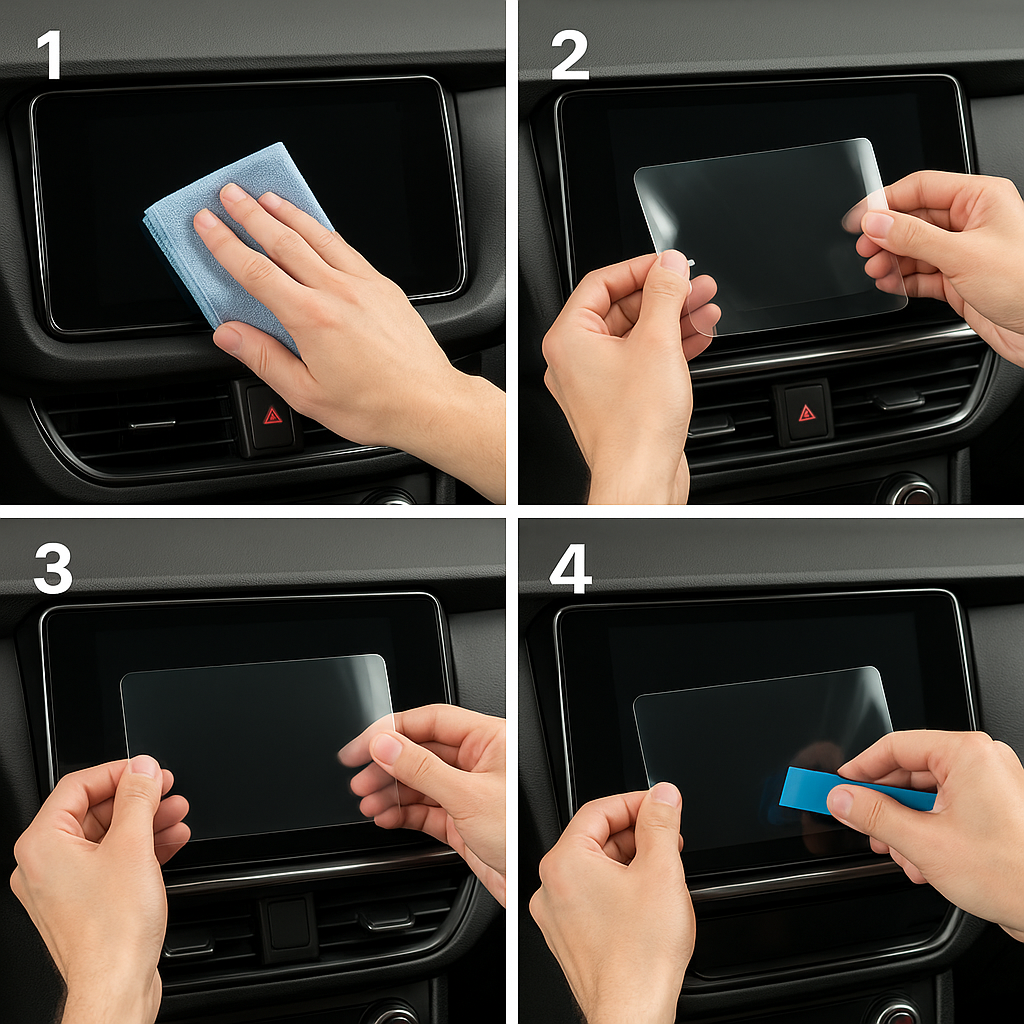
1. Clean the Navigation Screen Thoroughly


Use a wet wipe first, then a dry microfiber cloth.

Focus on:

Corners

Edges

Around the frame

Any oily fingerprints

Tip: Turn the screen off to see dust more easily.

2. Remove All Dust Particles


Even one small dust speck can create a permanent bubble.

Use:

Dust-removal stickers

A clean microfiber cloth

Hold the screen at an angle and look under the light. If perfectionism matters anywhere, it’s here.

3. Peel the First Protective Layer


Most hydrogel protectors have two layers.

Peel Layer 1 halfway and align the protector with:

Left and right edges

Upper frame

Any curved edges

Do not peel it completely yet.

4. Align and Apply the Protector


Once aligned:

Press the top centre gently

Slowly drag your finger downward

Peel off the rest of Layer 1 as you go

The film will naturally stick without much force.

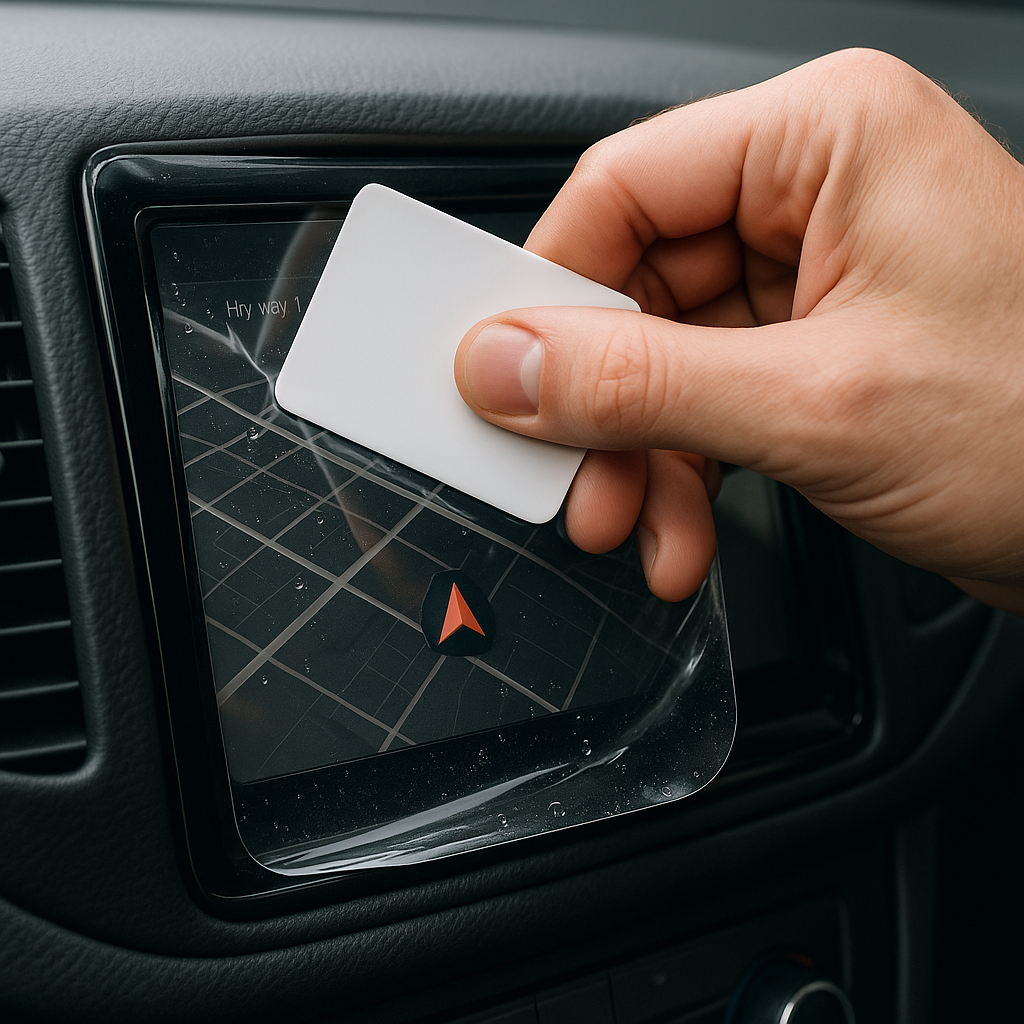
5. Use the Squeegee to Push Out Air


Work from centre outward, using firm but controlled pressure.

Hydrogel is self-healing, so small micro-bubbles usually disappear within 24–48 hours.

6. Remove the Final Top Layer


After application:

Peel Layer 2 from one corner

Pull slowly to avoid lifting the protector

This reveals a glossy, clear surface below.

7. Allow 24 Hours for Full Adhesion


Do not touch the screen too much during this period.

Avoid:

Heat exposure

Cleaning sprays

Aggressive pressing

Hydrogel needs time to “settle” and self-heal.
Common Mistakes to Avoid

Even a perfect protector can be ruined by simple errors.

 Installing in a dusty environment

Fibres, dust and hair easily get trapped.

Touching the sticky side

This leaves permanent marks.

Rushing the alignment

Hydrogel is flexible but not stretch-proof.

Cleaning with alcohol after installation

This can damage the outer coating.

Installing on a hot screen

Heat weakens adhesion and causes micro-bubbles.


For a complete walkthrough, see our guide on how to protect your car’s navigation screen.

Why Hydrogel Is Better Than Tempered Glass for Car Screens


Tempered glass works well for smartphones—but not for car navigation screens.

Hydrogel performs better because:

It bends and adapts to curved displays

It doesn’t create raised edges

It avoids touchscreen sensitivity issues

It self-heals micro-abrasions

It provides better Anti-Glare performance


If you want to see more in depth guide on why hydrogel protectors are better check out our guide on Hydrogel vs Tempered Glass Navigation Protectors Comparison


FAQs


1. Does a hydrogel protector reduce screen sensitivity

No. Hydrogel maintains full touch responsiveness because the material is soft and pressure-adaptive.

2. Can I reuse a hydrogel screen protector?

No. Once removed, it cannot be reinstalled cleanly.

3. How long do micro-bubbles take to disappear?

Usually 24–48 hours.

Stubborn ones may take up to 72 hours if the screen is curved.

4. Will the protector affect brightness or clarity?

High-quality hydrogel preserves original screen clarity.

Matte versions reduce glare but may slightly soften reflections.

5. Is hydrogel safe for anti-reflective or coated screens?

Yes. Hydrogel adhesive is gentle and does not damage coatings.


If you want premium hydrogel protectors for BMW, Audi, Mercedes, VW, Peugeot, Renault, Skoda and more, explore our full selection today.

Visit our shop at mr-key.com


Related Guides

Which cars benefit most from hydrogel navigation protection

How to Protect Your Car’s Navigation Screen from Scratches,Glare & Fingerprints
Hydrogel vs Tempered Glass Navigation Protectors Comparison

Related Posts

KEY COVERS: WHAT DO YOU NEED TO KNOW?

KEY COVERS: WHAT DO YOU NEED TO KNOW?

What is a Key Cover? A key cover , often referred to as a key shell or key case, is the outer part of your key. It houses the electronic board, chip, and battery but excludes the internal electronics themselves. If your key casing is damaged, there’s no need to replace the entire key – just changing the key cover can restore its durability and usability while saving you money. When Do You Need a New Key Cover? You might need a key cover replacement when: The buttons on your key become worn out or stop responding. The outer case cracks, exposing the internal electronics. The key mechanism no longer functions smoothly. You want to refresh the appearance of your key with a new, sturdy shell. Instead of struggling with a faulty key, simply replace the cover and extend the lifespan of your original key! How to Choose the Right Key Cover? When selecting a replacement key cover, consider the following factors: Button Layout: Ensure that the number of buttons and their symbols match your existing key. Blade Shape: If your key includes an integrated blade, make sure the new shell accommodates it correctly. Quality: A good-quality key cover ensures a snug fit, smooth functionality, and long-lasting durability. At MR-KEY , we offer a variety of key covers designed to match your specific car model perfectly, providing both aesthetics and functionality. How to Change Your Key Cover? Replacing your key cover is simple and doesn’t require professional assistance. Here’s how: Purchase a compatible key cover from our website. Open your old key case carefully. Transfer the electronic board and chip from your original key to the new key cover . Reassemble the key, ensuring all components fit securely. Test the buttons and functions to confirm everything is working properly. For step-by-step guidance, we provide video tutorials on our website, showing you exactly how to change your key shell and even replace the battery if needed. What Else Can You Change When Replacing the Key Cover? While changing your key cover, it's the perfect time to: Replace non-functional click buttons on your key’s electronic board. Change the battery since you're already disassembling the key, ensuring it lasts longer. At MR-KEY , we strive to make key replacements easy, affordable, and accessible to everyone. Explore our website to find the perfect key cover, key cutting services, and useful video guides to help you maintain your car key like a pro!

Jaguar and Land Rover Key Fobs: Common Problems & How to Fix Them

Jaguar and Land Rover Key Fobs: Common Problems & How to Fix Them

Owning a Jaguar or Land Rover means enjoying luxury, performance, and cutting-edge technology. But like any high-tech component, your key fob isn’t immune to problems. Whether you drive a Jaguar F-PACE, a Land Rover Discovery, or any other model, a malfunctioning key fob can quickly become an inconvenience. The good news is that most key fob issues can be resolved quickly and affordably . Here’s what you need to know about the most common Jaguar and Land Rover key fob problems and how you can fix them. Your Key Fob Isn’t Responding Pressing the button without any response is one of the most common issues. If your key fob isn’t unlocking or locking your car, the most likely culprit is a dead battery. Replacing it with a high-quality CR2032 battery is often the easiest fix. However, if the problem persists, your key fob may need reprogramming, or its internal electronic components might be damaged. Checking your vehicle’s manual for reprogramming instructions or visiting a dealership can help resolve the issue. In cases of water damage or physical impact, a complete key fob replacement might be necessary. Reduced Key Fob Signal Range If you notice that you need to be much closer to your car than usual for the key fob to work, the battery is likely weakening. Replacing the battery should be your first step. Other factors, such as interference from electronic devices like smartphones or WiFi routers, may also contribute to signal issues. Storing your key away from such devices can help. If these steps don’t improve the range, internal damage to the key fob’s antenna may require a replacement shell or an upgrade to a new key fob. Unresponsive or Sticking Buttons Over time, dirt and debris can accumulate under the buttons, making them less responsive or difficult to press. Cleaning the key fob with a soft cloth and isopropyl alcohol can help restore functionality. If the buttons feel loose or fail to click, a replacement shell might be necessary. In some cases, the internal button contacts wear out, requiring a full key fob upgrade. “Smart Key Not Found” or Keyless Start Issues If you see a “Key Not Found” message when trying to start your car, the issue may be a low battery in your key fob. Holding the key fob closer to the start button can sometimes override the problem, as many Jaguar and Land Rover models have a backup proximity sensor. If the issue persists, replacing the battery or consulting your vehicle’s manual for emergency start procedures might be required. If none of these solutions work, there may be a deeper issue with the vehicle’s keyless entry system. Spare Key Fob Not Working A backup key fob that hasn’t been used for a long time may no longer work when you need it. This can happen if the battery has drained due to inactivity or if the key has lost its programming. Regularly testing your spare key can prevent surprises. Replacing the battery should be the first step, and if the key has lost its programming, a visit to a professional or dealership may be necessary to restore its functionality. When to Replace Your Key Fob If you’ve tried all these fixes and your Jaguar or Land Rover key fob is still not working, it may be time for a replacement. Internal components wear out over time, and investing in a new key fob can save you from frustrating lockouts and start failures.

DIY Guide: How to Program or Sync Your Car Key Fob at Home

DIY Guide: How to Program or Sync Your Car Key Fob at Home

Programming a car key fob doesn’t always require a trip to the dealership or an expensive diagnostic tool. In many cases, you can program or resync your key fob at home—saving both time and money. Whether you’ve just replaced the battery, changed the shell, or purchased a new key fob entirely, this guide will walk you through the basics of syncing it with your vehicle. Why Program Your Key Fob? Key fobs are integral to modern car access and ignition systems. When you replace or reset your key, the vehicle and fob must reestablish communication. Without syncing, features like remote locking, trunk release, or even engine start may stop functioning. This synchronization process ensures your key fob and vehicle are electronically paired and communicate securely. Without it, even a new battery or case won’t make your remote functional again. Can You Program It Yourself? The answer depends largely on the make and model of your vehicle. Older vehicles with basic remote key fobs often support manual onboard programming that doesn’t require specialized equipment. These procedures typically involve inserting the key into the ignition, turning it in a specific sequence, and pressing buttons on the fob within a certain time frame. It’s a simple process, and many car owners are surprised at how effective these methods can be. In contrast, modern vehicles with smart keys or keyless entry systems usually require advanced programming tools. These keys often contain transponders that must be linked to the car’s electronic control unit, a task typically performed by dealerships or professional auto locksmiths. Still, if you own a basic Opel, Peugeot, or Citroën model, there’s a good chance you can complete the task yourself at home. How Onboard Programming Works If your vehicle supports onboard programming, the steps are often straightforward. While the exact process may vary depending on the model, the general method includes entering the vehicle, turning the ignition on and off several times, and pressing a button on the remote to complete pairing. You may receive confirmation through a dashboard light flash or an audible chime, indicating that the key fob is now synced. Take note, though: some vehicles require all remotes to be programmed in the same session, so if you have multiple key fobs, have them all with you before starting. If the procedure doesn’t work, don’t be discouraged—it may simply mean your car requires a more advanced programming approach. When Should You Call a Professional? Not all keys can be programmed at home. Smart keys, proximity sensors, and certain immobilizer systems are designed with enhanced security that requires proprietary equipment to program. If your vehicle doesn’t respond to onboard programming or your key fob is completely unresponsive, it’s best to seek assistance from a certified locksmith or dealership. Trying to force the programming process can sometimes cause more harm than good. If you’re unsure, always verify the requirements in your car’s manual or consult a trusted technician. Essential Tips for Success To avoid frustration, start with the basics: always use a fresh battery from a trusted brand such as Panasonic CR2032 . Clean the internal contacts and handle the circuit board carefully to prevent static damage. Don’t rush—take the time to follow steps precisely and test functionality before fully reassembling the key. When replacing the key shell, make sure it's compatible with your exact model and that the key blade, transponder chip, and electronics are properly seated. With a bit of patience and the right information, programming your car key fob at home can be a practical and satisfying DIY fix. For basic vehicles, it’s a task you can handle in minutes—saving the cost and hassle of dealership appointments. Understanding your vehicle’s requirements and using reliable parts makes all the difference. Whether you're refreshing an old key with a new case or pairing a new remote to your car, the ability to program it yourself puts control back in your hands. For a full selection of batteries, shells, and compatible accessories, visit mr-key.com .

Lost Your Roof Rack Key? Here's Exactly What to Do

Lost Your Roof Rack Key? Here's Exactly What to Do

Losing a roof rack key is more common than manufacturers like to admit. The good news: it's almost always solvable — quickly, cheaply, and without a locksmith. Here's the exact sequence to follow, from the moment you realise the key is gone. Step 1: Don't Panic — and Don't Force It The first instinct is to try to open the lock anyway. Don't. Forcing a barrel lock with the wrong tool damages the cylinder, strips the keyway, and turns a simple €8 key replacement into a €40 lock cylinder replacement. Leave the lock alone until you have the right key or professional help. Step 2: Check for the Key Code Before you do anything else, find your key code. This is the number stamped on your lock barrel, printed on your original key card, or listed in your rack documentation. Where to look: The lock face — look at the front of any lock point on your rack. The code is usually stamped directly on the metal Your original key — if you have one remaining key, the code is often stamped on the bow (the flat grip section) Paperwork — the key card or code card that came with your rack at purchase Registration confirmation — if you registered your rack online with Thule, Yakima, or Mont Blanc, the code may be on your account Found the code? You're done with the hard part. Jump to Step 5. No code visible? Continue to Step 3. Step 3: Photograph the Lock Take a clear, close-up photograph of the lock face in good light. This photo can do two things: Help a specialist identify your key — experienced suppliers can often determine the correct key from the keyway profile and any partial stamping visible in a photo Help a locksmith decode the lock — a physical locksmith can sometimes read the code from the lock face or decode it by impression Send the photo to a specialist before assuming you're stuck. Step 4: Identify Your Brand and Model If the code is genuinely unreadable, your brand and rack model narrows down the options considerably. Thule — uses N-series codes (N001–N200+), stamped on the lock barrel. If you know your N-code, the key is in stock. Yakima — uses SKS (Same Key System) codes, typically found on the lock core. Common range: SKS-101 to SKS-132+. Mont Blanc — numeric code system, on a sticker inside the lock or on the original key card. GIVI — code found on the product label or lock face. Other brands — most use ISO-standard barrel formats with numeric codes. Once you have brand + model, a specialist supplier can suggest the most likely code ranges for your rack generation and help you narrow it down. Step 5: Order the Replacement Key With your code confirmed, ordering is straightforward. What you need to provide: Brand (Thule, Yakima, Mont Blanc, GIVI, other) Exact key code (e.g. N121, SKS-115) Quantity — we recommend ordering two: one replacement and one spare From mr-key.com, keys ship to most European destinations within 2–5 business days . No locksmith. No dealer visit. No full rack replacement. Step 6: What If You Still Can't Unlock the Rack? If you have cargo on the rack that you need to remove urgently — bikes, a roof box, ski equipment — and you cannot wait for a replacement key, you have limited but real options. Option A: Call a locksmith A locksmith experienced with barrel locks can open your rack lock without damage and, in many cases, cut you a working key on the spot. This costs €50–€120 depending on location and time of day. Option B: Contact your rack manufacturer Thule and Yakima both have customer service lines. With proof of purchase or registered ownership, they may be able to supply a replacement key or lock service. Option C: Remove the lock cylinder On some rack models, the lock cylinder can be removed from the outside with the rack foot or arm partially dismantled. This requires mechanical confidence and the correct tools — consult your rack's installation manual first. Once the cylinder is out, a locksmith can decode it or you can replace it entirely. Roof Rack After the Crisis: What to Do Next Once you have access and a replacement key in hand, take 10 minutes to prevent this from happening again. Photograph your key code. Take a photo of the code stamped on your lock face. Store it in cloud storage or email it to yourself with the subject line "roof rack key code — [your rack brand]." Buy a spare key. It costs less than €10. Keep it somewhere separate from your main keyring — a drawer at home, your work locker, your other car. Register your rack. Thule and Yakima both offer product registration. Registering links your key code to your account, making future replacements instant. Label your key. If you have multiple sets of keys — car, house, garage, rack — label your rack key clearly so it's never confused and never left behind. Roof Rack Key Replacement: Brand-by-Brand Quick Reference Brand Where to Find Code Key Format Notes Thule Stamped on lock face N001–N200+ One-Key System: one code for all locks Yakima On lock core SKS-101–SKS-132+ Same Key System: one code for all locks Mont Blanc Inside lock or key card Numeric Sticker sometimes fades — check paperwork GIVI Product label or lock face Numeric Primarily motorcycle/touring racks Kamei / G3 / Farad Lock face or documentation Varies Contact supplier with photo if unsure FAQ Q: I lost both keys — can I still get a replacement? A: Yes. The key code is stamped on the lock itself, not on the key. As long as you can read the code on the lock face, you can order a replacement. If the code is unreadable, send a photo to a specialist supplier. Q: My rack is second-hand and came with no keys — what are my options? A: Check the lock face for a stamped code. If none is visible, a locksmith can decode the lock. Alternatively, order a replacement lock cylinder for your rack model — it will arrive with new keys and a new code. Q: How long will a locksmith take to open a roof rack lock? A: Most experienced locksmiths can open a barrel-style rack lock in under 10 minutes. The challenge is finding one who works on non-automotive locks — call ahead and confirm. Q: Can I drill out a roof rack lock myself? A: Technically yes, but this destroys the lock cylinder and leaves your rack unsecurable until you replace the full lock assembly. Only consider this if the cargo is time-critical and a locksmith is not available. Q: Will my insurance cover a lost roof rack key? A: Home contents or vehicle insurance sometimes covers key replacement, including accessories like rack locks. Check your policy — the cost of a specialist supplier is low, but it's worth reclaiming if covered. Q: I found a spare key in my car — how do I know if it's the right one? A: Try it carefully and gently. If it inserts smoothly and turns without force, it's the correct key. If it doesn't insert fully or requires force, stop — it's the wrong profile and forcing it risks damaging the cylinder. Q: Can I order a replacement key for an old rack that's no longer sold? A: In most cases yes. Key codes from established brands like Thule and Yakima remain in production for decades. Discontinued rack models still use the same N-series or SKS key codes. Get Your Replacement Key (Fast EU Shipping – Same-Day Dispatch) You know the code. You know the process. Don't leave it until the next trip. Visit mr-key.com to order your replacement roof rack key by brand and code. We ship to Germany, France, Italy, Greece, Netherlands, Romania, Spain, the UK, and across Europe — with tracking on every order. → Order Your Roof Rack Key at mr-key.com Also read: The Complete Guide to Roof Rack Replacement Keys | Thule Roof Rack Key Replacement: How to Find Your Code and Order the Right Key

Chat with us