
Post Name

In an age where smartphones can locate us with pinpoint accuracy and lost luggage can be tracked halfway around the world, it’s easy to assume car keys are just as smart. But for many frustrated drivers, losing a car key feels like sending it into a black hole. The lack of a clear way to find them often leads to stress, wasted time, and sometimes costly replacements. So here’s the big question: Do car keys have GPS, and can they be tracked like other smart devices?

This article explains the technology behind key tracking, compares GPS with Bluetooth, and offers practical ways to find lost keys in a connected world.


The Truth About GPS in Car Keys

While GPS technology has become common in many consumer devices, the vast majority of car keys do not include built-in GPS. Even the most modern remote key fobs, which allow for keyless entry and push-button start, generally lack the components necessary for GPS functionality. These components include a satellite GPS receiver, a data transmission module, and a sustainable power source—none of which are typically found in a key fob. The design of a car key prioritizes compactness, cost-efficiency, and low energy usage. Adding GPS would not only increase manufacturing costs but also introduce battery life challenges. That’s why most manufacturers have opted against including GPS tracking in car keys.

GPS requires constant power and data transmission — something a small coin cell battery in a typical key fob can’t support." – Marcus Lee, Automotive Tech Analyst


How Can Car Keys Be Tracked?

Although your keys may not have GPS, there are other technologies that make it possible to track or locate them when they’re lost. These include Bluetooth trackers, crowdsourced networks, and GPS systems that track the vehicle instead of the key itself.

1. Bluetooth Trackers (Apple AirTag, Tile, Chipolo)

These small, attachable gadgets can be added to your keychain and linked to a mobile app. They rely on Bluetooth to provide location data when within a certain range. If your keys are somewhere nearby—like in your home or office—these trackers can play a sound or show you their last known position on a map. The range is generally up to 120 meters (400 feet), and battery life can last up to a year, making them a practical, low-maintenance option for most users.

2. Crowdsourced Networks (Find My, Tile Network)

If your Bluetooth tracker is out of range, some brands offer a smart workaround. Apple’s AirTag, for instance, uses the “Find My” network, which consists of millions of iPhones around the world. If someone with an Apple device passes near your lost keys, the location is anonymously and securely sent to your phone. This creates a global, decentralized tracking system that mimics GPS functionality without requiring satellites or cellular connections.

3. Car GPS Systems (Vehicle Only, Not the Key)

Some high-end cars offer integrated GPS systems, but these track the vehicle, not the keys. Brands like Tesla, BMW, and Mercedes-Benz allow owners to locate their car through mobile apps. If your keys are left inside the car, you may be able to find them by locating the vehicle. However, once the keys are removed, they cannot be tracked unless equipped with a separate Bluetooth tracker.


GPS vs Bluetooth: What’s the Difference?

To better understand why GPS isn’t commonly included in car keys, it’s useful to compare the two technologies:
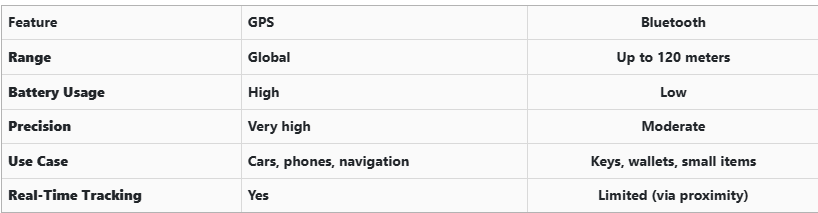
GPS provides global, real-time tracking with high precision, but it’s power-intensive and costly. Bluetooth, while more limited in range, is ideal for small items and short distances, offering a cost-effective solution for everyday use.


Global Perspectives on Key Tracking

Around the world, the adoption of key tracking technologies differs based on privacy laws, tech infrastructure, and consumer behavior. In Japan and South Korea, smart home and car integration are advanced, yet GPS-enabled keys are still not the norm. In many parts of Europe, particularly in countries like Germany, Bluetooth solutions are favored due to strict data privacy regulations. In contrast, the U.S. market has embraced personal tracking devices like Apple AirTag and Tile, making them increasingly common accessories. These differences highlight how technology adoption often reflects broader cultural and legal norms, as well as the balance between convenience and privacy.


Smart Tips to Keep Track of Your Keys

Whether your keys have advanced tech or not, you can take simple steps to avoid losing them. Attaching a Bluetooth tracker is a great first line of defense. Keeping your keys in a consistent, designated place at home reduces the chances of misplacement. Many tracking apps also offer “left behind” alerts, which notify you if you leave your keys behind when moving out of range. It's also smart to keep a spare key somewhere safe and consider going keyless if your next car allows it. Implementing a few of these habits can save you time, frustration, and the cost of replacing a lost key.


The Future of Key Tracking

While car keys may not have built-in GPS, technology continues to evolve with practical alternatives. Bluetooth trackers, supported by app alerts and community networks, already provide effective ways to find lost keys. As innovation progresses, we can expect even more seamless solutions, such as Ultra Wideband (UWB) technology and Internet of Things (IoT) integrations, to become mainstream.

As our tools become smarter, so must the way we use and manage them. With a little foresight and the right accessories, you'll never lose track of your keys again.

Related Posts

The Importance of Having a Spare Car Key: What Every Driver Should Know

The Importance of Having a Spare Car Key: What Every Driver Should Know

When it comes to car ownership, many of us take pride in maintaining our vehicles. We keep up with oil changes, tire rotations, and insurance renewals. But there’s one crucial aspect that many drivers overlook: having a spare car key. It might seem like a small detail, but nearly 40% of car owners don’t have a backup key for their vehicle. That’s a risk you might not want to take. Let’s explore why having a spare car key is so important and how it can save you time, money, and frustration. The Hidden Risks of Having Only One Key You may think that having just one car key is fine—after all, you always know where it is, right? But life has a funny way of surprising us, and car keys get lost or damaged more often than you might think. Here are some common risks you face when relying on just one key: Lost Keys : Losing your only car key can leave you stranded. Whether you're in a rush for work or on your way to an important event, misplacing your key means you're stuck until you find it—or worse, until you get a replacement. Key Damage : Keys, like anything else, wear out over time. A bent or broken key can cause problems with your car’s ignition, and if it's your only one, you’re in for a headache. Lockouts : It’s easy to accidentally lock your keys inside your car. Without a spare key, you’ll need to figure out how to regain access—both costly and inconvenient. Theft : If someone steals your key, not only are you locked out of your car, but you also face a potential security risk. A spare key can give you quick access and peace of mind while you handle the situation. Why a Spare Key Is a Lifesaver Having a spare key is more than just a backup plan; it’s a practical solution that can save you in many situations. Here’s why having a spare key should be on your to-do list: Saves You Time : If you’ve ever lost a key, you know how time-consuming it can be to get a replacement. With a spare key, you can avoid the wait and get back on the road quickly. Prevents Expensive Lockouts : Getting locked out of your car is stressful and costly. Emergency situations like this can cost you not just time but money, and depending on the circumstances, you might even need additional assistance. Convenience for Multiple Drivers : If you share your car with a spouse, roommate, or family member, having a spare key allows both of you to have access without needing to coordinate every trip. Peace of Mind : With a spare key, you won’t have to worry about the “what if” scenarios. It’s a simple safety net that ensures you’re never completely stranded. Affordable Solutions for Replacing Your Car Key You might be wondering how to go about getting a spare key. Fortunately, the process has never been easier or more affordable. Gone are the days when you had to rely on expensive or complicated processes to secure a replacement key. Here are some practical ways to get a spare key: Online Key Replacement Services : Many services offer easy, affordable options for getting a spare car key. Simply upload a photo of your key, and you’ll receive a replacement. Automotive Dealerships : Dealerships provide spare keys for almost any car make or model. However, this option is often more costly and may require you to bring the car in for verification and programming. How to Choose the Right Key Replacement Option When deciding on how to get a spare key, consider these factors: Cost : Depending on the service or method you choose, prices can vary. Evaluate your budget and the type of key your car requires before proceeding. Convenience : For some, the most convenient option is one that doesn’t require in-person visits. Research which option offers the best balance between time and convenience for your needs. Speed : Depending on your urgency, choose an option that fits your timeframe. Some services offer express options, while others may take longer. Don’t Wait Until It’s Too Late Many car owners don’t think about getting a spare key until they’re faced with an emergency. Don’t let that be you. Having a backup key is a small investment that can save you from significant stress and financial strain down the line. Take action today and make sure you have a spare key for your vehicle. Whether it’s for a just-in-case moment or for daily convenience, having that extra key can make all the difference when you need it most.

How Long Does a Car Key Battery Last? Can You Use a CR2025 Instead of a CR2032?

How Long Does a Car Key Battery Last? Can You Use a CR2025 Instead of a CR2032?

When was the last time you thought about the battery inside your car key? For most drivers, the answer is probably never—until the key suddenly stops working. A car key battery is a small but essential part of modern driving. It powers keyless entry, remote locking, and in many cases, keyless ignition systems. When the battery fails, it can leave you locked out of your car or stranded in inconvenient situations. Understanding how long a car key battery typically lasts and knowing when and how to replace it can save you time, money, and unnecessary frustration. In this detailed guide, you will learn how long a typical car key battery lasts, what factors shorten its life, the most common signs that your battery needs replacement, and whether you can substitute a CR2025 for a CR2032 battery in your car key fob. How Long Does a Car Key Battery Last? The average car key battery lasts between two to four years. However, the actual lifespan of your key battery depends on several factors, including how often you use the key, whether your car uses a proximity key system, the type of battery installed, the climate where you live, and the quality of the battery brand. If your car has a keyless entry system or keyless ignition that constantly communicates with your vehicle when nearby, your battery may drain more quickly. Frequent use—such as multiple lock and unlock cycles each day—also leads to faster battery depletion. What Can Shorten the Life of Your Car Key Battery? Frequent Use: Keys that are used many times per day will naturally consume more battery power. Keyless Proximity Systems: Smart keys that communicate continuously with the vehicle tend to use more energy. Extreme Temperatures: Exposure to both heat and cold can degrade battery performance and lifespan. Low-Quality Batteries: Cheap, no-name batteries often have a shorter life and can fail unexpectedly. Many drivers wait for their key to stop working before replacing the battery, but it is recommended to replace it proactively every one to two years to avoid surprise failures, especially before long trips or the winter season. Signs That Your Car Key Battery Is Failing Your car key usually gives warning signs before the battery completely dies. Knowing these symptoms can help you avoid being caught in an inconvenient situation. Reduced Range: You may need to stand closer to your car for the key to work properly. Delayed Response: The car may not immediately lock or unlock when you press the button. Intermittent Operation: Sometimes the key works, sometimes it does not. Dashboard Alerts: Some vehicles display a "low key battery" warning on the dashboard. Complete Failure: If ignored, the key will eventually stop working entirely. If you notice any of these warning signs, it is best to replace the battery immediately to ensure continuous, reliable operation. When Should You Change Your Car Key Battery? The best time to change your car key battery is before it fully fails. Most experts recommend replacing the battery every two years as preventive maintenance. You should also replace the battery immediately if you notice that your key’s range has reduced or if it sometimes stops working without warning. Seasonal changes also play a role. During winter, cold temperatures can reduce battery performance significantly, which is why it is wise to replace your battery before the onset of cold weather. Additionally, if you are planning a long trip or vacation, it is a good idea to install a new battery beforehand to avoid potential inconvenience. Can You Use a CR2025 Instead of a CR2032 Battery in a Car Key? One of the most common questions drivers ask is whether a CR2025 battery can be used as a substitute for a CR2032 in a car key fob. Although the two batteries are similar in many ways, there are critical differences to consider. CR2025 vs. CR2032: What Is the Difference? Both the CR2025 and CR2032 batteries are 3-volt lithium coin cells and have the same diameter of 20 millimeters. However, their thickness and capacity differ. Feature CR2025 CR2032 Diameter 20 mm 20 mm Thickness 2.5 mm 3.2 mm Voltage 3 volts 3 volts Capacity Approximately 150 mAh Approximately 220 mAh The CR2032 is thicker and has a higher energy capacity, meaning it will typically last longer than a CR2025 in the same device. Can a CR2025 Fit in a CR2032 Slot? Technically, a CR2025 can physically fit into a car key fob designed for a CR2032 battery because they have the same diameter. However, because the CR2025 is thinner, it may not make stable contact with the battery terminals inside the key. Some people attempt to compensate for the thinner battery by adding a small piece of paper, cardboard, or aluminum foil to hold it in place. Although this may temporarily restore functionality in an emergency, it is not a reliable or recommended solution for long-term use. Should You Use a CR2025 Instead of a CR2032? The short answer is that using a CR2025 in place of a CR2032 is acceptable as a temporary, emergency solution but is not advisable as a permanent fix. Using the incorrect battery size can lead to poor contact, inconsistent performance, and a much shorter operating life. Risks of Using the Wrong Battery: Unstable contact may cause the key to work intermittently. Lower battery capacity means the key will require more frequent battery replacements. A loose battery inside the fob can shift during handling, potentially damaging the internal components. For long-term reliability and to protect your car key from unnecessary wear, it is always best to use the exact battery size specified for your key fob. Where to Buy the Right Car Key Battery If you are looking for a high-quality CR2032 battery for your car key, Mr Key offers reliable options from trusted brands such as Panasonic. Choosing a premium battery will ensure your key functions properly for as long as possible and reduces the risk of sudden failure. Mr Key also provides a wide range of car key shells, key fobs, and accessories compatible with popular brands like Peugeot, Citroën, Nissan, Suzuki, Fiat, Ford, and more. Whether you need to replace the battery, the shell, or the entire key, Mr Key can help you find the right product at an affordable price. You can browse the full selection in the Mr Key online store and get the parts you need delivered directly to your door. Car key batteries are often forgotten until they stop working, but with proper care and timely replacement, you can avoid the inconvenience of being locked out or dealing with a non-functional key. Understanding how long a car key battery typically lasts and knowing the signs of failure can help you stay ahead of the problem. While a CR2025 battery can sometimes be used in an emergency, the CR2032 is the correct and recommended option for most car key fobs due to its longer life and better fit. Using the right battery size ensures that your key works reliably, protects your key's internal components, and provides peace of mind. Regularly check your key, replace the battery proactively, and always use the correct parts for the best performance. When you need a new battery or key shell, Mr Key is your trusted partner for fast, easy, and affordable car key repairs.

How to Upgrade Your Car Key: A Step-by-Step Guide

How to Upgrade Your Car Key: A Step-by-Step Guide

Upgrading your car key can significantly improve your vehicle’s security and make your daily routine more convenient. Whether you’re upgrading from a basic key to a remote key or stepping up to a smart key, this guide will take you through the entire process, step by step, ensuring a smooth transition. Understanding Your Key Type Before you start the upgrade process, it’s important to know which type of key you currently have. Here are the most common key types: Traditional Metal Keys : These are basic, mechanical keys, common in older vehicles. They don’t have any electronic components. Transponder Keys : These have an electronic chip inside the key head that communicates with the vehicle’s computer system for added security. Remote Keys : These keys have buttons to lock/unlock the doors remotely and usually have a physical blade as a backup. Understanding your current key type will help guide your decision on the best upgrade path. Choosing the Right Upgrade Once you know what type of key you have, you need to decide what features you want in your upgraded key. Some options to consider are: Remote Locking : Allows you to lock/unlock the doors from a distance. Keyless Entry : Lets you unlock the car without taking the key out of your pocket. Smart Key : Offers advanced functions such as proximity unlocking, push-button start, and remote engine start. Take some time to research the options available for your specific car model. Many car manufacturers offer compatible upgrades for different key types, so it’s important to consult your dealership or a trusted locksmith for recommendations. Gathering What You’ll Need Before starting the upgrade process, make sure you have the following materials: The New Key : This could be a transponder key, remote key, or smart key. Your Original Key : You’ll need this as a reference throughout the process. Key Programming Device : Some keys require a special device to pair the key with your car. Car Manual or Programming Guide : It’s always a good idea to have your car’s manual handy for specific instructions. Having everything ready will make the process much smoother. Step-by-Step Upgrade Process Purchase the New Key Start by purchasing your new key. You can buy it from your car’s dealership, a certified locksmith, or a trusted online retailer. Make sure that the key is compatible with your vehicle’s make and model. Transfer Electronics (if necessary) If your new key is just a shell, you will need to transfer the internal components from your old key. This includes the transponder chip and, if applicable, the key blade. Be careful when transferring the electronics to avoid any damage. Program the Key Programming the new key is crucial for it to work with your vehicle. Here’s a general guide: Insert the original key into the ignition and turn it to the ON position. Quickly remove the original key and insert the new key. Turn the new key to the ON position and wait for the security light to turn off. This might take a few minutes. Test the New Key After programming, it’s important to test the new key to ensure everything works properly. Check the following functions: Locking and unlocking the doors Starting the engine Any additional functions like remote trunk opening or proximity unlocking Troubleshooting Common Issues If your new key isn’t working as expected, don’t worry! Here are some common problems and their solutions: Key Not Recognized : Check if the transponder chip is properly placed in the key. Key Doesn’t Start the Car : Double-check the programming steps to ensure everything was done correctly. Buttons Don’t Work : Verify that the battery in the new key is properly installed and functional. If the problem persists, it’s best to consult a professional locksmith or visit your dealership for further assistance. Upgrading your car key is an excellent way to improve both the security and convenience of your vehicle. By following these steps, you’ll be able to transition smoothly to your new key. If you run into any issues, don’t hesitate to reach out to a professional locksmith who can help you along the way. Enjoy the benefits of your new car key and the added peace of mind that comes with enhanced security.

Simple and Affordable Solutions for Car Key Replacement and Repairs

Simple and Affordable Solutions for Car Key Replacement and Repairs

Misplacing or damaging your car keys can be a major inconvenience, but it doesn't have to be a costly ordeal. As a car owner seeking budget-friendly and efficient solutions, understanding your options is crucial. Here's a comprehensive guide to help you navigate the process of replacing your car keys without breaking the bank. Understanding Your Car Key Type Identifying the specific type of car key you have is the first step toward an effective replacement: Traditional Metal Keys : Simple, non-electronic keys that are easy and inexpensive to duplicate. Transponder Keys : Equipped with a chip that communicates with your vehicle's ignition system for added security. Remote Key Fobs : Allow remote locking and unlocking of your vehicle, often integrated with a transponder chip. Smart Keys : Provide keyless entry and start features, utilizing advanced technology for convenience. Cost-Effective Alternatives to Dealership Key Replacement Dealerships are known for charging premium prices for key replacements. Consider these more affordable options: Professional Locksmiths : Specialize in cutting and programming various types of car keys, often at a fraction of dealership costs. Online Key Retailers : Offer replacement keys and fobs that can be purchased and then programmed either by yourself or a professional. Hardware Stores : Some stores can duplicate traditional metal keys on the spot, providing a quick and inexpensive solution. Steps to Take When You've Lost Your Car Key Losing your car key can be stressful, but following these steps can streamline the replacement process: Verify Your Vehicle Identification Number (VIN) : Locate your VIN, typically found on the dashboard or inside the driver's side door, as it is essential for key replacement. Gather Necessary Documentation : Prepare proof of ownership, such as your vehicle registration and personal identification. Contact a Professional : Reach out to a reputable locksmith or key replacement service with your vehicle details to obtain a new key. Removing a Broken Key from the Ignition or Door Lock A broken key can be a frustrating obstacle. Here's how to address it: Use Needle-Nose Pliers : If a portion of the key is protruding, gently extract it using pliers. Apply Lubricant : Spray a graphite-based lubricant into the lock to ease the removal process. Seek Professional Assistance : If the key fragment is lodged deep or these methods fail, contact a locksmith to prevent further damage. Preventative Measures to Avoid Future Key Issues Keep a Spare Key : Having a duplicate stored safely can save time and money in emergencies. Regular Maintenance : Inspect your keys and locks periodically for signs of wear and address issues promptly. Use Key Protectors : Invest in key covers or cases to minimize physical damage.

Chat with us