Post Name

In an age where smartphones can locate us with pinpoint accuracy and lost luggage can be tracked halfway around the world, it’s easy to assume car keys are just as smart. But for many frustrated drivers, losing a car key feels like sending it into a black hole. The lack of a clear way to find them often leads to stress, wasted time, and sometimes costly replacements. So here’s the big question: Do car keys have GPS, and can they be tracked like other smart devices?

This article explains the technology behind key tracking, compares GPS with Bluetooth, and offers practical ways to find lost keys in a connected world.


The Truth About GPS in Car Keys

While GPS technology has become common in many consumer devices, the vast majority of car keys do not include built-in GPS. Even the most modern remote key fobs, which allow for keyless entry and push-button start, generally lack the components necessary for GPS functionality. These components include a satellite GPS receiver, a data transmission module, and a sustainable power source—none of which are typically found in a key fob. The design of a car key prioritizes compactness, cost-efficiency, and low energy usage. Adding GPS would not only increase manufacturing costs but also introduce battery life challenges. That’s why most manufacturers have opted against including GPS tracking in car keys.

GPS requires constant power and data transmission — something a small coin cell battery in a typical key fob can’t support." – Marcus Lee, Automotive Tech Analyst


How Can Car Keys Be Tracked?

Although your keys may not have GPS, there are other technologies that make it possible to track or locate them when they’re lost. These include Bluetooth trackers, crowdsourced networks, and GPS systems that track the vehicle instead of the key itself.

1. Bluetooth Trackers (Apple AirTag, Tile, Chipolo)

These small, attachable gadgets can be added to your keychain and linked to a mobile app. They rely on Bluetooth to provide location data when within a certain range. If your keys are somewhere nearby—like in your home or office—these trackers can play a sound or show you their last known position on a map. The range is generally up to 120 meters (400 feet), and battery life can last up to a year, making them a practical, low-maintenance option for most users.

2. Crowdsourced Networks (Find My, Tile Network)

If your Bluetooth tracker is out of range, some brands offer a smart workaround. Apple’s AirTag, for instance, uses the “Find My” network, which consists of millions of iPhones around the world. If someone with an Apple device passes near your lost keys, the location is anonymously and securely sent to your phone. This creates a global, decentralized tracking system that mimics GPS functionality without requiring satellites or cellular connections.

3. Car GPS Systems (Vehicle Only, Not the Key)

Some high-end cars offer integrated GPS systems, but these track the vehicle, not the keys. Brands like Tesla, BMW, and Mercedes-Benz allow owners to locate their car through mobile apps. If your keys are left inside the car, you may be able to find them by locating the vehicle. However, once the keys are removed, they cannot be tracked unless equipped with a separate Bluetooth tracker.


GPS vs Bluetooth: What’s the Difference?

To better understand why GPS isn’t commonly included in car keys, it’s useful to compare the two technologies:
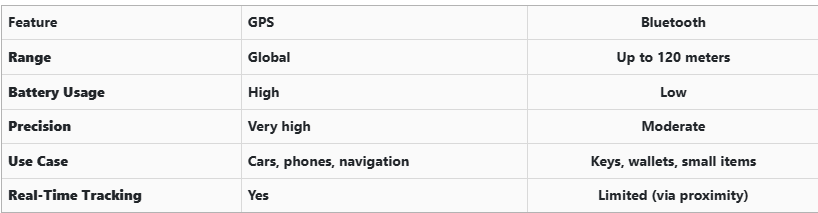
GPS provides global, real-time tracking with high precision, but it’s power-intensive and costly. Bluetooth, while more limited in range, is ideal for small items and short distances, offering a cost-effective solution for everyday use.


Global Perspectives on Key Tracking

Around the world, the adoption of key tracking technologies differs based on privacy laws, tech infrastructure, and consumer behavior. In Japan and South Korea, smart home and car integration are advanced, yet GPS-enabled keys are still not the norm. In many parts of Europe, particularly in countries like Germany, Bluetooth solutions are favored due to strict data privacy regulations. In contrast, the U.S. market has embraced personal tracking devices like Apple AirTag and Tile, making them increasingly common accessories. These differences highlight how technology adoption often reflects broader cultural and legal norms, as well as the balance between convenience and privacy.


Smart Tips to Keep Track of Your Keys

Whether your keys have advanced tech or not, you can take simple steps to avoid losing them. Attaching a Bluetooth tracker is a great first line of defense. Keeping your keys in a consistent, designated place at home reduces the chances of misplacement. Many tracking apps also offer “left behind” alerts, which notify you if you leave your keys behind when moving out of range. It's also smart to keep a spare key somewhere safe and consider going keyless if your next car allows it. Implementing a few of these habits can save you time, frustration, and the cost of replacing a lost key.


The Future of Key Tracking

While car keys may not have built-in GPS, technology continues to evolve with practical alternatives. Bluetooth trackers, supported by app alerts and community networks, already provide effective ways to find lost keys. As innovation progresses, we can expect even more seamless solutions, such as Ultra Wideband (UWB) technology and Internet of Things (IoT) integrations, to become mainstream.

As our tools become smarter, so must the way we use and manage them. With a little foresight and the right accessories, you'll never lose track of your keys again.
Related Posts

The Secret to Smooth Locks: How (and Why) to Lubricate Your Locks Like a Pro

The Secret to Smooth Locks: How (and Why) to Lubricate Your Locks Like a Pro

Regular lock maintenance is essential to prevent key jamming or lock failure. Proper lubrication reduces wear and tear, ensures smooth operation, and extends the lifespan of your locks. A well-lubricated lock decreases the risk of your key getting stuck or breaking inside the lock—an inconvenient and costly problem. At MR-KEY , we understand the importance of well-maintained locks and want to help you keep yours in top condition. How Often Should You Lubricate Your Locks? For most locks, lubricating them every three to six months is sufficient. However, locks exposed to extreme weather conditions—such as those on towbars, roof racks, or outdoor gates—require more frequent maintenance. Rain, dust, and freezing temperatures can cause internal components to stick, making it difficult to insert or turn the key. If you notice resistance when using a lock, it’s time for lubrication. What Lubricant Should You Use for Locks? Choosing the right lubricant is crucial for long-term lock performance. Here are the best options: • Teflon-based (PTFE) spray – Forms a protective film inside the lock, reducing friction and repelling dust buildup. • Dry silicone spray – Excellent for outdoor locks as it resists moisture without attracting dirt. • WD-40 Specialist Dry PTFE or White Lithium Grease – Unlike regular WD-40, these provide long-lasting lubrication and protection against corrosion. • Graphite powder – A great choice for older locks but should not be used if there’s oil residue inside the lock. While WD-40 Multi-Use is a quick fix for stuck locks, it is primarily a cleaner rather than a long-term lubricant. If used, follow up with a dry lubricant to prevent dirt accumulation inside the lock. How to Lubricate a Lock If your lock is functioning properly but feels slightly stiff, follow these steps: 1. Clean the Lock – Insert and remove the key a few times to dislodge debris, wiping it clean each time. 2. Apply the Lubricant – Insert the spray straw into the keyhole and apply two short bursts of lubricant. 3. Work the Lock – Insert and turn the key multiple times to distribute the lubricant inside. 4. Wipe Excess Lubricant – Remove any residue from the key and lock exterior to prevent dirt buildup. For graphite powder , follow the manufacturer’s specific instructions, as overapplication can lead to clumping inside the lock. Special Care for Towbar and Roof Rack Locks Locks on towbars and roof racks are exposed to harsher conditions than typical door locks. To keep them in good shape: • Regularly inspect them for stiffness or corrosion. • Apply dry silicone spray or PTFE lubricant for lasting protection. • If the lock is exposed to frequent moisture, white lithium grease offers superior water resistance. Lock It in: The Key to Long-Lasting Security Regular lock maintenance is a small effort that prevents big problems. By keeping your locks clean and properly lubricated—especially those exposed to the elements—you can avoid costly repairs and ensure they function smoothly for years. For high-quality lock maintenance products, visit MR-KEY and keep your locks in perfect working condition. A little maintenance goes a long way in ensuring security and peace of mind!

Top 10 Most Common Car Key Problems (And How to Fix Them)

Top 10 Most Common Car Key Problems (And How to Fix Them)

Car keys have changed dramatically in the last 20 years. What was once a simple mechanical tool has become an essential electronic device packed with functionality. From remote locking and trunk opening to push-start ignition systems and proximity sensors, today's car keys do a lot more than just turn in the ignition. However, this increased functionality also means more components that can fail—and when they do, the inconvenience can be frustrating or even immobilizing. For many drivers, key problems seem to come out of nowhere. A button stops working, the car doesn’t start, or a backup key won’t respond. Understanding the most common issues with modern car keys can help you avoid unnecessary trips to the dealership and identify quick fixes at home. Below, we’ll explore the ten most frequent car key problems, how to recognize the symptoms, and what steps to take to get your key working again—often without spending a fortune. 1. The Key Fob Has Stopped Responding One of the most common complaints drivers have is that their key fob simply stops responding. The remote may no longer lock or unlock the vehicle, the trunk button might stop working, or there may be no visible LED indicator when you press a button. In most cases, the culprit is a dead battery—something that’s inexpensive and easy to replace. Most key fobs use a CR2032 coin-cell battery, which can typically be changed with a small screwdriver or a plastic pry tool. If replacing the battery doesn’t bring the fob back to life, the issue may be with the internal electronics. Moisture, drops, and general wear over time can corrode or damage the tiny circuit board inside. In such cases, replacing the outer shell might not be enough—you may need to invest in a full replacement or transplant the electronics into a new case if only the buttons or housing are damaged. 2. The Car Doesn't Detect the Key Another increasingly common issue—especially in vehicles with push-to-start systems—is that the car doesn’t detect the key, even though it's inside the cabin or close to the sensor. You might see a warning on the dashboard such as “Key Not Detected” or “No Key Present.” This can happen due to a nearly dead battery in the fob, radio frequency interference from nearby electronics, or a fault in the key’s transponder chip. The first step is always to replace the key’s battery. If the issue persists, try holding the key closer to the start button or steering column—some vehicles have hidden backup sensors that detect the key at close range in emergencies. If none of that works, the problem could be with the chip inside the fob or the vehicle’s receiver, requiring diagnosis by a qualified locksmith or dealership technician. 3. The Key Turns in the Ignition, But Nothing Happens This issue is particularly frustrating: you insert your key into the ignition, it turns freely, but the car doesn’t respond at all. Often, this is a sign that the vehicle’s immobilizer system isn’t recognizing the key. Modern car keys contain a small RFID chip that communicates with the car’s anti-theft system. If this chip is damaged or unprogrammed, the vehicle will not start—no matter how well the mechanical part of the key works. Try using a spare key if you have one. If the backup works, you’ll know the issue lies within the primary key. If neither key works, the problem could be with the vehicle’s receiver, antenna ring, or immobilizer control unit. A professional diagnostic scan is typically needed to pinpoint the cause. 4. The Key Won’t Turn in the Door or Ignition If your key suddenly stops turning in the door or ignition cylinder, the cause may be as simple as wear and tear. Key blades—especially older ones—can become worn down over time, resulting in poor contact with the internal pins in the lock. Dirt, rust, or debris inside the lock can also prevent the key from turning, particularly if the vehicle hasn’t been manually unlocked in a while. First, try using a backup key. If it turns smoothly, your main key is likely worn. If both keys struggle, apply a non-residue contact cleaner or lock lubricant to clean out the cylinder. For long-term solutions, you may need to replace either the key blade or the ignition/door lock entirely. Don’t attempt to force the key, as this could cause the blade to bend or snap inside the lock. 5. The Buttons Feel Mushy or Stuck Physical wear is one of the most overlooked causes of key fob failure. Over time, the rubber buttons on your remote can wear down, become loose, or stop pressing properly. You might notice that only one or two buttons respond, or that they must be pressed harder than usual to work. In many cases, the outer shell has simply degraded, while the electronic board inside remains perfectly functional. The most effective fix is to replace the key shell. These replacement housings are inexpensive and widely available for most major vehicle brands. Simply open the fob, transfer the circuit board, battery, and buttons into the new shell, and your key will feel and function like new again—without any need for reprogramming. 6. Your Key Fob Got Wet Water and electronics rarely mix well, and key fobs are no exception. Whether your key was left out in the rain, fell into a puddle, or went through the washing machine, moisture can quickly short-circuit the internal components or lead to long-term corrosion. If your key gets wet, act fast. Remove the battery immediately and open the case to allow air circulation. Use desiccants such as silica gel packets to dry out the internal parts—avoid using rice, which is far less effective. If corrosion is visible, gently clean it with isopropyl alcohol and a cotton swab. If the key still doesn’t work after drying, the damage may be permanent and require replacement. 7. The Key Shell Is Cracked or Broken Keys endure daily use, pocket pressure, accidental drops, and exposure to the elements. Over time, the plastic casing of the fob can crack, split, or completely fall apart, leaving internal electronics vulnerable. Although a broken shell doesn’t necessarily mean the key is non-functional, it can make usage difficult and risky. Thankfully, key shell replacements are an easy and budget-friendly solution. You can often reuse all your original components, including the battery, buttons, and transponder chip. Replacing just the shell avoids costly reprogramming and restores your key’s durability and appearance. 8. The Key Still Doesn’t Work After Replacing the Battery Replacing a fob battery is supposed to solve the problem—but sometimes it doesn’t. If your remote remains unresponsive after a battery change, you may have installed the wrong type of battery, inserted it incorrectly, or failed to clean the contact points inside the fob. In some cases, the circuit board itself may be damaged or shorted out. Double-check that the battery type matches the original (commonly CR2032). Ensure it’s properly seated and that the metal contact tabs are clean and secure. If the problem continues, the issue likely lies with the circuit board, and the fob may need to be replaced entirely. 9. You’ve Lost Your Only Key Few things are more stressful than losing your only car key—especially if you don’t have a spare. Most modern vehicles require the key to be electronically paired with the car, so simply cutting a new blade isn’t enough. You’ll need your Vehicle Identification Number (VIN), proof of ownership, and a visit to either a dealership or a certified locksmith. Some aftermarket services can offer replacement keys that are compatible with your vehicle at a lower price than the dealership. Once the new key is cut and programmed, be sure to create and safely store a backup key to avoid being locked out in the future. 10. The Spare Key Doesn’t Work Anymore Spare keys are often kept in drawers or glove compartments for years without use. When finally needed, many drivers are surprised to find that the backup key doesn’t work. Batteries may have died, circuit boards may have degraded, or the key may have fallen out of sync with the vehicle. Start by replacing the battery. If that doesn’t work, the spare may need to be reprogrammed to the car. Keeping your spare key in a safe, climate-controlled environment and testing it occasionally is the best way to ensure it's ready when needed. Car key problems can range from mildly inconvenient to seriously disruptive—but the majority are entirely fixable, often at home and at minimal cost. Understanding the common causes behind these issues allows you to respond quickly, avoid dealership prices, and extend the life of your keys. At mr-key.com , you’ll find a wide selection of replacement key shells , batteries , blades , and complete electronic keys compatible with dozens of vehicle brands. With proper care and the right tools, you can keep your key in excellent condition and avoid ever being stranded due to a faulty fob.

The Importance of Regularly Updating Your Car's Key Fob Software

The Importance of Regularly Updating Your Car's Key Fob Software

In the digital age, vehicle security has evolved beyond traditional locks and keys. Modern cars rely on sophisticated electronic systems, with key fobs playing a crucial role in convenience and safety. However, many car owners overlook the importance of regularly updating their key fob software. Like any other electronic device, key fobs require updates to function optimally and protect against emerging threats. This article explores why keeping your car's key fob software up-to-date is essential for security, functionality, and overall vehicle performance. Enhanced Security Against Keyless Theft One of the primary reasons to update your key fob software is to safeguard your vehicle against hacking and theft. Car thieves have become increasingly tech-savvy, using methods such as relay attacks and key cloning to gain unauthorized access to vehicles. Manufacturers frequently release software updates to counteract these evolving threats, strengthening encryption protocols and implementing new security measures. Regular updates ensure that your vehicle remains protected against the latest hacking techniques, reducing the risk of keyless car theft. Improved Functionality and Performance Software updates do more than just enhance security; they also improve the functionality of your key fob. Updates can optimize the communication between the key fob and the vehicle, ensuring seamless operation of features like remote start, keyless entry, and trunk access. Some updates may also introduce new capabilities, such as extended remote range or better battery efficiency. By keeping your key fob software up to date, you maximize the effectiveness of these features, enhancing your overall driving experience. Fixing Bugs and Resolving Malfunctions Like any software-based system, key fobs can experience glitches or bugs over time. You may notice issues such as delayed responses, intermittent connectivity, or complete failure to unlock or start your car. In many cases, these problems stem from outdated software. Manufacturers release updates to fix such bugs, ensuring that your key fob operates smoothly. If you’ve been experiencing issues with your key fob, checking for software updates is a simple yet effective solution. Compatibility with Newer Vehicle Features Automakers continuously upgrade their vehicle software, adding new safety and convenience features. To ensure compatibility, your key fob software must also stay updated. For example, if your car receives an over-the-air (OTA) update that enhances security protocols, an outdated key fob may no longer function correctly. Keeping both your vehicle and key fob software current ensures seamless integration, preventing functionality issues and maintaining an optimal driving experience. How to Update Your Key Fob Software Updating your key fob software may vary depending on the manufacturer and model of your vehicle. Here are a few common ways to ensure your key fob is up to date: Check the Manufacturer’s Website – Automakers often release software updates for key fobs and other electronic components on their official websites. Look for any available updates specific to your vehicle model. Visit a Dealership or Certified Service Center – Many car manufacturers require key fob updates to be installed at an authorized dealership or service center. Technicians can update your key fob and ensure it is properly synced with your vehicle. Use a Mobile App (If Available) – Some modern car brands offer mobile apps that allow users to update their key fob software remotely. Check if your vehicle’s manufacturer provides such an option. Consult Your Owner’s Manual – Your car’s manual may provide instructions on how to check for key fob software updates and whether they can be performed manually. Regularly updating your car's key fob software is a simple yet crucial step in maintaining vehicle security and functionality. Updates help protect against theft, fix software glitches, and ensure compatibility with new vehicle features. Given the increasing reliance on electronic key systems, staying proactive about updates is essential. Whether through a dealership visit or an online update, keeping your key fob’s software current will help you enjoy a safer and more convenient driving experience. Stay informed, stay updated, and keep your vehicle secure.

Simple Tips to Free a Stuck Lock: What You Need to Know

Simple Tips to Free a Stuck Lock: What You Need to Know

Locks are meant to provide security, but when they seize up, they can leave you feeling frustrated and helpless. Dealing with a stuck lock is more common than you might think, and thankfully, there are affordable and effective solutions to get it working smoothly again. Whether it's a car door, trunk, or your home lock, here are some tried-and-true methods to free up a jammed lock. Why Locks Seize Up Understanding the causes behind a stuck lock can help you prevent it from happening in the future. Locks can seize up for various reasons: Dirt and Debris : Over time, dust, grime, or even small particles can accumulate inside the lock mechanism, making it harder for the internal parts to move smoothly. Rust and Corrosion : Exposure to moisture, humidity, or salty air can lead to rust buildup on metal parts within the lock, which can prevent movement. Lack of Lubrication : Locks need to be lubricated occasionally to ensure smooth operation. Without lubrication, friction increases, and the lock may eventually jam. Now, let’s look at some simple steps to tackle a seized lock. Step 1: Use Graphite Powder or Dry Lubricant The first thing to try is applying a lubricant, but be careful about what type you use. Wet or oil-based lubricants can attract dust, which eventually clogs the lock. Graphite Powder : This is one of the best options for freeing up a stuck lock. Sprinkle a small amount of graphite powder into the keyhole, insert the key, and gently move it back and forth. This spreads the graphite, reducing friction and allowing the lock components to move more freely. Dry Lubricants : These are specifically designed for locks and are ideal for situations where you want to avoid residue buildup. Spray a small amount into the lock, then insert the key and gently turn it. Pro Tip : Avoid using regular WD-40 or other oil-based products, as they may lead to a buildup over time, making the problem worse. Step 2: Try the Key with Gentle Force If lubrication alone doesn’t do the trick, the next step is to use a little gentle force with your key. Be cautious here; applying too much force could break the key inside the lock. Insert the Key : Once the lubricant has been applied, insert the key fully into the lock. Wiggle Carefully : Gently wiggle and turn the key without applying too much force. This movement may help distribute the lubricant further and gradually loosen up any stuck components. Caution : If you feel excessive resistance, don’t force the key. Forcing it can cause damage or even snap the key, which would require additional assistance to remove. Step 3: Warm Up the Lock (Especially Useful for Cold Weather) Cold temperatures can cause locks to seize due to ice or metal contraction. If you suspect the cold is the issue, warming up the lock can be effective. Use a Hair Dryer : Direct warm air onto the lock for several minutes to allow the metal to expand and the ice (if any) to melt. Heat the Key : You can also try warming the key slightly with a lighter, but exercise caution and make sure it isn’t too hot before inserting it into the lock. Safety Note : Avoid open flames directly on the lock itself, as this can damage surrounding surfaces or even warp the lock mechanism. Step 4: Use a Vinegar Solution for Corroded Locks If rust is the culprit, vinegar is a great household solution for loosening rust and corrosion in a lock. Apply Vinegar : Put a few drops of vinegar on the key, insert it into the lock, and let it sit for a minute or two. Vinegar can help dissolve light rust, making it easier to turn the key. Follow with Lubricant : After using vinegar, apply a small amount of graphite powder or dry lubricant to ensure the lock remains smooth and functional. Step 5: Work with Compressed Air to Remove Debris If dirt or debris has accumulated inside the lock, compressed air is a quick and efficient way to clear it out. Blow Out Dust : Use a can of compressed air and direct the nozzle into the keyhole. Short bursts of air can blow out dust and small debris that may be obstructing the mechanism. Follow Up : After using compressed air, it’s a good idea to add a dry lubricant to prevent any remaining dust from causing future jams. How to Prevent Lock Seizure in the Future Once you’ve successfully freed a seized lock, it’s helpful to take steps to prevent it from happening again. Here are some preventive tips: Regularly Lubricate : Use a dry lubricant or graphite powder once or twice a year, especially if you live in a humid or dusty area. Keep Locks Clean : Wipe off any visible dirt or dust around the lock mechanism. If the lock is exposed to elements (like outdoor or car locks), covering it can help keep debris and moisture out. Avoid Overusing Keys : If your key shows signs of wear, consider getting a replacement. Worn-out keys can cause more friction inside the lock, leading to jams. When to Seek Professional Help Sometimes, despite your best efforts, a lock just won’t budge. In cases where the lock is significantly damaged, heavily corroded, or if the key breaks inside, it’s best to reach out for professional assistance. A professional has specialized tools and expertise to address these issues without causing further damage. Taking Care of Your Locks A stuck lock can be an inconvenience, but by following these simple steps and using a little patience, you can often resolve the issue without professional help. Keeping locks in good condition with regular care is the key to ensuring they function smoothly for years to come.

Chat with us