Post Name

In an age where smartphones can locate us with pinpoint accuracy and lost luggage can be tracked halfway around the world, it’s easy to assume car keys are just as smart. But for many frustrated drivers, losing a car key feels like sending it into a black hole. The lack of a clear way to find them often leads to stress, wasted time, and sometimes costly replacements. So here’s the big question: Do car keys have GPS, and can they be tracked like other smart devices?

This article explains the technology behind key tracking, compares GPS with Bluetooth, and offers practical ways to find lost keys in a connected world.


The Truth About GPS in Car Keys

While GPS technology has become common in many consumer devices, the vast majority of car keys do not include built-in GPS. Even the most modern remote key fobs, which allow for keyless entry and push-button start, generally lack the components necessary for GPS functionality. These components include a satellite GPS receiver, a data transmission module, and a sustainable power source—none of which are typically found in a key fob. The design of a car key prioritizes compactness, cost-efficiency, and low energy usage. Adding GPS would not only increase manufacturing costs but also introduce battery life challenges. That’s why most manufacturers have opted against including GPS tracking in car keys.

GPS requires constant power and data transmission — something a small coin cell battery in a typical key fob can’t support." – Marcus Lee, Automotive Tech Analyst


How Can Car Keys Be Tracked?

Although your keys may not have GPS, there are other technologies that make it possible to track or locate them when they’re lost. These include Bluetooth trackers, crowdsourced networks, and GPS systems that track the vehicle instead of the key itself.

1. Bluetooth Trackers (Apple AirTag, Tile, Chipolo)

These small, attachable gadgets can be added to your keychain and linked to a mobile app. They rely on Bluetooth to provide location data when within a certain range. If your keys are somewhere nearby—like in your home or office—these trackers can play a sound or show you their last known position on a map. The range is generally up to 120 meters (400 feet), and battery life can last up to a year, making them a practical, low-maintenance option for most users.

2. Crowdsourced Networks (Find My, Tile Network)

If your Bluetooth tracker is out of range, some brands offer a smart workaround. Apple’s AirTag, for instance, uses the “Find My” network, which consists of millions of iPhones around the world. If someone with an Apple device passes near your lost keys, the location is anonymously and securely sent to your phone. This creates a global, decentralized tracking system that mimics GPS functionality without requiring satellites or cellular connections.

3. Car GPS Systems (Vehicle Only, Not the Key)

Some high-end cars offer integrated GPS systems, but these track the vehicle, not the keys. Brands like Tesla, BMW, and Mercedes-Benz allow owners to locate their car through mobile apps. If your keys are left inside the car, you may be able to find them by locating the vehicle. However, once the keys are removed, they cannot be tracked unless equipped with a separate Bluetooth tracker.


GPS vs Bluetooth: What’s the Difference?

To better understand why GPS isn’t commonly included in car keys, it’s useful to compare the two technologies:
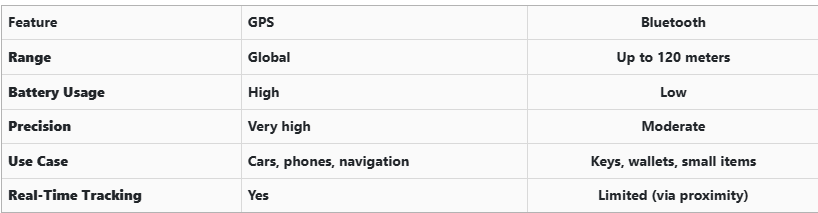
GPS provides global, real-time tracking with high precision, but it’s power-intensive and costly. Bluetooth, while more limited in range, is ideal for small items and short distances, offering a cost-effective solution for everyday use.


Global Perspectives on Key Tracking

Around the world, the adoption of key tracking technologies differs based on privacy laws, tech infrastructure, and consumer behavior. In Japan and South Korea, smart home and car integration are advanced, yet GPS-enabled keys are still not the norm. In many parts of Europe, particularly in countries like Germany, Bluetooth solutions are favored due to strict data privacy regulations. In contrast, the U.S. market has embraced personal tracking devices like Apple AirTag and Tile, making them increasingly common accessories. These differences highlight how technology adoption often reflects broader cultural and legal norms, as well as the balance between convenience and privacy.


Smart Tips to Keep Track of Your Keys

Whether your keys have advanced tech or not, you can take simple steps to avoid losing them. Attaching a Bluetooth tracker is a great first line of defense. Keeping your keys in a consistent, designated place at home reduces the chances of misplacement. Many tracking apps also offer “left behind” alerts, which notify you if you leave your keys behind when moving out of range. It's also smart to keep a spare key somewhere safe and consider going keyless if your next car allows it. Implementing a few of these habits can save you time, frustration, and the cost of replacing a lost key.


The Future of Key Tracking

While car keys may not have built-in GPS, technology continues to evolve with practical alternatives. Bluetooth trackers, supported by app alerts and community networks, already provide effective ways to find lost keys. As innovation progresses, we can expect even more seamless solutions, such as Ultra Wideband (UWB) technology and Internet of Things (IoT) integrations, to become mainstream.

As our tools become smarter, so must the way we use and manage them. With a little foresight and the right accessories, you'll never lose track of your keys again.

Related Posts

Pioneering Innovations in Cars: A Journey Through 150 Years

Pioneering Innovations in Cars: A Journey Through 150 Years

The automotive industry has undergone extraordinary changes in the last 150 years. From the earliest steam-powered engines to today’s smart, electric vehicles, cars have become symbols of innovation, convenience, and human progress. This article explores the most groundbreaking innovations that have defined car history, driving us into the future. 1. The Birth of the Car (Late 19th Century) The late 1800s marked the beginning of the automobile industry with the invention of the first cars. Key Milestone: Karl Benz’s creation of the Benz Patent-Motorwagen in 1885-86 was a game-changer. Impact: For the first time, individuals could travel independently without relying on horses or trains. This innovation laid the foundation for a new era of personal transportation. 2. The Rise of Mass Production (Early 20th Century) The early 1900s brought cars to the masses through assembly line production. Key Milestone: Henry Ford’s introduction of the moving assembly line in 1913 revolutionized car manufacturing. Impact: Cars became affordable and accessible to ordinary people, leading to the widespread adoption of automobiles. The Model T became a symbol of this industrial transformation. 3. The Era of Safety Innovations (1950s–1970s) As cars became common, safety innovations took center stage. Key Milestones: Seatbelts: Volvo introduced the modern three-point seatbelt in 1959. Airbags: Developed in the 1970s to provide additional protection during crashes. Impact: These innovations drastically reduced injuries and fatalities, making cars safer for all passengers. Safety continues to be a driving force behind car innovations today. 4. Fuel Efficiency and Environmental Consciousness (1980s–2000s) The late 20th century witnessed a shift towards eco-friendly car innovations. Key Milestones: Introduction of hybrid cars like the Toyota Prius (1997). Stricter emission regulations led to cleaner, more efficient engines. Impact: Consumers and manufacturers started prioritizing fuel efficiency and reducing environmental impact. This period laid the groundwork for the electric car revolution. 5. The Digital Revolution in Cars (2000s–2020s) Modern cars are no longer just machines; they’re smart devices on wheels. Key Innovations: GPS Navigation: Real-time navigation made travel simpler and safer. Infotainment Systems: Touchscreens and voice controls for entertainment and information. Driver Assistance: Features like parking sensors, adaptive cruise control, and collision alerts. Impact: Technology has transformed driving into a more connected, comfortable, and efficient experience. 6. Electric and Autonomous Cars (The Future is Here) The future of cars lies in sustainability and autonomy. Key Innovations: Electric Vehicles (EVs): Companies like Tesla popularized EVs, offering zero-emission driving. Autonomous Driving: Self-driving technology is advancing rapidly, promising safer and more efficient transportation. Impact: Electric and autonomous cars represent a monumental leap towards reducing environmental impact and redefining mobility. The next 50 years will likely see even bolder transformations. From steam engines to self-driving electric vehicles, the car has come a long way. Each era brought innovations that shaped not just how we travel but also how we live. As technology continues to evolve, the possibilities for cars seem endless. Whether it’s improving safety, reducing emissions, or offering autonomous capabilities, cars will remain at the heart of human progress.

Programming Your Car’s Keyless Remote: A Simple Guide for Every Car Owner

Programming Your Car’s Keyless Remote: A Simple Guide for Every Car Owner

When it comes to convenience, car keyless remotes have revolutionized the way we interact with our vehicles. No more fumbling with traditional keys or worrying about locking yourself out. With just a push of a button, you can lock, unlock, and even start your vehicle. But what happens when your keyless remote stops working, or when you need to program a new one? Here’s a simple guide to help you program your car's keyless remote, regardless of your vehicle's make or model. Understanding Keyless Remotes Before jumping into the programming process, it’s important to understand what a keyless remote is and how it works. Essentially, a keyless remote allows you to interact with your vehicle without needing to physically insert a key. Instead of using a traditional metal key, your car’s electronic system communicates wirelessly with the remote, allowing you to lock, unlock, and sometimes even start your vehicle, all with the push of a button. These remotes typically use a radio frequency to communicate with your car, sending a signal that’s encrypted for security. Most modern cars use transponder technology, which makes the system more secure and resistant to hacking or copying. This means that the remote must be properly programmed to your vehicle’s system to function correctly. When Do You Need to Program a Keyless Remote? There are several situations in which you might need to program your keyless remote: Replacing a Lost or Damaged Remote : If you’ve lost your keyless remote or it’s no longer functioning properly, you’ll need to get a replacement. This may require programming the new remote to sync with your vehicle. Adding a New Remote : If you’ve bought an additional keyless remote for your car (for a spouse, child, or other family member), you’ll need to program it so that it works with your vehicle. Battery Replacement : Sometimes, replacing the battery in your remote can cause the programming to reset, meaning you’ll need to reprogram the remote for it to work again. Changing or Resetting Vehicle Settings : Occasionally, vehicle settings or remotes can be reset or reprogrammed as part of regular maintenance, requiring you to program new or additional remotes. How to Program Your Car’s Keyless Remote Programming a keyless remote is easier than you might think, and in most cases, it can be done by following a few simple steps. The process varies slightly depending on the make and model of your car, but here’s a general overview of the steps involved: Get Your New or Replacement Remote : Ensure that your remote is compatible with your car’s system. If you're not sure, you can check with your car's manufacturer or an authorized dealership. Some remotes require specific codes to be programmed. Sit Inside Your Vehicle : For safety and security reasons, most cars require you to be inside the vehicle while programming the remote. Insert the Key in the Ignition : Insert the key into the ignition and turn it to the "ON" position without starting the engine. For cars with push-to-start systems, you may need to press the start button without pressing the brake pedal. Activate the Programming Mode : Depending on your car’s system, you’ll need to follow a sequence of steps to enter programming mode. This could involve turning the key on and off several times, or pressing certain buttons in a specific order. Refer to your vehicle’s manual for the exact steps, as the process can differ from one model to another. Program the Remote : Once your car is in programming mode, you’ll need to press the button on your keyless remote that you want to program. Usually, you’ll hear a chime or see the lights flash, indicating that the remote has been successfully programmed. Some cars may require you to press the button several times to ensure proper synchronization. Test the Remote : After programming, test the remote to make sure it works properly. Try locking and unlocking the doors or starting the engine. If everything works as expected, you’re done! Exit Programming Mode : To finish the process, simply turn off the ignition and remove the key. This should exit programming mode. If you have additional remotes to program, repeat the steps above for each one. What to Do if Programming Doesn’t Work While programming a keyless remote is usually a straightforward process, there are instances where things don’t go as planned. If your remote isn’t syncing with your car after following the steps, here are a few troubleshooting tips: Check the Battery : If the remote’s battery is dead or weak, it won’t transmit the signal to your car. Replace the battery and try programming again. Verify the Compatibility : Make sure that the remote is compatible with your vehicle’s make, model, and year. Some vehicles require special remotes that can only be programmed by the manufacturer or an authorized locksmith. Reset Your Vehicle’s System : In some cases, you might need to reset the car’s system to clear previous programming attempts. Check your owner’s manual or consult a professional for assistance. Consult a Professional : If you continue to have issues, it might be time to visit a dealership or a certified locksmith. These professionals have the tools and experience to program the remote correctly and ensure everything works seamlessly. Why Programming Your Keyless Remote Is Important Programming your keyless remote is a simple but important task that helps ensure your car’s security and convenience. By understanding how the process works and what to do if things go wrong, you’ll be able to troubleshoot and solve any issues quickly. Whether you’re replacing a lost remote or adding a new one to your collection, knowing how to program your remote saves time and money compared to visiting a dealership or locksmith. With the increased reliance on keyless remotes for unlocking and starting vehicles, it’s essential for every car owner to be familiar with this process. By keeping your remote in good working condition and knowing how to program it when necessary, you’ll enjoy a smoother, more efficient experience with your vehicle.

Key Lock Standards for Ultimate Vehicle Security

Key Lock Standards for Ultimate Vehicle Security

In today’s world, where vehicle security is more important than ever, understanding the various key lock standards is crucial for protecting your car against theft. Whether you own a luxury vehicle, a family car, or a fleet of commercial vehicles, knowing how different key locking systems work and what standards are in place can ensure that your vehicle remains secure. In this article, we’ll explore the key lock standards that every car owner should know, what makes a secure system, and how they help protect your car from potential threats. Understanding Key Lock Standards Key lock systems play an essential role in vehicle security. Modern car locks are not just about preventing unauthorized entry but also about preventing the car from being started or stolen. A well-designed key lock system integrates advanced technologies that enhance the protection of your vehicle. There are several key lock standards in the automotive industry, each with its specific focus on improving security and minimizing risks. These standards include traditional mechanical key locks, transponder keys, keyless entry systems, and smart keys. Mechanical Key Locks: The Traditional Standard Mechanical key locks are the most basic and traditional form of car locking systems. For many years, these locks were the standard, and they are still widely used today, particularly in older vehicles. A mechanical key lock involves a physical key that is inserted into the door or ignition switch to gain access to the car or start the engine. While simple, mechanical locks are not as secure as newer systems. Over time, thieves have developed methods to bypass or pick mechanical locks, making them less effective for modern vehicle security. However, many vehicles still rely on these locks, and they remain a crucial part of the overall security system. Transponder Keys: A Step Up in Security In response to the vulnerabilities of mechanical key locks, the automotive industry introduced transponder keys in the 1990s. A transponder key is equipped with a microchip embedded inside the key fob. When the key is inserted into the ignition, the microchip sends a signal to the vehicle's engine control unit (ECU), verifying that the key is legitimate and authorized to start the car. Transponder keys significantly enhance vehicle security by making it much more difficult for thieves to clone the key. Without the proper code, the car won’t start, even if the thief has an exact replica of the physical key. This added layer of security has made transponder keys the industry standard in many vehicles. Keyless Entry Systems: Convenience Meets Security Keyless entry systems, also known as remote entry systems, are now common in modern vehicles. These systems allow you to unlock or lock your car without inserting a key. Instead, the car communicates wirelessly with a key fob, sending a unique signal that grants access. The key fob typically includes buttons to lock or unlock the doors and sometimes to start the engine remotely. The convenience of keyless entry is undeniable, but it also introduces certain vulnerabilities. Keyless entry systems rely on wireless signals, which can sometimes be intercepted or duplicated by thieves using sophisticated equipment. To counteract these risks, manufacturers have developed enhanced encryption protocols and rolling codes that change each time the system is used, making it more challenging to hack into the system. Smart Keys: The Next Level of Vehicle Security Smart keys represent the latest evolution in vehicle security. These keys go beyond the capabilities of traditional key fobs and keyless entry systems by offering features like proximity sensing and push-to-start functionality. Smart keys allow you to unlock and start your vehicle without physically touching the key fob. The system detects when the key fob is near the car and grants access automatically. Smart keys are highly secure, as they use advanced encryption methods and rolling codes to protect the vehicle from unauthorized access. In addition, the vehicle can be programmed to disable the engine if an unauthorized key is detected, providing an additional layer of security. International Security Standards for Vehicle Locks To ensure the security of vehicles globally, several international standards have been developed to guide manufacturers in creating secure key lock systems. Some of the most important standards include: ISO 9001 : This standard focuses on the quality management of products, including vehicle locking systems. It ensures that manufacturers meet specific quality control guidelines, which helps ensure the reliability and security of key lock systems. ISO 14298 : This is a more specific standard related to secure key management for vehicles, focusing on preventing unauthorized duplication and tampering with vehicle keys. EC Regulation 1303/2014 : This European regulation outlines the technical specifications for car security systems, including locking systems. It provides a framework to protect vehicles against unauthorized access, theft, and other security risks. Adhering to these standards ensures that vehicle manufacturers meet global security requirements and offer their customers reliable and effective security systems. Why Secure Key Locks Are Essential for Vehicle Protection With increasing car theft rates and sophisticated methods used by criminals, investing in a secure key lock system is no longer optional—it’s essential. A secure key lock system prevents unauthorized access to the vehicle and ensures that only legitimate owners or authorized individuals can use the vehicle. Each level of security, from mechanical locks to smart keys, offers a different degree of protection, and modern vehicles often incorporate multiple systems to strengthen security. The combination of these advanced technologies, alongside international security standards, provides vehicle owners with peace of mind knowing their vehicle is well-protected. Key lock standards have come a long way from the traditional mechanical locks of the past. Today’s vehicles rely on advanced technologies like transponder keys, keyless entry systems, and smart keys to provide higher levels of security. These systems are designed to make it as difficult as possible for thieves to bypass them, giving car owners confidence that their vehicles are protected. By understanding the different key lock standards and their capabilities, you can make informed decisions about your vehicle’s security and take steps to ensure that your car remains safe from theft. Whether you’re driving a new model or an older vehicle, upgrading or maintaining your key lock system can help safeguard your investment and provide peace of mind on the road.

How to Install a Hydrogel Navigation Screen Protector

How to Install a Hydrogel Navigation Screen Protector

Nowadays car interiors rely heavily on touchscreens. Whether you drive a BMW 3 Series , VW Golf , Audi A4 , Mercedes A-Class , Peugeot 3008 , or Skoda Octavia , your infotainment display is the centre of navigation, settings, entertainment and safety features. But these screens are also fragile—prone to scratches , fingerprints , micro-abrasions , and glare . A hydrogel navigation screen protector is one of the best ways to protect your car touchscreen without affecting clarity or touch sensitivity. This guide shows you exactly how to install a hydrogel protector , step by step, with expert tips, mistakes to avoid, and a few insider tricks that most guides miss. What Is a Hydrogel Screen Protector? Hydrogel is a soft, self-healing, flexible material used widely in phone protection and now increasingly in automotive displays. Unlike tempered glass, it adapts to curved edges and eliminates small bubbles over time. For more technical background, you can read the scientific definition on hydrogels Hydrogel is ideal for infotainment screen protection because it: Reduces glare Absorbs micro-scratches Maintains full touch sensitivity Adapts to curved and angled car screens Self-heals small marks over 24–48 hours It’s especially useful for European cars where screens are large and glossy, such as: Mercedes MBUX screens (A-Class, C-Class, GLC) Volkswagen MIB systems (Golf, Passat, Tiguan) BMW iDrive displays (3 Series, X1, X3) Audi MMI touchscreens (A4, A3, Q5) Peugeot i-Cockpit models Renault Clio, Captur, Megane Skoda Octavia, Superb, Scala Curious which specific models benefit the most from hydrogel protection? Check out our full guide on which cars benefit most from hydrogel navigation protection . Before You Start: Essential Preparation Installing a hydrogel protector takes only a few minutes, but the preparation stage determines whether the final result looks factory-perfect . You Will Need Hydrogel screen protector Microfiber cloth Screen-cleaning wipe (wet & dry) Dust-removal sticker (optional but recommended) Small squeegee / card Choose the Right Environment Install the protector in: A dust-free space (car parked indoors is ideal) Soft lighting (so dust particles are visible) A still environment (no wind, no blowing air) Avoid doing it outside or while standing near open windows. Step-by-Step: How to Install a Hydrogel Navigation Screen Protector 1. Clean the Navigation Screen Thoroughly Use a wet wipe first, then a dry microfiber cloth. Focus on: Corners Edges Around the frame Any oily fingerprints Tip: Turn the screen off to see dust more easily. 2. Remove All Dust Particles Even one small dust speck can create a permanent bubble. Use: Dust-removal stickers A clean microfiber cloth Hold the screen at an angle and look under the light. If perfectionism matters anywhere, it’s here. 3. Peel the First Protective Layer Most hydrogel protectors have two layers . Peel Layer 1 halfway and align the protector with: Left and right edges Upper frame Any curved edges Do not peel it completely yet. 4. Align and Apply the Protector Once aligned: Press the top centre gently Slowly drag your finger downward Peel off the rest of Layer 1 as you go The film will naturally stick without much force. 5. Use the Squeegee to Push Out Air Work from centre outward , using firm but controlled pressure. Hydrogel is self-healing , so small micro-bubbles usually disappear within 24–48 hours . 6. Remove the Final Top Layer After application: Peel Layer 2 from one corner Pull slowly to avoid lifting the protector This reveals a glossy, clear surface below. 7. Allow 24 Hours for Full Adhesion Do not touch the screen too much during this period. Avoid: Heat exposure Cleaning sprays Aggressive pressing Hydrogel needs time to “settle” and self-heal. Common Mistakes to Avoid Even a perfect protector can be ruined by simple errors. Installing in a dusty environment Fibres, dust and hair easily get trapped. Touching the sticky side This leaves permanent marks. Rushing the alignment Hydrogel is flexible but not stretch-proof. Cleaning with alcohol after installation This can damage the outer coating. Installing on a hot screen Heat weakens adhesion and causes micro-bubbles. For a complete walkthrough , see our guide on how to protect your car’s navigation screen . Why Hydrogel Is Better Than Tempered Glass for Car Screens Tempered glass works well for smartphones—but not for car navigation screens. Hydrogel performs better because: It bends and adapts to curved displays It doesn’t create raised edges It avoids touchscreen sensitivity issues It self-heals micro-abrasions It provides better Anti-Glare performance If you want to see more in depth guide on why hydrogel protectors are better check out our guide on Hydrogel vs Tempered Glass Navigation Protectors Comparison FAQs 1. Does a hydrogel protector reduce screen sensitivity No. Hydrogel maintains full touch responsiveness because the material is soft and pressure-adaptive. 2. Can I reuse a hydrogel screen protector? No. Once removed, it cannot be reinstalled cleanly. 3. How long do micro-bubbles take to disappear? Usually 24–48 hours. Stubborn ones may take up to 72 hours if the screen is curved. 4. Will the protector affect brightness or clarity? High-quality hydrogel preserves original screen clarity. Matte versions reduce glare but may slightly soften reflections. 5. Is hydrogel safe for anti-reflective or coated screens? Yes. Hydrogel adhesive is gentle and does not damage coatings. If you want premium hydrogel protectors for BMW, Audi, Mercedes, VW, Peugeot, Renault, Skoda and more, explore our full selection today. Visit our shop at mr-key.com Related Guides Which cars benefit most from hydrogel navigation protection How to Protect Your Car’s Navigation Screen from Scratches,Glare & Fingerprints Hydrogel vs Tempered Glass Navigation Protectors Comparison

Chat with us