
Post Name

Losing or breaking your car key can feel like a full-blown emergency. Whether your key won’t turn in the ignition, your remote suddenly stops responding, or you’ve misplaced the whole thing entirely, one thing is certain: you need a replacement—and fast.

While most people assume that replacing a car key requires a trip to the dealership and a hefty bill, that’s no longer the only option. In fact, depending on your situation and car model, you may be able to handle it yourself with minimal cost and effort. Here’s what you need to know.

Why Car Keys Are More Complicated Than You Think

Gone are the days when a spare key meant heading to your local hardware store and getting a basic metal key cut in minutes. Today’s car keys are advanced devices that often include transponder chips, remote locking systems, and built-in immobilizers. Some even come as proximity fobs that allow push-button starting without ever taking the key out of your pocket.

Because of this, replacing a lost or damaged key isn’t just about cutting a new blade—it often involves electronic programming and matching frequencies to your specific vehicle.

Dealer, Locksmith, or DIY? Your Replacement Options

When it comes to replacing a car key, you typically have three choices:

Dealership: Offers official replacements, but often at the highest cost.

Auto Locksmith: Generally more affordable and mobile, but availability varies.

DIY: Ideal for shell replacements, battery swaps, and some remote keys—if you already have a functioning spare key or understand your model's programming process.

If you’ve damaged your key shell or the battery has died, DIY is a surprisingly good option—especially if you’re comfortable working with small components.

The Rise of DIY: Save Time, Learn Something, and Avoid Dealer Fees

More and more drivers are discovering how easy it can be to fix their own car keys. Whether it’s replacing a worn key case, changing a battery, or even installing electronics into a new shell, DIY key repair is growing in popularity.

To support that trend, we’ve created a full library of free video tutorials showing how to disassemble and reassemble key fobs for dozens of car models—from BMW and Audi to Peugeot, Fiat, and Toyota. These easy-to-follow guides show exactly how to change a key battery, switch a shell, or upgrade to a new case in minutes.

👉 Check out the full tutorial playlist on our YouTube channel: Mr-Key DIY Tutorials

Step-by-Step: Replacing a Battery or Shell at Home

Let’s say your remote still works but the case is cracked or the buttons are worn down. In that case, replacing just the outer shell is often all you need to do. Here’s a quick look at what that might involve:

Carefully open the old key shell using a flat screwdriver.

Remove the internal electronics and transponder chip.

Insert them into your new replacement shell.

Reinstall the battery or replace it with a fresh one (typically a CR2032 or CR1620).

Snap everything together and test the key.

If you already have a functioning key and just want a backup, some car models even allow you to program a new key yourself. Always check your owner’s manual or look up on-board programming methods by vehicle brand.

Choosing the Right Key or Shell

Not all replacement keys are created equal. Here’s what to consider:

Chip Type: Most modern cars use a transponder chip (like ID46, PCF7946, etc.). Make sure your new key has the correct one.

Blade Profile: HU83, VA2, TOY43—these are just a few examples. Match your key blade exactly.

Frequency: Remote keys operate on specific frequencies (433MHz and 868MHz are most common in Europe).

You can find affordable, compatible replacement shells and key fobs at reputable online stores like mr-key.com.

When to Call a Pro

There are still some situations where professional help is the smarter option:

You’ve lost all copies of your key.

Your car requires encrypted key coding with dealer-only tools.

Your key has a broken or unresponsive transponder chip.

In those cases, a locksmith or dealership may be necessary.

Don’t Overpay—Just Be Prepared

Car key replacement doesn’t have to be expensive, stressful, or time-consuming. In many cases, you can replace the shell, battery, or even the entire fob yourself—especially with a little guidance. Our Mr-Key YouTube channel is here to walk you through it.

Whether you’re fixing a key today or preparing for the future, knowing your options puts you in control. And sometimes, the right tutorial is all it takes to save the day (and a lot of money).
Related Posts

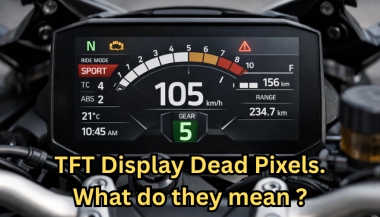
Dead Pixels on a Motorcycle TFT Display: What They Mean & When Replacement Is Inevitable

Dead Pixels on a Motorcycle TFT Display: What They Mean & When Replacement Is Inevitable

Dead pixels on a motorcycle TFT display are rarely “just cosmetic”. On modern bikes, the TFT dashboard is a sealed, laminated electronic unit exposed to sun, heat, vibration, rain, and pressure washing . When pixels fail, it often signals structural damage inside the display , not a surface defect. This article explains what TFT display dead pixels really mean, why they appear, how to diagnose them correctly, and the point where replacement becomes unavoidable . What riders mean by “dead pixels” — and why it matters The term motorcycle display dead pixels is used loosely. In practice, three very different faults exist. True dead pixels (permanently black) A true dead pixel is a pixel transistor that no longer functions. It stays black on all backgrounds and during startup screens. This is a hardware failure inside the LCD matrix . It does not self-heal. Stuck pixels (fixed bright color) A stuck pixel remains red, green, blue, or white. On phones or TVs, this can sometimes be intermittent. On motorcycle TFTs, stuck pixels are often caused by heat stress or internal pressure and frequently progress into permanent failure. Lines or blocks of dead pixels A vertical or horizontal line of missing pixels is not a pixel issue. It indicates row or column driver failure inside the panel — a structural defect of the display module. Once this appears, replacement is usually inevitable. Why TFT dead pixels appear on motorcycles Dead pixels on a dashboard are rarely random. They follow consistent mechanical and environmental causes. Heat and UV exposure Motorcycle TFTs sit in direct sunlight. Daily heat cycles expand and contract the laminated layers inside the display. Over time, this stresses internal bonds and pixel drivers. A single failed pixel can become a cluster. Micro-impact and pressure A light impact that doesn’t crack the glass can still damage the internal LCD stack. This is common on naked bikes and adventure models where the display is more exposed. Moisture ingress and condensation Condensation inside a TFT display is a critical warning sign. It means the factory seal has been compromised. Moisture accelerates corrosion on connectors and display drivers, often leading to dead pixels followed by total blackout. Electrical stress Voltage fluctuations or grounding issues can contribute, but if the pixel defect appears in the same physical location across reboots , the issue is almost always panel-level, not wiring. Brand examples: how this appears in real motorcycles Dead pixel reports follow similar patterns across brands. BMW TFT clusters: pixel lines or dark zones often appear after heat exposure or condensation events. Clusters are fully integrated and typically replaced as a unit. Yamaha TFT dashboards: isolated dead pixels may appear first, followed by spreading rows on models parked outdoors long-term. Kawasaki TFT displays: line failures are commonly reported after pressure washing or heavy rain use. Honda TFT dashboards: less frequent, but once pixel clusters appear, dealers usually recommend full replacement. Across all brands, panel repair is not part of standard dealer service . Fast diagnosis: how to tell if the damage is permanent You can determine the seriousness in minutes. Check startup screens If the pixel defect appears during the boot logo or splash screen, it is hardware, not software. Test multiple backgrounds Switch themes or display modes: Always black → dead pixel Always bright or colored → stuck pixel Straight line → driver failure Look for progression A defect that grows over weeks is not stable. Progression is a replacement signal. Inspect for condensation Any fogging or haze inside the screen means moisture ingress. Pixel failure combined with condensation almost always worsens. When TFT display replacement is inevitable Replacement is not about annoyance. It’s about predictable failure . Replacement becomes inevitable when any of the following occur: A row or column of dead pixels appears Dead pixels spread over time Dead pixels appear together with condensation The defect blocks speed, warnings, or riding data The bike relies on the TFT for ride modes or system alerts At this stage, the TFT is no longer a reliable instrument cluster. Why TFT displays are rarely repaired A motorcycle TFT is not a standalone screen. It is: Laminated glass + LCD + polarizer Sealed against weather Electronically paired to the motorcycle Separating and rebuilding this stack requires specialized industrial equipment. As a result, OEMs replace the entire unit . Used clusters introduce risks: coding issues, immobilizer pairing, mileage discrepancies, and unknown moisture history. Cost reality in Europe In Europe, OEM motorcycle TFT replacement typically ranges from: €600–€1,200 for mid-range models €1,500–€2,500+ for premium or integrated systems This includes coding and calibration, not just the display itself. That’s why a small dashboard pixel issue deserves early attention. Can dead pixels be prevented? You cannot prevent internal electronic aging. You can reduce the most common triggers: Surface scratches that weaken seals Micro-impacts UV exposure Moisture pooling around edges A properly fitted screen protector does not fix dead pixels, but it reduces the external damage pathways that often lead to full TFT failure. If you want to reduce the risk of turning a small pixel defect into a four-figure repair, you can protect the display surface early — explore motorcycle TFT screen protectors at mr-key.com FAQ: TFT display dead pixels Are dead pixels dangerous? They are not dangerous by themselves, but they often indicate deeper display degradation. Can software updates fix dead pixels? No. If the defect appears in the same physical location during startup, it is hardware. Will one dead pixel spread? Sometimes. Spread is common when heat or moisture is involved. Is condensation inside the TFT serious? Yes. Condensation indicates seal failure and greatly increases the risk of progressive damage. Is replacement always required? Not for a single stable pixel. Replacement becomes unavoidable with progression, lines, or moisture involvement.

DIY Guide: How to Program or Sync Your Car Key Fob at Home

DIY Guide: How to Program or Sync Your Car Key Fob at Home

Programming a car key fob doesn’t always require a trip to the dealership or an expensive diagnostic tool. In many cases, you can program or resync your key fob at home—saving both time and money. Whether you’ve just replaced the battery, changed the shell, or purchased a new key fob entirely, this guide will walk you through the basics of syncing it with your vehicle. Why Program Your Key Fob? Key fobs are integral to modern car access and ignition systems. When you replace or reset your key, the vehicle and fob must reestablish communication. Without syncing, features like remote locking, trunk release, or even engine start may stop functioning. This synchronization process ensures your key fob and vehicle are electronically paired and communicate securely. Without it, even a new battery or case won’t make your remote functional again. Can You Program It Yourself? The answer depends largely on the make and model of your vehicle. Older vehicles with basic remote key fobs often support manual onboard programming that doesn’t require specialized equipment. These procedures typically involve inserting the key into the ignition, turning it in a specific sequence, and pressing buttons on the fob within a certain time frame. It’s a simple process, and many car owners are surprised at how effective these methods can be. In contrast, modern vehicles with smart keys or keyless entry systems usually require advanced programming tools. These keys often contain transponders that must be linked to the car’s electronic control unit, a task typically performed by dealerships or professional auto locksmiths. Still, if you own a basic Opel, Peugeot, or Citroën model, there’s a good chance you can complete the task yourself at home. How Onboard Programming Works If your vehicle supports onboard programming, the steps are often straightforward. While the exact process may vary depending on the model, the general method includes entering the vehicle, turning the ignition on and off several times, and pressing a button on the remote to complete pairing. You may receive confirmation through a dashboard light flash or an audible chime, indicating that the key fob is now synced. Take note, though: some vehicles require all remotes to be programmed in the same session, so if you have multiple key fobs, have them all with you before starting. If the procedure doesn’t work, don’t be discouraged—it may simply mean your car requires a more advanced programming approach. When Should You Call a Professional? Not all keys can be programmed at home. Smart keys, proximity sensors, and certain immobilizer systems are designed with enhanced security that requires proprietary equipment to program. If your vehicle doesn’t respond to onboard programming or your key fob is completely unresponsive, it’s best to seek assistance from a certified locksmith or dealership. Trying to force the programming process can sometimes cause more harm than good. If you’re unsure, always verify the requirements in your car’s manual or consult a trusted technician. Essential Tips for Success To avoid frustration, start with the basics: always use a fresh battery from a trusted brand such as Panasonic CR2032 . Clean the internal contacts and handle the circuit board carefully to prevent static damage. Don’t rush—take the time to follow steps precisely and test functionality before fully reassembling the key. When replacing the key shell, make sure it's compatible with your exact model and that the key blade, transponder chip, and electronics are properly seated. With a bit of patience and the right information, programming your car key fob at home can be a practical and satisfying DIY fix. For basic vehicles, it’s a task you can handle in minutes—saving the cost and hassle of dealership appointments. Understanding your vehicle’s requirements and using reliable parts makes all the difference. Whether you're refreshing an old key with a new case or pairing a new remote to your car, the ability to program it yourself puts control back in your hands. For a full selection of batteries, shells, and compatible accessories, visit mr-key.com .

The Ultimate Checklist for Maintaining Your Car's Electronic Systems

The Ultimate Checklist for Maintaining Your Car's Electronic Systems

Why Regular Car Maintenance Matters Taking care of your car is more than just keeping it clean; it's about ensuring it stays reliable, safe, and efficient. When you stick to a regular maintenance schedule, you save yourself from costly repairs down the road and improve your vehicle’s lifespan. Whether you drive daily or occasionally, routine maintenance is something every car owner should prioritize. Here’s a simple breakdown of what you should check and when, so you can keep your car in top shape without breaking the bank. The Basics: Monthly Car Maintenance Checklist Think of this checklist as your car’s health routine. Performing these quick checks every month will help catch minor issues before they turn into big (and expensive) problems: Check the Oil Level : Pull out the dipstick, wipe it clean, reinsert, and check the level. Low oil can damage your engine over time. Inspect the Tire Pressure : Use a pressure gauge to ensure your tires are inflated to the recommended PSI. Under-inflated tires wear faster and decrease fuel efficiency. Top Off Windshield Washer Fluid : Keeping your windshield clean improves visibility and safety. Look for Visible Leaks : Check under your car for any oil, coolant, or fluid leaks. If you spot something unusual, it’s time to consult a professional. Test the Lights : Make sure all your lights—headlights, brake lights, and signals—are working properly. These tasks take less than 10 minutes and can help you avoid unexpected surprises on the road. Every 3,000–5,000 Miles: Oil Changes and Inspections Oil is your engine's lifeblood. Over time, oil breaks down, causing it to lose its ability to lubricate and protect your engine. Changing the oil regularly—about every 3,000 to 5,000 miles, depending on your vehicle—is crucial. What to do: Replace the oil filter alongside the oil to ensure clean circulation. Inspect the belts, hoses, and filters for any cracks or wear. Rotate your tires to promote even tread wear and extend their lifespan. Following this schedule will improve engine performance and fuel efficiency while reducing wear and tear. 6-Month Maintenance: A Deeper Look Every six months (or around 6,000–7,500 miles), it’s time to give your car a more thorough inspection. This ensures that everything continues to operate as it should: Check the Battery : Look for corrosion on the terminals and ensure the battery has enough charge. A weak battery can leave you stranded. Inspect Brake Pads and Rotors : Squealing or grinding noises may indicate it’s time for new brake pads. Safe brakes are non-negotiable. Replace Wiper Blades : Worn-out wipers reduce visibility during rain or snow. Swap them out for a clear view. Check Fluid Levels : Inspect coolant, transmission fluid, and brake fluid. Top them off if necessary or replace them according to your vehicle’s manual. Annual Car Maintenance: Keep It Running Like New Your annual maintenance routine focuses on long-term performance and reliability. Here’s what to prioritize: Replace the Air Filter : A clean air filter improves engine efficiency and fuel economy. Examine the Suspension and Alignment : If your car pulls to one side or the ride feels bumpy, it’s time to get your alignment and suspension checked. Flush and Replace Fluids : This includes coolant, brake fluid, and transmission fluid. Over time, these break down and need to be replaced to prevent damage. Inspect the Exhaust System : Check for leaks, damage, or unusual noises. A faulty exhaust can impact fuel efficiency and safety. Annual checkups ensure your car remains reliable for years to come, saving you money on unexpected repairs. Pro Tip: Pay Attention to Your Car’s Warning Signs Your car has built-in systems to tell you when something’s wrong. Ignoring these warning signs could lead to bigger issues down the road: Check Engine Light : Don’t dismiss this. It’s your car’s way of saying it needs immediate attention. Strange Noises : Grinding, squealing, or clunking sounds are often red flags for underlying problems. Vibrations or Pulling : This could signal alignment issues, tire imbalances, or suspension problems. If you notice any of these, act quickly. Addressing small concerns early can prevent expensive breakdowns later. Why Routine Car Maintenance Saves You Money Regular maintenance may seem like an extra expense, but it’s far more affordable than major repairs. For example: A routine oil change costs far less than replacing a damaged engine. Keeping tires properly inflated extends their life and improves fuel efficiency. Replacing brake pads is much cheaper than repairing damaged rotors or calipers. By investing a little time and effort into routine checks, you avoid costly breakdowns and ensure your car stays reliable.

How to Easily Find Your Key Code for a Hassle-Free Replacement

How to Easily Find Your Key Code for a Hassle-Free Replacement

When it comes to replacing a car key , knowing your key code is essential. This code allows you to obtain a precise duplicate, ensuring that your new key fits seamlessly without any issues. Whether you've lost your key, broken it, or simply need a spare, understanding where to locate this code can make the replacement process faster and more affordable. In this guide, we’ll walk you through what a key code is, where to find it, and tips to ensure a smooth replacement process. Why Is the Key Code Important? A key code is more than just a number; it's a unique identifier that tells a key cutter exactly how to replicate your key. Without it, the process can be longer, more complicated, and potentially costly if the key doesn’t match your vehicle’s lock. Ensures a Perfect Fit : The key code guarantees that your new key will be cut to match your original one precisely. Saves Time and Money : With the correct code, you can avoid trial and error, reducing the risk of needing multiple key replacements. Improves Security : Knowing the exact specifications of your key can prevent unauthorized duplicates. Types of Key Codes Key codes come in different types depending on the key and vehicle model. Here are the main types: Direct Code : Often a 4 to 8-digit code, this code can be entered directly into a key-cutting machine for accurate replication. Indirect Code : This type of code requires a conversion chart to find the direct key code. Though indirect codes aren’t as common, they may still appear on some older models. Blind Code : Sometimes, the code may not be directly readable or is hidden in the key's design. These require decoding using a specialized tool or software. Understanding which type of code you have can make the process smoother when you’re ready to replace your key. Common Locations for Key Codes Finding the key code isn’t always straightforward, but with a few tips, you can track it down more easily. Here are the most common places to check: 1. Vehicle Manual Your vehicle’s manual often contains useful information, including the key code. It’s usually found in the section detailing the vehicle’s locking system. The manual may also provide guidance on other important security features, so it’s a great place to start. Tip : If you can’t find it in the manual, try looking in the index under “keys” or “security.” 2. Key Fob or Key Itself For some keys, the code is printed directly on the key or key fob. Look closely at the metal part of the key or the plastic casing for a small series of numbers. This code may be faint, so you may need a magnifying glass or good lighting. Tip : Be cautious when handling the key to avoid damaging the code. A worn key can sometimes obscure the code, so check carefully. 3. Vehicle Registration and Documents Some vehicle documents, especially those you receive when you first purchase the car, may include the key code. Check any paperwork related to the purchase, including sales documents, registration, and the car title. Tip : Keep these documents safe as they contain essential information for ownership and replacement needs. 4. Original Key Packaging If you have access to the original packaging of the key, such as a bag or box, the key code is sometimes printed there. This is especially common if the key came from a dealer or as part of a new car purchase. Tip : Always save key packaging, as it can provide helpful information for future reference. 5. Contacting the Dealership If you’re unable to locate the code yourself, you can reach out to the dealership where you purchased the vehicle. Dealerships often keep records of key codes, especially if the vehicle is still under warranty. Some may provide the code for free, while others might charge a fee. Tip : Have your vehicle identification number (VIN) handy when contacting the dealership, as it can help verify your ownership. Tips for Safe Key Code Storage Once you have located your key code, it’s important to keep it safe to make future replacements easier. Here are some tips: Store Digitally : Save the code in a secure document on your phone or computer. You can even use a password-protected note or cloud storage. Keep a Physical Copy : Write down the code and store it with other important vehicle documents, like your insurance and registration. Avoid Sharing the Code : Treat the key code like a password; only share it with trusted professionals when necessary for replacements. What to Do if You Can’t Find the Code If your search for the code has been unsuccessful, don’t worry—there are still options. Here’s what to do: Contact a Professional : Some professionals can create a new key by decoding the lock without needing the original key code. This is particularly helpful if you’ve lost all copies of your key. Request Assistance from the Manufacturer : In some cases, you can contact the vehicle’s manufacturer for support. They may ask for documentation proving ownership and might provide the code directly or guide you through the next steps. Benefits of Knowing Your Key Code Having the key code at your fingertips offers several advantages, whether you need a quick replacement or simply want peace of mind. Saves Time in Emergencies : If you lose your key unexpectedly, having the code handy allows for faster replacements. Lower Replacement Costs : With the exact code, key makers can avoid unnecessary recutting, saving you money. Simplifies Multiple Key Requests : If you need multiple copies, the code makes it easy to obtain several accurate replacements without errors. Locating and safely storing your key code can simplify the replacement process significantly. By knowing exactly where to look for the code and keeping it secure, you can avoid potential stress and save both time and money when the need for a replacement arises. Taking these steps now ensures that, should you ever need a new key, the process will be as smooth and efficient as possible.

Chat with us