Post Name

Losing or breaking your car key can feel like a full-blown emergency. Whether your key won’t turn in the ignition, your remote suddenly stops responding, or you’ve misplaced the whole thing entirely, one thing is certain: you need a replacement—and fast.

While most people assume that replacing a car key requires a trip to the dealership and a hefty bill, that’s no longer the only option. In fact, depending on your situation and car model, you may be able to handle it yourself with minimal cost and effort. Here’s what you need to know.

Why Car Keys Are More Complicated Than You Think

Gone are the days when a spare key meant heading to your local hardware store and getting a basic metal key cut in minutes. Today’s car keys are advanced devices that often include transponder chips, remote locking systems, and built-in immobilizers. Some even come as proximity fobs that allow push-button starting without ever taking the key out of your pocket.

Because of this, replacing a lost or damaged key isn’t just about cutting a new blade—it often involves electronic programming and matching frequencies to your specific vehicle.

Dealer, Locksmith, or DIY? Your Replacement Options

When it comes to replacing a car key, you typically have three choices:

Dealership: Offers official replacements, but often at the highest cost.

Auto Locksmith: Generally more affordable and mobile, but availability varies.

DIY: Ideal for shell replacements, battery swaps, and some remote keys—if you already have a functioning spare key or understand your model's programming process.

If you’ve damaged your key shell or the battery has died, DIY is a surprisingly good option—especially if you’re comfortable working with small components.

The Rise of DIY: Save Time, Learn Something, and Avoid Dealer Fees

More and more drivers are discovering how easy it can be to fix their own car keys. Whether it’s replacing a worn key case, changing a battery, or even installing electronics into a new shell, DIY key repair is growing in popularity.

To support that trend, we’ve created a full library of free video tutorials showing how to disassemble and reassemble key fobs for dozens of car models—from BMW and Audi to Peugeot, Fiat, and Toyota. These easy-to-follow guides show exactly how to change a key battery, switch a shell, or upgrade to a new case in minutes.

👉 Check out the full tutorial playlist on our YouTube channel: Mr-Key DIY Tutorials

Step-by-Step: Replacing a Battery or Shell at Home

Let’s say your remote still works but the case is cracked or the buttons are worn down. In that case, replacing just the outer shell is often all you need to do. Here’s a quick look at what that might involve:

Carefully open the old key shell using a flat screwdriver.

Remove the internal electronics and transponder chip.

Insert them into your new replacement shell.

Reinstall the battery or replace it with a fresh one (typically a CR2032 or CR1620).

Snap everything together and test the key.

If you already have a functioning key and just want a backup, some car models even allow you to program a new key yourself. Always check your owner’s manual or look up on-board programming methods by vehicle brand.

Choosing the Right Key or Shell

Not all replacement keys are created equal. Here’s what to consider:

Chip Type: Most modern cars use a transponder chip (like ID46, PCF7946, etc.). Make sure your new key has the correct one.

Blade Profile: HU83, VA2, TOY43—these are just a few examples. Match your key blade exactly.

Frequency: Remote keys operate on specific frequencies (433MHz and 868MHz are most common in Europe).

You can find affordable, compatible replacement shells and key fobs at reputable online stores like mr-key.com.

When to Call a Pro

There are still some situations where professional help is the smarter option:

You’ve lost all copies of your key.

Your car requires encrypted key coding with dealer-only tools.

Your key has a broken or unresponsive transponder chip.

In those cases, a locksmith or dealership may be necessary.

Don’t Overpay—Just Be Prepared

Car key replacement doesn’t have to be expensive, stressful, or time-consuming. In many cases, you can replace the shell, battery, or even the entire fob yourself—especially with a little guidance. Our Mr-Key YouTube channel is here to walk you through it.

Whether you’re fixing a key today or preparing for the future, knowing your options puts you in control. And sometimes, the right tutorial is all it takes to save the day (and a lot of money).

Related Posts

5 Reasons Why Your Car Remote Isn’t Working and How to Fix It

5 Reasons Why Your Car Remote Isn’t Working and How to Fix It

In an age where convenience is king, keyless entry systems have revolutionized how we interact with our vehicles. Gone are the days of fumbling for physical keys—today’s drivers rely heavily on the sleek, compact functionality of car remotes. However, what happens when this modern convenience fails you? Few things are more frustrating than standing beside your car, repeatedly pressing your remote, only to be met with silence. Understanding why your car remote isn’t working can save you from unnecessary panic, costly repairs, and inconvenient lockouts. This comprehensive guide explores the five most common reasons your remote may malfunction and offers in-depth, actionable solutions to get you back on the road quickly. 1. Battery Depletion: The Silent Saboteur The number one reason for car remote failure is, unsurprisingly, a dead or depleted battery. Though seemingly small, the battery inside your remote plays a crucial role in its operation. Most key fobs use lithium coin batteries (commonly CR2025 or CR2032), known for their durability and longevity. But even these reliable power sources don’t last forever. Factors contributing to faster battery depletion include: Frequent use (especially for remote start and lock/unlock functions) Extreme temperature exposure (both heat and cold reduce battery life) Long periods of inactivity (leading to gradual discharge) Solution: Replacing your key fob battery is a simple, cost-effective fix. Always consult your vehicle’s manual to identify the correct battery type. When replacing, ensure the new battery is seated correctly to avoid poor contact. Proactively changing the battery every 1-2 years, even before it’s fully drained, can prevent sudden failures. 2. Signal Interference: The Invisible Obstacle Key fobs communicate with your vehicle via radio frequencies. However, various external factors can interfere with this communication. Living in urban environments, parking in underground garages, or being near large electronic devices (such as cell towers, Wi-Fi routers, or even other vehicles) can disrupt the signal between your remote and car. Solution: If you suspect signal interference: Move closer to your vehicle or try unlocking it from a different angle. Step away from potential sources of interference like electronic devices or heavy machinery. Hold the key fob higher or away from your body to improve signal transmission. While occasional interference is common, if the problem persists across multiple locations, consider resetting or reprogramming your fob. 3. Desynchronization: Losing Connection Sometimes, your key fob may lose synchronization with your vehicle’s receiver—especially after events like a battery change or extended periods of non-use. When this happens, the fob and vehicle are essentially "speaking different languages," resulting in non-responsiveness. Solution: Check your vehicle's manual, as many manufacturers provide step-by-step instructions to manually re-sync the fob. Typically, this involves a sequence like inserting and turning the ignition key, pressing specific buttons, or opening and closing the doors in a set pattern. If manual reprogramming fails, you may need assistance from a dealership or certified locksmith equipped with the necessary diagnostic tools. 4. Physical Damage: The Wear and Tear Factor Remote key fobs, despite their solid appearance, are not invincible. Everyday handling—dropping the remote, spilling liquids, or even rough storage—can cause internal components to malfunction. Moisture exposure, in particular, is a key offender, leading to corrosion or short-circuiting of the circuitry inside. Solution: Inspect your remote regularly for: Visible cracks, chips, or signs of wear Sticky buttons or unresponsive keys Water damage indicators If damage is evident, replacing the remote may be your best bet. For minor issues, cleaning the interior components (after carefully opening the casing) with a soft cloth and isopropyl alcohol can sometimes restore functionality. Consider investing in a protective cover to prevent future damage. 5. Vehicle Receiver Issues: The Hidden Problem While the key fob often gets the blame, sometimes the issue lies within your vehicle’s receiver system. If the receiver—which detects and processes the signal from your remote—is malfunctioning, your remote will appear useless regardless of its condition. Solution: One telltale sign of a faulty receiver is if multiple remotes fail to operate the car. In this case, the problem is likely internal. Diagnosing and fixing receiver issues typically requires professional assistance, either from a dealership or an experienced automotive technician equipped with specialized diagnostic tools. Global Context: Keyless Challenges Worldwide The rise of keyless systems isn't limited to one region—it’s a global phenomenon. However, as technology advances, so do the challenges. For instance, key signal cloning and relay attacks have become prevalent, particularly in Europe and North America, prompting manufacturers to enhance security measures continually. Understanding the basics of how your key fob works and its vulnerabilities can help protect against both everyday failures and more sophisticated threats. Stay Ahead of the Problem Modern car remotes offer unmatched convenience, but when they fail, the disruption can be significant. Whether it’s a dead battery, signal interference, synchronization glitch, physical damage, or vehicle receiver issue, knowing how to identify and fix the problem puts you in control. Take proactive steps—replace batteries regularly, handle your remote with care, and familiarize yourself with your vehicle’s reprogramming process. A small investment of time today could save you from major headaches tomorrow. Stay informed. Stay prepared. And keep your car remote working seamlessly, wherever the road takes you.

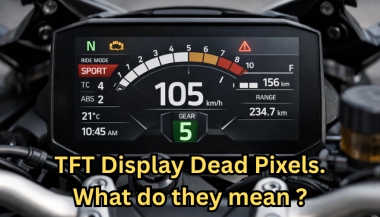
Dead Pixels on a Motorcycle TFT Display: What They Mean & When Replacement Is Inevitable

Dead Pixels on a Motorcycle TFT Display: What They Mean & When Replacement Is Inevitable

Dead pixels on a motorcycle TFT display are rarely “just cosmetic”. On modern bikes, the TFT dashboard is a sealed, laminated electronic unit exposed to sun, heat, vibration, rain, and pressure washing . When pixels fail, it often signals structural damage inside the display , not a surface defect. This article explains what TFT display dead pixels really mean, why they appear, how to diagnose them correctly, and the point where replacement becomes unavoidable . What riders mean by “dead pixels” — and why it matters The term motorcycle display dead pixels is used loosely. In practice, three very different faults exist. True dead pixels (permanently black) A true dead pixel is a pixel transistor that no longer functions. It stays black on all backgrounds and during startup screens. This is a hardware failure inside the LCD matrix . It does not self-heal. Stuck pixels (fixed bright color) A stuck pixel remains red, green, blue, or white. On phones or TVs, this can sometimes be intermittent. On motorcycle TFTs, stuck pixels are often caused by heat stress or internal pressure and frequently progress into permanent failure. Lines or blocks of dead pixels A vertical or horizontal line of missing pixels is not a pixel issue. It indicates row or column driver failure inside the panel — a structural defect of the display module. Once this appears, replacement is usually inevitable. Why TFT dead pixels appear on motorcycles Dead pixels on a dashboard are rarely random. They follow consistent mechanical and environmental causes. Heat and UV exposure Motorcycle TFTs sit in direct sunlight. Daily heat cycles expand and contract the laminated layers inside the display. Over time, this stresses internal bonds and pixel drivers. A single failed pixel can become a cluster. Micro-impact and pressure A light impact that doesn’t crack the glass can still damage the internal LCD stack. This is common on naked bikes and adventure models where the display is more exposed. Moisture ingress and condensation Condensation inside a TFT display is a critical warning sign. It means the factory seal has been compromised. Moisture accelerates corrosion on connectors and display drivers, often leading to dead pixels followed by total blackout. Electrical stress Voltage fluctuations or grounding issues can contribute, but if the pixel defect appears in the same physical location across reboots , the issue is almost always panel-level, not wiring. Brand examples: how this appears in real motorcycles Dead pixel reports follow similar patterns across brands. BMW TFT clusters: pixel lines or dark zones often appear after heat exposure or condensation events. Clusters are fully integrated and typically replaced as a unit. Yamaha TFT dashboards: isolated dead pixels may appear first, followed by spreading rows on models parked outdoors long-term. Kawasaki TFT displays: line failures are commonly reported after pressure washing or heavy rain use. Honda TFT dashboards: less frequent, but once pixel clusters appear, dealers usually recommend full replacement. Across all brands, panel repair is not part of standard dealer service . Fast diagnosis: how to tell if the damage is permanent You can determine the seriousness in minutes. Check startup screens If the pixel defect appears during the boot logo or splash screen, it is hardware, not software. Test multiple backgrounds Switch themes or display modes: Always black → dead pixel Always bright or colored → stuck pixel Straight line → driver failure Look for progression A defect that grows over weeks is not stable. Progression is a replacement signal. Inspect for condensation Any fogging or haze inside the screen means moisture ingress. Pixel failure combined with condensation almost always worsens. When TFT display replacement is inevitable Replacement is not about annoyance. It’s about predictable failure . Replacement becomes inevitable when any of the following occur: A row or column of dead pixels appears Dead pixels spread over time Dead pixels appear together with condensation The defect blocks speed, warnings, or riding data The bike relies on the TFT for ride modes or system alerts At this stage, the TFT is no longer a reliable instrument cluster. Why TFT displays are rarely repaired A motorcycle TFT is not a standalone screen. It is: Laminated glass + LCD + polarizer Sealed against weather Electronically paired to the motorcycle Separating and rebuilding this stack requires specialized industrial equipment. As a result, OEMs replace the entire unit . Used clusters introduce risks: coding issues, immobilizer pairing, mileage discrepancies, and unknown moisture history. Cost reality in Europe In Europe, OEM motorcycle TFT replacement typically ranges from: €600–€1,200 for mid-range models €1,500–€2,500+ for premium or integrated systems This includes coding and calibration, not just the display itself. That’s why a small dashboard pixel issue deserves early attention. Can dead pixels be prevented? You cannot prevent internal electronic aging. You can reduce the most common triggers: Surface scratches that weaken seals Micro-impacts UV exposure Moisture pooling around edges A properly fitted screen protector does not fix dead pixels, but it reduces the external damage pathways that often lead to full TFT failure. If you want to reduce the risk of turning a small pixel defect into a four-figure repair, you can protect the display surface early — explore motorcycle TFT screen protectors at mr-key.com FAQ: TFT display dead pixels Are dead pixels dangerous? They are not dangerous by themselves, but they often indicate deeper display degradation. Can software updates fix dead pixels? No. If the defect appears in the same physical location during startup, it is hardware. Will one dead pixel spread? Sometimes. Spread is common when heat or moisture is involved. Is condensation inside the TFT serious? Yes. Condensation indicates seal failure and greatly increases the risk of progressive damage. Is replacement always required? Not for a single stable pixel. Replacement becomes unavoidable with progression, lines, or moisture involvement.

Why Your Motorcycle TFT Display Needs a Screen Protector (Before It’s Too Late)

Why Your Motorcycle TFT Display Needs a Screen Protector (Before It’s Too Late)

Modern motorcycles are smarter, more connected, and more expensive than ever. At the center of that evolution sits the TFT display—your bike’s digital command hub. Speed, revs, riding modes, navigation, calls, warnings. One exposed surface controls it all. And it’s far more vulnerable than most riders realise. A motorcycle screen protector isn’t an accessory. It’s preventive maintenance. Ignore it, and you’re gambling with one of the most expensive components on your bike. The Hidden Weak Point on Modern Motorcycles Motorcycle manufacturers invest heavily in engines, frames, and electronics. But the TFT display? It’s still a thin, exposed panel, mounted directly in the line of fire. Unlike a phone, it: Lives outdoors 24/7 Takes direct UV exposure Gets hit by dust, sand, insects, and road debris Is cleaned repeatedly—often incorrectly A single mistake is enough to leave permanent damage. TFT Displays Scratch Far Easier Than You Think Most motorcycle TFT screens are plastic-based or plastic-coated , not hardened glass like premium smartphones. That matters. Plastic scratches: From dust particles wiped across the surface From dry cloths or paper towels From jacket zippers or gloves Even from “careful” cleaning at fuel stops Once scratched, there is no polish, no fix, no reset . The damage is permanent. A motorcycle display protector absorbs this damage instead of the screen itself. Sunlight Is Quietly Destroying Your Display UV exposure doesn’t crack screens overnight. It does something worse. It slowly: Fades colours Reduces contrast Creates uneven patches Permanently dulls brightness After a few summers, the display that once looked sharp now looks tired—especially when riding in direct sunlight. A quality bike screen protector acts as a UV barrier, preserving clarity and colour accuracy for years. Glare Isn’t Just Annoying. It’s Dangerous. A washed-out screen at speed isn’t just inconvenient. It means: Missed warning lights Hard-to-read navigation prompts Delayed reaction times In bright sun, an unprotected TFT can become a mirror. Screen protectors designed for motorcycles reduce reflections and glare, improving readability in real-world riding conditions—not showroom lighting. Cleaning Your Screen Is Probably Damaging It Most riders clean their TFT displays the same way they clean helmets or windscreens. That’s a mistake. Common causes of micro-scratches: Dry wiping Paper towels Window cleaners Cloths contaminated with dust Over time, these tiny marks add up. The screen becomes hazy. Night riding gets worse. Contrast drops. A motorcycle screen protector takes that abuse instead—so you can replace the protector, not the display. The Real Cost of a Damaged Motorcycle TFT Display Here’s what many riders discover too late. Replacing a TFT display typically costs: €800–€1,200 for the part Labour and coding often extra In many cases, the bike must go to an authorised dealer Insurance often won’t cover cosmetic damage. Scratches don’t qualify as “failure.” A screen protector costs a fraction of that—and eliminates the risk entirely. Resale Value Takes a Direct Hit Buyers notice screens immediately. A scratched or faded TFT display: Signals neglect Raises questions about overall maintenance Lowers perceived value Even if the bike is mechanically perfect, a damaged display can knock hundreds off resale or trade-in value. Protecting the screen protects the bike’s future value. Why Motorcycle Displays Are More Vulnerable Than Phones It’s tempting to compare TFT displays to smartphones. That comparison fails. Motorcycle screens: Are permanently exposed to the elements Experience constant vibration Are cleaned in uncontrolled environments Sit at steep angles that catch sunlight They endure more abuse in one riding season than most phones do in five years. A dedicated motorcycle display protector is designed for exactly these conditions. Screen Protectors Don’t Affect Touch or Visibility A common myth: screen protectors reduce clarity or touch response. High-quality motorcycle screen protectors are: Ultra-thin Optically clear Designed for glove interaction Precisely cut for each display shape Once installed, most riders forget it’s even there—until it saves the screen. Installation Is Easier Than You Expect Modern protectors are made for DIY installation. Typically: No liquids required No permanent adhesives No tools beyond what’s included With careful alignment, installation takes minutes—and protects the display for years. Who Should Use a Motorcycle Screen Protector? Short answer: every rider. Especially if you: Park outdoors Ride in bright sun Tour long distances Use navigation or Bluetooth features Plan to keep or resell the bike If your motorcycle has a TFT display, it’s already at risk. FAQ Do motorcycle TFT displays scratch easily? Yes. Most TFT displays use plastic-based surfaces that scratch far more easily than smartphone glass—often from normal cleaning alone. Can a scratched motorcycle display be repaired? No. Scratches are permanent. The only true fix is replacing the entire display unit. How much does it cost to replace a motorcycle TFT screen? Replacement typically costs between €800 and €1,200, excluding labour and dealer programming. Does a screen protector affect brightness or touch sensitivity? No. Quality protectors are optically clear and maintain full touch responsiveness. Is a motorcycle screen protector worth it? Considering the replacement cost of a TFT display, a screen protector is one of the highest-value protective upgrades you can make. Can I remove or replace the protector later? Yes. Screen protectors are removable and replaceable without damaging the original display. Protect the Most Expensive Screen on Your Bike Your motorcycle’s TFT display is essential, fragile, and costly to replace. Damage doesn’t announce itself. It accumulates quietly—scratch by scratch, fade by fade—until it’s too late. Visit our shop at mr-key.com to explore our motorcycle screen protectors and protect your display before the damage becomes permanent.

Understanding Key Fob Security: Protecting Your Vehicle

Understanding Key Fob Security: Protecting Your Vehicle

You use your key fob every day—locking and unlocking your car, maybe even starting the engine from a distance—without giving it a second thought. But as technology in vehicles advances, so do the methods used to compromise it. Keyless entry has made life more convenient, but it’s also introduced a new set of risks. If you’ve ever wondered how secure your key fob really is, or how you can protect yourself against modern car theft, this guide is for you. How Your Key Fob Works Key fobs operate by sending a low-frequency radio signal to your car. When the car recognizes the encrypted signal, it unlocks or starts the engine. It’s fast, wireless, and requires no physical interaction with the car—just proximity. Most modern fobs also use a rolling code system that changes the signal each time, making it harder for thieves to duplicate. This technology helps protect against basic forms of signal cloning, but “harder” doesn’t mean “impossible.” Criminals have found ways to bypass even these security measures. What Is a Relay Attack? One of the most common forms of key fob theft today is the relay attack. It relies on extending the communication range of your key fob without your knowledge. Here’s how it works: thieves use two devices. One person stands near your home, capturing the signal from your key fob—even through walls or windows. The second person uses a relay device to transmit that signal to your car. The car thinks the key fob is close and unlocks the doors. In some cases, they can even start the engine and drive off without ever seeing the key. All of this can happen in seconds. There’s no broken glass, no forced entry, and often no alarms triggered. By the time you realize something’s wrong, your vehicle might already be gone. Signal Jamming and Other Threats Relay attacks aren’t the only thing to worry about. Another tactic thieves use is signal jamming. This involves blocking the signal between your key fob and your car when you attempt to lock it. You might press the button and hear nothing unusual—but your car never actually locks. You walk away, thinking everything’s secure, while the thief simply opens the door and gains access. Then there’s code grabbing, which involves intercepting your key fob’s signal and replaying it later to unlock the vehicle. While more complex and less common, it’s another reminder that your key fob isn’t just a convenience—it’s a target. How to Protect Your Key Fob Fortunately, there are several effective ways to protect your key fob. Start by storing it away from exterior walls and windows. The closer your fob is to the outside of your home, the easier it is for thieves to pick up its signal. For stronger protection, use a Faraday pouch or metal container. These signal-blocking enclosures prevent any radio frequency from escaping, effectively rendering your fob invisible to relay devices. They’re inexpensive, easy to use, and highly effective. If your vehicle allows it, consider disabling the keyless entry feature when not in use—especially overnight or when your car is parked for long periods. You’ll usually find this option in your car’s settings or user manual. Make a habit of confirming your vehicle locks before walking away. Look for flashing lights or listen for the beep. These small checks can alert you if a jamming attempt has occurred. Be cautious with third-party or aftermarket fobs. Not all of them use reliable encryption or high-quality components. A poorly designed fob could introduce new vulnerabilities rather than protecting against them. Stay One Step Ahead Keyless technology is here to stay, offering undeniable convenience to drivers. But with that convenience comes a new wave of digital risks. Thieves don’t need to break windows anymore—they just need the right equipment and an unsecured signal. You don’t need to be a tech expert to protect yourself. Just understanding how your key fob works—and taking a few simple precautions—can significantly reduce your risk. Treat your fob like the digital key it is. Keep it protected, and you’ll keep your car safer, too. Because in today’s world, car security isn’t just about the locks—it’s about the signal.

Chat with us