Post Name

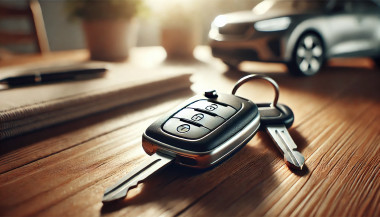
In modern vehicles, the once simple car key has evolved into a sophisticated piece of technology. With built-in electronics, anti-theft features, and remote functions, today’s car key is part of a broader ecosystem designed for both convenience and security.

Yet with all this advancement comes confusion. Many drivers aren’t sure what terms like immobilizer, transponder chip, and key fob actually mean—or how they relate to one another.

This guide breaks down these components in detail, explains how they work together, and clarifies why it matters when you’re replacing, reprogramming, or troubleshooting your car key.

What Is an Immobilizer?

An immobilizer is an electronic security device installed in most modern cars. Its purpose is to prevent the engine from starting unless the correct key—specifically, the correct coded signal—is detected.

When you attempt to start your vehicle, the system searches for a signal from a registered transponder chip. If that signal is missing or incorrect, the immobilizer blocks the ignition system. This means the engine won’t crank or turn over, even if the physical key fits.

Immobilizers are embedded in the car’s engine control unit (ECU) and became standard in vehicles after the late 1990s in many countries, in response to rising car theft.

They offer a silent, invisible layer of protection against common theft techniques like hotwiring. Without the correct digital authentication, the car simply will not start.

What Is a Transponder Chip?

The transponder chip is a small electronic microchip located inside the car key or key fob. The word “transponder” is a combination of “transmitter” and “responder.” It is designed to emit a unique code that the car's immobilizer can recognize.

When you insert the key into the ignition or bring a key fob close to a push-start system, the chip sends a signal to the car’s ECU. If the code matches the one stored in the car’s database, the immobilizer disables itself and allows the engine to start.

Transponder chips are passive. They do not require a battery and are activated by electromagnetic energy from the ignition coil or receiver unit inside the vehicle.

Without a functioning or correctly programmed transponder chip, your car will not start—even if the metal key turns in the ignition.

What Is a Key Fob?

A key fob is the remote control device you carry that allows you to perform functions like locking or unlocking your car, opening the trunk, and activating panic alarms. In modern vehicles, key fobs may also control remote start or proximity-based unlocking features.

While key fobs often include a transponder chip inside them, they serve a different function. The key fob operates remote commands via short-range radio signals. The transponder chip, on the other hand, is responsible for enabling or disabling the engine.

Smart key fobs, found in many recent vehicles, don’t require insertion into the ignition. Instead, the car detects the fob nearby and permits the engine to start with a button press.

If your key fob battery dies, you might still be able to start the car manually if the transponder chip is present and recognized. Most fobs also have a hidden mechanical key inside, which can be used to unlock the door if the electronics fail.

How They Work Together

Although they are distinct components, the immobilizer, transponder chip, and key fob all work in harmony to secure and operate your vehicle.

The immobilizer controls whether the engine is allowed to start.

The transponder chip provides the digital identity that must be verified by the immobilizer.

The key fob provides wireless control of non-engine functions like locking, unlocking, and trunk access.

In most modern cars:

You approach the vehicle with the key fob.

The fob unlocks the doors.

When you start the vehicle, the transponder chip sends a signal to the immobilizer.

If the code matches, the engine is authorized to start.

If the code doesn’t match, or if the chip is missing or damaged, the engine remains disabled—even if the rest of the key’s functions work perfectly.

Why This Knowledge Matters

Understanding how your car key works is essential when:

Replacing a lost or broken key

Buying a spare or duplicate

Diagnosing why your car won’t start

Choosing between locksmith and dealership services

For example, if your key fob unlocks your car but won’t start it, the issue may lie with the transponder chip, not the battery. Conversely, if your fob doesn’t lock or unlock the car remotely, the chip may still be functional, and the issue could simply be a dead battery.

Replacing a key without properly programming the transponder chip will result in a non-starting vehicle, even if the key physically fits and the remote works.

For reliable replacement keys, fobs, batteries, and accessories, visit our Car Key Collection.

Car keys are no longer just mechanical tools. They’re complex, multi-function devices that combine security, convenience, and connectivity. By understanding the role of the immobilizer, transponder chip, and key fob, you’ll not only protect your vehicle better, but also avoid costly mistakes when dealing with repairs or replacements.

Whether you’re troubleshooting a non-starting car or simply trying to replace a damaged key, knowing the difference between these three elements gives you the clarity and confidence to take the right action.
Related Posts

Can a Locksmith Cut a Key from a Photo or Code?

Can a Locksmith Cut a Key from a Photo or Code?

Short answer: yes— for many keys, a locksmith can cut accurately from a photo or a code . The details depend on the key type, the quality of the image/data. Key cutting from code vs from photo By code (most precise). A key code (often printed on locks, key tags, or documentation) translates into a series of cut depths called the bitting . On a code machine, a locksmith dials those depths and cuts a new key without the original present . This is the preferred method for many utility keys (e.g., caravan, retro auto, e-bike battery, furniture, mailboxes, ATVs, roof racks, towbars), but also for car keys. By photo (works in many cases). From a clear, square-on image, a trained technician can decode the cut depths and reproduce the bitting. Research has shown keys can be recreated from ordinary or telephoto shots if the profile and scale are known. This is why publishing close-ups of your keys is discouraged. When a photo is “good enough” If you’re ordering car keys cut by photo or utility keys by photo , expect guidelines like: Flat, well-lit, high-resolution image; key blade perfectly side-on. Ruler/coin in frame for scale; entire blade visible, shoulder to tip. For double-sided/laser keys, shots of both sides. Keyway/profile identification (brand/series). Automotive: cutting from photo or code—plus programming Cutting the blade is only step one for modern cars. Since the late 1990s, most vehicles have immobilisers ; the key’s transponder chip must be recognised or the engine won’t start. In practice: Get the correct blank and cut it (photo or code). Program the transponder/remote (OBD or on-board procedures), or pair a proximity fob. Test mechanical operation and ignition start. Main points UK readers should know: Immobiliser/transponder tech became standard in the mid-1990s; without a programmed chip, a correctly cut key usually won’t start the car. A key code specific to your vehicle lets a locksmith/dealer cut precisely without an original; some guides explain where owners can find it. Utility keys we commonly see cut by code If you have the key code , these are routinely cut accurately online: Retro automobile keys (classic patterns; often stamped codes). Caravan & motorhome key s (e.g., ZADI, FAP/FAWO—codes on barrels). E-bike battery keys (e.g., ABUS/AXA series). Furniture, mailboxes keys (office furniture, cam locks). ATV/quad ignition and compartment keys. Roof racks (e.g., Thule N*** series). Towbars (e.g., Westfalia/Brink code series). For these categories, supplying the printed code (from the lock face, key head, manual, or tag) usually yields the fastest, most reliable result compared to photos. Accuracy expectations & limitations What typically works well Flat cylinder keys with standard depth systems (common utility keys). Many car blades (including laser/sidewinder) if the image is clean and scaled. Keys where the lock/brand series is known and the bitting can be derived . What may be restricted or not feasible from a photo Patented/restricted keyways (require authorised proof and controlled blanks). Highly worn, bent, or obscured keys in photos. Complex security keys that need factory or authorised dealer processes. Car keys where programming tokens, PINs, or security codes are required. For security and consumer protection in the UK, look for MLA-approved locksmiths and insist on identity/ownership checks for sensitive work. Real-world risk: why photos can be enough Academic work and well-reported incidents show that key geometry can be decoded from images at surprising distances. Media have covered expensive lock replacements after keys appeared on camera, underlining the practical risk of sharing key images online. Keep your keys out of frame. What an online order typically requires For car keys (photo or code): Vehicle make/model/year, blade type, and VIN if needed for code retrieval. Clear photos (both sides). Programming method: mobile visit, on-site, or mail-in ECU/fob (varies by model). Expect additional steps for remote locking and proximity systems. For utility keys (cut by code): The code from the lock face or original key (e.g., N123 , Z **). Brand or system (Thule, Zadi, Westfalia, etc.). Quantity and turnaround needs (next-day options often available). Speed and success rates By code : fastest and most consistent for; minimal adjustment needed. By photo : slightly more validation and back-and-forth; still accurate when images meet spec. Why choose an online key cutting service like MR-KEY Unlike traditional emergency locksmiths who mainly handle urgent lockouts, MR-KEY specialises in precision key cutting from photos or codes — ideal when you’re not locked out but need an exact replacement or spare . Through our online platform, you can: Order from anywhere in the UK — simply upload a clear photo or enter your key code. Get fast, expert cutting using professional decoding software and calibrated machines. Receive your key by post , ready to use or, for vehicles, to be programmed locally. With MR-KEY, you save the cost and time of a mobile visit while still getting locksmith-level precision. Each key is verified before dispatch to ensure perfect fitting and reliable operation. FAQs Can a locksmith cut a car key from a photo? Often yes, the blade can be cut from a high-quality photo , but modern cars also need transponder/immobiliser programming before the engine will start. Is cutting by code more accurate than using a photo? For most utility keys , yes . A verified key code maps to exact cut depths, making the process highly repeatable and quick. Can someone copy my key from a social media photo? It’s technically possible; public cases and research have shown keys can be decoded from images . Avoid posting close-ups of keys online. What’s the difference between “key cutting,” “key replacement,” and an “emergency locksmith”? Key cutting : the physical milling of a blade (by code/copy/photo). Key replacement : end-to-end service supplying a working key/fob (cutting + programming if needed). Emergency locksmith : rapid response for lockouts or urgent access/security issues. Order your new key today at mr-key.com — fast, accurate, and cut by professionals from your photo or code.

Cold Weather and Your Car Key Fob: What You Need to Know

Cold Weather and Your Car Key Fob: What You Need to Know

As the temperature drops and winter approaches, it’s not just your car’s engine that needs extra attention. Your car’s key fob is also affected by the cold weather, and it’s important to understand how frigid temperatures can impact its performance. In this article, we’ll explore how cold weather can affect your key fob and what you can do to prevent it from causing you frustration during the colder months. How Cold Weather Affects Your Key Fob Key fobs are small electronic devices designed to make our lives easier. They allow us to lock, unlock, and start our cars without ever having to take the key out of our pocket or bag. However, like any electronic device, key fobs are sensitive to extreme temperatures. When the temperature drops, the battery inside the key fob can be affected. Cold weather causes the battery’s chemical reactions to slow down, which can lead to a reduced charge or even a complete failure to operate. If your key fob suddenly stops working or becomes unresponsive, it's likely due to the cold weather affecting the battery's ability to function properly. In addition to battery performance, the cold can also cause the internal components of the key fob to contract. This may interfere with the fob’s functionality, causing it to not respond when you press the buttons. Furthermore, moisture from snow, rain, or condensation can get into the fob, which can cause short circuits or further damage. Signs Your Key Fob May Be Affected by the Cold If you live in an area where cold temperatures are common, it’s essential to be aware of the signs that your key fob might be struggling with the weather. Here are some indicators that the cold is affecting your key fob: Unresponsive buttons : If you press the buttons on your key fob and nothing happens, it may be due to the battery or the internal components not responding correctly to the cold. Delayed reactions : If you notice a delay in your fob’s response, where the locks or alarm take longer than usual to react, this is another sign of cold-induced malfunction. Reduced range : If your key fob is working, but only from a very short distance, it could be due to the battery’s reduced performance in the cold. If you notice these issues, don’t immediately panic. There are simple fixes and preventative steps you can take to resolve the issue. What You Can Do to Protect Your Key Fob in the Cold Fortunately, there are several things you can do to ensure that your key fob continues to work properly during cold weather. By taking a few precautions, you can protect the battery and internal components of your key fob from extreme temperatures: Keep Your Key Fob Warm One of the easiest ways to prevent cold weather from affecting your key fob is to keep it warm. If you're going outside during cold weather, keep your key fob in your coat pocket or a warm, insulated area. You can even use a small pouch or key fob holder with insulation to protect it from the cold. Replace the Battery Before Winter If your key fob is already showing signs of battery issues, consider replacing the battery before winter hits. Even if it’s not quite dead yet, replacing the battery can help ensure that your key fob works smoothly during colder months. Many key fob batteries are easy to replace and can be done at home with a simple tool. Use a Backup Key If you anticipate being in extremely cold conditions or live in a particularly harsh climate, consider having a backup key. Many cars come with a traditional key hidden inside the key fob, which you can use if the key fob stops working in the cold. Having this backup can save you a lot of hassle if your fob stops working unexpectedly. Avoid Moisture Exposure It’s important to keep your key fob dry, especially in winter, when snow, rain, and condensation can cause moisture to build up inside. If your fob does get wet, dry it thoroughly as soon as possible and avoid leaving it outside in damp conditions. If moisture persists, it may cause the internal components to fail. Test Your Key Fob Regularly To ensure that everything is working properly, make a habit of testing your key fob regularly, especially during the colder months. If you notice any signs of malfunction early, you can address the issue before it gets worse. What to Do If Your Key Fob Stops Working If your key fob stops working despite taking preventative measures, don’t panic. There are a few things you can do: Warm up the Fob : Try warming up the fob by placing it in your pocket for a few minutes or rubbing it in your hands. This can help restore some functionality if the battery has slowed down due to the cold. Replace the Battery : If the fob still isn’t working, it may be time to replace the battery. A new battery can often resolve issues related to cold weather. Contact a Professional : If the fob continues to malfunction after changing the battery, it may be time to take it to a professional locksmith or the dealership to check for internal damage. While it’s easy to overlook the impact that cold weather can have on your car’s key fob, it’s important to understand the effects that extreme temperatures can have on its performance. By taking simple precautions and knowing the signs of potential issues, you can help ensure that your key fob continues to work smoothly throughout the colder months. From keeping it warm to regular maintenance, there are several ways to protect your key fob and avoid the frustration of a malfunction during the winter. So, this season, take a few extra steps to care for your key fob, and you’ll be able to unlock and start your car with ease, no matter how cold it gets outside.

The Importance of Regularly Updating Your Car's Key Fob Software

The Importance of Regularly Updating Your Car's Key Fob Software

In the digital age, vehicle security has evolved beyond traditional locks and keys. Modern cars rely on sophisticated electronic systems, with key fobs playing a crucial role in convenience and safety. However, many car owners overlook the importance of regularly updating their key fob software. Like any other electronic device, key fobs require updates to function optimally and protect against emerging threats. This article explores why keeping your car's key fob software up-to-date is essential for security, functionality, and overall vehicle performance. Enhanced Security Against Keyless Theft One of the primary reasons to update your key fob software is to safeguard your vehicle against hacking and theft. Car thieves have become increasingly tech-savvy, using methods such as relay attacks and key cloning to gain unauthorized access to vehicles. Manufacturers frequently release software updates to counteract these evolving threats, strengthening encryption protocols and implementing new security measures. Regular updates ensure that your vehicle remains protected against the latest hacking techniques, reducing the risk of keyless car theft. Improved Functionality and Performance Software updates do more than just enhance security; they also improve the functionality of your key fob. Updates can optimize the communication between the key fob and the vehicle, ensuring seamless operation of features like remote start, keyless entry, and trunk access. Some updates may also introduce new capabilities, such as extended remote range or better battery efficiency. By keeping your key fob software up to date, you maximize the effectiveness of these features, enhancing your overall driving experience. Fixing Bugs and Resolving Malfunctions Like any software-based system, key fobs can experience glitches or bugs over time. You may notice issues such as delayed responses, intermittent connectivity, or complete failure to unlock or start your car. In many cases, these problems stem from outdated software. Manufacturers release updates to fix such bugs, ensuring that your key fob operates smoothly. If you’ve been experiencing issues with your key fob, checking for software updates is a simple yet effective solution. Compatibility with Newer Vehicle Features Automakers continuously upgrade their vehicle software, adding new safety and convenience features. To ensure compatibility, your key fob software must also stay updated. For example, if your car receives an over-the-air (OTA) update that enhances security protocols, an outdated key fob may no longer function correctly. Keeping both your vehicle and key fob software current ensures seamless integration, preventing functionality issues and maintaining an optimal driving experience. How to Update Your Key Fob Software Updating your key fob software may vary depending on the manufacturer and model of your vehicle. Here are a few common ways to ensure your key fob is up to date: Check the Manufacturer’s Website – Automakers often release software updates for key fobs and other electronic components on their official websites. Look for any available updates specific to your vehicle model. Visit a Dealership or Certified Service Center – Many car manufacturers require key fob updates to be installed at an authorized dealership or service center. Technicians can update your key fob and ensure it is properly synced with your vehicle. Use a Mobile App (If Available) – Some modern car brands offer mobile apps that allow users to update their key fob software remotely. Check if your vehicle’s manufacturer provides such an option. Consult Your Owner’s Manual – Your car’s manual may provide instructions on how to check for key fob software updates and whether they can be performed manually. Regularly updating your car's key fob software is a simple yet crucial step in maintaining vehicle security and functionality. Updates help protect against theft, fix software glitches, and ensure compatibility with new vehicle features. Given the increasing reliance on electronic key systems, staying proactive about updates is essential. Whether through a dealership visit or an online update, keeping your key fob’s software current will help you enjoy a safer and more convenient driving experience. Stay informed, stay updated, and keep your vehicle secure.

How to Take the Perfect Photo of Your Key for Easy Replacement

How to Take the Perfect Photo of Your Key for Easy Replacement

When you need a replacement key , taking a clear, detailed photo of your key can make the process much faster and more accurate. A high-quality image helps key makers understand the exact specifications, cuts, and dimensions of your key, which is especially important if you don’t have a spare. In this guide, we’ll walk you through the best practices for photographing your key so you can get an accurate replacement with ease. Why a Clear Key Photo Matters Photographing a key might sound simple, but it requires a bit of attention to detail. A well-taken photo captures the key’s grooves and unique cuts clearly, helping the key cutter replicate the exact pattern. Saves Time : A high-quality photo reduces the need for multiple attempts to cut a new key . Ensures Accuracy : Clear images help capture specific details, leading to a more precise fit. Convenient Process : With just a smartphone and a few tips, you can photograph your key from home without needing special equipment. Essential Tools for Photographing Your Key To take a clear photo of your key, you don’t need much beyond a few household items. Here’s what you’ll need: Smartphone or Camera : A phone camera is usually sufficient, but a standard digital camera works well too. Plain Background : Choose a neutral, solid-colored background like a piece of white paper or a smooth table surface. Good Lighting : Natural daylight or a bright room light helps capture details without shadows. Small Object for Elevation : A coin or similar item can lift the key slightly, making it easier to photograph. Step-by-Step Guide to Taking the Perfect Key Photo Follow these steps to take a photo that ensures clarity and accuracy for key replacement. 1. Set Up the Background Place a piece of plain white paper or another smooth, light-colored surface under your key. The solid color helps the details of the key stand out without any visual distractions. Tip : Avoid backgrounds with patterns or textures, as these can obscure the key’s features. 2. Position the Key Correctly Lay the key flat on the background, with the grooves and cuts facing up. The key should be positioned horizontally to allow a clear view of all its details. Side Profile : Make sure to capture the side profile that shows the cuts and grooves. Elevate Slightly : Place a coin or small object under one end of the key to angle it slightly toward the camera. This can help reduce shadows and improve focus on the cuts. 3. Adjust Lighting Good lighting is essential for capturing details. If possible, photograph your key in natural daylight near a window or use a well-lit room. Avoid Shadows : Ensure that no shadows fall across the key, as they can obscure details. Diffuse Light : If using a lamp, consider placing a thin cloth over it to diffuse the light and reduce harsh reflections. 4. Focus and Zoom Make sure your camera or smartphone is focused directly on the key. You may need to tap the screen to bring it into sharp focus. Zoom in Carefully : If you’re using a smartphone, zoom in slightly to capture the details, but avoid over-zooming, which can blur the image. Test Multiple Angles : Sometimes a slight adjustment in angle can capture the cuts more effectively, so take a few shots from slightly different perspectives. 5. Capture Multiple Photos It’s always a good idea to take several photos to ensure you have the best one. Try different angles and lighting adjustments to capture as many details as possible. Close-Up of the Grooves : Take one close-up image focusing on the cuts and grooves of the key. Overall Image : Include one full-length photo that shows the entire key from end to end. Try Different Angles : Slightly tilt the key or move the camera to see which angle best captures the detail of the cuts. Common Mistakes to Avoid When Photographing Your Key To get the best results, steer clear of these common issues that can impact the quality of your key photo: Blurry Images : If your hand shakes, use a small tripod or prop your phone on a stable surface. Poor Lighting : Avoid taking photos in dim rooms; use bright light to ensure the key is clearly visible. Obstructed Details : Make sure the entire length of the key is visible, without any part being cut off or covered. Tips for Ensuring a Smooth Replacement Process Once you have a clear photo of your key, there are a few final steps to make the replacement process as efficient as possible. Check the Photos : Look over your photos before sending them to ensure that they’re clear and detailed. Label the Key : If you’re photographing multiple keys, label each one in the image or add a note to avoid confusion. Include Measurements : If possible, add the measurements of the key’s length and width in your notes for added accuracy. A clear, detailed photo of your key can save you time and effort when seeking a replacement. By following these simple steps, you’ll provide all the necessary details to ensure your new key is an accurate match. Remember, good lighting, focus, and capturing all the unique cuts are essential to achieving the best results. With these guidelines, you’re set to take a photo that will make your key replacement process smooth and hassle-free.

Chat with us