Post Name

What is a Key Cover?

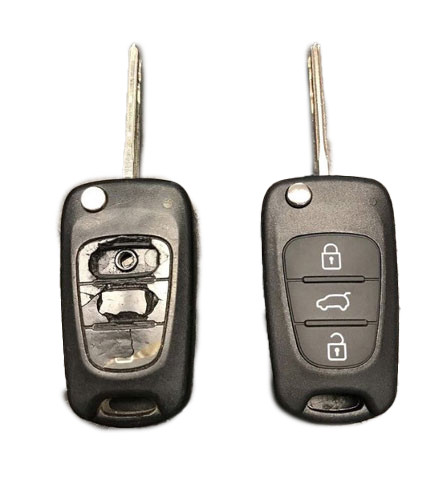
A key cover, often referred to as a key shell or key case, is the outer part of your key. It houses the electronic board, chip, and battery but excludes the internal electronics themselves. If your key casing is damaged, there’s no need to replace the entire key – just changing the key cover can restore its durability and usability while saving you money.

When Do You Need a New Key Cover?

You might need a key cover replacement when:

  • The buttons on your key become worn out or stop responding.
  • The outer case cracks, exposing the internal electronics.
  • The key mechanism no longer functions smoothly.
  • You want to refresh the appearance of your key with a new, sturdy shell.

Instead of struggling with a faulty key, simply replace the cover and extend the lifespan of your original key!

How to Choose the Right Key Cover?

When selecting a replacement key cover, consider the following factors:

  • Button Layout: Ensure that the number of buttons and their symbols match your existing key.
  • Blade Shape: If your key includes an integrated blade, make sure the new shell accommodates it correctly.
  • Quality: A good-quality key cover ensures a snug fit, smooth functionality, and long-lasting durability.

At MR-KEY, we offer a variety of key covers designed to match your specific car model perfectly, providing both aesthetics and functionality.

How to Change Your Key Cover?

Replacing your key cover is simple and doesn’t require professional assistance. Here’s how:

  1. Purchase a compatible key cover from our website.
  2. Open your old key case carefully.
  3. Transfer the electronic board and chip from your original key to the new key cover.
  4. Reassemble the key, ensuring all components fit securely.
  5. Test the buttons and functions to confirm everything is working properly.

For step-by-step guidance, we provide video tutorials on our website, showing you exactly how to change your key shell and even replace the battery if needed.

What Else Can You Change When Replacing the Key Cover?

While changing your key cover, it's the perfect time to:

  • Replace non-functional click buttons on your key’s electronic board.
  • Change the battery since you're already disassembling the key, ensuring it lasts longer.

At MR-KEY, we strive to make key replacements easy, affordable, and accessible to everyone. Explore our website to find the perfect key cover, key cutting services, and useful video guides to help you maintain your car key like a pro!

Related Posts

Car Ignition Switch Problems: Symptoms, Causes, and Replacement Guide

Car Ignition Switch Problems: Symptoms, Causes, and Replacement Guide

The ignition switch is one of the most important electrical components in any car. When it starts to fail, the symptoms can appear suddenly, seem unrelated, and quickly leave you stranded. This guide explains the real-world signs , the common causes , the most accurate diagnosis steps , and a clear ignition switch replacement guide that helps any driver understand what’s happening and what to do next. If you’re dealing with car ignition lock problems , this article gives you the clarity you need to fix the issue fast and safely. What the Ignition Switch Actually Does The ignition switch has two critical jobs: 1. Electrical power distribution It sends power to the dashboard, fuel pump, ignition system, starter motor, and electronic modules. 2. Starting the engine When you turn the key (or press the button), it bridges electrical circuits, enabling the starter motor to crank the engine. When the ignition switch begins failing, even slightly, it disrupts these circuits. That’s why symptoms can range from flickering dash lights to complete engine shutdown. Symptoms of a Failing Ignition Switch These are the most common, proven symptoms that mechanics use to identify ignition switch problems. 1. Car Won’t Start or Cranks Intermittently If turning the key does nothing—or the engine cranks sometimes but not always—the ignition switch may not be sending power consistently to the starter relay. Typical behavior includes: Silence when turning the key Clicks but no cranking Starts only after multiple attempts Total power loss during cranking This is one of the most classic ignition switch symptoms. 2. Stalling While Driving A failing ignition switch can cut power to the engine while you’re moving . Common signs: Sudden stall for no reason All dash lights go off instantly Engine dies when hitting bumps Engine cuts out but restarts immediately This is dangerous and needs urgent attention. 3. Dashboard Lights Flickering or Turning Off When the internal contacts inside the switch wear out, they create tiny power interruptions. You may see: Speedometer drops to zero Warning lights randomly appear Interior electronics momentarily cut out Radio resets or flickers These short power losses are a major red flag. 4. Key Feels Hot or Hard to Turn If the key is warm after driving, the switch may be overheating internally. If the key becomes difficult to rotate, the ignition cylinder (mechanical part) may be worn — which often leads to switch failure later. 5. Accessories Don’t Work in ACC Mode If turning the key to ACC does not activate: radio wipers power windows heater fan …the accessory circuit inside the switch may be failing. 6. No Sound from the Fuel Pump When Turning the Key You should hear a soft humming for 1–2 seconds. If you don’t, it may mean the ignition switch isn’t powering the pump relay. What Causes Ignition Switch Problems? Ignition switches fail for predictable and well-documented reasons. 1. Internal Wear Over Time Inside the ignition switch are metal contact plates . After thousands of cycles, these contacts burn, corrode, or lose tension. Symptoms develop slowly: random stalling needing to wiggle the key intermittent power This is the most common cause. 2. Heavy Keychains Many drivers don’t realise this: A heavy keychain constantly pulls on the ignition cylinder. Over years, this causes: internal looseness misalignment premature switch failure If your keychain has more than a few items, it may be contributing. 3. Heat and Electrical Overload Faulty relays, worn fuel pumps, or aftermarket accessories can overload the ignition switch. Excess heat damages the internal copper contacts, causing: hot key symptoms partial circuit failure total switch burnout 4. Moisture or Dirt in the Cylinder Moisture or dust causes the mechanical part of the ignition to jam or bind. This forces extra pressure onto the switch every time the key turns. 5. Faulty Key or Worn Key Blade If your key doesn’t rotate smoothly, it can damage both the cylinder and the switch . Worn keys often lead to electrical faults later. How to Diagnose Ignition Switch Problems Accurately Before replacing parts, you should confirm the ignition switch is truly the issue. These steps follow the same logic professional mechanics use. 1. Check if Dashboard Lights Turn On Turn the key to ON without starting the engine. If: no lights come on lights flicker radio stays off …the ignition switch might not be sending voltage. 2. Try Starting with Accessories On Turn the key to ACC. If the accessories work in ACC but the engine won’t start, the “start circuit” inside the ignition switch may be failing. 3. Wiggle Test Gently wiggle the key while: trying to start with ACC on with the engine idling If wiggling makes electronics turn on/off, the switch is internally worn. 4. Bump Test While Driving If the car stalls when hitting bumps or potholes, the switch is losing internal contact momentarily. This is one of the strongest indicators of a failing switch. 5. Test Voltage at the Ignition Switch (Advanced) Using a multimeter, check for: constant power switched power accessory power start signal power If any circuit fails randomly, it confirms an ignition switch fault. If you need a safety reference for electrical testing, you can check the UK Government’s general vehicle safety guidance here: Prevention: How to Avoid Ignition Switch Problems Ignition switch failures can often be prevented with small habits. 1. Keep Your Keychain Light Remove heavy accessories. This reduces stress on the ignition cylinder and switch dramatically. 2. Avoid Resting Hands on the Key While Driving Constant pressure on the key twists the internal contacts. 3. Only Use Correct, Undamaged Keys Bent, cracked, or worn keys can damage: the cylinder the switch the steering lock If your key is worn, replace it before it causes further problems. 4. Address Electrical Problems Early A failing alternator, weak battery, or short circuits can overload the ignition switch. If you notice dim headlights or battery warnings, fix those early. 5. Keep Dust and Moisture Out of the Cylinder Avoid spraying WD-40 or household lubricants into the ignition—it attracts dust. Use proper graphite lock lubricant if needed. Ignition Switch Replacement Guide You should only replace the ignition switch if diagnosis confirms it. Below is a clear replacement overview used by both DIYers and technicians. Note: Procedures vary by vehicle, but the overall steps are similar. 1. Disconnect the Battery Always disconnect the negative terminal. This prevents: accidental airbag deployment electrical shorts damage to modules 2. Remove Steering Column Covers Most cars use simple screws underneath. Once removed, the top and bottom covers split apart. 3. Locate the Ignition Switch Module It is usually mounted behind the ignition cylinder. Depending on the car: it may be held by two screws or secured with clips or integrated into a combined steering lock module 4. Remove the Electrical Connector Ignition switches usually have one large multi-pin connector. Release the locking tab and pull it gently. 5. Remove and Replace the Switch Install the new switch in the exact orientation as the old one. Common mistakes to avoid: misaligning the switch’s internal slot tightening screws unevenly damaging wiring during removal 6. Reassemble and Test Thoroughly After reassembly, test: ACC mode ON mode engine start headlights indicators wipers radio If everything works consistently, the replacement is successful. Is It Safe to Drive with a Bad Ignition Switch? Usually no . A failing ignition switch can: stall the engine suddenly disable power steering shutdown ABS cut power to headlights at night The RAC warns that electrical failures causing engine cut-outs are a serious safety risk. If your switch is failing, get it inspected immediately. FAQ: Car Ignition Switch Problems 1. How much does ignition switch replacement cost? Most replacements cost £80–£300 depending on the vehicle. Some modern cars require coding, making the cost higher. 2. Can a bad ignition switch cause the car to stall? Yes. Loss of electrical contact in the switch can cut power to the engine instantly. 3. Is a failing ignition switch the same as a bad starter? No. A bad starter prevents the engine from cranking. A bad ignition switch prevents power from reaching the starter or other systems. 4. Can a locksmith replace an ignition switch? In many cases, yes — especially for older vehicles. For modern immobilizer systems, a vehicle technician may be required. 5. Can I drive with ignition switch problems? It’s unsafe. The engine can cut out while driving, especially on bumps or turns. 6. Does a bad ignition switch affect accessories only? It can affect: accessories engine start fuel pump dashboard power ECU communication It depends on which internal circuit fails. 7. What’s the lifespan of an ignition switch? Most last between 10–15 years , depending on usage and electrical load. 8. Do push-button cars have ignition switches? Yes — they use an electronic ignition switch module instead of a mechanical one. Failure symptoms are similar. 9. What does a worn key have to do with ignition switch problems? A badly worn key can cause mechanical strain on the cylinder, which then stresses the electrical switch linked behind it. 10. Can I prevent ignition switch issues? Yes — keep your keychain light, avoid forcing the key, and keep electrical systems maintained. For high-quality replacement automotive parts and spare key, visit our shop at mr-key.com .

Exploring the Future of Car Key Technology: What’s Next?

Exploring the Future of Car Key Technology: What’s Next?

In the rapidly evolving world of automotive technology, car keys have transformed from simple metal tools into sophisticated electronic devices. As vehicles become smarter, so do their keys. From keyless entry to biometric authentication, car key technology continues to push boundaries. Let’s explore the next frontier of car key innovations and how they’ll impact convenience, security, and vehicle ownership. 1. Digital Keys: Unlocking with Your Smartphone One of the most exciting advancements is the rise of digital keys. These allow you to unlock and start your car using just your smartphone. How It Works: Digital keys rely on Bluetooth or NFC (Near Field Communication) technology to securely transmit signals between your phone and the car. Convenience: No more fumbling for keys. Your phone acts as your all-in-one device. Security Features: Many digital key apps offer encrypted access and the ability to revoke permissions instantly if your phone is lost or stolen. This innovation is gaining traction among automakers and is expected to become standard in the near future. 2. Biometric Authentication: Keys That Recognize You Biometric car keys are already starting to appear in premium vehicles. These keys use your unique physical features to grant access. Fingerprint Recognition: Similar to unlocking your phone, some car keys now scan your fingerprint to unlock the car. Facial Recognition: Cameras built into the vehicle can identify you and automatically unlock the doors. Why It Matters: Biometrics provide an additional layer of security, making it nearly impossible for thieves to gain unauthorized access. This cutting-edge technology ensures that only you—and those you authorize—can start your vehicle. 3. Smart Key Customization: Personalization at Its Best The future of car keys isn’t just about unlocking cars; it’s about creating personalized driving experiences. Pre-Set Preferences: Smart keys can remember your seat position, climate control settings, and even your preferred music playlist. User Profiles: In households with multiple drivers, smart keys can switch profiles based on who’s using the car. Why It’s Useful: This feature saves time and enhances comfort, making every drive tailored to your needs. As vehicles become more personalized, smart keys will play a vital role in delivering these conveniences. 4. Ultra-Secure Encryption: Fighting Key Hacking As technology advances, so do the tactics of cybercriminals. To combat this, car key technology is embracing stronger encryption. Rolling Codes: Modern key fobs use rolling codes that change with every use, making it harder for hackers to intercept signals. Blockchain Technology: Some experts predict that blockchain could be integrated into car key systems for unbreakable security. Impact on Security: These measures aim to eliminate vulnerabilities, ensuring that only the rightful owner can access the vehicle. Advanced encryption is a critical step in securing the future of car ownership. 5. Integration with Smart Homes: A Connected Lifestyle Imagine your car keys working seamlessly with your smart home devices. This future is closer than you think. Examples: Unlock your car and have your home’s lights turn on simultaneously. Use voice commands to lock your car doors through your home assistant. Convenience Factor: This integration enhances the interconnectedness of your daily routines, saving you time and effort. As smart ecosystems grow, car keys will become a pivotal part of a connected lifestyle. 6. Eco-Friendly Innovations: Sustainable Car Keys Sustainability is a growing concern in all industries, including automotive technology. Car keys are no exception. Recyclable Materials: Future car keys could be made from eco-friendly or recycled materials. Energy-Efficient Batteries: Expect longer-lasting, rechargeable batteries that reduce waste. Why It Matters: These changes not only benefit the environment but also align with the broader push toward sustainable vehicle manufacturing. As the industry shifts toward greener practices, even car keys are becoming part of the solution. A New Era of Car Keys Car key technology is on the cusp of incredible transformations, combining convenience, security, and sustainability. Whether through digital keys, biometrics, or smart home integration, the future holds endless possibilities for making your driving experience safer and more seamless. For car owners, these innovations mean less hassle, greater control, and enhanced peace of mind. As car key technology evolves, so does the way we interact with our vehicles—ushering in a new era of smarter and more secure mobility.

Effortlessly Ordering Multiple Replacement Car Keys: A Step-by-Step Guide

Effortlessly Ordering Multiple Replacement Car Keys: A Step-by-Step Guide

As a car owner, managing multiple key replacements can be daunting. Fortunately, there's a streamlined method to order several keys simultaneously using a CSV file. Here's how you can simplify the process: 1. Prepare Your Key List Create a Spreadsheet: Use software like Microsoft Excel to list your key codes. Enter Details: In Column A, input each key code; in Column B, specify the quantity needed. Avoid Headers: Start directly with your data; do not include column titles. 2. Save as CSV Choose CSV Format: When saving, select 'CSV (Comma delimited)' from the 'Save as type' dropdown. Ensure Correct Format: Avoid other CSV formats to prevent compatibility issues. 3. Upload Your CSV File Access Your Account: Log into your trade account on the key replacement website. Navigate to Product Page: Find the specific key product you need. Upload CSV: Click the 'Upload a CSV' button above the key number entry field and select your file. Wait for Processing: Large files may take time to upload; remain on the page until completion. 4. Complete Your Order Add to Basket: Once uploaded, click 'Add to basket.' Proceed to Checkout: Follow the standard payment process to finalize your order. Important Considerations Separate Files for Different Keys: If ordering various key types or series, create individual CSV files for each. Trade Account Requirement: This feature is typically available to trade account holders; ensure you have the necessary access. By following these steps, you can efficiently manage bulk key replacements, saving time and ensuring accuracy.

Why Your Car Remote Isn’t Working and How to Fix It

Why Your Car Remote Isn’t Working and How to Fix It

Car remotes have become an essential part of modern vehicle ownership, offering convenience and added security. However, when they stop working, it can lead to frustration and delays. If you’ve ever faced a malfunctioning car remote, don’t worry—you’re not alone. Here’s a guide to help you understand the common reasons why your car remote might fail and how you can fix the issue quickly and affordably. 1. Dead Battery: The Usual Suspect One of the most common reasons for a non-functional car remote is a dead battery. Over time, the small coin batteries in your remote lose their charge, making the remote unusable. Signs of a Dead Battery: Reduced range, inconsistent functionality, or complete failure to respond. How to Fix It: Replace the battery with a compatible CR-type coin battery. Check your car manual or the remote’s casing for the correct battery type. Pro Tip: Always keep a spare battery in your glove compartment to avoid getting stranded. 2. Signal Interference: The Invisible Barrier Signal interference can block communication between your remote and your car. This can happen in areas with high electromagnetic activity or if the remote’s signal is weakened. Common Causes: Proximity to cell towers, Wi-Fi routers, or even other key fobs . How to Resolve It: Move closer to your car and try again. Change your location if you’re in a crowded parking area. Keep your remote away from other electronic devices that might cause interference. Prevention Tip: Avoid storing your car remote near electronics when not in use. 3. Remote Needs Reprogramming Sometimes, a car remote loses its programming, which is essential for communicating with your car. This can happen after battery replacement, electrical system resets, or software glitches. Signs Your Remote Needs Reprogramming: The buttons don’t respond, or the remote only works intermittently. What You Can Do: Check your car manual for DIY reprogramming instructions. If DIY methods fail, consult a professional locksmith or your car dealer for assistance. Pro Tip: Always reprogram your remote immediately after replacing its battery to avoid compatibility issues. 4. Physical Damage: More Than Just Wear and Tear Daily use, accidental drops, or exposure to moisture can damage your car remote, leading to malfunction. The internal components, such as the circuit board, are particularly sensitive. Signs of Damage: Cracks on the casing, loose buttons, or water ingress. How to Address It: For minor issues, replace the remote casing or repair loose buttons. If the circuit board is damaged, you’ll need a replacement remote. Preventative Measures: Use a protective key cover to shield your remote from damage. Keep your remote away from water and extreme temperatures. 5. Faulty Car Receiver: The Problem Isn’t Always the Remote In some cases, the issue lies with your car’s receiver rather than the remote. If the receiver is damaged or malfunctioning, it won’t recognize signals from the remote. How to Diagnose: If multiple remotes fail to work with the same car, the receiver might be the issue. Test your remote on a similar vehicle, if possible, to rule out the remote as the problem. How to Fix It: Consult a professional mechanic to inspect and repair the car’s receiver system. General Tips to Keep Your Car Remote Functional Prevention is better than cure, especially when it comes to car remotes. Here are some tips to avoid future issues: Regular Maintenance: Inspect your remote periodically for wear and tear. Store It Safely: Keep your remote in a safe, dry place to avoid accidental damage. Backup Plan: Always have a spare key or remote handy for emergencies. Invest in a Tracker: Attach a Bluetooth tracker to your remote for easy location if it gets misplaced. When to Seek Professional Help While many car remote issues can be resolved with DIY methods, some problems require professional assistance. If your remote still doesn’t work after troubleshooting, consult a locksmith or an automotive specialist. They can help with repairs, replacements, and reprogramming at an affordable cost. Don’t Let a Faulty Remote Slow You Down A malfunctioning car remote can be a hassle, but most issues are fixable with a little know-how. Whether it’s a dead battery, signal interference, or physical damage, understanding the root cause will help you resolve the problem efficiently. With proper care and maintenance, your car remote will continue to offer the convenience and security you rely on every day.

Chat with us