Post Name

The ignition switch is one of the most important electrical components in any car. When it starts to fail, the symptoms can appear suddenly, seem unrelated, and quickly leave you stranded. This guide explains the real-world signs, the common causes, the most accurate diagnosis steps, and a clear ignition switch replacement guide that helps any driver understand what’s happening and what to do next.

If you’re dealing with car ignition lock problems, this article gives you the clarity you need to fix the issue fast and safely.


What the Ignition Switch Actually Does

The ignition switch has two critical jobs:

1. Electrical power distribution

It sends power to the dashboard, fuel pump, ignition system, starter motor, and electronic modules.

2. Starting the engine

When you turn the key (or press the button), it bridges electrical circuits, enabling the starter motor to crank the engine.

When the ignition switch begins failing, even slightly, it disrupts these circuits. That’s why symptoms can range from flickering dash lights to complete engine shutdown.


Symptoms of a Failing Ignition Switch


These are the most common, proven symptoms that mechanics use to identify ignition switch problems.

1. Car Won’t Start or Cranks Intermittently


If turning the key does nothing—or the engine cranks sometimes but not always—the ignition switch may not be sending power consistently to the starter relay.

Typical behavior includes:

Silence when turning the key

Clicks but no cranking

Starts only after multiple attempts

Total power loss during cranking

This is one of the most classic ignition switch symptoms.

2. Stalling While Driving


A failing ignition switch can cut power to the engine while you’re moving.

Common signs:

Sudden stall for no reason

All dash lights go off instantly

Engine dies when hitting bumps

Engine cuts out but restarts immediately

This is dangerous and needs urgent attention.

3. Dashboard Lights Flickering or Turning Off


When the internal contacts inside the switch wear out, they create tiny power interruptions.

You may see:

Speedometer drops to zero

Warning lights randomly appear

Interior electronics momentarily cut out

Radio resets or flickers

These short power losses are a major red flag.

4. Key Feels Hot or Hard to Turn


If the key is warm after driving, the switch may be overheating internally.

If the key becomes difficult to rotate, the ignition cylinder (mechanical part) may be worn — which often leads to switch failure later.

5. Accessories Don’t Work in ACC Mode


If turning the key to ACC does not activate:

radio

wipers

power windows

heater fan

…the accessory circuit inside the switch may be failing.

6. No Sound from the Fuel Pump When Turning the Key


You should hear a soft humming for 1–2 seconds.

If you don’t, it may mean the ignition switch isn’t powering the pump relay.
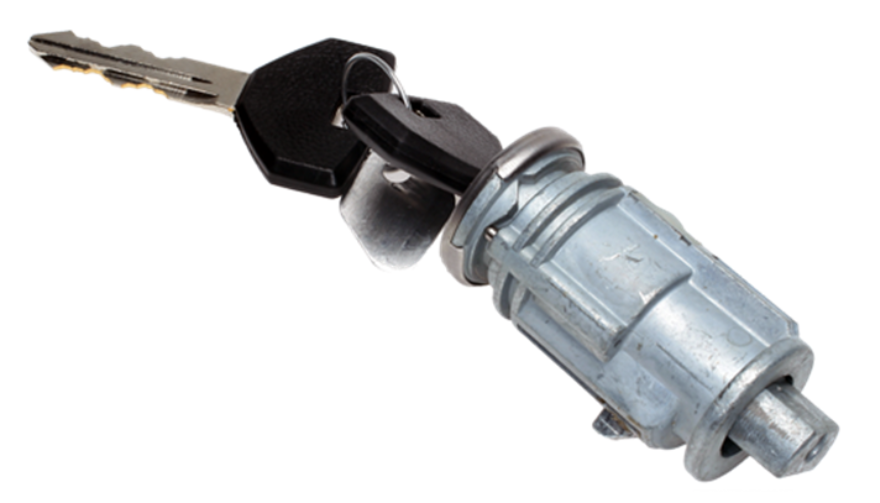


What Causes Ignition Switch Problems?


Ignition switches fail for predictable and well-documented reasons.

1. Internal Wear Over Time


Inside the ignition switch are metal contact plates.

After thousands of cycles, these contacts burn, corrode, or lose tension.

Symptoms develop slowly:


random stalling

needing to wiggle the key

intermittent power

This is the most common cause.

2. Heavy Keychains


Many drivers don’t realise this:

A heavy keychain constantly pulls on the ignition cylinder.

Over years, this causes:

internal looseness

misalignment

premature switch failure

If your keychain has more than a few items, it may be contributing.

3. Heat and Electrical Overload


Faulty relays, worn fuel pumps, or aftermarket accessories can overload the ignition switch.

Excess heat damages the internal copper contacts, causing:

hot key symptoms

partial circuit failure

total switch burnout

4. Moisture or Dirt in the Cylinder


Moisture or dust causes the mechanical part of the ignition to jam or bind.

This forces extra pressure onto the switch every time the key turns.


5. Faulty Key or Worn Key Blade


If your key doesn’t rotate smoothly, it can damage both the cylinder and the switch.

Worn keys often lead to electrical faults later.


How to Diagnose Ignition Switch Problems Accurately


Before replacing parts, you should confirm the ignition switch is truly the issue. These steps follow the same logic professional mechanics use.


1. Check if Dashboard Lights Turn On


Turn the key to ON without starting the engine.

If:

no lights come on

lights flicker

radio stays off

…the ignition switch might not be sending voltage.

2. Try Starting with Accessories On


Turn the key to ACC.

If the accessories work in ACC but the engine won’t start, the “start circuit” inside the ignition switch may be failing.


3. Wiggle Test


Gently wiggle the key while:

trying to start

with ACC on

with the engine idling


If wiggling makes electronics turn on/off, the switch is internally worn.

4. Bump Test While Driving


If the car stalls when hitting bumps or potholes, the switch is losing internal contact momentarily.

This is one of the strongest indicators of a failing switch.

5. Test Voltage at the Ignition Switch (Advanced)


Using a multimeter, check for:

constant power

switched power

accessory power

start signal power

If any circuit fails randomly, it confirms an ignition switch fault.


If you need a safety reference for electrical testing, you can check the UK Government’s general vehicle safety guidance here:


Prevention: How to Avoid Ignition Switch Problems


Ignition switch failures can often be prevented with small habits.

1. Keep Your Keychain Light


Remove heavy accessories.

This reduces stress on the ignition cylinder and switch dramatically.

2. Avoid Resting Hands on the Key While Driving


Constant pressure on the key twists the internal contacts.

3. Only Use Correct, Undamaged Keys


Bent, cracked, or worn keys can damage:

the cylinder

the switch

the steering lock


If your key is worn, replace it before it causes further problems.


4. Address Electrical Problems Early


A failing alternator, weak battery, or short circuits can overload the ignition switch.

If you notice dim headlights or battery warnings, fix those early.

5. Keep Dust and Moisture Out of the Cylinder


Avoid spraying WD-40 or household lubricants into the ignition—it attracts dust.

Use proper graphite lock lubricant if needed.


Ignition Switch Replacement Guide


You should only replace the ignition switch if diagnosis confirms it.

Below is a clear replacement overview used by both DIYers and technicians.


Note: Procedures vary by vehicle, but the overall steps are similar.

1. Disconnect the Battery


Always disconnect the negative terminal.

This prevents:

accidental airbag deployment

electrical shorts

damage to modules

2. Remove Steering Column Covers


Most cars use simple screws underneath.

Once removed, the top and bottom covers split apart.

3. Locate the Ignition Switch Module


It is usually mounted behind the ignition cylinder.

Depending on the car:

it may be held by two screws

or secured with clips

or integrated into a combined steering lock module

4. Remove the Electrical Connector


Ignition switches usually have one large multi-pin connector.

Release the locking tab and pull it gently.

5. Remove and Replace the Switch


Install the new switch in the exact orientation as the old one.

Common mistakes to avoid:

misaligning the switch’s internal slot

tightening screws unevenly

damaging wiring during removal

6. Reassemble and Test Thoroughly


After reassembly, test:

ACC mode

ON mode

engine start

headlights

indicators

wipers

radio

If everything works consistently, the replacement is successful.


Is It Safe to Drive with a Bad Ignition Switch?


Usually no.

A failing ignition switch can:

stall the engine suddenly

disable power steering

shutdown ABS

cut power to headlights at night


The RAC warns that electrical failures causing engine cut-outs are a serious safety risk.

If your switch is failing, get it inspected immediately.


FAQ: Car Ignition Switch Problems


1. How much does ignition switch replacement cost?

Most replacements cost £80–£300 depending on the vehicle. Some modern cars require coding, making the cost higher.

2. Can a bad ignition switch cause the car to stall?

Yes. Loss of electrical contact in the switch can cut power to the engine instantly.

3. Is a failing ignition switch the same as a bad starter?

No.

A bad starter prevents the engine from cranking.

A bad ignition switch prevents power from reaching the starter or other systems.

4. Can a locksmith replace an ignition switch?

In many cases, yes — especially for older vehicles.

For modern immobilizer systems, a vehicle technician may be required.

5. Can I drive with ignition switch problems?

It’s unsafe. The engine can cut out while driving, especially on bumps or turns.

6. Does a bad ignition switch affect accessories only?

It can affect:

accessories

engine start

fuel pump

dashboard power

ECU communication

It depends on which internal circuit fails.

7. What’s the lifespan of an ignition switch?

Most last between 10–15 years, depending on usage and electrical load.

8. Do push-button cars have ignition switches?

Yes — they use an electronic ignition switch module instead of a mechanical one.

Failure symptoms are similar.

9. What does a worn key have to do with ignition switch problems?

A badly worn key can cause mechanical strain on the cylinder, which then stresses the electrical switch linked behind it.

10. Can I prevent ignition switch issues?

Yes — keep your keychain light, avoid forcing the key, and keep electrical systems maintained.


For high-quality replacement automotive parts and spare key, visit our shop at mr-key.com.

Related Posts

How to Easily Find Your Key Code for a Hassle-Free Replacement

How to Easily Find Your Key Code for a Hassle-Free Replacement

When it comes to replacing a car key , knowing your key code is essential. This code allows you to obtain a precise duplicate, ensuring that your new key fits seamlessly without any issues. Whether you've lost your key, broken it, or simply need a spare, understanding where to locate this code can make the replacement process faster and more affordable. In this guide, we’ll walk you through what a key code is, where to find it, and tips to ensure a smooth replacement process. Why Is the Key Code Important? A key code is more than just a number; it's a unique identifier that tells a key cutter exactly how to replicate your key. Without it, the process can be longer, more complicated, and potentially costly if the key doesn’t match your vehicle’s lock. Ensures a Perfect Fit : The key code guarantees that your new key will be cut to match your original one precisely. Saves Time and Money : With the correct code, you can avoid trial and error, reducing the risk of needing multiple key replacements. Improves Security : Knowing the exact specifications of your key can prevent unauthorized duplicates. Types of Key Codes Key codes come in different types depending on the key and vehicle model. Here are the main types: Direct Code : Often a 4 to 8-digit code, this code can be entered directly into a key-cutting machine for accurate replication. Indirect Code : This type of code requires a conversion chart to find the direct key code. Though indirect codes aren’t as common, they may still appear on some older models. Blind Code : Sometimes, the code may not be directly readable or is hidden in the key's design. These require decoding using a specialized tool or software. Understanding which type of code you have can make the process smoother when you’re ready to replace your key. Common Locations for Key Codes Finding the key code isn’t always straightforward, but with a few tips, you can track it down more easily. Here are the most common places to check: 1. Vehicle Manual Your vehicle’s manual often contains useful information, including the key code. It’s usually found in the section detailing the vehicle’s locking system. The manual may also provide guidance on other important security features, so it’s a great place to start. Tip : If you can’t find it in the manual, try looking in the index under “keys” or “security.” 2. Key Fob or Key Itself For some keys, the code is printed directly on the key or key fob. Look closely at the metal part of the key or the plastic casing for a small series of numbers. This code may be faint, so you may need a magnifying glass or good lighting. Tip : Be cautious when handling the key to avoid damaging the code. A worn key can sometimes obscure the code, so check carefully. 3. Vehicle Registration and Documents Some vehicle documents, especially those you receive when you first purchase the car, may include the key code. Check any paperwork related to the purchase, including sales documents, registration, and the car title. Tip : Keep these documents safe as they contain essential information for ownership and replacement needs. 4. Original Key Packaging If you have access to the original packaging of the key, such as a bag or box, the key code is sometimes printed there. This is especially common if the key came from a dealer or as part of a new car purchase. Tip : Always save key packaging, as it can provide helpful information for future reference. 5. Contacting the Dealership If you’re unable to locate the code yourself, you can reach out to the dealership where you purchased the vehicle. Dealerships often keep records of key codes, especially if the vehicle is still under warranty. Some may provide the code for free, while others might charge a fee. Tip : Have your vehicle identification number (VIN) handy when contacting the dealership, as it can help verify your ownership. Tips for Safe Key Code Storage Once you have located your key code, it’s important to keep it safe to make future replacements easier. Here are some tips: Store Digitally : Save the code in a secure document on your phone or computer. You can even use a password-protected note or cloud storage. Keep a Physical Copy : Write down the code and store it with other important vehicle documents, like your insurance and registration. Avoid Sharing the Code : Treat the key code like a password; only share it with trusted professionals when necessary for replacements. What to Do if You Can’t Find the Code If your search for the code has been unsuccessful, don’t worry—there are still options. Here’s what to do: Contact a Professional : Some professionals can create a new key by decoding the lock without needing the original key code. This is particularly helpful if you’ve lost all copies of your key. Request Assistance from the Manufacturer : In some cases, you can contact the vehicle’s manufacturer for support. They may ask for documentation proving ownership and might provide the code directly or guide you through the next steps. Benefits of Knowing Your Key Code Having the key code at your fingertips offers several advantages, whether you need a quick replacement or simply want peace of mind. Saves Time in Emergencies : If you lose your key unexpectedly, having the code handy allows for faster replacements. Lower Replacement Costs : With the exact code, key makers can avoid unnecessary recutting, saving you money. Simplifies Multiple Key Requests : If you need multiple copies, the code makes it easy to obtain several accurate replacements without errors. Locating and safely storing your key code can simplify the replacement process significantly. By knowing exactly where to look for the code and keeping it secure, you can avoid potential stress and save both time and money when the need for a replacement arises. Taking these steps now ensures that, should you ever need a new key, the process will be as smooth and efficient as possible.

Top 10 Most Common Car Key Problems (And How to Fix Them)

Top 10 Most Common Car Key Problems (And How to Fix Them)

Car keys have changed dramatically in the last 20 years. What was once a simple mechanical tool has become an essential electronic device packed with functionality. From remote locking and trunk opening to push-start ignition systems and proximity sensors, today's car keys do a lot more than just turn in the ignition. However, this increased functionality also means more components that can fail—and when they do, the inconvenience can be frustrating or even immobilizing. For many drivers, key problems seem to come out of nowhere. A button stops working, the car doesn’t start, or a backup key won’t respond. Understanding the most common issues with modern car keys can help you avoid unnecessary trips to the dealership and identify quick fixes at home. Below, we’ll explore the ten most frequent car key problems, how to recognize the symptoms, and what steps to take to get your key working again—often without spending a fortune. 1. The Key Fob Has Stopped Responding One of the most common complaints drivers have is that their key fob simply stops responding. The remote may no longer lock or unlock the vehicle, the trunk button might stop working, or there may be no visible LED indicator when you press a button. In most cases, the culprit is a dead battery—something that’s inexpensive and easy to replace. Most key fobs use a CR2032 coin-cell battery, which can typically be changed with a small screwdriver or a plastic pry tool. If replacing the battery doesn’t bring the fob back to life, the issue may be with the internal electronics. Moisture, drops, and general wear over time can corrode or damage the tiny circuit board inside. In such cases, replacing the outer shell might not be enough—you may need to invest in a full replacement or transplant the electronics into a new case if only the buttons or housing are damaged. 2. The Car Doesn't Detect the Key Another increasingly common issue—especially in vehicles with push-to-start systems—is that the car doesn’t detect the key, even though it's inside the cabin or close to the sensor. You might see a warning on the dashboard such as “Key Not Detected” or “No Key Present.” This can happen due to a nearly dead battery in the fob, radio frequency interference from nearby electronics, or a fault in the key’s transponder chip. The first step is always to replace the key’s battery. If the issue persists, try holding the key closer to the start button or steering column—some vehicles have hidden backup sensors that detect the key at close range in emergencies. If none of that works, the problem could be with the chip inside the fob or the vehicle’s receiver, requiring diagnosis by a qualified locksmith or dealership technician. 3. The Key Turns in the Ignition, But Nothing Happens This issue is particularly frustrating: you insert your key into the ignition, it turns freely, but the car doesn’t respond at all. Often, this is a sign that the vehicle’s immobilizer system isn’t recognizing the key. Modern car keys contain a small RFID chip that communicates with the car’s anti-theft system. If this chip is damaged or unprogrammed, the vehicle will not start—no matter how well the mechanical part of the key works. Try using a spare key if you have one. If the backup works, you’ll know the issue lies within the primary key. If neither key works, the problem could be with the vehicle’s receiver, antenna ring, or immobilizer control unit. A professional diagnostic scan is typically needed to pinpoint the cause. 4. The Key Won’t Turn in the Door or Ignition If your key suddenly stops turning in the door or ignition cylinder, the cause may be as simple as wear and tear. Key blades—especially older ones—can become worn down over time, resulting in poor contact with the internal pins in the lock. Dirt, rust, or debris inside the lock can also prevent the key from turning, particularly if the vehicle hasn’t been manually unlocked in a while. First, try using a backup key. If it turns smoothly, your main key is likely worn. If both keys struggle, apply a non-residue contact cleaner or lock lubricant to clean out the cylinder. For long-term solutions, you may need to replace either the key blade or the ignition/door lock entirely. Don’t attempt to force the key, as this could cause the blade to bend or snap inside the lock. 5. The Buttons Feel Mushy or Stuck Physical wear is one of the most overlooked causes of key fob failure. Over time, the rubber buttons on your remote can wear down, become loose, or stop pressing properly. You might notice that only one or two buttons respond, or that they must be pressed harder than usual to work. In many cases, the outer shell has simply degraded, while the electronic board inside remains perfectly functional. The most effective fix is to replace the key shell. These replacement housings are inexpensive and widely available for most major vehicle brands. Simply open the fob, transfer the circuit board, battery, and buttons into the new shell, and your key will feel and function like new again—without any need for reprogramming. 6. Your Key Fob Got Wet Water and electronics rarely mix well, and key fobs are no exception. Whether your key was left out in the rain, fell into a puddle, or went through the washing machine, moisture can quickly short-circuit the internal components or lead to long-term corrosion. If your key gets wet, act fast. Remove the battery immediately and open the case to allow air circulation. Use desiccants such as silica gel packets to dry out the internal parts—avoid using rice, which is far less effective. If corrosion is visible, gently clean it with isopropyl alcohol and a cotton swab. If the key still doesn’t work after drying, the damage may be permanent and require replacement. 7. The Key Shell Is Cracked or Broken Keys endure daily use, pocket pressure, accidental drops, and exposure to the elements. Over time, the plastic casing of the fob can crack, split, or completely fall apart, leaving internal electronics vulnerable. Although a broken shell doesn’t necessarily mean the key is non-functional, it can make usage difficult and risky. Thankfully, key shell replacements are an easy and budget-friendly solution. You can often reuse all your original components, including the battery, buttons, and transponder chip. Replacing just the shell avoids costly reprogramming and restores your key’s durability and appearance. 8. The Key Still Doesn’t Work After Replacing the Battery Replacing a fob battery is supposed to solve the problem—but sometimes it doesn’t. If your remote remains unresponsive after a battery change, you may have installed the wrong type of battery, inserted it incorrectly, or failed to clean the contact points inside the fob. In some cases, the circuit board itself may be damaged or shorted out. Double-check that the battery type matches the original (commonly CR2032). Ensure it’s properly seated and that the metal contact tabs are clean and secure. If the problem continues, the issue likely lies with the circuit board, and the fob may need to be replaced entirely. 9. You’ve Lost Your Only Key Few things are more stressful than losing your only car key—especially if you don’t have a spare. Most modern vehicles require the key to be electronically paired with the car, so simply cutting a new blade isn’t enough. You’ll need your Vehicle Identification Number (VIN), proof of ownership, and a visit to either a dealership or a certified locksmith. Some aftermarket services can offer replacement keys that are compatible with your vehicle at a lower price than the dealership. Once the new key is cut and programmed, be sure to create and safely store a backup key to avoid being locked out in the future. 10. The Spare Key Doesn’t Work Anymore Spare keys are often kept in drawers or glove compartments for years without use. When finally needed, many drivers are surprised to find that the backup key doesn’t work. Batteries may have died, circuit boards may have degraded, or the key may have fallen out of sync with the vehicle. Start by replacing the battery. If that doesn’t work, the spare may need to be reprogrammed to the car. Keeping your spare key in a safe, climate-controlled environment and testing it occasionally is the best way to ensure it's ready when needed. Car key problems can range from mildly inconvenient to seriously disruptive—but the majority are entirely fixable, often at home and at minimal cost. Understanding the common causes behind these issues allows you to respond quickly, avoid dealership prices, and extend the life of your keys. At mr-key.com , you’ll find a wide selection of replacement key shells , batteries , blades , and complete electronic keys compatible with dozens of vehicle brands. With proper care and the right tools, you can keep your key in excellent condition and avoid ever being stranded due to a faulty fob.

Can I order a replacement car key online with delivery?

Can I order a replacement car key online with delivery?

Short answer: Yes. You can order a replacement car key online in the UK and have it delivered in 3–4 days. Choose the right key type, provide a photo or key code for cutting, and have a local locksmith program it when it arrives. Why trust this guide: With over 25 years in the locksmith trade and more than 650,000 satisfied customers, Mr-Key explains exactly how online key replacement works — clearly, securely, and step by step. When online replacement works (and when it doesn’t) Ordering online is ideal if you need a spare, a like-for-like remote, or a replacement for a lost or damaged key. It’s the fastest and most convenient way to get OEM-grade parts delivered to your door. You simply order the correct key, have it cut from a photo or key code, then let a local locksmith program it to your vehicle. Online ordering doesn’t replace immobiliser pairing. Modern vehicles still require professional programming once the key arrives. Key types explained Transponder keys These have a mechanical blade and an electronic chip that communicates with your car’s immobiliser. Remote fobs Include lock/unlock buttons plus a built-in transponder. We supply the pre-cut blade (if requested) and tested electronics. Proximity or smart keys Keyless entry and push-start units. Delivered ready for your locksmith to pair with the car. Key shells & batteries Replace worn housings or dead batteries without any programming. Also available: caravan keys, ATV keys , roof-rack keys , mailbox keys, towbar keys , and more. Browse our full range at mr-key.com . How online ordering works 1. Identify your key Use your vehicle make, model, and year. Match your key shape, button layout, and frequency markings. 2. Choose how to cut it By photo: send a clear image of your existing key. By key code: provide the manufacturer’s key code for factory-accurate cutting. 3. We cut and test Keys are machine-cut and tested for precision. Electronics are checked before dispatch. 4. Delivery in 3–4 days Typical UK delivery with tracking and updates. 5. Local programming Arrange a nearby automotive locksmith to pair the key. Most jobs take 15–30 minutes. What affects cost Key type — proximity and smart keys cost more than basic transponders. Electronics and frequency — differ by brand and year. Cutting method — photo or code; standard or laser blade. Programming complexity — varies by model. Extras — spare shells, emergency blades, or upgraded housings. Pro tip: Order two keys now — you’ll save money on future locksmith visits and prevent lockouts. Programming: DIY vs local locksmith Modern immobilisers are secure by design. Mr-Key does not supply pairing or programming kits. A professional locksmith uses diagnostic tools to safely program your new key and verify vehicle ownership. It’s faster, safer, and ensures full functionality. Shipping, warranty & returns Delivery: 3–4 days across the UK. Warranty: 12-month full coverage on keys and electronics. Returns: Contact support before programming — unused items are easier to exchange. Dealer vs local locksmith vs online Option Speed Convenience Programming Best for Main dealer Medium–slow Appointment required Dealer tools Brand-new cars, under warranty Local locksmith Fast Mobile visit Done on site Emergencies, quick help Online (Mr-Key) 3–4 days Order from home Done by locksmith Planned replacements, spares Most UK drivers choose online ordering + local locksmith pairing — the fastest, most cost-efficient combination. Troubleshooting after delivery Key turns but car won’t start Blade fits, but immobiliser isn’t paired yet. Book a locksmith. Remote buttons not working Replace the battery and re-pair during programming. Proximity key not detected Use the emergency start position (usually near the steering column) and ask your locksmith to register it. Blade feels rough Use light graphite lubricant or send a photo for recheck. How to avoid another lockout Order a second key and keep it at home. Replace weak remote batteries yearly. Label your spare with the vehicle reg. For keyless cars, store keys away from doors and use a signal-blocking pouch. FAQ Can I order a replacement car key online and get it delivered? Yes. Send your key photo or code, receive delivery in 3–4 days, and have it programmed locally. Do I need proof of ownership? Your locksmith may ask for it. For UK vehicle documentation, see GOV.UK – V5C log book . What’s the difference between key types? Transponder keys start the car; remote fobs add buttons; proximity keys enable keyless entry/start. Can you cut my key from a photo? Yes. Clear, well-lit images allow accurate decoding and cutting. Can I program the key myself? No. Only an automotive locksmith can safely pair it. How long does delivery take? Usually 3–4 days within the UK. Do you cover my vehicle? Almost all brands plus caravans, ATVs, lockers, and more. What warranty do I get? 12-month full warranty on all keys and electronics. What if the battery is dead? Replace it with the correct cell. If issues continue, have the locksmith check frequency and pairing. What if I’ve lost all keys? Order online and arrange programming. Mobile locksmiths can often attend on site. Can I order two keys? Yes — it’s the smartest option to prevent future emergencies. Shop now: https://mr-key.com

What’s the Difference Between a Key Fob, Smart Key, and Proximity Key?

What’s the Difference Between a Key Fob, Smart Key, and Proximity Key?

Over the past two decades, vehicle security and convenience have evolved dramatically. Traditional metal keys have steadily given way to a range of more advanced systems that offer not only better protection but also more comfort for the everyday driver. Among the most commonly used terms in today’s automotive world are key fob , smart key , and proximity key . While often used interchangeably, these are not identical technologies. Each represents a step forward in how drivers interact with their cars, and understanding the differences between them is essential—especially when replacing, repairing, or purchasing new key components. In this article, we’ll explore each key type in detail, highlight what sets them apart, and offer practical insights to help you identify which type you own—and what that means for functionality, replacement options, and compatibility. Key Fob: The Foundation of Remote Access A key fob , in the modern context, refers to a remote control device that allows users to perform basic functions such as locking or unlocking the car doors. The word "fob" originally described a decorative accessory on a keychain, but it has evolved to refer specifically to these electronic remotes. Most key fobs use radio frequency (RF) signals to communicate with the vehicle. When you press a button on the fob, it sends a coded signal to a receiver inside the car, instructing it to lock, unlock, open the trunk, or activate the panic alarm. Some key fobs also include a physical key blade that can be used manually if the battery is dead or if the remote functionality fails. Key fobs became standard in the early 2000s and are now found in nearly every modern car. They represent the bridge between the traditional mechanical key and more advanced systems. While they don’t offer hands-free operation or engine-starting capabilities by default, they introduced a level of convenience that significantly improved the driving experience at the time of their launch. Smart Key: Hands-Free, High-Tech, Highly Secure The smart key builds on the foundation of the key fob but adds a major element of sophistication: hands-free access and ignition . With a smart key, you no longer need to press buttons to enter or start your vehicle. Instead, the key communicates continuously with the vehicle via low-frequency antennas and encrypted signals . As long as the key is within a certain range—often in your pocket or handbag—the vehicle automatically detects it and allows for keyless entry and push-button start. In many smart key systems, simply touching the door handle unlocks the vehicle. Once inside, starting the car requires nothing more than pressing a button on the dashboard. Some smart keys even store personalized settings, such as seat position or mirror alignment, offering a more tailored driving experience for each registered user. Originally reserved for luxury vehicles, smart keys have become increasingly common across all vehicle classes. Brands like Lexus, Mercedes-Benz, and BMW were early adopters, but today you’ll find smart keys in many Hyundai, Kia, Toyota, Nissan, and Volkswagen models. They offer both convenience and enhanced security thanks to rolling code encryption, which helps prevent signal interception and unauthorized vehicle access. Proximity Key: The Functional Twin of the Smart Key The term proximity key is often used synonymously with smart key, and in many cases, it functions in the same way. A proximity key allows the car to detect when the key is nearby—typically within one to three feet—and respond accordingly. You can unlock the car simply by approaching or touching the handle, and engine start is enabled through a button as long as the key remains inside the cabin. However, while all smart keys are proximity-based, not all proximity systems include the full feature set of a smart key. In some vehicles, the proximity key may lack advanced personalization or remote app integration, but the core functionality— hands-free locking, unlocking, and push-to-start capability —remains intact. The term “proximity key” is more commonly used in owner manuals or by manufacturers in Europe and Asia, while “smart key” has become the marketing standard in North America. Regardless of the terminology, the underlying technology is largely the same, relying on short-range radio waves, signal encryption, and two-way authentication between the key and the car. Breaking Down the Differences To simplify the distinctions between these three key types, it’s helpful to focus on user experience and technical capability. A traditional key fob requires active input—pressing a button to unlock the doors—whereas smart and proximity keys allow for passive, automatic operation. Additionally, the integration of engine start buttons, memory features, and enhanced security protocols tends to be exclusive to smart and proximity systems. Another notable difference lies in design and construction . Key fobs often have visible mechanical blades and rubber buttons, while smart keys are usually more compact, feature fewer or no physical buttons, and hide the emergency key blade inside the unit. Understanding this can help when shopping for replacement shells, batteries, or full units. Identifying Your Key Type Not sure which key your car uses? You’re not alone. Here's how to tell: If you must press a button on your key to unlock the doors and start the engine with a physical ignition slot, you’re likely using a key fob . If your car unlocks automatically when you approach and starts with a dashboard button —without ever removing the key from your pocket—you have a smart key or proximity key . If your car allows for keyless entry but still requires button pressing on the remote , it's most likely a standard key fob with added convenience features. Why Knowing the Difference Matters Understanding what type of key you use is crucial when you’re purchasing replacement components. A smart key cannot be replaced by a basic key fob, as it contains far more complex electronics and vehicle-specific programming. Likewise, replacing a proximity key requires knowing the exact frequency, chip type, and compatibility with your vehicle’s immobilizer system. At mr-key.com , we help car owners find exactly what they need—whether it’s a replacement key shell, a fresh battery, or a full remote unit with electronics and transponder chip included. With detailed listings sorted by make, model, and key type, it’s easy to identify the correct product and avoid costly dealership programming fees. As automotive technology continues to evolve, so does the way we access and operate our vehicles. Whether you're using a classic key fob, a cutting-edge smart key, or a proximity-based system, each offers a different balance of convenience, security, and technical complexity. Recognizing the key you use—and understanding how it works—not only makes you a more informed vehicle owner but also helps you take better care of your key system. When the time comes for a replacement or upgrade, you’ll be prepared to make the right choice quickly and confidently. For high-quality, vehicle-specific replacement parts, visit mr-key.com . From fob covers and CR2032 batteries to complete electronic keys and blades, we’ve got everything you need to keep your key performing like new.

Chat with us