Post Name

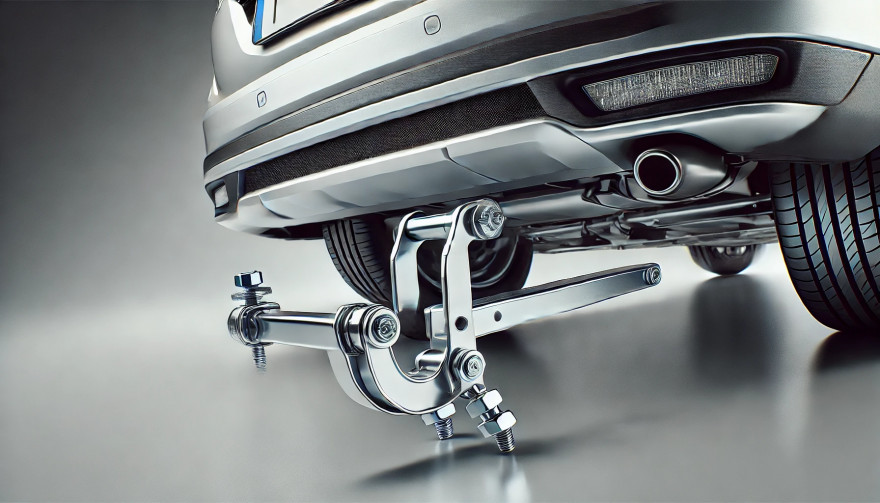
Detachable tow bars offer versatility and convenience for car owners who occasionally need to tow. Unlike fixed tow bars, they can be removed when not in use, maintaining your car's aesthetics and avoiding unnecessary bulk. However, understanding how they work, their benefits, and their maintenance requirements is essential to get the most out of your tow bar. Here’s what you need to know.

Why Choose a Detachable Tow Bar?

A detachable tow bar is an excellent solution if you only tow occasionally or prefer a clean look for your car when the tow bar is not in use. Here are some of its key advantages:

  • Aesthetic Appeal: When removed, the tow bar does not interfere with the car's design.
  • Convenience: Detachable tow bars are easy to attach and remove without tools, making them user-friendly.
  • Versatility: They allow you to tow various loads, from trailers to bike racks, without permanently altering your car's appearance.
  • Legal Compliance: In some regions, a visible, unused tow bar can lead to fines. A detachable option helps you avoid this.

Types of Detachable Tow Bars

Detachable tow bars come in different types, each suited to specific needs and preferences:

Vertical Detachable Tow Bars

  • Design: These tow bars fit seamlessly into your car’s underside, leaving no visible parts when removed.
  • Best For: Those prioritizing aesthetics and a clean finish.

Horizontal Detachable Tow Bars

  • Design: These are partially visible but still maintain a low profile.
  • Best For: Easier access and handling without compromising too much on appearance.

Swan Neck Tow Bars

  • Design: These have a slim, curved neck, making them stylish and less obtrusive.
  • Best For: European-style vehicles and those who need a compact towing solution.

How to Install and Use a Detachable Tow Bar

Installing and using a detachable tow bar is straightforward, but following the proper steps ensures safety and efficiency:

  • Read the Manual: Always start by reviewing the manufacturer’s instructions specific to your tow bar.
  • Clean the Mounting Area: Dirt or debris can interfere with secure attachment.
  • Secure the Tow Bar: Align the tow bar with the mounting bracket and ensure it clicks into place.
  • Test Stability: Gently pull the tow bar to confirm it’s securely attached.
  • Remove When Not in Use: Detach the tow bar and store it in a clean, dry place to prevent wear.

Common Issues and Troubleshooting

While detachable tow bars are convenient, they can occasionally present challenges. Here’s how to address some common problems:

  • Stuck Tow Bar: If the tow bar is difficult to remove, check for rust or dirt in the mounting area. Use a lubricant to loosen it, but avoid using excessive force.
  • Loose Connection: Ensure the tow bar clicks firmly into place during installation. A loose tow bar can be dangerous.
  • Key Issues: If the locking mechanism doesn’t work, inspect the key and lock for dirt or damage. Sometimes, a replacement key may be necessary.

Tips for Maintaining Your Detachable Tow Bar

Proper maintenance can extend the life of your detachable tow bar and ensure its performance:

  • Regular Cleaning: Clean the tow bar and mounting area to prevent rust and buildup.
  • Lubricate Moving Parts: Apply a small amount of lubricant to the locking mechanism and other moving parts for smooth operation.
  • Inspect for Damage: Check for signs of wear, cracks, or rust, especially if you tow frequently.
  • Store Properly: When not in use, store the tow bar in a protective case or bag in a dry location.

Safety Considerations When Towing

Towing comes with responsibility. Here are some safety tips to keep in mind:

  • Check Weight Limits: Never exceed your car or tow bar’s towing capacity.
  • Inspect Connections: Ensure the tow bar and trailer hitch are secure before every trip.
  • Test Lights: Verify that your trailer’s brake and signal lights are functioning properly.
  • Drive Cautiously: Towing affects handling and braking. Allow extra time for stopping and maneuvering.

Benefits of Investing in a Detachable Tow Bar

For many drivers, a detachable tow bar offers the perfect balance of functionality and style. Whether you’re towing for leisure, work, or practicality, this option ensures:

  • A clean car appearance when the tow bar is removed.
  • Versatile use for different towing needs.
  • Easy storage and maintenance.

Detachable tow bars are a versatile and practical choice for occasional towing. With proper installation, regular maintenance, and a focus on safety, you can enjoy their convenience without compromising your car's aesthetics. Whether you're hauling a trailer or attaching a bike rack, a detachable tow bar offers flexibility and ease for all your towing needs.

What Will You Receive When Your Order is Complete?

When you place an order, you’ll receive two perfectly cut keys for Witter, GWD, TOW Trust, or Renz towbars, tailored to your original key code. These keys are compatible with lock codes within the ranges TR01-TR10 or 32001-32200. Simply select your code from the dropdown menu (e.g., TR03), and we’ll take care of the rest.  

Order Your Keys Today!


Related Posts

Lost Your Westfalia Towbar Key? Here's What to Do

Lost Your Westfalia Towbar Key? Here's What to Do

Have you lost your Westfalia towbar key just before a long-planned trip or an important towing job? Don’t worry, you’re not alone. Every year, thousands of drivers face the same issue: the towbar key disappears right when it's needed most. Westfalia detachable towbar keys are usually used only a few times per year – often for summer holidays, camping trips, towing, or moving. Because they are used so rarely, they often get forgotten for months. It's easy to lose track of where they were last placed: in the glove compartment, a drawer in the garage, or a coat pocket? Fortunately, there's a simple solution – without having to replace the entire towbar system. Step 1: Check the Lock Cylinder for a 5-Digit Code Take a close look at the front of your Westfalia towbar lock, around the keyhole. Many models have a 5-digit code engraved directly into the metal. If the code is between 20000 and 50000, it is your personal key code. This code allows professional key services (like MR-KEY) to create a perfectly matched replacement key – without the original. Examples of valid codes: 23456 27891 49821 You can enter this code directly into an online order form. Order a replacement key here: https://mr-key.com/cat/towbars-keys What if You Only See 3 Digits? Sometimes, you might only find a 3-digit number on the lock body (e.g., 104, 287). Unfortunately, these numbers are not valid key codes . They usually refer to batch numbers or internal components. In this case, we recommend: Conducting a thorough search for the original key (glove compartment, toolbox, jacket pockets, etc.) If the key cannot be found, consider replacing the towbar locking mechanism Tip: Make a Spare Key While You Still Can If you still have your original Westfalia towbar key, now is the perfect time to make a copy . Many Westfalia keys show a code like: 2W01 to 2W50 This code is usually engraved on the metal shaft of the key and matches your towbar lock. With this code, we can quickly and affordably produce a precise duplicate. Why make a spare key? Avoid last-minute panic before departure Reduce costs by preventing lock replacement Fast delivery when ordering by code Order here: https://mr-key.com/cat/towbars-keys Fast and Professional Westfalia Key Service At MR-KEY , we specialize in duplicating Westfalia towbar keys by code. Our service is fast, precise, and hassle-free: Simply provide the 5-digit lock code (20000–50000) We cut the key using high-precision machines Every key is checked before shipping In most cases, shipping is completed within 24 hours . Quick Overview Situation Can a New Key Be Made? What to Do 5-digit code on the lock (20000–50000) Yes Order a key by code Only 3-digit number on the lock No Search for the key or replace the lock Original key with "2W" code present Yes Have a spare key made Tips: How to Avoid Losing Your Key in the Future To avoid ending up in this situation again, follow these simple tips: Store your spare key in your vehicle documents folder or glove box Label your keychain with "Towbar" for easy identification Take a photo of your key code and save it on your phone or in the cloud These small steps can save you time, stress, and money. Losing your Westfalia towbar key doesn't have to ruin your travel plans. As long as your lock has a valid 5-digit code between 20000 and 50000 , a replacement key can be made and shipped quickly. And if you still have the original key? Make a copy now – a small investment for long-term peace of mind. Order your Westfalia replacement key now: https://mr-key.com/cat/towbars-keys Safe travels!

DIY Guide: How to Program or Sync Your Car Key Fob at Home

DIY Guide: How to Program or Sync Your Car Key Fob at Home

Programming a car key fob doesn’t always require a trip to the dealership or an expensive diagnostic tool. In many cases, you can program or resync your key fob at home—saving both time and money. Whether you’ve just replaced the battery, changed the shell, or purchased a new key fob entirely, this guide will walk you through the basics of syncing it with your vehicle. Why Program Your Key Fob? Key fobs are integral to modern car access and ignition systems. When you replace or reset your key, the vehicle and fob must reestablish communication. Without syncing, features like remote locking, trunk release, or even engine start may stop functioning. This synchronization process ensures your key fob and vehicle are electronically paired and communicate securely. Without it, even a new battery or case won’t make your remote functional again. Can You Program It Yourself? The answer depends largely on the make and model of your vehicle. Older vehicles with basic remote key fobs often support manual onboard programming that doesn’t require specialized equipment. These procedures typically involve inserting the key into the ignition, turning it in a specific sequence, and pressing buttons on the fob within a certain time frame. It’s a simple process, and many car owners are surprised at how effective these methods can be. In contrast, modern vehicles with smart keys or keyless entry systems usually require advanced programming tools. These keys often contain transponders that must be linked to the car’s electronic control unit, a task typically performed by dealerships or professional auto locksmiths. Still, if you own a basic Opel, Peugeot, or Citroën model, there’s a good chance you can complete the task yourself at home. How Onboard Programming Works If your vehicle supports onboard programming, the steps are often straightforward. While the exact process may vary depending on the model, the general method includes entering the vehicle, turning the ignition on and off several times, and pressing a button on the remote to complete pairing. You may receive confirmation through a dashboard light flash or an audible chime, indicating that the key fob is now synced. Take note, though: some vehicles require all remotes to be programmed in the same session, so if you have multiple key fobs, have them all with you before starting. If the procedure doesn’t work, don’t be discouraged—it may simply mean your car requires a more advanced programming approach. When Should You Call a Professional? Not all keys can be programmed at home. Smart keys, proximity sensors, and certain immobilizer systems are designed with enhanced security that requires proprietary equipment to program. If your vehicle doesn’t respond to onboard programming or your key fob is completely unresponsive, it’s best to seek assistance from a certified locksmith or dealership. Trying to force the programming process can sometimes cause more harm than good. If you’re unsure, always verify the requirements in your car’s manual or consult a trusted technician. Essential Tips for Success To avoid frustration, start with the basics: always use a fresh battery from a trusted brand such as Panasonic CR2032 . Clean the internal contacts and handle the circuit board carefully to prevent static damage. Don’t rush—take the time to follow steps precisely and test functionality before fully reassembling the key. When replacing the key shell, make sure it's compatible with your exact model and that the key blade, transponder chip, and electronics are properly seated. With a bit of patience and the right information, programming your car key fob at home can be a practical and satisfying DIY fix. For basic vehicles, it’s a task you can handle in minutes—saving the cost and hassle of dealership appointments. Understanding your vehicle’s requirements and using reliable parts makes all the difference. Whether you're refreshing an old key with a new case or pairing a new remote to your car, the ability to program it yourself puts control back in your hands. For a full selection of batteries, shells, and compatible accessories, visit mr-key.com .

Key Fob vs. Transponder vs. Smart Key: What’s the Difference?

Key Fob vs. Transponder vs. Smart Key: What’s the Difference?

Unlocking the Modern Car Key In the past, a car key was a simple piece of metal. You inserted it into the door, turned it, and the car unlocked. You repeated the process in the ignition to start the engine. Today, however, a car key might be a sleek device that never even leaves your pocket. It may unlock your doors remotely, start the car with a button, or communicate with your vehicle without you even touching it. This evolution in key technology has introduced convenience, security, and — for many drivers — a bit of confusion. What kind of key do you actually have? Is it a transponder key , a key fob , or a smart key ? And why does it matter? In this blog, we break down each type of modern car key, explain how they work, and highlight what makes them different — so you can better understand, maintain, and protect the device that starts your vehicle. What Is a Transponder Key? The transponder key was the first major step toward electronic vehicle security. Introduced in the 1990s, it features a small microchip embedded in the plastic head of a standard metal key. This chip communicates with the car's immobilizer system. When you insert the key into the ignition and turn it, the car sends out a low-frequency signal. If the chip responds with the correct, pre-programmed code, the vehicle starts. If the code is incorrect — or missing — the car won’t start at all. Key characteristics: Looks like a traditional key Contains a passive chip (no battery needed) Requires physical insertion and turning Designed to prevent hotwiring and unauthorized key copies Transponder keys are still widely used, especially in vehicles produced between the late 1990s and early 2010s. They’re simple, reliable, and provide basic but effective protection against theft. What Is a Key Fob? The term key fob typically refers to a small, handheld remote that controls access to your car without inserting a key into a lock. Most modern fobs include buttons for locking and unlocking the doors, opening the trunk, and triggering a panic alarm. Some also support remote engine start. In many vehicles, the fob is attached to — or integrated with — a mechanical key that includes a transponder chip. Others are "flip keys," with a metal blade that folds inside the fob casing. Key fob features: Enables remote locking/unlocking May include a transponder chip Often includes a mechanical backup key Battery-powered (usually coin cell batteries) May include passive entry on some models Key fobs offer a balance between convenience and control. While you still need to press buttons or insert a key in many cases, they streamline the process and add useful features. What Is a Smart Key? The smart key is the most advanced and convenient type of car key available today. It communicates with your vehicle wirelessly using radio frequency or low-energy Bluetooth. As long as the smart key is within range — often in your pocket or bag — the car will unlock automatically when you touch the handle, and start when you press the ignition button. Unlike a key fob, there’s no need to press buttons or insert anything into the ignition. The system detects the key’s presence and grants access and engine start as needed. Smart key features include: Passive keyless entry (PKE) Push-button start Proximity detection Fully hands-free operation Often includes comfort access features like memory seating and climate control However, smart keys also introduce new considerations. They rely entirely on battery power, so a dead battery can temporarily disable key functions. Because smart keys are always transmitting a signal, they are also vulnerable to relay attacks , in which thieves use signal amplifiers to trick the car into unlocking. Key Comparison Table To help clarify the differences between each type of key, here’s a side-by-side comparison: Feature Transponder Key Key Fob Smart Key Physical key required Yes Sometimes (flip blade) No Remote locking/unlocking No Yes (buttons) Yes (proximity-based) Push-button start No No Yes Battery required No Yes Yes Security level Moderate High (with chip) High Common years of use 1995–2012 2000–present 2015–present Risk of relay attack None Low (in some cases) High (without signal shield) Why It Matters: Practical Impacts for Drivers Understanding what kind of car key you have can save you time, money, and stress in several situations: 1. Replacing Lost or Broken Keys Smart keys can cost anywhere from $200–$600+ to replace and usually require dealership programming. Transponder keys are cheaper and often programmable by locksmiths. 2. Diagnosing Key Issues If your car won’t start, it could be due to a dead battery in your fob or smart key. But if you have a transponder key, the issue might be with the chip or immobilizer system. 3. Security Awareness Smart keys are vulnerable to digital theft via relay attacks. If you have one, consider using a Faraday pouch or signal-blocking case to protect your vehicle while parked. Want to protect your key? Browse Mr Key's security accessories here. 4. Choosing Accessories Batteries, protective covers, signal-blocking cases, and replacement parts vary depending on your key type. Buying the wrong product can lead to frustration or compatibility issues. Know Your Key, Protect Your Car Your car key is more than a tool — it’s an entry system, a security feature, and a communication device. Whether you’re carrying a traditional transponder key, a button-operated key fob, or a proximity-based smart key, knowing the difference is the first step toward better security, smarter repairs, and fewer surprises. In a world where cars are smarter than ever, your key plays a more important role than most drivers realize. Take a moment to identify which type you have — and take steps to protect it.

How to Upgrade Your Car Key: A Step-by-Step Guide

How to Upgrade Your Car Key: A Step-by-Step Guide

Upgrading your car key can significantly improve your vehicle’s security and make your daily routine more convenient. Whether you’re upgrading from a basic key to a remote key or stepping up to a smart key, this guide will take you through the entire process, step by step, ensuring a smooth transition. Understanding Your Key Type Before you start the upgrade process, it’s important to know which type of key you currently have. Here are the most common key types: Traditional Metal Keys : These are basic, mechanical keys, common in older vehicles. They don’t have any electronic components. Transponder Keys : These have an electronic chip inside the key head that communicates with the vehicle’s computer system for added security. Remote Keys : These keys have buttons to lock/unlock the doors remotely and usually have a physical blade as a backup. Understanding your current key type will help guide your decision on the best upgrade path. Choosing the Right Upgrade Once you know what type of key you have, you need to decide what features you want in your upgraded key. Some options to consider are: Remote Locking : Allows you to lock/unlock the doors from a distance. Keyless Entry : Lets you unlock the car without taking the key out of your pocket. Smart Key : Offers advanced functions such as proximity unlocking, push-button start, and remote engine start. Take some time to research the options available for your specific car model. Many car manufacturers offer compatible upgrades for different key types, so it’s important to consult your dealership or a trusted locksmith for recommendations. Gathering What You’ll Need Before starting the upgrade process, make sure you have the following materials: The New Key : This could be a transponder key, remote key, or smart key. Your Original Key : You’ll need this as a reference throughout the process. Key Programming Device : Some keys require a special device to pair the key with your car. Car Manual or Programming Guide : It’s always a good idea to have your car’s manual handy for specific instructions. Having everything ready will make the process much smoother. Step-by-Step Upgrade Process Purchase the New Key Start by purchasing your new key. You can buy it from your car’s dealership, a certified locksmith, or a trusted online retailer. Make sure that the key is compatible with your vehicle’s make and model. Transfer Electronics (if necessary) If your new key is just a shell, you will need to transfer the internal components from your old key. This includes the transponder chip and, if applicable, the key blade. Be careful when transferring the electronics to avoid any damage. Program the Key Programming the new key is crucial for it to work with your vehicle. Here’s a general guide: Insert the original key into the ignition and turn it to the ON position. Quickly remove the original key and insert the new key. Turn the new key to the ON position and wait for the security light to turn off. This might take a few minutes. Test the New Key After programming, it’s important to test the new key to ensure everything works properly. Check the following functions: Locking and unlocking the doors Starting the engine Any additional functions like remote trunk opening or proximity unlocking Troubleshooting Common Issues If your new key isn’t working as expected, don’t worry! Here are some common problems and their solutions: Key Not Recognized : Check if the transponder chip is properly placed in the key. Key Doesn’t Start the Car : Double-check the programming steps to ensure everything was done correctly. Buttons Don’t Work : Verify that the battery in the new key is properly installed and functional. If the problem persists, it’s best to consult a professional locksmith or visit your dealership for further assistance. Upgrading your car key is an excellent way to improve both the security and convenience of your vehicle. By following these steps, you’ll be able to transition smoothly to your new key. If you run into any issues, don’t hesitate to reach out to a professional locksmith who can help you along the way. Enjoy the benefits of your new car key and the added peace of mind that comes with enhanced security.

Chat with us