Post Name

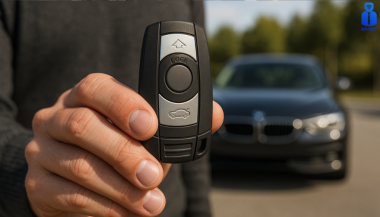
When it comes to convenience, car keyless remotes have revolutionized the way we interact with our vehicles. No more fumbling with traditional keys or worrying about locking yourself out. With just a push of a button, you can lock, unlock, and even start your vehicle. But what happens when your keyless remote stops working, or when you need to program a new one? Here’s a simple guide to help you program your car's keyless remote, regardless of your vehicle's make or model.

Understanding Keyless Remotes

Before jumping into the programming process, it’s important to understand what a keyless remote is and how it works. Essentially, a keyless remote allows you to interact with your vehicle without needing to physically insert a key. Instead of using a traditional metal key, your car’s electronic system communicates wirelessly with the remote, allowing you to lock, unlock, and sometimes even start your vehicle, all with the push of a button.

These remotes typically use a radio frequency to communicate with your car, sending a signal that’s encrypted for security. Most modern cars use transponder technology, which makes the system more secure and resistant to hacking or copying. This means that the remote must be properly programmed to your vehicle’s system to function correctly.

When Do You Need to Program a Keyless Remote?

There are several situations in which you might need to program your keyless remote:

Replacing a Lost or Damaged Remote: If you’ve lost your keyless remote or it’s no longer functioning properly, you’ll need to get a replacement. This may require programming the new remote to sync with your vehicle.

Adding a New Remote: If you’ve bought an additional keyless remote for your car (for a spouse, child, or other family member), you’ll need to program it so that it works with your vehicle.

Battery Replacement: Sometimes, replacing the battery in your remote can cause the programming to reset, meaning you’ll need to reprogram the remote for it to work again.

Changing or Resetting Vehicle Settings: Occasionally, vehicle settings or remotes can be reset or reprogrammed as part of regular maintenance, requiring you to program new or additional remotes.

How to Program Your Car’s Keyless Remote

Programming a keyless remote is easier than you might think, and in most cases, it can be done by following a few simple steps. The process varies slightly depending on the make and model of your car, but here’s a general overview of the steps involved:

Get Your New or Replacement Remote: Ensure that your remote is compatible with your car’s system. If you're not sure, you can check with your car's manufacturer or an authorized dealership. Some remotes require specific codes to be programmed.

Sit Inside Your Vehicle: For safety and security reasons, most cars require you to be inside the vehicle while programming the remote.

Insert the Key in the Ignition: Insert the key into the ignition and turn it to the "ON" position without starting the engine. For cars with push-to-start systems, you may need to press the start button without pressing the brake pedal.

Activate the Programming Mode: Depending on your car’s system, you’ll need to follow a sequence of steps to enter programming mode. This could involve turning the key on and off several times, or pressing certain buttons in a specific order. Refer to your vehicle’s manual for the exact steps, as the process can differ from one model to another.

Program the Remote: Once your car is in programming mode, you’ll need to press the button on your keyless remote that you want to program. Usually, you’ll hear a chime or see the lights flash, indicating that the remote has been successfully programmed. Some cars may require you to press the button several times to ensure proper synchronization.

Test the Remote: After programming, test the remote to make sure it works properly. Try locking and unlocking the doors or starting the engine. If everything works as expected, you’re done!

Exit Programming Mode: To finish the process, simply turn off the ignition and remove the key. This should exit programming mode. If you have additional remotes to program, repeat the steps above for each one.

What to Do if Programming Doesn’t Work

While programming a keyless remote is usually a straightforward process, there are instances where things don’t go as planned. If your remote isn’t syncing with your car after following the steps, here are a few troubleshooting tips:

  • Check the Battery: If the remote’s battery is dead or weak, it won’t transmit the signal to your car. Replace the battery and try programming again.
  • Verify the Compatibility: Make sure that the remote is compatible with your vehicle’s make, model, and year. Some vehicles require special remotes that can only be programmed by the manufacturer or an authorized locksmith.
  • Reset Your Vehicle’s System: In some cases, you might need to reset the car’s system to clear previous programming attempts. Check your owner’s manual or consult a professional for assistance.
  • Consult a Professional: If you continue to have issues, it might be time to visit a dealership or a certified locksmith. These professionals have the tools and experience to program the remote correctly and ensure everything works seamlessly.

Why Programming Your Keyless Remote Is Important

Programming your keyless remote is a simple but important task that helps ensure your car’s security and convenience. By understanding how the process works and what to do if things go wrong, you’ll be able to troubleshoot and solve any issues quickly. Whether you’re replacing a lost remote or adding a new one to your collection, knowing how to program your remote saves time and money compared to visiting a dealership or locksmith.

With the increased reliance on keyless remotes for unlocking and starting vehicles, it’s essential for every car owner to be familiar with this process. By keeping your remote in good working condition and knowing how to program it when necessary, you’ll enjoy a smoother, more efficient experience with your vehicle.

Related Posts

How to Know If Your Car Key Has a Hidden Transponder Chip

How to Know If Your Car Key Has a Hidden Transponder Chip

Modern car keys are more than just simple tools to unlock doors—they're powerful components of your vehicle’s security system. Hidden inside many keys is a small yet crucial piece of technology known as a transponder chip . But how can you tell if your car key has one? Whether you’ve lost your key, are looking to replace it, or simply want to understand your vehicle better, knowing if your key contains a transponder chip is essential. This guide will explain what a transponder is, why it matters, and how you can easily check if your key is equipped with one. What Is a Transponder Chip? A transponder chip, short for "transmitter + responder," is a small electronic microchip embedded inside the plastic head of the car key or within a smart key fob. When you insert the key into the ignition—or have it nearby in a push-button start system—the chip emits a unique signal. The vehicle’s onboard computer must recognize this signal before it will allow the engine to start. Without the correct signal, even if the key physically fits into the ignition, the car won’t move. Transponders have been a game-changer in reducing car theft, and today, nearly all vehicles produced after the late 1990s are equipped with them. Learn more about how modern keys work and find replacement options in our car keys collection. Why It’s Critical to Know If Your Key Has a Chip If your key has a hidden transponder chip, replacing it is more complicated than simply cutting a new metal key. You will need a key that not only matches the cut but also includes the correct programming to communicate with your car’s immobilizer system. Failing to recognize this can lead to frustration, extra dealership fees, or even being stranded. Moreover, understanding your key's technology helps you make smarter choices when buying a spare, upgrading your security setup, or troubleshooting ignition issues. How to Check If Your Car Key Has a Transponder Chip Fortunately, you don’t need expensive equipment to find out. Start by considering the age of your vehicle: if your car was manufactured after 1995 (in Europe) or 1998 (in the USA), chances are very high it uses a transponder system. Next, examine the physical key. Keys with large, bulky plastic heads usually house a chip inside. In contrast, purely metallic keys without plastic parts tend to belong to older, non-transponder vehicles. You can also perform a simple foil test. Wrap the head of your key in aluminum foil and try to start the car. Since foil blocks radio frequencies, if the car refuses to start, it’s likely that a transponder chip is present. If you want absolute certainty, consult your vehicle’s manual or speak with a professional locksmith. Many locksmiths use specialized tools to detect whether a chip exists. For additional technical explanation, you can refer to this guide on how immobilizer systems work. What Happens If the Transponder Signal Is Missing? If you try to start your car without the proper transponder signal, the immobilizer system kicks in. Most vehicles will either not crank at all or crank without allowing the engine to fire. Some models will display a warning light on the dashboard, often shaped like a padlock or a car with a key icon. Without a valid transponder signal, you won't be going anywhere—no matter how new or well-cut the key is. Can You Program a Transponder Key Yourself? Depending on the make and model of your car, some basic keys can be programmed at home—especially if you already have one working key available. However, many newer vehicles require professional diagnostic tools connected directly to the car’s computer to program keys securely. Attempting DIY programming on these systems without the right knowledge can lock your car’s immobilizer and lead to expensive repairs. Always consult your car’s manual or seek professional help before attempting any programming yourself. Knowledge = Protection Understanding whether your car key contains a hidden transponder chip isn’t just a fun fact—it's essential for protecting your vehicle and saving yourself time, money, and hassle. Whether you're planning to replace a worn-out key, add a backup, or upgrade your security, knowing what’s inside your key helps you make better, safer decisions. If you ever need a spare key, a battery replacement, or advice on key maintenance, you can explore more in our online store at Mr Key . Remember: a smart driver is a secure driver. Stay informed, stay prepared, and you'll always stay one step ahead.

The Benefits of Smart Car Keys: A Leap Into the Future of Automotive Convenience

The Benefits of Smart Car Keys: A Leap Into the Future of Automotive Convenience

Smarter, Simpler, Safer Imagine walking toward your car, and instead of fumbling through your bag or pockets for keys, your vehicle recognizes your presence and unlocks itself. This convenience is not a futuristic concept—it’s the reality of smart car keys, an innovation that has redefined automotive technology. As vehicles become more advanced, smart keys are becoming indispensable for drivers seeking security, convenience, and style. But what exactly makes smart keys so revolutionary? Let’s explore their features and benefits. What Are Smart Car Keys? Smart car keys, also known as proximity keys or keyless entry systems, use advanced technology to simplify the interaction between you and your vehicle. Unlike traditional keys or even remote fobs, smart keys rely on radio frequency identification (RFID) or Bluetooth to communicate with your car. Once within a specific range, the car recognizes the key, unlocking the doors and enabling push-button ignition. These keys offer far more than just access and starting capabilities. They are designed to enhance security and integrate features like personalized settings, making them a step ahead of conventional systems. From luxury sedans to electric vehicles, smart keys are rapidly becoming a standard feature in modern cars. The Key Benefits of Smart Car Keys One of the most noticeable advantages of smart keys is their unmatched convenience. Imagine walking to your car with hands full of groceries or during a rainstorm. With a smart key in your pocket or bag, the car automatically unlocks as you approach, eliminating the need to dig around for your keys. Similarly, starting the engine is as simple as pressing a button, streamlining the driving experience. Smart keys also prioritize security. Unlike traditional keys that can be duplicated, smart keys use encrypted communication to connect with the vehicle. This encryption ensures that unauthorized users cannot access or start the car. Some smart systems even include anti-theft mechanisms that disable the engine if the key is not detected nearby, adding an extra layer of protection. Moreover, many smart keys are equipped with customizable features. Depending on the car, they can store and recall settings such as seat positions, climate control preferences, and mirror adjustments. Some even allow for remote control of the car via a smartphone app, enabling users to lock, unlock, or preheat their vehicle with a simple tap on their phone. Smart Keys Around the World: Trends and Adoption The use of smart keys is growing globally, with different regions adopting the technology at varying rates. In developed markets like North America, Europe, and Japan, smart keys have become standard in mid-range and luxury vehicles. These regions, driven by technological advancements and consumer demand, are setting the pace for smart key adoption. In emerging markets, traditional keys are still more prevalent due to their affordability. However, the demand for smart keys is on the rise, especially among buyers of premium cars. As automotive manufacturers expand their offerings, smart keys are becoming accessible to a broader audience. The future of smart keys is even more exciting. Many automakers are exploring app-based systems and biometric authentication, such as fingerprint or facial recognition. These innovations aim to further integrate vehicles into the digital ecosystems of their owners, offering seamless connectivity and enhanced personalization. Challenges of Using Smart Keys While smart keys bring significant advantages, they are not without their challenges. One of the primary concerns is the cost of replacement. Losing a smart key can be expensive, with replacements often requiring programming by a dealership or specialized locksmith. This cost is significantly higher than that of traditional keys. Another issue is the potential vulnerability to hacking. Relay attacks, where thieves amplify the signal from a smart key to unlock a vehicle, are a known risk. While manufacturers are continually improving encryption methods, owners should take precautions, such as using signal-blocking pouches, to protect their keys. Battery life is another consideration. Smart keys depend on batteries, and if the battery dies unexpectedly, you may find yourself locked out of your car. Most manufacturers include a physical backup key or emergency override options, but staying mindful of your key’s battery status is essential. Why Smart Keys Are the Future Smart keys represent more than just a technological advancement—they symbolize a shift in how we interact with vehicles. Their ability to enhance convenience, security, and personalization makes them a must-have feature for modern drivers. As cars become increasingly integrated with digital ecosystems, smart keys are expected to evolve, incorporating features like biometric security and deeper smartphone integration. For drivers, this evolution means a more intuitive and tailored experience. From automatically adjusting settings based on the detected key to integrating with smart home systems, smart keys are paving the way for a connected and seamless future. Embrace the Smart Key Revolution Smart car keys are more than a luxury; they are becoming an essential tool in modern driving. Their convenience, advanced security, and customizable features make them a game-changer in automotive technology. However, as with any innovation, understanding their potential challenges and how to address them is crucial. Whether you’re unlocking your car as you approach or starting the engine with a simple button press, smart keys represent a leap forward in convenience and functionality. As automotive technology continues to advance, smart keys are leading the charge, offering a glimpse into a future where cars seamlessly adapt to our needs.

The Top 5 Car Key Emergencies and How to Handle Them

The Top 5 Car Key Emergencies and How to Handle Them

When it comes to car keys , emergencies often strike at the worst possible moments. Whether you’re rushing to work, stuck at a grocery store, or stranded in an unfamiliar location, knowing how to handle these situations can save you time, stress, and money. Below are the five most common car key emergencies and practical solutions to get you back on track. 1. Locked Out of Your Car? Here’s What to Do Locking your keys inside your car is a common yet frustrating mistake. The good news? There are ways to regain access without breaking the bank—or your window. Check for Spare Keys: If you have a spare key, now is the time to use it. Always keep one in a secure but accessible location, like with a trusted friend or at home. Use a Slim Jim or Unlocking Tool: While not ideal for everyone, these tools can work if you’re familiar with their use. However, be cautious to avoid damaging your car. Call a Locksmith or Roadside Assistance: Professional services can unlock your car safely and quickly. While it might cost you, it’s often cheaper than repairing a broken window. Pro Tip: Many modern cars come with apps or key fobs that allow remote unlocking. Familiarize yourself with these features beforehand. 2. Key Stuck in the Ignition? Don’t Panic A key stuck in the ignition can leave you feeling helpless, but with the right steps, you can often fix the issue yourself. Check the Gear Position: Ensure the car is in “Park” or “Neutral.” Many cars prevent key removal unless the gear is correctly positioned. Inspect for Steering Wheel Lock: Wiggle the steering wheel gently while trying to turn and remove the key. A locked steering wheel might be the culprit. Lubricate the Lock: Use a small amount of graphite lubricant to loosen the ignition lock. Avoid oil-based lubricants as they can attract dirt. Seek Professional Help: If the key is still stuck, call a locksmith or mechanic to prevent further damage. 3. Lost Your Key Fob Without a Spare? Act Fast Losing your key fob with no backup can be a nightmare, especially if your car relies on it entirely. Contact a Locksmith: Many locksmiths can program a new key fob on the spot, often at a lower cost than going to a dealership. Order a Replacement: Some car manufacturers allow you to order a replacement key fob online. Be prepared to provide proof of ownership. Preventative Measures: Always have a spare key fob and store it in a safe location. Consider investing in a key tracker to avoid future mishaps. 4. Dealing with a Wet or Damaged Key Fob? Accidents happen—maybe your key fob went through the wash or got drenched in the rain. The good news? Not all is lost. Dry It Out: Remove the battery and place the key fob in a bag of rice or silica gel to absorb moisture. Let it sit for at least 24 hours. Replace the Battery: Water damage can short-circuit the battery, so replace it with a new one after drying the fob. Test the Fob: After reassembling, check if the fob functions properly. If not, you may need to replace it or have it repaired by a professional. 5. Dead Key Fob Battery in a Remote Location? A dead key fob battery can leave you stranded, but this issue is often easier to resolve than you might think. Check for Hidden Features: Many cars have an emergency key hidden in the fob itself. This can manually unlock the door. Push-Button Start Workaround: Some cars allow you to start the engine by holding the dead fob close to the start button. Carry a Spare Battery: Always keep a spare CR-type battery in your glove box for quick replacements. These are inexpensive and widely available. Pro Tip: Familiarize yourself with your car’s manual to learn emergency procedures for dead key fobs. General Tips to Prevent Car Key Emergencies Preparation is your best defense against car key emergencies. Follow these tips to avoid getting caught off guard: Keep a Spare Key Handy: Store it at home, with a trusted person, or in a secure, hidden location. Invest in a Key Tracker: Attach a Bluetooth-enabled tracker to your key fob for easy location via your smartphone. Regular Maintenance: Replace key fob batteries proactively and inspect your keys for wear and tear. Learn Emergency Features: Understand your car’s built-in features, such as remote unlocking or hidden keys, to save time in emergencies. Stay Prepared, Stay Calm Car key emergencies don’t have to derail your day. With a little preparation and knowledge, you can tackle these common scenarios with confidence. Whether it’s unlocking your car, replacing a battery, or dealing with a damaged key fob, taking proactive measures ensures you’re always one step ahead.

How to identify the correct BMW key case?

How to identify the correct BMW key case?

Ordering the wrong BMW key case leads to delays, extra cost, and keys that won’t start your car. BMW has used multiple key designs across generations , so identifying your key type before buying is essential. This guide shows you how to correctly identify your BMW key case and avoid costly mistakes. Why Accurate Key Identification Matters BMW keys are part of the vehicle’s immobilizer system. If you choose the wrong case, your internal electronics and transponder chip may not fit correctly, leaving you with a remote that won’t start your engine. Many BMW key fobs look similar but differ in frequency, board layout, and blade type. Dealerships confirm keys by VIN and part number because BMW key components are not universal . Independent key services require the same accuracy. BMW Key Types (Quick Identification) BMW Key Style Model Years (Approx.) Identification Clues Classic metal key Pre-1995 No remote buttons, some have a small built-in torch light Diamond key (EWS) 1995–2005 Diamond shape, 3 buttons, no battery door , rechargeable inside ignition Slot-in rectangular key (CAS) 2004–2010 Flat fob, removable emergency key blade , sliding battery cover Comfort Access key (Keyless) 2010–2019 Keyless start, similar shape to slot key, CR2032 battery BMW Display Key 2016+ (high-end models) LCD touchscreen on fob Example model guidance: E46, E39, E53 X5: Diamond key E90, E60, E70, E87: Rectangular slot key F10, F30, F25: Comfort Access style G11 7-Series, i8: Display Key For model confirmation, use a free BMW VIN decoder such as the one referenced on the BMW Owners Portal . Step-by-Step: Confirm Your Correct BMW Key Case 1) Check physical shape and buttons Count buttons, note shape, and check for removable blade or battery hatch. 2) Look for FCC ID / Part Number Inside the shell or on the back you may find codes like: FCC ID: KR55WK49127, NBGIDGNG1 BMW part numbers starting with 66 12… Matching part numbers ensures correct fit, even for look-alike shells. 3) Confirm blade type (if applicable) Common BMW blade profiles: HU58, HU92, HU100 . 4) Cross-check model and production year BMW changed key systems by chassis generation. If unsure, a BMW dealer can confirm via VIN — per BMW policy, keys are VIN-matched for security. Ordering & Cutting Your BMW Key When you order a BMW key case online, you will either: ✔ Transfer your existing electronics No immobilizer programming required if you keep your transponder. ✔ OR get a new blade cut Professional cutting can be done by photo or by key code , allowing fast remote service without visiting a locksmith. Most BMW keys can be cut accurately from a high-resolution photo using digital bitting extraction, a process also documented in locksmith standards. Important: Shell-only replacements do not program the transponder; if you need a new key, a locksmith or dealer must program it to the vehicle. BMW Key Replacement FAQ Can I replace only the case? Yes. If electronics work, transfer them into a matching case. Do I need programming? Not if you keep the same transponder chip. New keys require programming. Can BMW keys be cut by photo? Yes. High-accuracy digital decoding allows cutting from an image. How long is BMW key delivery when ordering online? Typically 3-4 days depending on region and shipping speed. Do Comfort Access keys use a special case? Yes. Ensure the case is specified as Comfort Access compatible . Ready to Order the Correct BMW Key Case? If you’re unsure, send photos of your key and vehicle model details — our specialists will help identify the correct case before purchase. ✓ BMW key cases for all generations ✓ Key cutting via photo or code ✓ Fast worldwide BMW key delivery ✓ Secure and privacy-verified ordering Visit our shop at MR-KEY.com to identify and order the correct BMW key case.

Chat with us