Post Name

In an age where smartphones can locate us with pinpoint accuracy and lost luggage can be tracked halfway around the world, it’s easy to assume car keys are just as smart. But for many frustrated drivers, losing a car key feels like sending it into a black hole. The lack of a clear way to find them often leads to stress, wasted time, and sometimes costly replacements. So here’s the big question: Do car keys have GPS, and can they be tracked like other smart devices?

This article explains the technology behind key tracking, compares GPS with Bluetooth, and offers practical ways to find lost keys in a connected world.


The Truth About GPS in Car Keys

While GPS technology has become common in many consumer devices, the vast majority of car keys do not include built-in GPS. Even the most modern remote key fobs, which allow for keyless entry and push-button start, generally lack the components necessary for GPS functionality. These components include a satellite GPS receiver, a data transmission module, and a sustainable power source—none of which are typically found in a key fob. The design of a car key prioritizes compactness, cost-efficiency, and low energy usage. Adding GPS would not only increase manufacturing costs but also introduce battery life challenges. That’s why most manufacturers have opted against including GPS tracking in car keys.

GPS requires constant power and data transmission — something a small coin cell battery in a typical key fob can’t support." – Marcus Lee, Automotive Tech Analyst


How Can Car Keys Be Tracked?

Although your keys may not have GPS, there are other technologies that make it possible to track or locate them when they’re lost. These include Bluetooth trackers, crowdsourced networks, and GPS systems that track the vehicle instead of the key itself.

1. Bluetooth Trackers (Apple AirTag, Tile, Chipolo)

These small, attachable gadgets can be added to your keychain and linked to a mobile app. They rely on Bluetooth to provide location data when within a certain range. If your keys are somewhere nearby—like in your home or office—these trackers can play a sound or show you their last known position on a map. The range is generally up to 120 meters (400 feet), and battery life can last up to a year, making them a practical, low-maintenance option for most users.

2. Crowdsourced Networks (Find My, Tile Network)

If your Bluetooth tracker is out of range, some brands offer a smart workaround. Apple’s AirTag, for instance, uses the “Find My” network, which consists of millions of iPhones around the world. If someone with an Apple device passes near your lost keys, the location is anonymously and securely sent to your phone. This creates a global, decentralized tracking system that mimics GPS functionality without requiring satellites or cellular connections.

3. Car GPS Systems (Vehicle Only, Not the Key)

Some high-end cars offer integrated GPS systems, but these track the vehicle, not the keys. Brands like Tesla, BMW, and Mercedes-Benz allow owners to locate their car through mobile apps. If your keys are left inside the car, you may be able to find them by locating the vehicle. However, once the keys are removed, they cannot be tracked unless equipped with a separate Bluetooth tracker.


GPS vs Bluetooth: What’s the Difference?

To better understand why GPS isn’t commonly included in car keys, it’s useful to compare the two technologies:
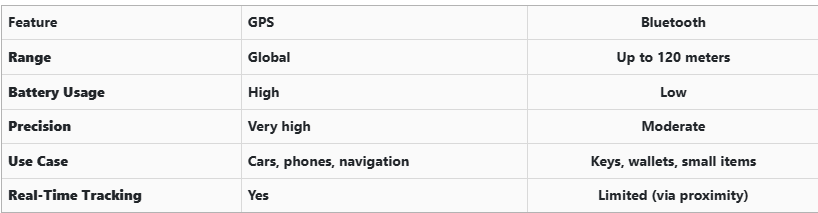
GPS provides global, real-time tracking with high precision, but it’s power-intensive and costly. Bluetooth, while more limited in range, is ideal for small items and short distances, offering a cost-effective solution for everyday use.


Global Perspectives on Key Tracking

Around the world, the adoption of key tracking technologies differs based on privacy laws, tech infrastructure, and consumer behavior. In Japan and South Korea, smart home and car integration are advanced, yet GPS-enabled keys are still not the norm. In many parts of Europe, particularly in countries like Germany, Bluetooth solutions are favored due to strict data privacy regulations. In contrast, the U.S. market has embraced personal tracking devices like Apple AirTag and Tile, making them increasingly common accessories. These differences highlight how technology adoption often reflects broader cultural and legal norms, as well as the balance between convenience and privacy.


Smart Tips to Keep Track of Your Keys

Whether your keys have advanced tech or not, you can take simple steps to avoid losing them. Attaching a Bluetooth tracker is a great first line of defense. Keeping your keys in a consistent, designated place at home reduces the chances of misplacement. Many tracking apps also offer “left behind” alerts, which notify you if you leave your keys behind when moving out of range. It's also smart to keep a spare key somewhere safe and consider going keyless if your next car allows it. Implementing a few of these habits can save you time, frustration, and the cost of replacing a lost key.


The Future of Key Tracking

While car keys may not have built-in GPS, technology continues to evolve with practical alternatives. Bluetooth trackers, supported by app alerts and community networks, already provide effective ways to find lost keys. As innovation progresses, we can expect even more seamless solutions, such as Ultra Wideband (UWB) technology and Internet of Things (IoT) integrations, to become mainstream.

As our tools become smarter, so must the way we use and manage them. With a little foresight and the right accessories, you'll never lose track of your keys again.

Related Posts

The Essential Car Parts Guide: Understanding Your Vehicle's Core Components

The Essential Car Parts Guide: Understanding Your Vehicle's Core Components

Unveiling the Anatomy of Your Car Your car is more than just a mode of transportation—it's a complex machine composed of various parts working in harmony to ensure smooth and safe driving. Understanding these essential car parts not only helps you appreciate your vehicle better but also empowers you to identify issues, perform basic maintenance, and communicate effectively with mechanics. In this guide, we’ll explore the key components that keep your car running and why they’re vital for optimal performance. 1. Engine: The Heart of Your Vehicle The engine is the powerhouse of your car, converting fuel into energy to propel the vehicle forward. There are various types of engines, including: Internal Combustion Engines (ICE): Common in most vehicles, using gasoline or diesel. Hybrid Engines: Combining a traditional engine with an electric motor for better efficiency. Electric Motors: Found in EVs, powered by rechargeable batteries. Key components within the engine include pistons, the crankshaft, and the timing belt. Regular maintenance like oil changes and timely inspections are crucial for keeping the engine in good condition. 2. Transmission: Changing Gears Made Easy The transmission system ensures that power from the engine is transferred to the wheels at the correct speed and torque. There are two main types of transmissions: Manual Transmission: Requires the driver to shift gears manually. Automatic Transmission: Shifts gears automatically, providing greater convenience. Proper transmission fluid levels are essential for smooth gear transitions and the longevity of the system. 3. Battery: Your Vehicle's Power Source The car battery supplies the electrical power needed to start the engine and operate various electrical systems, such as lights, wipers, and infotainment. Modern vehicles may also include auxiliary batteries for additional power needs. Maintenance Tip: Regularly check battery terminals for corrosion and ensure proper voltage levels, especially in extreme weather conditions. 4. Braking System: Your Lifeline on the Road The braking system ensures the vehicle slows down or stops when needed, making it a critical safety component. Key parts include: Brake Pads and Rotors: Convert kinetic energy into heat, slowing the car down. Brake Fluid: Transfers force from the brake pedal to the braking mechanism. Regular inspection of the braking system can prevent wear and ensure reliability. 5. Tires and Wheels: Where the Rubber Meets the Road Tires and wheels are vital for traction, handling, and overall vehicle stability. There are various types of tires designed for specific conditions, such as all-season, winter, and performance tires. Maintenance Tip: Regularly check tire pressure, alignment, and tread depth to ensure safe driving and optimal fuel efficiency. 6. Suspension System: Smoothing Out the Ride The suspension system absorbs shocks from uneven road surfaces, ensuring a smooth and stable ride. Key components include: Shock Absorbers: Reduce impact from road irregularities. Struts and Springs: Provide structural support and maintain balance. A well-maintained suspension system enhances comfort and handling. 7. Exhaust System: Keeping Emissions in Check The exhaust system directs harmful gases away from the engine and reduces emissions. Key components include the muffler, catalytic converter, and exhaust pipes. Environmental Note: A faulty exhaust system can increase emissions and negatively impact air quality. Regular checks are essential for compliance with emission standards. 8. Cooling System: Preventing Overheating The cooling system regulates the engine's temperature to prevent overheating. It includes components like the radiator, coolant, and thermostat. Maintenance Tip: Regularly check coolant levels and inspect hoses for leaks to ensure efficient cooling. 9. Fuel System: Delivering Energy to the Engine The fuel system stores and supplies fuel to the engine for combustion. Key parts include the fuel pump, injectors, and fuel tank. Efficiency Tip: Clean fuel injectors and replace the fuel filter as needed to maintain optimal fuel efficiency. 10. Electrical System: Powering Your Vehicle's Features From the headlights to the infotainment system, the electrical system powers numerous features in your car. It includes wiring, alternators, and fuses. Maintenance Tip: Inspect fuses and ensure the alternator is functioning properly to avoid electrical issues. Empowering Yourself Through Knowledge Understanding the essential parts of your car equips you with the knowledge to maintain your vehicle effectively and address issues proactively. By staying informed, you can extend the life of your car, save on repair costs, and ensure a safer driving experience. Whether you’re a car enthusiast or a regular driver, knowing your vehicle’s anatomy is the first step toward smarter car ownership.

Car Won’t Start After Key Shell Change? Here’s What the Transponder Chip Does

Car Won’t Start After Key Shell Change? Here’s What the Transponder Chip Does

Modern car keys have come a long way from the traditional cut metal blades of the past. What was once a simple tool for turning an ignition has evolved into a smart, encrypted device with layers of built-in security. Among the most critical components in today’s car keys is the transponder chip — a small but vital element that could be the reason your car doesn’t start after replacing your key shell. If you've recently changed the shell or casing of your key and suddenly find that your car won’t start, you're not alone. This is one of the most common (and frustrating) issues car owners face when performing a key repair or upgrade. So let’s break down what’s really happening — and how you can fix it. What Is a Transponder and What Does It Do? A transponder chip (short for “transmitter-responder”) is a small electronic component embedded in your car key. Its purpose is to communicate with your vehicle’s immobilizer system to authorize ignition. Here’s how it works: When you insert your key and turn the ignition, your car sends out a radio signal. The transponder chip in your key responds with a coded signal unique to your car. If the code is correct, the car’s computer disables the immobilizer and allows the engine to start. If the chip is missing, broken, or the code doesn’t match — the engine won’t start, even if the key blade physically turns. This system is an anti-theft measure, and it's present in most vehicles manufactured after the late 1990s. Without a functional transponder, your key may unlock the doors but it will not allow the car to start. This ensures that even if someone manages to copy the physical blade of your key, they still can’t steal your car. Why Your Key Might Not Work After Shell Replacement Changing your key shell (also called a case or housing) can seem like a simple cosmetic repair — but it’s easy to overlook the importance of transferring the transponder chip during the process. If your key no longer starts the car after a shell replacement, the most likely reason is: You forgot to move the transponder chip into the new shell. In many keys, the chip is not part of the electronics board . It’s often a tiny black or glass capsule , sometimes hidden in a small compartment within the key shell — completely separate from the buttons and battery. If you didn’t see it, it’s probably still sitting inside the old casing. Some people assume that simply moving over the circuit board and battery is enough — but without the transponder, your key won’t be recognized by the car’s immobilizer. This results in the engine failing to start, even though the buttons may still lock and unlock the doors. Symptoms of a Missing or Misplaced Transponder If your key turns in the ignition but: The car does not crank or start You see a flashing key icon or immobilizer warning on the dashboard The central locking might still work, but the engine won’t respond You hear a clicking sound but no ignition occurs Then it’s almost certainly a transponder issue. The car's system is waiting for a valid coded signal from the key — and without it, the start command is rejected. How to Fix It: What You Need to Do Here’s how to get your car running again: 1. Check Your Old Key Shell Open the old casing and look for a small black or clear capsule (typically rice-sized). That’s your transponder chip. Some are glued in place and may require careful prying. 2. Transfer the Chip Carefully remove it and insert it into the correct compartment in your new key shell. Some aftermarket shells have a specific slot for it, while others require a bit of creativity to keep it securely in place. In some cases, adhesive putty or double-sided tape can help hold it. 3. Reassemble and Test Put your key back together and try starting the car again. If the chip is correctly placed, it should work immediately — no reprogramming needed. Always test both ignition and door lock/unlock functions. What If You Lost the Chip? Unfortunately, if the chip is damaged or lost, the key will no longer be able to start your vehicle. In this case, you’ll need to: Contact a professional auto locksmith Have a new transponder chip programmed to your car’s immobilizer system Provide proof of ownership (such as your vehicle logbook or registration) in most cases Depending on the make and model of your car, programming a new chip may cost anywhere from $50 to $250 , and it typically requires special diagnostic equipment. It’s worth noting that some dealerships may charge significantly more than independent auto locksmiths — and you may have to wait longer for service. Pro Tips When Replacing Your Key Shell Always examine the inside of your old shell carefully before throwing it away. Take photos before disassembly so you know where each component goes. If you're unsure where the chip is or how to transfer it, look for DIY videos specific to your key model. Use tweezers and caution — the chip is fragile. Avoid static electricity or contact with magnets during the transfer process. Some modern keys have transponders integrated into the circuit board , in which case no separate chip needs to be moved. If you’re working with a smart key or proximity key, additional steps may be required. These typically involve re-synchronization with the vehicle’s system and may not function correctly without professional assistance. Small Chip, Big Consequences It’s incredible how something as small as a transponder chip can control such a major function. Replacing your key shell is a great way to refresh the look and feel of your key — but it’s vital not to overlook the importance of transferring every component, especially the transponder. Many DIY repairs are abandoned or lead to confusion simply because of this overlooked step. Fortunately, it’s one of the easiest problems to fix once you understand what to look for. If your key looks brand new but your car won’t start, don’t panic. Chances are, the solution is sitting inside your old key shell — quietly waiting to be moved over.

What to Do If You Lose Your Volkswagen Key?

What to Do If You Lose Your Volkswagen Key?

Losing a Volkswagen key is stressful. It usually happens at the worst possible moment—before work, during travel, or far from home. Modern VW keys are no longer simple pieces of metal. They combine electronics, immobiliser chips, and precision-cut blades. When a lost car key situation happens, knowing the right steps saves time, money, and frustration. This guide explains exactly what to do if you lose your VW key, how to secure your vehicle, and how to get a proper VW key replacement without unnecessary delays. Stay Calm and Check the Obvious First Before assuming your VW key is gone for good, pause. Keys are often misplaced, not stolen. Check: Jacket and trouser pockets Bags and backpacks Around the car, driveway, or parking area Home entry points and recent stops Many VW keys are lost nearby and found within minutes. If the key truly cannot be located, move to the next step. Secure Your Volkswagen Immediately If you suspect the key is lost in a public place, vehicle security becomes the priority. Modern Volkswagen keys communicate with the car via encrypted signals. While this offers protection, losing a key still creates risk. What to do: Lock the vehicle if possible Avoid leaving the car unattended for long periods Do not delay replacement if the key cannot be recovered The fewer active keys exist for your vehicle, the safer it remains. Identify What Type of VW Key You Lost Not all Volkswagen keys are the same. Knowing what you lost helps you choose the correct replacement. Common VW key types include: Mechanical keys (older VW models) Transponder keys (chip-based immobiliser keys) Remote flip keys Smart / proximity keys (keyless entry systems) You can usually identify your key type by: The year of the vehicle Whether it had buttons Whether the car starts with a traditional ignition or push-start This information ensures you order the correct VW key replacement. Why a Spare Volkswagen Key Matters More Than You Think Many VW owners only realise the importance of a spare after losing their only key. A spare key: Prevents vehicle immobilisation Reduces stress during travel Makes replacement faster and simpler Acts as a backup for emergencies Relying on a single key is one of the most common and avoidable mistakes VW drivers make. Replacing a Lost Volkswagen Key the Smart Way A VW key replacement does not always require the original key. At mr-key.com , you can order replacement Volkswagen keys, fobs, and key cases designed to match your exact model. Available solutions include: Replacement VW key shells and fobs New key blades cut to match your vehicle Keys cut from a photo of the original Keys cut from a code , where available This allows you to restore access even if the original key is completely lost. Important : Electronic keys may still require programming after cutting, depending on the model. How VW Keys Can Be Cut Without the Original Many drivers assume a missing key makes replacement impossible. That is not true. VW keys can often be cut: From a clear photo of the original key blade From a key code linked to the vehicle or lock This method restores the physical function of the key with high precision. It is especially useful when no spare key exists. More information on official VW security and immobiliser systems can be found on the Volkswagen website Protect Your Replacement VW Key Once you replace a lost VW key, protect it properly. Simple habits make a big difference: Use a protective key case Avoid placing keys loosely in bags or pockets Keep a spare key stored safely at home Small steps prevent repeat key loss—and repeat stress. Frequently Asked Questions Can I replace a Volkswagen key without the original? Yes. A VW key replacement is possible even without the original key. Keys can be cut from a photo or code, depending on the model. What should I do if I lose my only VW key? Secure the vehicle first. Then order a replacement key as soon as possible to avoid being locked out or immobilised. Are all VW keys the same? No. Volkswagen uses different key types depending on model and year, including mechanical, transponder, remote, and smart keys. Does a replacement VW key need programming? Some VW keys include electronic chips that require programming. Cutting the key restores physical access, while programming enables full functionality. Why is having a spare VW key important? A spare key saves time, stress, and complications if your main key is lost or damaged. For independent vehicle security standards and best practices, see guidance from recognised automotive organisations such as ADAC If you’ve lost your Volkswagen key or want to avoid future problems, explore VW key replacements , fobs , cases , and key cutting services at mr-key.com and secure your vehicle the smart way.

How to Clean and Maintain Your Car Key Fob Like a Pro

How to Clean and Maintain Your Car Key Fob Like a Pro

Your car key fob is one of the most used items in your daily life. You press it multiple times a day, carry it in your pocket or bag, toss it on desks, and sometimes accidentally drop it on the ground. But how often do you actually clean or check it? Most people only think about their key fob when it stops working. By then, it's often too late. The good news is, with a little attention and regular maintenance, you can keep your car key fob working perfectly for years to come. In this article, you'll learn how to clean and maintain your car key fob like a pro — so you can save money, avoid frustration, and get the best performance out of your key. Why Cleaning and Maintaining Your Key Fob Matters Car key fobs aren’t just simple remotes. They're packed with sensitive electronics, small batteries, and tiny contact points that can easily get damaged by dirt, moisture, or simple neglect. If you never clean or check your key fob, you might start to notice: Unresponsive buttons Reduced signal range Frequent battery issues Complete failure to unlock or start the car Most of these problems are avoidable with basic maintenance . Cleaning your key fob regularly helps keep it functional, protects its electronics, and ensures it lasts longer. It also saves you from spending money on costly repairs or total key replacements. How to Clean Your Car Key Fob: Step-by-Step Guide Step 1: Open the Key Fob Gently Start by carefully opening your key fob. Most models have a small groove or notch where you can insert a flathead screwdriver or a coin to separate the shell. Be gentle — forcing it open can crack the plastic or damage internal clips. If you're unsure, check your car’s manual or look up your key model online to find specific instructions. Step 2: Remove the Battery Once you open the key fob, always remove the battery before cleaning. This protects the electronic circuit from any accidental moisture and prevents short-circuiting. Set the battery aside in a dry, safe place. Step 3: Clean the Exterior Use a soft, dry microfiber cloth to wipe the outside of the key fob shell. For tougher dirt or sticky areas, slightly dampen the cloth with water or isopropyl alcohol (70% or higher). Avoid using harsh cleaning chemicals that could damage the plastic or remove painted symbols. Step 4: Clean the Buttons and Small Gaps Dirt, dust, and pocket debris often collect around the buttons. These particles can block the buttons from making proper contact or cause them to stick. Use a cotton swab or a soft toothbrush to gently clean around the edges and in between the buttons. For tight spaces, a toothpick can help dislodge stubborn dirt. If needed, lightly moisten the cotton swab with alcohol to break down grime. Always dry the key fob thoroughly after cleaning. Step 5: Inspect and Clean the Battery Contacts Battery contacts can become dirty or corroded over time, especially if the battery leaked or moisture got inside. Check the metal contact points carefully. If you see white powder or greenish residue (common signs of corrosion), gently clean them using a cotton swab dipped in isopropyl alcohol. Be extremely careful not to bend or scratch the contacts. If corrosion is too severe, the key fob might need professional repair or a replacement circuit board. Step 6: Replace the Battery if Needed Key fob batteries typically last between 1 to 2 years, but frequent use, weak signals, or exposure to extreme temperatures can shorten battery life. If your battery is old or low, replace it with a new one. Most car key fobs use CR2032 or CR2025 batteries. Always make sure you install the new battery in the correct position, respecting the polarity (+ / -). A fresh battery not only improves response time but also ensures the signal reaches your car reliably. Step 7: Reassemble the Key Fob Once everything is clean and fully dry, carefully snap the key fob back together. Make sure the casing is securely closed and the buttons feel smooth and responsive. Test the key fob to confirm that it works correctly. Pro Tips to Keep Your Car Key Fob in Top Shape A well-maintained key fob can last many years. Here’s how to keep it working perfectly: Keep it Dry: Most key fobs aren’t waterproof. Avoid rain, puddles, wet pockets, or any contact with liquids. Use a Protective Cover: A silicone or rubber key cover adds shock protection, keeps out dirt, and prevents scratches. Avoid Extreme Heat or Cold: Leaving your key fob in direct sunlight or in a freezing car can damage the battery and weaken plastic parts. Change the Battery Regularly: Don’t wait for your key fob to completely stop working. Weak batteries can lead to unreliable signals and unexpected failure. Don’t Drop It: Even though most key fobs can handle light drops, repeated impact can cause internal damage. When to Replace the Key Fob Shell If your key fob shell is cracked, worn, or no longer closes tightly, it’s time to replace it. A damaged shell can let moisture and dirt reach the electronics and cause long-term damage. Replacing the shell is a quick and affordable solution that can extend your key fob’s life significantly. At Mr. Key , we offer high-quality key fob shells, batteries, and repair kits that can help you refresh your key fob and save money compared to dealership prices. Explore our key fob repair kits, protective covers, and replacement batteries now at mr-key.com . Your car key fob may seem like a small detail, but it plays a huge role in your daily life. Without it, you can’t get in or even start your car. The good news is that taking care of your key fob is easy. With regular cleaning, battery checks, and some simple maintenance, you can keep it working reliably for years. And if you need to replace your battery, your key shell, or your entire key fob, Mr. Key is here to help. We provide everything you need to keep your keys in perfect shape, save money, and avoid unnecessary trips to the dealer.

Chat with us