Post Name

Locked Out? Here’s What to Do Next

Imagine this: you’re rushing to an important meeting or trying to get your kids to school, only to discover you’ve lost your car keys or locked them inside your vehicle. Panic sets in, and the inconvenience seems insurmountable. Losing or damaging your car keys is a frustrating, but surprisingly common problem. Luckily, car key replacement services are more advanced and accessible than ever. But where do you start? From understanding key types to navigating costs and services, this guide breaks down everything you need to know about car key replacement.

Understanding Car Key Types: The First Step to Replacement

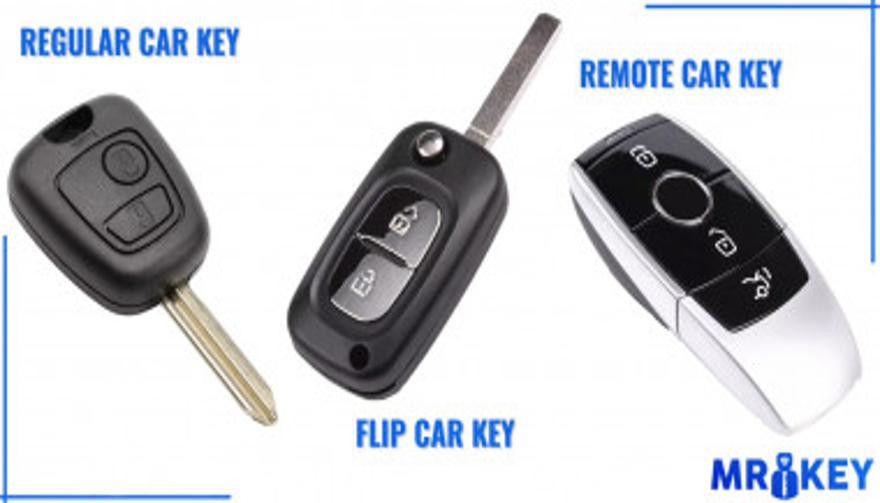
Before diving into the replacement process, it’s essential to identify the type of car key you have. The complexity of your key determines the cost and the effort required for replacement.

Traditional Mechanical Keys

  • The simplest and most common in older vehicles.
  • Easily duplicated at hardware stores or locksmiths.

Transponder Keys

  • Equipped with a microchip that communicates with the car’s ignition system.
  • Offers enhanced security, as the car won’t start without the correct chip signal.

Remote Key Fobs

  • Allows remote locking, unlocking, and other functions like opening the trunk.
  • Replacing a lost or damaged fob can be more expensive due to programming needs.

Smart Keys

  • Found in modern luxury cars, these keys provide keyless entry and start.
  • Operate via proximity sensors, making them highly convenient but costly to replace.

Each key type requires a different replacement approach, so understanding your key’s functionality is crucial.

The Replacement Process: What to Expect

Replacing a car key can range from a quick, inexpensive fix to a more involved process requiring specialized tools and expertise. Here's a step-by-step overview of what to expect:

Determine Your Replacement Options

  • Authorized Dealership: Best for complex keys, but often the most expensive option.
  • Local Locksmith: Typically faster and more affordable for mechanical keys and some transponders.
  • Online Services: Websites offering key duplication or fob replacements can be convenient, though programming may still require a locksmith.

Gather Essential Information

  • Vehicle identification number (VIN) and proof of ownership.
  • Details about the key type and car make and model.

Programming and Testing

  • Keys with transponders or fobs often require programming to match your car’s system.
  • A professional locksmith or dealership will ensure the new key functions seamlessly.

Costs: How Much Should You Expect to Pay?

The cost of car key replacement varies significantly based on the key type, service provider, and your location. Here’s a general breakdown:

  • Mechanical Keys: $10–$50 for duplication.
  • Transponder Keys: $75–$200, including programming.
  • Remote Key Fobs: $150–$400, depending on the car make and model.
  • Smart Keys: $250–$600, with luxury models at the higher end.

Factors affecting cost include the car's age, whether you need key programming, and the urgency of the service. Always compare prices across locksmiths, dealerships, and online providers for the best deal.

A Global Perspective: Trends and Innovations in Car Key Replacement

Car key replacement practices vary worldwide, influenced by technology, availability of services, and local regulations.

  • United States and Europe: Locksmiths and dealerships dominate the market, with online platforms gaining traction for basic duplications.
  • Asia: With the rise of smart keys in markets like Japan and South Korea, dealerships often handle replacements due to proprietary technology.
  • Emerging Markets: Mechanical keys are still prevalent, and costs are generally lower, though advanced key systems are increasingly common.

Global trends indicate a shift toward digital and biometric key systems, with smartphone-based replacements and app-controlled access gaining popularity. However, these advancements also raise concerns about cybersecurity and hacking.

Tips to Avoid Future Key Emergencies

While no one can predict when a key might be lost or damaged, a few preventative measures can save you from headaches down the road:

  • Invest in a Spare Key: Having a duplicate ready can save time and money.
  • Use a Key Finder Device: Attach a Bluetooth tracker to your keyring to locate lost keys easily.
  • Protect Smart Keys: Store them in a signal-blocking pouch to prevent relay attacks.

Plan Ahead and Stay Prepared

Car key replacement might seem daunting, but with the right knowledge and preparation, it’s a manageable process. Understanding your key type, exploring your replacement options, and taking preventative steps can save you time and money.

If you’re facing a key emergency, start by identifying your options and gathering the necessary information. And for the future, consider investing in a spare or upgrading to a more secure system.

Losing your car keys may be inconvenient, but it doesn’t have to derail your plans. With modern solutions and a little foresight, you’ll be back on the road in no time.

Related Posts

What’s the Difference Between a Key Fob, Smart Key, and Proximity Key?

What’s the Difference Between a Key Fob, Smart Key, and Proximity Key?

Over the past two decades, vehicle security and convenience have evolved dramatically. Traditional metal keys have steadily given way to a range of more advanced systems that offer not only better protection but also more comfort for the everyday driver. Among the most commonly used terms in today’s automotive world are key fob , smart key , and proximity key . While often used interchangeably, these are not identical technologies. Each represents a step forward in how drivers interact with their cars, and understanding the differences between them is essential—especially when replacing, repairing, or purchasing new key components. In this article, we’ll explore each key type in detail, highlight what sets them apart, and offer practical insights to help you identify which type you own—and what that means for functionality, replacement options, and compatibility. Key Fob: The Foundation of Remote Access A key fob , in the modern context, refers to a remote control device that allows users to perform basic functions such as locking or unlocking the car doors. The word "fob" originally described a decorative accessory on a keychain, but it has evolved to refer specifically to these electronic remotes. Most key fobs use radio frequency (RF) signals to communicate with the vehicle. When you press a button on the fob, it sends a coded signal to a receiver inside the car, instructing it to lock, unlock, open the trunk, or activate the panic alarm. Some key fobs also include a physical key blade that can be used manually if the battery is dead or if the remote functionality fails. Key fobs became standard in the early 2000s and are now found in nearly every modern car. They represent the bridge between the traditional mechanical key and more advanced systems. While they don’t offer hands-free operation or engine-starting capabilities by default, they introduced a level of convenience that significantly improved the driving experience at the time of their launch. Smart Key: Hands-Free, High-Tech, Highly Secure The smart key builds on the foundation of the key fob but adds a major element of sophistication: hands-free access and ignition . With a smart key, you no longer need to press buttons to enter or start your vehicle. Instead, the key communicates continuously with the vehicle via low-frequency antennas and encrypted signals . As long as the key is within a certain range—often in your pocket or handbag—the vehicle automatically detects it and allows for keyless entry and push-button start. In many smart key systems, simply touching the door handle unlocks the vehicle. Once inside, starting the car requires nothing more than pressing a button on the dashboard. Some smart keys even store personalized settings, such as seat position or mirror alignment, offering a more tailored driving experience for each registered user. Originally reserved for luxury vehicles, smart keys have become increasingly common across all vehicle classes. Brands like Lexus, Mercedes-Benz, and BMW were early adopters, but today you’ll find smart keys in many Hyundai, Kia, Toyota, Nissan, and Volkswagen models. They offer both convenience and enhanced security thanks to rolling code encryption, which helps prevent signal interception and unauthorized vehicle access. Proximity Key: The Functional Twin of the Smart Key The term proximity key is often used synonymously with smart key, and in many cases, it functions in the same way. A proximity key allows the car to detect when the key is nearby—typically within one to three feet—and respond accordingly. You can unlock the car simply by approaching or touching the handle, and engine start is enabled through a button as long as the key remains inside the cabin. However, while all smart keys are proximity-based, not all proximity systems include the full feature set of a smart key. In some vehicles, the proximity key may lack advanced personalization or remote app integration, but the core functionality— hands-free locking, unlocking, and push-to-start capability —remains intact. The term “proximity key” is more commonly used in owner manuals or by manufacturers in Europe and Asia, while “smart key” has become the marketing standard in North America. Regardless of the terminology, the underlying technology is largely the same, relying on short-range radio waves, signal encryption, and two-way authentication between the key and the car. Breaking Down the Differences To simplify the distinctions between these three key types, it’s helpful to focus on user experience and technical capability. A traditional key fob requires active input—pressing a button to unlock the doors—whereas smart and proximity keys allow for passive, automatic operation. Additionally, the integration of engine start buttons, memory features, and enhanced security protocols tends to be exclusive to smart and proximity systems. Another notable difference lies in design and construction . Key fobs often have visible mechanical blades and rubber buttons, while smart keys are usually more compact, feature fewer or no physical buttons, and hide the emergency key blade inside the unit. Understanding this can help when shopping for replacement shells, batteries, or full units. Identifying Your Key Type Not sure which key your car uses? You’re not alone. Here's how to tell: If you must press a button on your key to unlock the doors and start the engine with a physical ignition slot, you’re likely using a key fob . If your car unlocks automatically when you approach and starts with a dashboard button —without ever removing the key from your pocket—you have a smart key or proximity key . If your car allows for keyless entry but still requires button pressing on the remote , it's most likely a standard key fob with added convenience features. Why Knowing the Difference Matters Understanding what type of key you use is crucial when you’re purchasing replacement components. A smart key cannot be replaced by a basic key fob, as it contains far more complex electronics and vehicle-specific programming. Likewise, replacing a proximity key requires knowing the exact frequency, chip type, and compatibility with your vehicle’s immobilizer system. At mr-key.com , we help car owners find exactly what they need—whether it’s a replacement key shell, a fresh battery, or a full remote unit with electronics and transponder chip included. With detailed listings sorted by make, model, and key type, it’s easy to identify the correct product and avoid costly dealership programming fees. As automotive technology continues to evolve, so does the way we access and operate our vehicles. Whether you're using a classic key fob, a cutting-edge smart key, or a proximity-based system, each offers a different balance of convenience, security, and technical complexity. Recognizing the key you use—and understanding how it works—not only makes you a more informed vehicle owner but also helps you take better care of your key system. When the time comes for a replacement or upgrade, you’ll be prepared to make the right choice quickly and confidently. For high-quality, vehicle-specific replacement parts, visit mr-key.com . From fob covers and CR2032 batteries to complete electronic keys and blades, we’ve got everything you need to keep your key performing like new.

Smart or Mechanical Car Keys: What to Choose for Your Vehicle’s Security?

Smart or Mechanical Car Keys: What to Choose for Your Vehicle’s Security?

When it comes to vehicle security, the type of car key you use is crucial. Car keys have evolved dramatically over the years, and today, two main types are commonly available: smart keys and mechanical keys. Each type offers distinct advantages and drawbacks, depending on your preferences, security needs, and budget. In this article, we’ll explore the differences between these two types of keys, their pros and cons, and help you determine which one is best for your vehicle’s security. Understanding Smart Car Keys Smart car keys, often referred to as key fobs, have become the standard for most new vehicles. These advanced keys operate using radio frequency identification (RFID) technology, which allows the key to communicate wirelessly with your car. The interaction between the car and the key is based on encrypted signals, enhancing both convenience and security. Key Features of Smart Car Keys: Keyless Entry: One of the most convenient features of smart keys is keyless entry. With this technology, you don’t have to physically insert a key into the lock to open your car. Instead, the key fob transmits a signal to the car’s receiver, unlocking the doors automatically when you approach. This feature is especially useful when your hands are full or during inclement weather. Push-to-Start Ignition: Many modern vehicles with smart keys feature a push-to-start ignition system. With this technology, you can start your car simply by pressing a button, provided that the key fob is inside the vehicle. No need to insert a key into the ignition, making the process quicker and easier. Enhanced Security Features: Smart keys are designed to improve vehicle security. They utilize encrypted signals that are difficult to replicate or hack. Modern key fobs often come with rolling codes, meaning the signal changes each time the key is used, making it nearly impossible for thieves to copy the key’s signal. Additionally, many smart keys are equipped with proximity sensors that automatically lock the doors when the key is a certain distance away, reducing the risk of theft. Convenience and Customization: Some smart car keys allow for extra features, such as memory settings for seat adjustments, climate control, and even personalized preferences like music playlists. This adds a layer of comfort and convenience to your driving experience. Drawbacks of Smart Car Keys: While smart keys offer numerous benefits, they come with a few challenges: Battery Dependence: Smart keys rely on batteries, both within the key fob and sometimes within the car itself. If the battery in your key fob dies, you might find yourself locked out of your vehicle or unable to start it. Fortunately, many vehicles allow you to use a backup mechanical key that is hidden inside the fob itself. However, the reliance on batteries can still be a disadvantage. Cost: Replacing a lost or damaged smart key can be expensive, particularly if it involves reprogramming or replacing the vehicle’s security system. Smart keys are generally more costly than mechanical keys, so the price of a replacement key can put a strain on your budget. Vulnerability to Hacking: Although modern smart keys are designed to be secure, they are not completely immune to theft. Sophisticated thieves have developed methods of intercepting and cloning key fob signals. While this is still a relatively rare occurrence, it’s important to be aware of the potential risks and take extra precautions to protect your key fob. Vulnerability to Water and Extreme Conditions: Smart keys are sensitive to water damage, which makes them less suitable for activities like surfing, open-water swimming, or even heavy rain exposure. Unlike mechanical keys, which are more resistant to environmental factors, electronic key fobs can malfunction if exposed to water or extreme weather conditions. This can leave you stranded or necessitate an expensive replacement. Understanding Mechanical Car Keys Mechanical car keys, also known as traditional metal keys, have been in use for over a century. These keys work through a physical mechanism: when inserted into the ignition, they turn to engage the engine. While they are less common in modern vehicles, mechanical keys are still widely used, particularly in older cars or more budget-friendly models. Key Features of Mechanical Car Keys: Simplicity and Reliability: One of the main advantages of mechanical keys is their simplicity. Unlike smart keys, mechanical keys don’t rely on electronics or batteries, making them highly reliable, especially in situations where technology might fail. Whether it’s a long road trip or a cold winter morning, you can always count on your mechanical key to work. Affordability: Mechanical keys are far less expensive to produce and replace than electronic keys. If you lose your key, getting a replacement is typically much cheaper. For those on a budget, mechanical keys are a practical option for car security. No Risk of Signal Interception: Mechanical keys don’t use radio signals, which means they can’t be intercepted or hacked in the same way smart keys can. There’s no risk of someone remotely copying your key’s signal to gain access to your vehicle. Durability: Mechanical keys are often made from durable materials, which means they can last for many years if properly cared for. They don’t require regular battery replacements and are resistant to the kind of wear and tear that might affect electronic systems. Suitable for Adventures: Mechanical keys are an excellent choice for outdoor enthusiasts and adventurers. Since they are resistant to water damage, they’re ideal for activities where you might get wet, such as hiking in the rain, kayaking, or camping by a lake. Their durability ensures they’ll keep working even in rugged or wet conditions. Drawbacks of Mechanical Car Keys: While mechanical keys have their merits, they also come with limitations: Lack of Convenience: Unlike smart keys, mechanical keys require manual operation. You need to physically insert the key into the door and ignition, which may be less convenient, especially when you’re in a hurry or carrying items. Security Risks: While mechanical keys can’t be hacked, they are more easily duplicated. If someone gets a hold of your key, they can make a copy, which could put your vehicle at risk. Additionally, older mechanical key systems don’t have the advanced security features found in modern smart keys. No Keyless Entry or Push-Start Features: Mechanical keys lack keyless entry and push-to-start ignition, which can make your car less convenient to use. In addition, you won’t have access to any of the advanced features offered by smart keys, such as memory settings or remote start. When deciding between a smart or mechanical car key, the best choice depends on your individual needs, preferences, and security concerns. If you prioritize convenience and advanced security , a smart key might be the right choice for you. Features like keyless entry, push-to-start ignition, and superior encryption provide a higher level of comfort and safety. If you have a newer vehicle or enjoy the latest technology, a smart key will enhance your driving experience. If you value simplicity, reliability, and cost-effectiveness , a mechanical key may be the better option. It’s a great choice for older vehicles, drivers on a budget, or those who don’t need the added complexity of modern electronic systems. Mechanical keys are also ideal for people who want a straightforward, low-maintenance solution to car access. Regardless of which type of key you choose, it’s important to maintain backups and ensure that your keys are properly cared for. If you opt for a smart key, remember to replace the batteries regularly and store the key in a safe place to prevent loss or theft. If you use a mechanical key, consider having a spare made to avoid being locked out of your vehicle in case of misplacement. For ultimate peace of mind, having both types of keys can be a smart investment—offering the convenience of advanced features alongside the reliability of a traditional backup. Together, they ensure you’re prepared for any situation while adding an extra layer of security.

How to Program a Car Key: A Step-by-Step Guide

How to Program a Car Key: A Step-by-Step Guide

Lost Your Car Key Programming? Here's What to Do Have you ever lost your car keys or found yourself with a spare key that doesn’t start your vehicle? While the process of programming a car key might seem intimidating, it’s often simpler than you’d expect. In many cases, car owners can program keys themselves without needing a visit to a dealership. This guide walks you through the essentials of car key programming, helping you save time, effort, and potentially a significant amount of money. Understanding Car Key Programming: The Basics Car key programming is the process of syncing a key with a car's internal computer so it can communicate securely. Modern vehicles use transponder keys or smart keys equipped with chips that emit a unique signal. Without proper programming, these keys won’t function, even if they fit perfectly into the ignition. While older mechanical keys didn’t require programming, today’s advanced systems add a layer of security, reducing the risk of car theft. However, this added sophistication means that replacing or reprogramming a key is no longer as simple as cutting a piece of metal. Quick Tip: Check your vehicle’s owner manual to see if programming your car key is a DIY-friendly process, as some models allow self-programming, while others require professional tools. Step-by-Step Guide to Programming a Car Key Before starting, ensure you have all necessary tools and information: The vehicle’s owner manual. All keys that need programming, including the functional ones. Step 1: Access Programming Mode Start by sitting in the driver’s seat with all the doors closed. Insert the already functional key into the ignition and turn it to the “on” position (do not start the engine). Some vehicles require you to cycle the key between “on” and “off” positions a specific number of times to enter programming mode. Step 2: Add the New Key Once in programming mode, remove the functional key and quickly insert the new key into the ignition. Turn it to the “on” position. The vehicle’s security light may flash to indicate the key has been successfully programmed. Step 3: Test the Key After programming, remove the new key and test it to ensure it can start the car and unlock the doors. Note: Each car manufacturer has unique programming steps. Be sure to consult your owner’s manual or the manufacturer’s website for specific instructions. When Professional Help Is Needed While many vehicles allow for DIY key programming, others require specialized equipment or software that only dealerships or locksmiths can access. This is particularly true for luxury or high-end cars with advanced encryption and security features. If your DIY efforts fail, it’s best to seek help from a certified professional. Visiting a dealership is a reliable, albeit more expensive, option. Alternatively, professional locksmiths often provide programming services at a lower cost, making them a practical choice for many drivers. Costs and Considerations The cost of programming a car key varies significantly based on the vehicle’s make and model. For basic models, self-programming might cost nothing if you already have a functional key. However, professional programming can range from $50 to $300 or more, especially for smart keys or proximity fobs. To minimize costs: Have a spare key : Always keep a functional spare to simplify programming if a replacement is needed. Research costs : Call local locksmiths or dealerships to compare pricing. Empower Yourself with Knowledge Programming a car key doesn’t have to be a daunting task. With the right tools and information, many car owners can handle the process themselves, saving time and money. However, it’s essential to recognize when professional assistance is necessary, particularly for complex key systems. By understanding the basics of car key programming and following a step-by-step approach, you can ensure your vehicle remains secure and functional. So, whether it’s a spare key or a replacement, you now have the confidence to tackle the task or know where to turn for help.

Effortlessly Ordering Multiple Replacement Car Keys: A Step-by-Step Guide

Effortlessly Ordering Multiple Replacement Car Keys: A Step-by-Step Guide

As a car owner, managing multiple key replacements can be daunting. Fortunately, there's a streamlined method to order several keys simultaneously using a CSV file. Here's how you can simplify the process: 1. Prepare Your Key List Create a Spreadsheet: Use software like Microsoft Excel to list your key codes. Enter Details: In Column A, input each key code; in Column B, specify the quantity needed. Avoid Headers: Start directly with your data; do not include column titles. 2. Save as CSV Choose CSV Format: When saving, select 'CSV (Comma delimited)' from the 'Save as type' dropdown. Ensure Correct Format: Avoid other CSV formats to prevent compatibility issues. 3. Upload Your CSV File Access Your Account: Log into your trade account on the key replacement website. Navigate to Product Page: Find the specific key product you need. Upload CSV: Click the 'Upload a CSV' button above the key number entry field and select your file. Wait for Processing: Large files may take time to upload; remain on the page until completion. 4. Complete Your Order Add to Basket: Once uploaded, click 'Add to basket.' Proceed to Checkout: Follow the standard payment process to finalize your order. Important Considerations Separate Files for Different Keys: If ordering various key types or series, create individual CSV files for each. Trade Account Requirement: This feature is typically available to trade account holders; ensure you have the necessary access. By following these steps, you can efficiently manage bulk key replacements, saving time and ensuring accuracy.

Chat with us