
Post Name

When it comes to vehicle security, the type of car key you use is crucial. Car keys have evolved dramatically over the years, and today, two main types are commonly available: smart keys and mechanical keys. Each type offers distinct advantages and drawbacks, depending on your preferences, security needs, and budget. In this article, we’ll explore the differences between these two types of keys, their pros and cons, and help you determine which one is best for your vehicle’s security.

Understanding Smart Car Keys

Smart car keys, often referred to as key fobs, have become the standard for most new vehicles. These advanced keys operate using radio frequency identification (RFID) technology, which allows the key to communicate wirelessly with your car. The interaction between the car and the key is based on encrypted signals, enhancing both convenience and security.

Key Features of Smart Car Keys:

  • Keyless Entry: One of the most convenient features of smart keys is keyless entry. With this technology, you don’t have to physically insert a key into the lock to open your car. Instead, the key fob transmits a signal to the car’s receiver, unlocking the doors automatically when you approach. This feature is especially useful when your hands are full or during inclement weather.
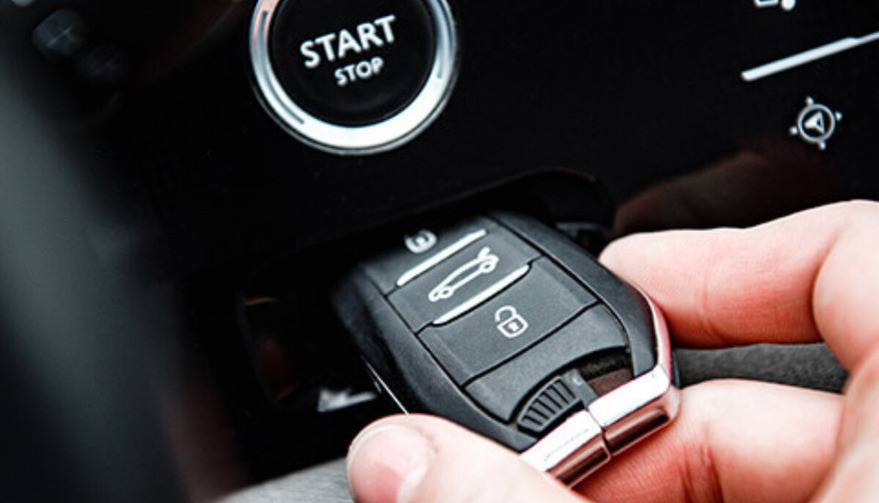
  • Push-to-Start Ignition: Many modern vehicles with smart keys feature a push-to-start ignition system. With this technology, you can start your car simply by pressing a button, provided that the key fob is inside the vehicle. No need to insert a key into the ignition, making the process quicker and easier.
  • Enhanced Security Features: Smart keys are designed to improve vehicle security. They utilize encrypted signals that are difficult to replicate or hack. Modern key fobs often come with rolling codes, meaning the signal changes each time the key is used, making it nearly impossible for thieves to copy the key’s signal. Additionally, many smart keys are equipped with proximity sensors that automatically lock the doors when the key is a certain distance away, reducing the risk of theft.
  • Convenience and Customization: Some smart car keys allow for extra features, such as memory settings for seat adjustments, climate control, and even personalized preferences like music playlists. This adds a layer of comfort and convenience to your driving experience.

Drawbacks of Smart Car Keys:

While smart keys offer numerous benefits, they come with a few challenges:

  • Battery Dependence: Smart keys rely on batteries, both within the key fob and sometimes within the car itself. If the battery in your key fob dies, you might find yourself locked out of your vehicle or unable to start it. Fortunately, many vehicles allow you to use a backup mechanical key that is hidden inside the fob itself. However, the reliance on batteries can still be a disadvantage.
  • Cost: Replacing a lost or damaged smart key can be expensive, particularly if it involves reprogramming or replacing the vehicle’s security system. Smart keys are generally more costly than mechanical keys, so the price of a replacement key can put a strain on your budget.
  • Vulnerability to Hacking: Although modern smart keys are designed to be secure, they are not completely immune to theft. Sophisticated thieves have developed methods of intercepting and cloning key fob signals. While this is still a relatively rare occurrence, it’s important to be aware of the potential risks and take extra precautions to protect your key fob.
  • Vulnerability to Water and Extreme Conditions: Smart keys are sensitive to water damage, which makes them less suitable for activities like surfing, open-water swimming, or even heavy rain exposure. Unlike mechanical keys, which are more resistant to environmental factors, electronic key fobs can malfunction if exposed to water or extreme weather conditions. This can leave you stranded or necessitate an expensive replacement.

Understanding Mechanical Car Keys

Mechanical car keys, also known as traditional metal keys, have been in use for over a century. These keys work through a physical mechanism: when inserted into the ignition, they turn to engage the engine. While they are less common in modern vehicles, mechanical keys are still widely used, particularly in older cars or more budget-friendly models.

Key Features of Mechanical Car Keys:

  • Simplicity and Reliability: One of the main advantages of mechanical keys is their simplicity. Unlike smart keys, mechanical keys don’t rely on electronics or batteries, making them highly reliable, especially in situations where technology might fail. Whether it’s a long road trip or a cold winter morning, you can always count on your mechanical key to work.
  • Affordability: Mechanical keys are far less expensive to produce and replace than electronic keys. If you lose your key, getting a replacement is typically much cheaper. For those on a budget, mechanical keys are a practical option for car security.
  • No Risk of Signal Interception: Mechanical keys don’t use radio signals, which means they can’t be intercepted or hacked in the same way smart keys can. There’s no risk of someone remotely copying your key’s signal to gain access to your vehicle.
  • Durability: Mechanical keys are often made from durable materials, which means they can last for many years if properly cared for. They don’t require regular battery replacements and are resistant to the kind of wear and tear that might affect electronic systems.
  • Suitable for Adventures: Mechanical keys are an excellent choice for outdoor enthusiasts and adventurers. Since they are resistant to water damage, they’re ideal for activities where you might get wet, such as hiking in the rain, kayaking, or camping by a lake. Their durability ensures they’ll keep working even in rugged or wet conditions.

Drawbacks of Mechanical Car Keys:

While mechanical keys have their merits, they also come with limitations:

  • Lack of Convenience: Unlike smart keys, mechanical keys require manual operation. You need to physically insert the key into the door and ignition, which may be less convenient, especially when you’re in a hurry or carrying items.
  • Security Risks: While mechanical keys can’t be hacked, they are more easily duplicated. If someone gets a hold of your key, they can make a copy, which could put your vehicle at risk. Additionally, older mechanical key systems don’t have the advanced security features found in modern smart keys.
  • No Keyless Entry or Push-Start Features: Mechanical keys lack keyless entry and push-to-start ignition, which can make your car less convenient to use. In addition, you won’t have access to any of the advanced features offered by smart keys, such as memory settings or remote start.

 When deciding between a smart or mechanical car key, the best choice depends on your individual needs, preferences, and security concerns.

  • If you prioritize convenience and advanced security, a smart key might be the right choice for you. Features like keyless entry, push-to-start ignition, and superior encryption provide a higher level of comfort and safety. If you have a newer vehicle or enjoy the latest technology, a smart key will enhance your driving experience.
  • If you value simplicity, reliability, and cost-effectiveness, a mechanical key may be the better option. It’s a great choice for older vehicles, drivers on a budget, or those who don’t need the added complexity of modern electronic systems. Mechanical keys are also ideal for people who want a straightforward, low-maintenance solution to car access.

Regardless of which type of key you choose, it’s important to maintain backups and ensure that your keys are properly cared for. If you opt for a smart key, remember to replace the batteries regularly and store the key in a safe place to prevent loss or theft. If you use a mechanical key, consider having a spare made to avoid being locked out of your vehicle in case of misplacement.

For ultimate peace of mind, having both types of keys can be a smart investment—offering the convenience of advanced features alongside the reliability of a traditional backup. Together, they ensure you’re prepared for any situation while adding an extra layer of security.
Related Posts

How to Protect Your Car Key Fob from Relay Attacks

How to Protect Your Car Key Fob from Relay Attacks

Car theft has entered the digital age — and unfortunately, so have the thieves. As car manufacturers move toward keyless technology, a new type of threat has emerged: the relay attack. Unlike traditional break-ins, this high-tech method allows criminals to steal a vehicle without touching the keys — or even breaking a window. Imagine this: your car is parked safely outside your house. Your key fob is inside, hanging on a hook by the front door. You're fast asleep. But outside, two individuals with small electronic devices are working together. One stands near your front door, scanning for a signal from your key fob. The other waits by your car. Within seconds, your key’s signal is captured, extended, and transmitted to your car. It unlocks, starts, and drives away — and you might not notice until morning. This is not science fiction. It's called a relay attack , and it's one of the fastest-growing vehicle theft methods worldwide. Why Relay Attacks Are So Effective The key to this technique is exploiting the constant communication between your car and its fob. Most keyless entry systems are designed for convenience — you don’t even need to press a button. The car automatically detects the presence of the key fob and unlocks when you approach. This convenience is exactly what makes it vulnerable. Relay devices — which are cheap, portable, and easy to use — can mimic the signal and trick the car into thinking the key is nearby, even when it’s inside your home. Security experts have raised the alarm about this method for years, but many drivers still don’t realize how easily their vehicles can be accessed. In the UK alone, keyless car theft now accounts for more than 90% of vehicle thefts involving high-end models, according to the AA. And with the rise of online tutorials and black-market tools, the problem is growing globally. So, What Can You Do to Stay Safe? Fortunately, protecting your vehicle doesn’t require advanced tech or a huge investment — just awareness and a few smart habits. One of the most effective ways to block relay attacks is also the simplest: store your keys in a signal-blocking container . Often called a Faraday pouch or Faraday box, this lined case prevents radio signals from escaping. When your keys are stored inside, they can’t be scanned or cloned, no matter how close a thief gets to your home. Placement also matters. Many drivers leave their keys near the front door or on an entryway table — spots that are easy to access from outside. Moving your keys to the center of your home, an upper floor, or even a metal box can reduce signal exposure dramatically. Some newer key fobs allow you to manually disable the signal when it’s not in use. This feature is often hidden in the manual and rarely mentioned by dealers. Taking a moment to learn whether your key supports this — and how to activate it — can make a big difference. It’s also worth checking whether your vehicle’s software is up to date. Many automakers periodically release firmware updates that strengthen encryption or reduce signal range. In some cases, updates can even detect and block suspicious unlock attempts. And while it may seem old-fashioned, physical security still works . Devices like steering wheel locks or gear shift immobilisers can be powerful visual deterrents. Even if a thief manages to unlock your vehicle, the sight of a bulky lock inside may be enough to send them looking for an easier target. If you're looking for practical solutions beyond GPS , check out our blog: Do Car Keys Have GPS? What You Need to Know About Key Tracking . In summary, here are a few key takeaways to keep your keys and vehicle safer: Store your fob in a signal-blocking pouch or metal container Keep keys away from entry points like doors or windows Disable keyless signals if your fob supports it Update your car’s firmware regularly Use visible anti-theft devices as a deterrent Looking Ahead: Smarter Cars, Smarter Drivers Relay attacks are part of a larger trend — one where modern technology makes life more convenient, but also creates new risks. Just like we’ve learned to secure our phones and passwords, we now need to think about how we secure our vehicles. As carmakers explore more secure solutions — like Ultra Wideband (UWB) tech and biometric verification — drivers still need to take responsibility for their vehicle’s safety. The tools are already out there, and many of them cost less than a meal out. It’s not just about avoiding theft; it’s about peace of mind. So next time you get home, before tossing your keys on the hallway table, take a second to think: are they really safe there?

How to Upgrade Your Car Key: A Step-by-Step Guide

How to Upgrade Your Car Key: A Step-by-Step Guide

Upgrading your car key can significantly improve your vehicle’s security and make your daily routine more convenient. Whether you’re upgrading from a basic key to a remote key or stepping up to a smart key, this guide will take you through the entire process, step by step, ensuring a smooth transition. Understanding Your Key Type Before you start the upgrade process, it’s important to know which type of key you currently have. Here are the most common key types: Traditional Metal Keys : These are basic, mechanical keys, common in older vehicles. They don’t have any electronic components. Transponder Keys : These have an electronic chip inside the key head that communicates with the vehicle’s computer system for added security. Remote Keys : These keys have buttons to lock/unlock the doors remotely and usually have a physical blade as a backup. Understanding your current key type will help guide your decision on the best upgrade path. Choosing the Right Upgrade Once you know what type of key you have, you need to decide what features you want in your upgraded key. Some options to consider are: Remote Locking : Allows you to lock/unlock the doors from a distance. Keyless Entry : Lets you unlock the car without taking the key out of your pocket. Smart Key : Offers advanced functions such as proximity unlocking, push-button start, and remote engine start. Take some time to research the options available for your specific car model. Many car manufacturers offer compatible upgrades for different key types, so it’s important to consult your dealership or a trusted locksmith for recommendations. Gathering What You’ll Need Before starting the upgrade process, make sure you have the following materials: The New Key : This could be a transponder key, remote key, or smart key. Your Original Key : You’ll need this as a reference throughout the process. Key Programming Device : Some keys require a special device to pair the key with your car. Car Manual or Programming Guide : It’s always a good idea to have your car’s manual handy for specific instructions. Having everything ready will make the process much smoother. Step-by-Step Upgrade Process Purchase the New Key Start by purchasing your new key. You can buy it from your car’s dealership, a certified locksmith, or a trusted online retailer. Make sure that the key is compatible with your vehicle’s make and model. Transfer Electronics (if necessary) If your new key is just a shell, you will need to transfer the internal components from your old key. This includes the transponder chip and, if applicable, the key blade. Be careful when transferring the electronics to avoid any damage. Program the Key Programming the new key is crucial for it to work with your vehicle. Here’s a general guide: Insert the original key into the ignition and turn it to the ON position. Quickly remove the original key and insert the new key. Turn the new key to the ON position and wait for the security light to turn off. This might take a few minutes. Test the New Key After programming, it’s important to test the new key to ensure everything works properly. Check the following functions: Locking and unlocking the doors Starting the engine Any additional functions like remote trunk opening or proximity unlocking Troubleshooting Common Issues If your new key isn’t working as expected, don’t worry! Here are some common problems and their solutions: Key Not Recognized : Check if the transponder chip is properly placed in the key. Key Doesn’t Start the Car : Double-check the programming steps to ensure everything was done correctly. Buttons Don’t Work : Verify that the battery in the new key is properly installed and functional. If the problem persists, it’s best to consult a professional locksmith or visit your dealership for further assistance. Upgrading your car key is an excellent way to improve both the security and convenience of your vehicle. By following these steps, you’ll be able to transition smoothly to your new key. If you run into any issues, don’t hesitate to reach out to a professional locksmith who can help you along the way. Enjoy the benefits of your new car key and the added peace of mind that comes with enhanced security.

Programming Your Car’s Keyless Remote: A Simple Guide for Every Car Owner

Programming Your Car’s Keyless Remote: A Simple Guide for Every Car Owner

When it comes to convenience, car keyless remotes have revolutionized the way we interact with our vehicles. No more fumbling with traditional keys or worrying about locking yourself out. With just a push of a button, you can lock, unlock, and even start your vehicle. But what happens when your keyless remote stops working, or when you need to program a new one? Here’s a simple guide to help you program your car's keyless remote, regardless of your vehicle's make or model. Understanding Keyless Remotes Before jumping into the programming process, it’s important to understand what a keyless remote is and how it works. Essentially, a keyless remote allows you to interact with your vehicle without needing to physically insert a key. Instead of using a traditional metal key, your car’s electronic system communicates wirelessly with the remote, allowing you to lock, unlock, and sometimes even start your vehicle, all with the push of a button. These remotes typically use a radio frequency to communicate with your car, sending a signal that’s encrypted for security. Most modern cars use transponder technology, which makes the system more secure and resistant to hacking or copying. This means that the remote must be properly programmed to your vehicle’s system to function correctly. When Do You Need to Program a Keyless Remote? There are several situations in which you might need to program your keyless remote: Replacing a Lost or Damaged Remote : If you’ve lost your keyless remote or it’s no longer functioning properly, you’ll need to get a replacement. This may require programming the new remote to sync with your vehicle. Adding a New Remote : If you’ve bought an additional keyless remote for your car (for a spouse, child, or other family member), you’ll need to program it so that it works with your vehicle. Battery Replacement : Sometimes, replacing the battery in your remote can cause the programming to reset, meaning you’ll need to reprogram the remote for it to work again. Changing or Resetting Vehicle Settings : Occasionally, vehicle settings or remotes can be reset or reprogrammed as part of regular maintenance, requiring you to program new or additional remotes. How to Program Your Car’s Keyless Remote Programming a keyless remote is easier than you might think, and in most cases, it can be done by following a few simple steps. The process varies slightly depending on the make and model of your car, but here’s a general overview of the steps involved: Get Your New or Replacement Remote : Ensure that your remote is compatible with your car’s system. If you're not sure, you can check with your car's manufacturer or an authorized dealership. Some remotes require specific codes to be programmed. Sit Inside Your Vehicle : For safety and security reasons, most cars require you to be inside the vehicle while programming the remote. Insert the Key in the Ignition : Insert the key into the ignition and turn it to the "ON" position without starting the engine. For cars with push-to-start systems, you may need to press the start button without pressing the brake pedal. Activate the Programming Mode : Depending on your car’s system, you’ll need to follow a sequence of steps to enter programming mode. This could involve turning the key on and off several times, or pressing certain buttons in a specific order. Refer to your vehicle’s manual for the exact steps, as the process can differ from one model to another. Program the Remote : Once your car is in programming mode, you’ll need to press the button on your keyless remote that you want to program. Usually, you’ll hear a chime or see the lights flash, indicating that the remote has been successfully programmed. Some cars may require you to press the button several times to ensure proper synchronization. Test the Remote : After programming, test the remote to make sure it works properly. Try locking and unlocking the doors or starting the engine. If everything works as expected, you’re done! Exit Programming Mode : To finish the process, simply turn off the ignition and remove the key. This should exit programming mode. If you have additional remotes to program, repeat the steps above for each one. What to Do if Programming Doesn’t Work While programming a keyless remote is usually a straightforward process, there are instances where things don’t go as planned. If your remote isn’t syncing with your car after following the steps, here are a few troubleshooting tips: Check the Battery : If the remote’s battery is dead or weak, it won’t transmit the signal to your car. Replace the battery and try programming again. Verify the Compatibility : Make sure that the remote is compatible with your vehicle’s make, model, and year. Some vehicles require special remotes that can only be programmed by the manufacturer or an authorized locksmith. Reset Your Vehicle’s System : In some cases, you might need to reset the car’s system to clear previous programming attempts. Check your owner’s manual or consult a professional for assistance. Consult a Professional : If you continue to have issues, it might be time to visit a dealership or a certified locksmith. These professionals have the tools and experience to program the remote correctly and ensure everything works seamlessly. Why Programming Your Keyless Remote Is Important Programming your keyless remote is a simple but important task that helps ensure your car’s security and convenience. By understanding how the process works and what to do if things go wrong, you’ll be able to troubleshoot and solve any issues quickly. Whether you’re replacing a lost remote or adding a new one to your collection, knowing how to program your remote saves time and money compared to visiting a dealership or locksmith. With the increased reliance on keyless remotes for unlocking and starting vehicles, it’s essential for every car owner to be familiar with this process. By keeping your remote in good working condition and knowing how to program it when necessary, you’ll enjoy a smoother, more efficient experience with your vehicle.

5 Reasons Why Your Car Remote Isn’t Working and How to Fix It

5 Reasons Why Your Car Remote Isn’t Working and How to Fix It

In an age where convenience is king, keyless entry systems have revolutionized how we interact with our vehicles. Gone are the days of fumbling for physical keys—today’s drivers rely heavily on the sleek, compact functionality of car remotes. However, what happens when this modern convenience fails you? Few things are more frustrating than standing beside your car, repeatedly pressing your remote, only to be met with silence. Understanding why your car remote isn’t working can save you from unnecessary panic, costly repairs, and inconvenient lockouts. This comprehensive guide explores the five most common reasons your remote may malfunction and offers in-depth, actionable solutions to get you back on the road quickly. 1. Battery Depletion: The Silent Saboteur The number one reason for car remote failure is, unsurprisingly, a dead or depleted battery. Though seemingly small, the battery inside your remote plays a crucial role in its operation. Most key fobs use lithium coin batteries (commonly CR2025 or CR2032), known for their durability and longevity. But even these reliable power sources don’t last forever. Factors contributing to faster battery depletion include: Frequent use (especially for remote start and lock/unlock functions) Extreme temperature exposure (both heat and cold reduce battery life) Long periods of inactivity (leading to gradual discharge) Solution: Replacing your key fob battery is a simple, cost-effective fix. Always consult your vehicle’s manual to identify the correct battery type. When replacing, ensure the new battery is seated correctly to avoid poor contact. Proactively changing the battery every 1-2 years, even before it’s fully drained, can prevent sudden failures. 2. Signal Interference: The Invisible Obstacle Key fobs communicate with your vehicle via radio frequencies. However, various external factors can interfere with this communication. Living in urban environments, parking in underground garages, or being near large electronic devices (such as cell towers, Wi-Fi routers, or even other vehicles) can disrupt the signal between your remote and car. Solution: If you suspect signal interference: Move closer to your vehicle or try unlocking it from a different angle. Step away from potential sources of interference like electronic devices or heavy machinery. Hold the key fob higher or away from your body to improve signal transmission. While occasional interference is common, if the problem persists across multiple locations, consider resetting or reprogramming your fob. 3. Desynchronization: Losing Connection Sometimes, your key fob may lose synchronization with your vehicle’s receiver—especially after events like a battery change or extended periods of non-use. When this happens, the fob and vehicle are essentially "speaking different languages," resulting in non-responsiveness. Solution: Check your vehicle's manual, as many manufacturers provide step-by-step instructions to manually re-sync the fob. Typically, this involves a sequence like inserting and turning the ignition key, pressing specific buttons, or opening and closing the doors in a set pattern. If manual reprogramming fails, you may need assistance from a dealership or certified locksmith equipped with the necessary diagnostic tools. 4. Physical Damage: The Wear and Tear Factor Remote key fobs, despite their solid appearance, are not invincible. Everyday handling—dropping the remote, spilling liquids, or even rough storage—can cause internal components to malfunction. Moisture exposure, in particular, is a key offender, leading to corrosion or short-circuiting of the circuitry inside. Solution: Inspect your remote regularly for: Visible cracks, chips, or signs of wear Sticky buttons or unresponsive keys Water damage indicators If damage is evident, replacing the remote may be your best bet. For minor issues, cleaning the interior components (after carefully opening the casing) with a soft cloth and isopropyl alcohol can sometimes restore functionality. Consider investing in a protective cover to prevent future damage. 5. Vehicle Receiver Issues: The Hidden Problem While the key fob often gets the blame, sometimes the issue lies within your vehicle’s receiver system. If the receiver—which detects and processes the signal from your remote—is malfunctioning, your remote will appear useless regardless of its condition. Solution: One telltale sign of a faulty receiver is if multiple remotes fail to operate the car. In this case, the problem is likely internal. Diagnosing and fixing receiver issues typically requires professional assistance, either from a dealership or an experienced automotive technician equipped with specialized diagnostic tools. Global Context: Keyless Challenges Worldwide The rise of keyless systems isn't limited to one region—it’s a global phenomenon. However, as technology advances, so do the challenges. For instance, key signal cloning and relay attacks have become prevalent, particularly in Europe and North America, prompting manufacturers to enhance security measures continually. Understanding the basics of how your key fob works and its vulnerabilities can help protect against both everyday failures and more sophisticated threats. Stay Ahead of the Problem Modern car remotes offer unmatched convenience, but when they fail, the disruption can be significant. Whether it’s a dead battery, signal interference, synchronization glitch, physical damage, or vehicle receiver issue, knowing how to identify and fix the problem puts you in control. Take proactive steps—replace batteries regularly, handle your remote with care, and familiarize yourself with your vehicle’s reprogramming process. A small investment of time today could save you from major headaches tomorrow. Stay informed. Stay prepared. And keep your car remote working seamlessly, wherever the road takes you.

Chat with us