Post Name

In an age where smartphones can locate us with pinpoint accuracy and lost luggage can be tracked halfway around the world, it’s easy to assume car keys are just as smart. But for many frustrated drivers, losing a car key feels like sending it into a black hole. The lack of a clear way to find them often leads to stress, wasted time, and sometimes costly replacements. So here’s the big question: Do car keys have GPS, and can they be tracked like other smart devices?

This article explains the technology behind key tracking, compares GPS with Bluetooth, and offers practical ways to find lost keys in a connected world.


The Truth About GPS in Car Keys

While GPS technology has become common in many consumer devices, the vast majority of car keys do not include built-in GPS. Even the most modern remote key fobs, which allow for keyless entry and push-button start, generally lack the components necessary for GPS functionality. These components include a satellite GPS receiver, a data transmission module, and a sustainable power source—none of which are typically found in a key fob. The design of a car key prioritizes compactness, cost-efficiency, and low energy usage. Adding GPS would not only increase manufacturing costs but also introduce battery life challenges. That’s why most manufacturers have opted against including GPS tracking in car keys.

GPS requires constant power and data transmission — something a small coin cell battery in a typical key fob can’t support." – Marcus Lee, Automotive Tech Analyst


How Can Car Keys Be Tracked?

Although your keys may not have GPS, there are other technologies that make it possible to track or locate them when they’re lost. These include Bluetooth trackers, crowdsourced networks, and GPS systems that track the vehicle instead of the key itself.

1. Bluetooth Trackers (Apple AirTag, Tile, Chipolo)

These small, attachable gadgets can be added to your keychain and linked to a mobile app. They rely on Bluetooth to provide location data when within a certain range. If your keys are somewhere nearby—like in your home or office—these trackers can play a sound or show you their last known position on a map. The range is generally up to 120 meters (400 feet), and battery life can last up to a year, making them a practical, low-maintenance option for most users.

2. Crowdsourced Networks (Find My, Tile Network)

If your Bluetooth tracker is out of range, some brands offer a smart workaround. Apple’s AirTag, for instance, uses the “Find My” network, which consists of millions of iPhones around the world. If someone with an Apple device passes near your lost keys, the location is anonymously and securely sent to your phone. This creates a global, decentralized tracking system that mimics GPS functionality without requiring satellites or cellular connections.

3. Car GPS Systems (Vehicle Only, Not the Key)

Some high-end cars offer integrated GPS systems, but these track the vehicle, not the keys. Brands like Tesla, BMW, and Mercedes-Benz allow owners to locate their car through mobile apps. If your keys are left inside the car, you may be able to find them by locating the vehicle. However, once the keys are removed, they cannot be tracked unless equipped with a separate Bluetooth tracker.


GPS vs Bluetooth: What’s the Difference?

To better understand why GPS isn’t commonly included in car keys, it’s useful to compare the two technologies:
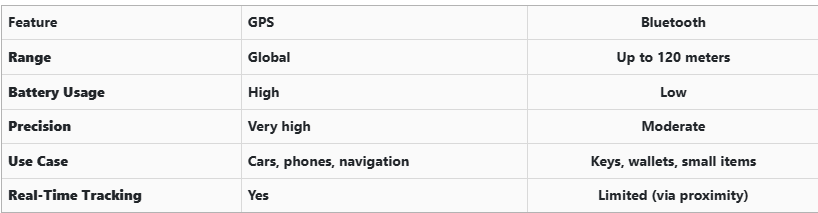
GPS provides global, real-time tracking with high precision, but it’s power-intensive and costly. Bluetooth, while more limited in range, is ideal for small items and short distances, offering a cost-effective solution for everyday use.


Global Perspectives on Key Tracking

Around the world, the adoption of key tracking technologies differs based on privacy laws, tech infrastructure, and consumer behavior. In Japan and South Korea, smart home and car integration are advanced, yet GPS-enabled keys are still not the norm. In many parts of Europe, particularly in countries like Germany, Bluetooth solutions are favored due to strict data privacy regulations. In contrast, the U.S. market has embraced personal tracking devices like Apple AirTag and Tile, making them increasingly common accessories. These differences highlight how technology adoption often reflects broader cultural and legal norms, as well as the balance between convenience and privacy.


Smart Tips to Keep Track of Your Keys

Whether your keys have advanced tech or not, you can take simple steps to avoid losing them. Attaching a Bluetooth tracker is a great first line of defense. Keeping your keys in a consistent, designated place at home reduces the chances of misplacement. Many tracking apps also offer “left behind” alerts, which notify you if you leave your keys behind when moving out of range. It's also smart to keep a spare key somewhere safe and consider going keyless if your next car allows it. Implementing a few of these habits can save you time, frustration, and the cost of replacing a lost key.


The Future of Key Tracking

While car keys may not have built-in GPS, technology continues to evolve with practical alternatives. Bluetooth trackers, supported by app alerts and community networks, already provide effective ways to find lost keys. As innovation progresses, we can expect even more seamless solutions, such as Ultra Wideband (UWB) technology and Internet of Things (IoT) integrations, to become mainstream.

As our tools become smarter, so must the way we use and manage them. With a little foresight and the right accessories, you'll never lose track of your keys again.

Related Posts

Guide to Identifying and Replacing Your Keys

Guide to Identifying and Replacing Your Keys

Losing your keys can be a frustrating experience, but identifying the right replacement doesn't have to be. Whether you've lost a house key, a car key, or a key to a padlock or cabinet, understanding how to identify the key you need is crucial. This guide will walk you through the process of identifying your keys, ensuring you find the right replacement quickly and efficiently. The Importance of Key Identification Before diving into how to replace a lost key, it’s important to understand why key identification is critical. Keys come in a variety of shapes, sizes, and designs, each tailored to specific types of locks. Identifying your key correctly will save time, money, and frustration. For example, car keys often include transponder chips that need to be programmed to your vehicle, while house keys may have specific patterns that fit only one brand of lock. Step 1: Check for Key Codes and Markings The first step in identifying your key is to look for any codes or markings. These can be found on the key itself or sometimes on the lock. Key codes are often a series of letters and numbers that indicate the specific model or cut of the key. If you still have the original key, examine it closely for these codes. If not, check the lock for any inscriptions that might offer clues. Key codes are essential, particularly for high-security keys or specialized keys such as those used in commercial settings. For car keys, this code might also be found in the vehicle’s manual or on a key tag provided at the time of purchase. Step 2: Determine the Key Type Next, determine the type of key you need. Different keys serve different purposes: House Keys: Typically flat with unique grooves along the edge, these are used in residential locks. Car Keys: These may include electronic transponders and are often more complex. Padlock Keys: Usually smaller, these keys have a unique profile that fits the specific lock. Cabinet or Locker Keys: These are often smaller and may be specific to a brand or lock type. Identifying the correct key type is important because it narrows down your options when searching for a replacement. Step 3: Identify the Lock Brand If you cannot find a key code, identifying the lock brand is the next best step. The brand name is usually stamped somewhere on the lock or key. Knowing the brand will help you narrow down the options for finding a replacement key. For example, many house keys are cut to fit specific brands like Yale or Schlage. Car keys, on the other hand, are usually specific to the car manufacturer. Knowing the brand is especially useful when you need to replace a key without an original to reference. Step 4: Examine the Key Profile The profile of the key refers to the unique cuts, grooves, and ridges along its blade. This profile is what allows the key to operate a specific lock. When identifying your key, compare the profile of your key to those available through online resources or in-store at key-cutting services. If you have a high-security key, it may have a more complex profile that is difficult to replicate. In such cases, it’s best to consult a professional locksmith or the lock manufacturer for an exact match. Step 5: Utilize Online Resources There are many online resources available to help you identify and replace your lost key. Websites often offer key identification tools where you can input details such as key codes, lock brands, and key types to find a match. Additionally, many online stores specialize in replacement keys, offering a wide selection based on the information you provide. Step 6: Contact the Manufacturer If you're still having trouble identifying your key, contacting the lock or car manufacturer can be extremely helpful. Provide them with any details you have about the lock or key, and they can often guide you to the right replacement. For car keys, your vehicle identification number (VIN) can often be used by the dealership to cut a new key or program a replacement transponder key. Step 7: Professional Locksmith Assistance When all else fails, a professional locksmith is your best bet. Locksmiths have the tools and expertise to identify and replicate nearly any type of key. They can also assist with programming transponder keys for cars or creating master keys for complex locking systems. Losing a key doesn't have to be a stressful experience if you know how to identify and replace it effectively. By following these steps—checking for key codes, determining the key type, identifying the lock brand, examining the key profile, using online resources, and seeking professional help—you can ensure that you find the right replacement quickly and efficiently. Proper key identification is the first step toward restoring access and ensuring security.

Comprehensive Guide: Common Car Key Problems and How to Solve Them

Comprehensive Guide: Common Car Key Problems and How to Solve Them

Your car key is a small but essential part of your daily life. When it stops working properly—whether due to a dead battery, water exposure, signal interference, or ignition issues—it can quickly disrupt your plans. Fortunately, many common car key problems can be identified early and resolved effectively with the right approach. In this comprehensive guide, we explore four of the most frequent car key issues and provide detailed solutions to help you stay on the road with confidence. Recognizing a Failing Car Key Battery The battery inside your car key fob is designed to last, but not indefinitely. On average, a CR2032 battery will power a key fob effectively for one to three years, depending on usage patterns and environmental conditions. A weakening battery usually does not fail suddenly; it provides warning signs that many drivers overlook. One of the earliest indications is a noticeable decrease in the remote’s operating range. You may find yourself needing to stand closer to the vehicle for the key fob to work. As the battery continues to lose power, the fob may start working inconsistently, responding only after multiple button presses or with a delay. Some vehicles will display a low battery warning on the dashboard, providing a clear signal that replacement is necessary. Allowing the battery to fully deplete can leave you unable to unlock or start your car at a critical moment. By promptly replacing the battery with a reliable product, such as the Panasonic CR2032, you can restore full functionality and prevent future inconvenience. Addressing Water Damage in Car Keys Water damage is a common cause of key fob failure. Whether it’s from rain exposure, dropping the key in water, or accidental washing, moisture can cause both immediate and long-term damage to the key's internal components. When water enters the fob, it can short-circuit the delicate electronics, rendering the key inoperative. In other cases, corrosion may develop slowly, causing the key to malfunction days or weeks after the exposure. If your car key gets wet, the first step is to remove the battery immediately to minimize damage. Dry the key as thoroughly as possible using a soft cloth and allow it to air dry in a warm, ventilated space for at least 24 hours. It is crucial to avoid using heat sources like hair dryers, which can damage sensitive components. After drying, install a fresh battery and test the key. If the key still does not function, the internal circuits may have been irreparably damaged, and a professional evaluation or shell replacement may be necessary. Understanding Weak Signal Issues in Car Keys A weak key fob signal can lead to frustration and can often be mistakenly attributed to a battery issue alone. While a low battery is a common cause, signal strength can also be affected by other factors. Physical impacts, such as dropping the key, can disrupt the internal connections or damage the antenna, reducing the fob's ability to communicate effectively with the car. Environmental factors can also interfere with the signal. Parking near large metal structures, power lines, or areas with strong electronic interference can block or weaken the signal temporarily. Additionally, worn buttons that no longer make proper contact with the internal circuit board can result in poor signal transmission, even if the battery is new. When experiencing signal issues, it is important to inspect the key carefully. Replacing the battery, ensuring all components are securely seated, and considering the replacement of worn key shells can often restore proper function. Persistent problems, however, may require professional assessment to ensure the key and vehicle are correctly paired. Dealing with Ignition Problems When the Car Key Won’t Turn One of the most alarming car key issues is inserting the key into the ignition only to find it won’t turn. This problem can stem from several sources, and identifying the correct cause is essential for a safe and effective fix. A worn key blade is a common culprit, especially in vehicles with many years of use. Over time, the precision cuts on the key blade can wear down, making it difficult for the key to properly engage the pins within the ignition cylinder. Another frequent cause is the steering wheel lock mechanism. If the steering wheel locks in place, it can prevent the key from turning until the wheel is gently moved to relieve the pressure. In some cases, the ignition cylinder itself may become dirty, misaligned, or mechanically worn. If you have a spare key, testing it can help determine whether the issue lies with the key or the ignition. Cleaning the ignition slot with compressed air can sometimes resolve minor blockages. If the problem persists, professional servicing of the ignition system may be necessary to avoid more serious mechanical failures. Car Key Maintenance and Problem Solving Car key problems are a common inconvenience that most drivers will face at some point. However, understanding the signs and causes of these issues can empower you to act quickly and avoid more significant disruptions. Whether dealing with a failing battery, water exposure, weak signal, or ignition lockout, timely intervention and proper maintenance can prevent escalation. Regularly checking your key's condition, replacing batteries with trusted products, and ensuring your key shell remains intact are simple yet effective practices that can extend the life of your car key. By addressing small issues early, you can maintain reliable access to your vehicle and reduce the risk of unexpected problems. For high-quality replacement shells, batteries, and accessories, visit mr-key.com and explore solutions designed to keep your car key functioning like new.

Hydrogel vs Tempered Glass Navigation Protectors Comparison

Hydrogel vs Tempered Glass Navigation Protectors Comparison

Cars and vehicles nowadays often include large touchscreen navigation systems that are prone to scratches, fingerprints and cracks. These displays are expensive to replace – one owner reported a factory infotainment screen costing over $3,000 to swap out – so protecting them is crucial. That’s where navigation screen protectors come in. The two main options are hydrogel film protectors and tempered glass protectors . Below, we compare hydrogel vs tempered glass for car navigation screens, looking at fit, durability, clarity and more, so you can choose the best protection for your car. Hydrogel vs Tempered Glass: The Essentials Tempered glass protectors A rigid, hard 9H glass shield. Excellent scratch resistance, very clear, and feels like the original screen. Best for completely flat displays. Hydrogel protectors A flexible, self-healing polymer film originally used in aviation and military applications. Ultra-thin, edge-to-edge fit, excellent for curved or uniquely shaped screens. Key difference: Hydrogel bends. Tempered glass doesn’t. Fit & Coverage (Hydrogel Wins) Modern cars often have curved or tapered displays. Tempered glass cannot follow these shapes, leaving exposed edges, air gaps or weak adhesion points. Hydrogel protectors conform perfectly to flat, curved and 3D-shaped screens. They wrap the edges, eliminate halo gaps, and achieve full-surface coverage. If your car’s screen isn’t perfectly flat, hydrogel is the correct choice. Scratch & Impact Protection Tempered glass: Extremely resistant to scratches Can crack on impact, sacrificing itself to protect the screen Once cracked, must be replaced Hydrogel: Softer surface, but self-heals micro-scratches over time Doesn’t shatter; absorbs everyday bumps Ideal for preventing long-term wear and swirl marks Glass is harder; hydrogel stays clearer longer thanks to self-healing. Clarity, Glare & Touch Sensitivity Both types maintain high clarity and touch accuracy, but behave differently in real use: Tempered glass: Ultra-clear Glossy surface shows fingerprints easily Good touch response Hydrogel: Crystal-clear or matte anti-glare options Reduces reflections in sunlight — very useful in cars Zero touch interference due to ultra-thin structure Minor micro-bubbles self-resolve within hours If you drive in bright sun or hate fingerprint shine, hydrogel’s matte option is a major advantage. Installation & Removal Tempered glass: Simple dry install One-shot alignment Rigid, so easy to place but unforgiving if misaligned Hydrogel: Dry or wet install Allows micro-adjustments Easy bubble removal No cracking during installation Removal is simple for both, though hydrogel is safer (no glass shards, no risk of breakage during removal). If you want to learn more about how to install your hydrogel navigation screen protector visit our guide. Which Should You Choose? For general car owners with modern infotainment systems, the winner is clear: ✔ Hydrogel protectors are better for most car navigation screens. Why: Perfect fit on curved screens Self-healing surface Anti-glare options Full edge-to-edge coverage Zero loss in touch sensitivity Tempered glass is fine for older or perfectly flat screens — but today’s automotive displays benefit more from hydrogel technology. FAQ Does a navigation screen really need protection? Yes. Screens scratch easily, attract fingerprints, and are expensive to replace. A protector preserves clarity and resale value. Is hydrogel or tempered glass better overall? Hydrogel — unless your screen is perfectly flat. It fits better, reduces glare, and self-heals surface scratches. Will a protector affect touch response? No. Both types maintain excellent touch accuracy. Hydrogel is especially responsive due to its thin, adaptive structure. How do I protect my screen from fingerprints and glare? Use a matte hydrogel film. For more techniques, see our guide on [ How to Protect Your Car’s Navigation Screen from Scratches, Glare & Fingerprints ] . Which cars benefit most from hydrogel protection? Any model with curved, large, glossy or high-resolution displays. See our model list: [ Which Cars Benefit Most From Hydrogel Navigation Protection? ] . For custom-cut hydrogel protectors for your exact car model, visit mr-key.com . Related Guides How to Protect Your Car’s Navigation Screen from Scratches, Glare & Fingerprints How to Install a Hydrogel Navigation Screen Protector Which Cars Benefit Most From Hydrogel Navigation Protection?

Common Car Key Problems and Solutions Every Driver Should Know

Common Car Key Problems and Solutions Every Driver Should Know

There’s nothing quite as frustrating as standing outside your car, key in hand, only to realize something’s not working. Whether your key won’t turn, the remote isn’t responding, or the key itself has seen better days, car key problems seem to happen at the worst possible moment. The good news? Most of these issues are avoidable or fixable, and knowing what to expect can save you both time and stress. 1. Worn-Out Key Blades You might not notice it happening, but over time, your key blade wears down. Each time you insert it into the lock or ignition, tiny grooves and cuts on the blade experience friction. After years of use, the edges get smooth, and the key may stop fitting snugly. Suddenly, you find yourself jiggling or forcing it, risking more damage. The solution here is simple: if you start noticing that the key feels loose or takes a few tries to turn, it’s time to get a replacement cut based on the original code, not by copying the worn-out key. A fresh, precisely cut key blade will fit and function perfectly, preventing damage to your lock cylinder. 2. Dead Key Fob Battery Modern cars often come with remote keys or keyless entry systems, and while they offer convenience, they also rely on tiny batteries. One day, you press the button, and nothing happens—no lights, no unlock sound, no response. Before assuming the worst, check the battery. Typically, key fob batteries (like CR1620 or CR2032 types) are inexpensive and easy to replace. A quick change will often restore full functionality. Make it a habit to change your key battery every 1-2 years, especially if you notice reduced range or need to press the button multiple times. 3. Key Not Turning in the Ignition You get into your car, insert the key, and suddenly it won’t turn. You might try wiggling the steering wheel or pushing the key harder, but nothing works. More often than not, the problem is either with the steering lock mechanism being engaged or dirt buildup inside the ignition cylinder. First, try gently moving the steering wheel side-to-side while turning the key—sometimes the wheel locks under tension, and this simple trick unlocks it. If the problem persists, there could be debris inside the ignition. Using a can of compressed air to blow out dust and tiny particles can help, but if it continues, a professional cleaning or inspection might be necessary before the key or ignition gets damaged. 4. Broken or Bent Keys You might not think twice when you use your key to open a package or pry something open—but keys aren't made for multitasking. Over time, rough handling, bending, or dropping your key can weaken the metal. Eventually, you could end up with a bent key that struggles to fit, or worse, a snapped key stuck in your lock. If your key has visible bends or cracks, don’t wait. Replacing it before it breaks entirely can save you the headache of needing an extraction service. Also, always carry a spare key, just in case. 5. Key Programming Issues If your car uses a transponder key or a smart key, there’s more than just a metal blade involved. Inside is a chip programmed to communicate with your car’s immobilizer system. If your key loses synchronization—maybe after battery replacement, an electrical issue, or accidentally resetting your system—it can leave you unable to start your vehicle. In these cases, reprogramming the key is necessary. Some cars allow you to do this manually following specific sequences (like turning the ignition on and off), but others require specialized diagnostic tools. Familiarizing yourself with your car’s manual or researching the process beforehand helps avoid surprises. 6. Water Damage Dropped your key in water or left it exposed to rain? Electronics inside remote keys and smart keys aren’t waterproof. Moisture can short-circuit internal components, causing the key to stop functioning entirely. If this happens, act fast. Remove the battery immediately and dry out the key as thoroughly as possible. You can use silica gel packets or place the key in a bowl of rice overnight to absorb moisture. However, water damage isn’t always reversible, so keeping your key away from wet environments is the best precaution. Car key problems often feel like an emergency when they strike, but most of them are preventable or quickly fixable with a little know-how. Paying attention to the warning signs—whether it’s a key that’s worn, a fob that’s sluggish, or a key that won’t turn—allows you to act before things escalate. Understanding how your key works and handling it with care will save you from unnecessary stress (and unexpected expenses) down the road. So next time something feels off with your key, remember: a little attention now can prevent a major hassle later.

Chat with us